Freedom251 › Local Kubernetes Tools
Kubus
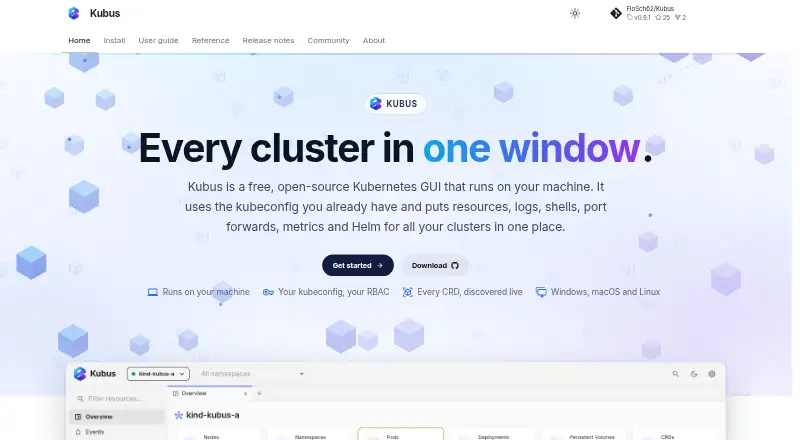
What Kubus is
Kubus is a free, open-source Kubernetes GUI that runs locally on Windows, macOS, and Linux. It brings resources, logs, shells, port forwards, metrics, and Helm release management into one desktop app. Users can combine selected kubeconfig contexts in resource lists and identify each resource by its cluster. Kubus supports built-in Kubernetes resource types and discovers custom resource definitions live. For troubleshooting, it can stream logs from multiple pods and open container terminals, ephemeral debug containers, and node shells. Helm releases can be browsed, installed, upgraded, rolled back, or uninstalled without the Helm binary. Kubus uses existing kubeconfig credentials and supports GKE, EKS, and AKS through their credential plugins, as well as SSH jump hosts and SOCKS or HTTP proxies. The local server binds to 127.0.0.1; Kubus says it has no cloud, account, or telemetry, and Secret values are redacted by default. Metrics and health charts require metrics-server. New releases no longer support Intel Macs.
Who it suits
Kubus suits Kubernetes users who want a local desktop interface for cluster resources, troubleshooting, and Helm operations. It can use existing kubeconfig credentials and supports Windows, Apple Silicon macOS, and Linux.
What it does well
- Free and open source, with no paid tiers stated.
- Combines selected kubeconfig contexts in merged lists.
- Streams logs from multiple pods and offers debug shells.
- Helm operations do not require the Helm binary.
What to know first
- Metrics and health charts require metrics-server in the cluster.
- New releases no longer support Intel Macs.
- Access follows the permissions granted by the configured kubeconfig.
Limits
Metrics and health charts require metrics-server in the Kubernetes cluster. New releases are not available for Intel Macs.
Plans
| Plan | Billed and limits | Price |
|---|---|---|
| Kubus | Free and open-source; no paid tiers stated | Free |
As kubus-app.dev lists them, read 4 Oct 2026. The maker's own page has the final word.
Getting started
- Visit https://kubus-app.dev/.
- Download the desktop installer for Windows, Apple Silicon macOS, or Linux.
- Configure kubeconfig credentials for the clusters you want to access.
- Use the configured kubeconfig contexts to view cluster resources.
- Install metrics-server in the cluster if you want metrics and health charts.
Overview
Kubus is a free, open-source Kubernetes desktop GUI that runs locally. It is best suited to operators who want cluster resources, troubleshooting tools and Helm workflows in one application, particularly across several kubeconfig contexts. Its focused Kubernetes toolkit is a strong fit for local cluster work, but its desktop installer support excludes Intel Macs on new releases.
Key features
Kubus can combine selected kubeconfig contexts in merged resource lists and mark each entry with its cluster. That makes cross-cluster inspection more practical than switching context views one at a time. It includes built-in Kubernetes resource types and discovers custom resource definitions live, so clusters that use extensions are not confined to a fixed resource catalogue.
For debugging, it streams logs from multiple pods and provides container terminals, ephemeral debug containers and node shells. These tools bring several common investigation tasks into one GUI, but they do not bypass Kubernetes permissions: Kubus uses the access granted by the configured kubeconfig. Before destructive actions on protected clusters, it also requires the operator to type a resource name, adding a deliberate check rather than changing underlying access rights.
Helm releases can be browsed, installed, upgraded, rolled back and uninstalled without requiring the Helm binary. Kubus uses existing kubeconfig credentials, including GKE, EKS and AKS credential plugins, and can connect through SSH jump hosts or SOCKS and HTTP proxies. Metrics and health charts require metrics-server in the cluster, so those views depend on cluster setup rather than Kubus alone.
The app runs a local server bound to 127.0.0.1. Kubus says it has no cloud, account or telemetry, and redacts Secret values by default. That local-first approach may suit teams seeking a desktop interface without a Kubus-hosted service; cluster permissions still determine what the user can do.
Pricing
Kubus costs nothing. The free plan is open source, and no paid tiers are stated, so there is no lower paid plan that trades features for price. There is no free trial because the product is free. This makes it a straightforward option for individuals or teams evaluating a desktop Kubernetes GUI without a subscription, though its maker builds it in spare time and welcomes bug reports, ideas and pull requests through GitHub issues.
Platforms
Kubus supports Windows, macOS and Linux, with desktop installers for Windows, Apple Silicon macOS and Linux. New releases no longer support Intel Macs, which rules it out for users who need current versions on that hardware. The desktop application runs locally; the listed web platform does not change the stated installer availability.
Who it's for
Kubus is a good match for Kubernetes operators who work with multiple contexts, need a compact set of log and shell tools, or manage Helm releases without installing the Helm binary. Its credential-plugin support and proxy and jump-host connections also suit users working with GKE, EKS or AKS and routed cluster access. It is a weaker choice for Intel Mac users seeking ongoing releases, or for anyone whose expected metrics and health charts are unavailable because the cluster lacks metrics-server.
Pros and cons
Pros
- Broad inspection and debugging: merged multi-context lists, live custom-resource discovery, multi-pod logs, terminals, debug containers and node shells serve varied operational tasks.
- Helm without a separate binary: release installation, upgrades, rollbacks and removal are handled in the app.
- Local-first design: the server binds to 127.0.0.1, Secret values are redacted by default, and Kubus says it has no cloud, account or telemetry.
- No paid tier: the free, open-source plan has no stated paid upgrade.
Cons
- Metrics depend on cluster setup: metrics-server must be installed for metrics and health charts.
- No new Intel Mac releases: users on Intel hardware cannot rely on current desktop versions.
- Permissions are inherited: Kubus follows kubeconfig access, so it does not independently expand or narrow cluster authorization.
- Community-led development: the maker builds Kubus in spare time, with contributions and issue reports welcomed through GitHub.
Alternatives
Kubeterm is worth considering if you want a free desktop plan with no account, trial period or feature gates, or need Android and iOS support alongside desktop platforms.
Kunobi may suit users who want a free tier capped at three simultaneous clusters with community support, or prefer an option that also offers a Pro plan and free trial.
Rancher Desktop is another free, open-source desktop application, identified by its site as part of SUSE's Rancher Engineering group.
srelens is an alternative for readers seeking a free, MIT-licensed, open-source option with no paid tier, account or license key.
vCluster Platform is aimed at virtual-cluster use, with its free tier allowing unlimited virtual clusters up to 64 CPUs or 32 GPUs and a maximum of one HA vCluster.
Colima is a free, MIT-licensed container runtime project for macOS and Linux, rather than a broad desktop Kubernetes management GUI.
ctlptl is a free, Apache-2.0-licensed alternative with no paid plans or usage limits stated.
Kube Inspector offers a free, open-source option with no paid tier, account or sign-in.
Browse Local Kubernetes Tools for more options.
Verdict
Choose Kubus if you want a free local GUI that brings multi-cluster inspection, practical debugging tools and Helm management together, and your platform and cluster setup meet its requirements. Look elsewhere if you need new releases for an Intel Mac or rely on metrics and health charts without metrics-server.
Verdict
Kubus brings cluster inspection, debugging, and Helm management into a local GUI without a stated paid tier. Check the metrics-server requirement and Intel Mac limitation against your setup.
Questions
How much does Kubus cost?
The listed Kubus plan is free, and no paid tiers are stated.
Is Kubus open source?
Yes. It is described as free and open source.
Which operating systems have desktop installers?
Installers are listed for Windows, Apple Silicon macOS, and Linux. New releases no longer support Intel Macs.
Does Kubus require a separate account?
Kubus says it has no account, cloud, or telemetry. It uses existing kubeconfig credentials.
Does Kubus include Helm support?
Yes. It can browse, install, upgrade, roll back, and uninstall Helm releases without requiring the Helm binary.
What is needed for metrics and health charts?
The Kubernetes cluster needs metrics-server.
Facts from Kubus's own pages
- Access control
- Kubus uses the permissions granted by the configured kubeconfig, while its protected-cluster guard requires typing a resource name before destructive actions. · kubus-app.dev, 4 Oct 2026
- Helm
- Kubus supports Helm release browsing, installation, upgrades, rollbacks, and uninstall without requiring the Helm binary. · kubus-app.dev, 4 Oct 2026
- Integrations
- Kubus uses existing kubeconfig credentials and supports GKE, EKS, and AKS through their credential plugins; it can also connect through SSH jump hosts or SOCKS/HTTP proxies. · kubus-app.dev, 4 Oct 2026
- Logs and debugging
- It can stream logs from multiple pods and provides container terminals, ephemeral debug containers, and node shells. · kubus-app.dev, 4 Oct 2026
- Maker
- Kubus is built in the open and in the maker's spare time by FloSch, who describes it as the Kubernetes client they wanted for their network automation work. · kubus-app.dev, 4 Oct 2026
- Metrics requirement
- Metrics and health charts require metrics-server in the Kubernetes cluster. · kubus-app.dev, 4 Oct 2026
- Multi-cluster
- It can display selected kubeconfig contexts together in merged lists with a cluster column. · kubus-app.dev, 4 Oct 2026
- Platform availability
- Desktop installers are listed for Windows, Apple Silicon macOS, and Linux; Intel Macs are no longer supported by new releases. · kubus-app.dev, 4 Oct 2026
- Product
- Kubus is a free, open-source Kubernetes GUI that runs locally and brings resources, logs, shells, port forwards, metrics, and Helm into one desktop app. · kubus-app.dev, 4 Oct 2026
- Resources
- It supports built-in Kubernetes resource types and discovers custom resource definitions live. · kubus-app.dev, 4 Oct 2026
- Security
- The local server binds to 127.0.0.1, Kubus says it has no cloud, account, or telemetry, and Secret values are redacted by default. · kubus-app.dev, 4 Oct 2026
- Support
- The maker welcomes bug reports, ideas, and pull requests through the GitHub issue tracker. · kubus-app.dev, 4 Oct 2026
Where Kubus stands on Freedom251
- Local Kubernetes Tools#13 of 23