Freedom251 › Minecraft Seed Finders
KLIMATA
What KLIMATA is
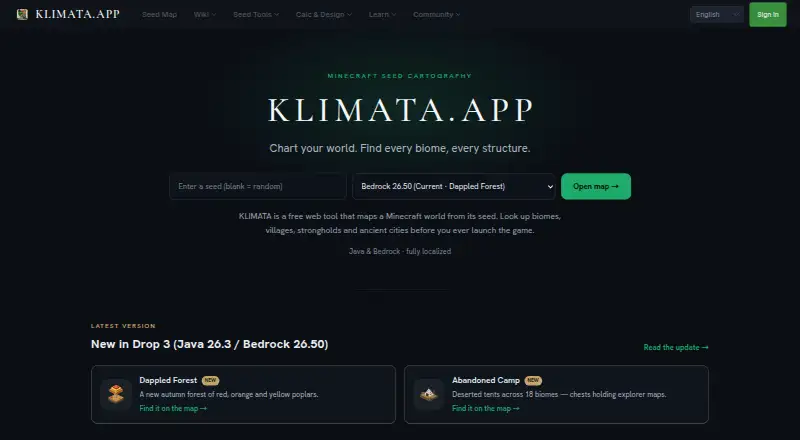
KLIMATA is a web-based Minecraft seed map tool for viewing biomes, structures, and slime chunks. Enter a seed to generate a map that can be scrolled and zoomed, without installing software or creating an account to start. The map marks more than 10 structure types across the Overworld, Nether, and End, and provides coordinates users can copy. Java slime chunk detection uses the Sporos engine through WebAssembly. The site also offers a chunk planner, a layer-based structure designer with 3D isometric preview, and a Redstone Academy with 19 lessons. Users can save favorite seeds, share maps by URL, and revisit automatically saved recent seed history. The free plan permits up to three saved seeds, with unlimited core features and five daily exports; more exports are available after watching an ad. The page lists Java Edition 1.7–26.2 and Bedrock support, but current Bedrock biome and structure positions are approximations using Java algorithms, with native Bedrock support planned. Stronghold rings do not identify exact tunnel locations; an Eye of Ender is needed in-game for that.
Who it suits
KLIMATA suits Minecraft players who want to explore seed maps and plan around biomes, structures, or slime chunks. It also offers tools for chunk planning, structure design, and Redstone lessons.
What it does well
- Seed maps support scrolling and zooming.
- Shows more than 10 structure types with copyable coordinates.
- Includes a chunk planner and structure designer.
- No installation or account is needed to start.
- Free plan includes unlimited core features.
What to know first
- Free plan saves up to three seeds.
- Bedrock locations currently use Java-based approximations.
- Exact stronghold tunnel locations require an in-game Eye of Ender.
- Free exports are limited to five daily unless an ad is watched.
Limits
The free plan allows up to three saved seeds and five exports per day, with more exports available after watching an ad. Premium removes the seed-saving cap and offers ad-free and high-resolution exports; exact stronghold tunnel locations still need an in-game Eye of Ender.
Plans
| Plan | Billed and limits | Price |
|---|---|---|
| Free | Free forever · Core features unlimited · save up to 3 seeds · exports 5/day, more after watching an ad · 8 languages | Free |
| Premium | ¥500 / month excl. tax · Unlimited seed saving · ad-free exports · high-resolution export · ads hidden | ¥500 a month |
| Premium annual | ¥5,000/year excl. tax (≈¥417/month · 2 months free) · Unlimited seed saving · ad-free exports · high-resolution export · ads hidden | ¥5,000 a year |
As klimata.app lists them, read 11 Oct 2026. The maker's own page has the final word.
Getting started
- Open https://klimata.app/en in a web browser.
- Enter a Minecraft seed to view its map; no installation or account is needed to start.
- Save up to three seeds on the free plan, or choose Premium for unlimited seed saving.
- Share a map using its URL if you want others to view it.
KLIMATA is a browser-based Minecraft seed mapping workspace for players who want biome and structure information alongside planning and learning tools. It is especially suitable for Java players who need cross-dimension coordinates, and for anyone who prefers not to install an application. The free plan covers core mapping well; paid tiers mainly expand saving and exporting.
Overview
Enter a seed and KLIMATA produces a map you can pan and zoom, with biome search for finding terrain types and structure search for locating destinations. More than 10 structure categories are marked across the Overworld, Nether, and End, and their coordinates can be copied for use in a world. That combination makes it useful both for scouting a new build location and for checking a particular structure without repeatedly loading the game.
Recent seed history is saved automatically, while favourites can be stored and maps shared by URL. You can begin by entering a seed without an account or installation. Seed calculations and text-based skin generation run in the browser, so those inputs are not sent to KLIMATA's server. The service is independent and is not affiliated with Mojang AB or Microsoft.
Key features
Maps, structures, and slime chunks
Scrolling and zooming let one map serve both broad planning and close inspection. Structure coverage across all three dimensions is a practical advantage over Overworld-only viewers. Java slime-chunk detection uses the Sporos engine, which runs the game's algorithm through WebAssembly; Java players therefore get a purpose-built check rather than a generic visual estimate.
Edition coverage and important limits
KLIMATA lists Java Edition versions 1.7 through 26.2 and supports Bedrock. Native Bedrock support is planned, while current Bedrock biome and structure positions are approximations produced with Java algorithms. Bedrock users should treat coordinates as planning guidance and verify them in-game. Stronghold display is similarly directional: ring zones are shown, but an Eye of Ender is still required to locate exact tunnel positions.
Planning and learning tools
A chunk planner extends the map into build preparation. The layer-based structure designer adds a 3D isometric preview, useful when a layered plan is easier to understand than a flat map. Redstone Academy contributes 19 lessons, giving newer players a structured way to study mechanisms rather than only search for locations.
Pricing
| Plan | Price | What it includes |
|---|---|---|
| Free | free, forever | Unlimited core features, up to 3 saved seeds, 5 exports per day, with more exports after watching an ad, and 8 languages. |
| Premium | ¥500 a month, excluding tax | Unlimited seed saving, ad-free exports, high-resolution export, and hidden ads. |
| Premium annual | ¥5,000 a year, excluding tax (approximately 417 JPY per month; 2 months free) | The same Premium features on an annual term. |
The Free plan is a sensible starting point for occasional mapping, but three saved seeds and five daily exports constrain players who archive many worlds or produce repeated map files. Premium is aimed at regular builders and map archivists who need unlimited saving, cleaner exports, or higher resolution. There is no free trial, so the free tier is the practical way to evaluate the service before paying.
Platforms
KLIMATA runs on the web and requires no installation. Both Java and Bedrock editions are addressed, though Bedrock's algorithmic approximations reduce coordinate confidence compared with native support.
Who it's for
Choose KLIMATA if you want one browser workspace for seed maps, cross-dimension structure searches, slime chunks, build planning, and introductory Redstone lessons. It suits players who value URL sharing and browser-side seed processing, as well as frequent users willing to pay for unlimited saves and export improvements. It is a weaker fit when exact Bedrock positions are essential or when stronghold tunnels must be identified without in-game verification.
Pros and cons
Pros
- Broad map scope: biome search and more than 10 structure types cover the Overworld, Nether, and End.
- Useful free tier: core features are unlimited and three seeds can be saved without payment.
- More than a map: the chunk planner, isometric structure designer, and 19-lesson Redstone Academy support work beyond initial exploration.
- Low-friction access: no download or account is needed to enter a seed, and maps can be shared by URL.
- Browser-side seed processing: seed inputs are calculated locally rather than sent to the server.
Cons
- Bedrock precision is limited: current positions use Java algorithms while native support is planned.
- Strongholds still need in-game checking: ring zones do not reveal exact tunnel locations.
- Free exports are capped: five per day, unless you watch an ad, and only three seeds can be saved.
- Premium is required for high-resolution, ad-free exports: those benefits are not part of the free plan.
Alternatives
For a broad directory of comparable tools, see Minecraft Seed Finders.
- MC Seed View is a free option on Android, iOS, and the web.
- SeedFinder adds Linux, Windows, self-hosted, and API access; its hosted API is limited to 60 requests per IP per minute.
- ChunkSeeds Seed Finder is free, requires no account, and scans up to 350,000 seeds per pass for Java reverse searches.
- Crafty Seed Map is a free Java-only viewer for selected 1.18.2 through 1.21.3 versions.
- Ezseed Minecraft Seed Finder is a free browser tool covering Java 1.20–26.2 and Bedrock up to 26.30 without downloads or accounts.
- Feed the Mods Minecraft Seed Map is a free browser tool.
- MC Seed Map Seed Finder is a free Java Edition seed-search project.
- Minecraft Search Seed Finder offers free core features plus a 2.99 USD monthly Emerald plan.
Verdict
KLIMATA is a strong choice for Java players who want mapping, structure coordinates, planning, and learning in one browser tool, with a generous free starting point. Look elsewhere if you need native-precision Bedrock data or exact stronghold tunnel locations from the map alone.
Verdict
KLIMATA offers seed mapping alongside planning, design, and learning tools in a browser. Bedrock locations and stronghold tunnel positions have stated limitations, and paid plans cost ¥500 a month or ¥5,000 a year, excluding tax.
Questions
What does KLIMATA cost?
The Free plan costs nothing. Premium is ¥500 a month, and Premium annual is ¥5,000 a year; both paid prices exclude tax.
Is there a free plan or trial?
There is a free plan with core features, up to three saved seeds, and five exports per day, with more exports available after watching an ad. There is no free trial.
Which Minecraft editions does it support?
The page lists Java Edition 1.7–26.2 and Bedrock support. Bedrock biome and structure positions currently use Java-based approximations, and native support is planned.
Do I need an account or installation to try it?
No. You can enter a seed without installing anything or creating an account.
Is KLIMATA affiliated with Minecraft's makers?
KLIMATA says it is not an official Minecraft service and is not affiliated with Mojang AB or Microsoft.
Facts from KLIMATA's own pages
- Additional tools
- The site also offers a chunk planner, a layer-based structure designer with 3D isometric preview, and a Redstone Academy with 19 lessons. · klimata.app, 11 Oct 2026
- Biome map
- It renders biome maps from a seed and supports scrolling and zooming. · klimata.app, 11 Oct 2026
- Data and providers
- The privacy policy lists Google or Discord sign-in, Stripe payments, and Cloudflare hosting, CDN, and database services; it says card numbers are not stored by KLIMATA. · klimata.app, 11 Oct 2026
- Editions and versions
- The page lists Java Edition 1.7–26.2 and Bedrock support, while noting native Bedrock support is planned and current Bedrock biome and structure positions are approximations using Java algorithms. · klimata.app, 11 Oct 2026
- No installation required
- Users can enter a seed without installing anything or creating an account to start. · klimata.app, 11 Oct 2026
- Official affiliation
- The site states that KLIMATA is not an official Minecraft service and is not affiliated with Mojang AB or Microsoft. · klimata.app, 11 Oct 2026
- Privacy and processing
- The privacy policy says seed calculation and skin generation from text run in the browser and those inputs are not sent to the server. · klimata.app, 11 Oct 2026
- Purpose
- KLIMATA is a Minecraft seed map tool for visualizing biomes, structures, and slime chunks. · klimata.app, 11 Oct 2026
- Security
- The privacy policy says KLIMATA implements reasonable measures to protect personal information and notes that no internet transmission method is completely secure. · klimata.app, 11 Oct 2026
- Sharing and saving
- Users can save favorite seeds, share maps by URL, and access automatically saved recent seed history; the free plan allows up to 3 saved seeds. · klimata.app, 11 Oct 2026
- Slime chunks
- Java slime chunk detection uses the Sporos engine, which runs the game's algorithm via WebAssembly. · klimata.app, 11 Oct 2026
- Stronghold limit
- KLIMATA shows stronghold ring zones, but users need to use an Eye of Ender in-game to find exact tunnel locations. · klimata.app, 11 Oct 2026
- Structure markers
- The map displays more than 10 structure types across the Overworld, Nether, and End, with coordinates users can copy. · klimata.app, 11 Oct 2026
Where KLIMATA stands on Freedom251
- Minecraft Seed Finders#14 of 36