Freedom251 › Minecraft Seed Finders

Feed the Mods Minecraft Seed Map
What Feed the Mods Minecraft Seed Map is
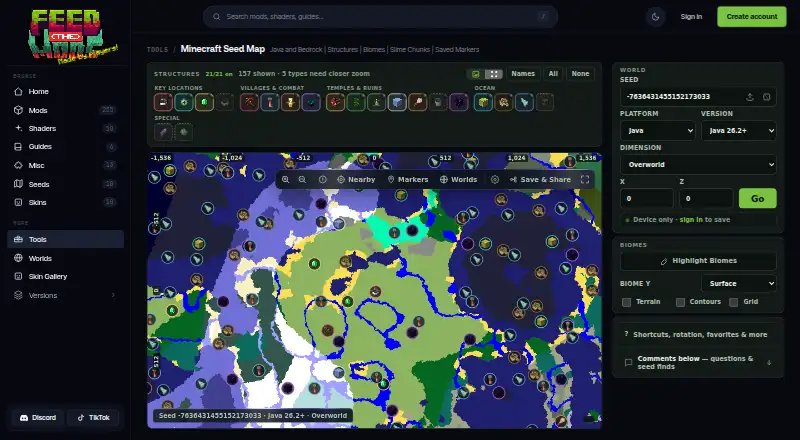
Feed the Mods Minecraft Seed Map is a free browser tool that turns a Minecraft world seed and settings into a map of biomes, structures, slime chunks, and coordinates. It supports Java and Bedrock using separate edition-specific generation rules, and advertises 14+ Java versions, Bedrock, Large Biomes, and the Overworld, Nether, and End. More than 30 finders cover locations including villages, strongholds, ancient cities, fortresses, bastions, and End cities. The map displays biome details under the cursor and lets users copy X/Z coordinates or a /tp command. Users can preserve a current view in a map link; signed-in users can sync markers, notes, and explored state across devices and share read-only marker views. Signed-out users keep markers on their device. This tool calculates world generation rather than editing a save, and it targets vanilla biomes, slime chunks, and supported vanilla structures—not ores or modded structures. Results can differ from the game with custom generation, mods, datapacks, or previously explored chunks in upgraded saves.
Who it suits
It suits Minecraft players who want to explore seeds, locate supported vanilla structures, or plan with coordinates. It is also useful for players who want to save or share map markers.
What it does well
- Free browser tool with no advertised paywall.
- Supports Java and Bedrock generation rules.
- More than 30 structure and location finders.
- Copy X/Z coordinates or a /tp command.
- Sync and share markers when signed in.
What to know first
- Does not find ores or modded structures.
- Custom generation and mods can affect accuracy.
- Does not edit Minecraft saves.
- Privacy policy says the site logs IP and browser details.
Limits
The map covers vanilla biomes, slime chunks, and supported vanilla structures; it does not locate ores or modded structures. Custom server generation, mods, datapacks, and previously explored chunks in upgraded saves can make map results differ from the game.
Plans
| Plan | Billed and limits | Price |
|---|---|---|
| Seed Map | Free browser tool; no accounts, ads, or paywalls advertised on Tools page | Free |
As feed-the-mods.com lists them, read 9 Oct 2026. The maker's own page has the final word.
Getting started
- Open the Seed Map in a web browser.
- Enter a Minecraft world seed and select the relevant edition and generation settings.
- Explore the map and use its finders for biomes, slime chunks, or supported structures.
- Copy X/Z coordinates or a /tp command as needed.
- Sign in to sync markers and notes across devices or share a read-only view.
Feed the Mods Minecraft Seed Map is a free web tool for plotting Minecraft biomes, structures, slime chunks, and coordinates from a seed. It suits Java and Bedrock players planning vanilla worlds, particularly those who want to preserve markers or share a plan. Its broad edition and structure coverage is useful, but modified generation can reduce confidence in the results.
Overview
Enter a seed and world settings to inspect terrain across the Overworld, Nether, and End. The map computes expected generation from those inputs rather than opening or changing a Minecraft save, so it is best used before an expedition or while planning a new world—not as a save editor or a complete view of everything already explored.
More than 30 structure finders include villages, strongholds, ancient cities, fortresses, bastions, and End cities. That breadth makes it practical for locating destinations without switching tools. The scope remains deliberately vanilla: the map does not locate ores or modded structures.
Key features
- Java and Bedrock coverage: Separate edition rules, 14+ advertised Java versions, Bedrock support, Large Biomes, and three dimensions give players useful setup choices. You must select the matching edition and version; custom server generation, mods, and datapacks can produce different terrain or structure positions.
- Map and coordinate tools: A live cursor reports biome information, while copyable X/Z coordinates and a ready-to-copy /tp command shorten the path from map discovery to in-game travel.
- Saved planning: Signed-in users can synchronize markers, notes, and explored structures across devices and publish read-only links. A shared-world link lets others view saved markers without editing them. Signed-out users retain markers on their current device, which is convenient for a one-device session but not a cross-device workflow.
- Generation boundary: Previously explored chunks in upgraded saves, custom servers, mods, and datapacks can make the calculated map diverge from the game. Treat results as a vanilla-generation guide rather than a guarantee for an altered world.
Pricing
| Plan | Price | What you get |
|---|---|---|
| Seed Map | free | Free browser tool with Java and Bedrock support, biome and structure searches, and a map preview. |
There is no free trial because the tool is already free, and no paid tier is presented. The Tools page advertises no accounts, ads, or paywalls for the browser tool. That makes it a straightforward choice for occasional searches; the trade-off is that account-based syncing requires signing in even though basic, device-local markers do not.
Platforms
Feed the Mods Minecraft Seed Map runs in a web browser. It is not presented as a native desktop or mobile application, so your experience depends on browser access and the selected Minecraft edition and version.
Who it's for
Choose it for vanilla Java or Bedrock planning when you need many structure types, dimension coverage, and practical coordinates in one map. It is especially suitable for builders, survival groups, and explorers who want synchronized notes or a read-only plan to share. Look elsewhere if your world relies on modded structures, datapacks, custom server generation, ore-finding, or save-level inspection.
Pros and cons
Pros
- Wide target coverage: More than 30 finders cover major destinations from villages to End cities.
- Both major editions: Separate Java and Bedrock rules and 14+ Java versions accommodate varied vanilla setups.
- Useful navigation output: Live biome data, X/Z copying, and a /tp command make findings actionable.
- Shareable planning: Synced markers, notes, explored state, and read-only links support group planning.
- No purchase barrier: The browser tool costs nothing and advertises no paywalls.
Cons
- Vanilla-only scope: Ores and modded structures are outside its coverage.
- Accuracy can vary: Custom generation, modifications, and upgraded explored saves may not match calculated results.
- Web-only access: There is no native platform listed.
- Privacy trade-off: The site uses cookies and logs IP address, browser type, ISP, timestamps, and referring or exit pages.
Alternatives
Browse Minecraft Seed Finders for a wider comparison. Choose MC Seed View if Android or iOS access matters alongside web use. SeedFinder suits users who need API, Windows, Linux, or self-hosted options; its hosted API is limited to 60 requests per IP per minute. Pick ChunkSeeds Seed Finder for Java reverse searches scanning up to 350,000 seeds per pass without an account. Crafty Seed Map is a Java-only viewer for selected 1.18.2–1.21.3 versions. Ezseed Minecraft Seed Finder is a browser tool covering Java 1.20–26.2 and Bedrock up to 26.30 without download or account. KLIMATA adds a free tier with three saved seeds and five daily exports, plus a 500.00 JPY Premium plan. MC Seed Map Seed Finder is another independent Java browser search tool. Minecraft Search Seed Finder offers free core features and a 2.99 USD-per-month Emerald Monthly tier.
Verdict
Feed the Mods Minecraft Seed Map is a strong free choice for players planning vanilla Java or Bedrock worlds who value broad structure coverage and shareable coordinates. Its main reason to choose it is the combination of edition support, three-dimension mapping, and saved planning at no cost. Look elsewhere when your world uses mods, datapacks, custom generation, or requires ore searches and save editing, because those cases fall outside its reliable scope.
Verdict
A focused seed map for exploring supported Minecraft generation and planning around coordinates or structures. Check its vanilla-content scope and accuracy caveat if your world uses custom generation, mods, or datapacks.
Questions
How much does the Seed Map cost?
The Seed Map is listed as free. It is a free browser tool.
Does it support Java and Bedrock?
Yes. It supports both editions with separate generation rules.
Which locations can it find?
Its more than 30 finders include villages, strongholds, ancient cities, fortresses, bastions, and End cities. It also maps biomes, slime chunks, and coordinates.
Does it work with ores or modded structures?
No. Its stated coverage is vanilla biomes, slime chunks, and supported vanilla structures.
Does the map change my Minecraft save?
No. It calculates world generation from the seed and settings; it does not edit the save.
Can I save or share map markers?
Signed-in users can sync markers, notes, and explored structures across devices and share read-only views of saved markers. Signed-out users keep markers on their device.
Facts from Feed the Mods Minecraft Seed Map's own pages
- Account behavior
- The guide says signed-out users keep markers on their device, while signed-in users sync markers and explored structures to their account. · feed-the-mods.com, 9 Oct 2026
- Accuracy caveat
- Custom server generation, mods, datapacks, and previously explored chunks in upgraded saves can cause map results to differ from the game. · feed-the-mods.com, 9 Oct 2026
- Affiliation
- Feed The Mods says it is not an official Minecraft service and is not approved by or associated with Mojang or Microsoft. · feed-the-mods.com, 9 Oct 2026
- Coordinate tools
- Users can view live cursor biome information and copy X/Z coordinates or a /tp command. · feed-the-mods.com, 9 Oct 2026
- Maker
- Feed The Mods describes its site as a resource for modded Minecraft information, updates, tutorials, and troubleshooting. · feed-the-mods.com, 9 Oct 2026
- Not a save editor
- The map calculates world generation from the seed and settings and does not edit the Minecraft save. · feed-the-mods.com, 9 Oct 2026
- Privacy
- The privacy policy says the site uses cookies and logs information including IP address, browser type, ISP, timestamps, and referring or exit pages. · feed-the-mods.com, 9 Oct 2026
- Purpose
- The browser tool maps biomes, structures, slime chunks, and coordinates from a Minecraft world seed. · feed-the-mods.com, 9 Oct 2026
- Saved planning
- Signed-in users can sync markers, notes, and explored state across devices and create read-only share links. · feed-the-mods.com, 9 Oct 2026
- Sharing
- A map link can preserve the current view, and a shared-world link lets visitors see saved markers without editing them. · feed-the-mods.com, 9 Oct 2026
- Structure finders
- The map combines more than 30 finders, including villages, strongholds, ancient cities, fortresses, bastions, and End cities. · feed-the-mods.com, 9 Oct 2026
- Support
- The maker invites questions and feedback by email at [email protected] and says it will try to respond as soon as possible. · feed-the-mods.com, 9 Oct 2026
- Supported content limit
- The guide says the tool targets vanilla biomes, slime chunks, and supported vanilla structures, and does not find ores or modded structures. · feed-the-mods.com, 9 Oct 2026
- Supported editions
- It supports Java and Bedrock with separate edition-specific generation rules. · feed-the-mods.com, 9 Oct 2026
- Versions and dimensions
- The product page advertises 14+ Java versions, Bedrock support, Large Biomes, and the Overworld, Nether, and End. · feed-the-mods.com, 9 Oct 2026
Where Feed the Mods Minecraft Seed Map stands on Freedom251
- Minecraft Seed Finders#11 of 36