Freedom251 › Minecraft Seed Finders

Ezseed Minecraft Seed Finder
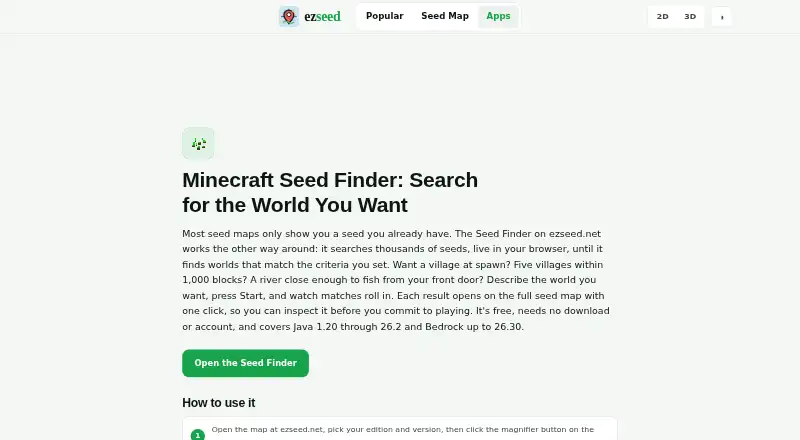
What Ezseed Minecraft Seed Finder is
Ezseed Minecraft Seed Finder is a free browser tool that searches for Minecraft worlds matching selected structures or biomes. Structure filters can target mapped structures, set a minimum count from 1 to 10, and specify a radius and center point. Biome filters check for any biome within a chosen radius, and multiple conditions can be combined using AND logic so every condition must match. Searches run in the browser against real world generation using the selected edition’s structure rules. The finder supports Java 1.20 through 26.2 and Bedrock up to 26.30. Each matching result opens on a full seed map for inspection. The map state is stored in the URL, allowing results to be bookmarked or shared. Ezseed says seed calculations run locally through cubiomes WebAssembly, seeds are never uploaded, and the tool works offline once loaded. Its free plan requires no download or account. Results may nevertheless be incomplete, outdated, approximate, or wrong for some versions, coordinates, devices, seeds, or edge cases. Ezseed describes the utility as fan-made and not approved by or associated with Mojang Studios or Microsoft.
Who it suits
It suits Minecraft players looking for worlds with particular structures or biomes, especially those who want to inspect a map before playing. The listed free plan requires no download or account.
What it does well
- Combines multiple structure and biome conditions with AND logic.
- Supports Java 1.20 through 26.2 and Bedrock up to 26.30.
- Matching results open on a full seed map.
- Map URLs can be bookmarked or shared.
- Ezseed says calculations are local and work offline after loading.
What to know first
- Results may be incomplete, approximate, outdated, or wrong.
- Edition support is limited to the listed version ranges.
- The utility is not approved by or associated with Mojang Studios or Microsoft.
Plans
| Plan | Billed and limits | Price |
|---|---|---|
| Free | Java 1.20–26.2 · Bedrock up to 26.30 · browser-based · no download or account | Free |
As ezseed.net lists them, read 1 Oct 2026. The maker's own page has the final word.
Getting started
- Open the Seed Finder website.
- Choose the Minecraft edition and version.
- Set structure criteria, biome criteria, or both.
- Combine criteria with AND logic if every condition must match.
- Run the search and open a matching result on its full seed map.
- Bookmark or share the result using the URL.
Ezseed Minecraft Seed Finder is a free web tool that searches for Minecraft worlds matching chosen biome and structure conditions. It is best for players with specific world-generation goals who want to inspect a candidate before starting. Its focused search and map preview are useful, but the stated accuracy limits matter if a particular result is essential.
Overview
Rather than relying on a fixed catalogue, Ezseed searches thousands of seeds live for worlds that meet your criteria. That makes it a better fit for players who know what they want nearby than for anyone browsing casually for inspiration. Searches run in the browser using real world generation and the structure rules for the selected edition, so the tool can narrow a search without requiring a download or account.
Seed calculations run locally through cubiomes WebAssembly, and Ezseed says seeds are never uploaded. It also says the finder works offline once loaded. A matching result opens on a full seed map, with the map state saved in the URL for bookmarking or sharing.
Key features
Search by structures and biomes
Structure criteria can cover any mapped structure, set a minimum count from one to ten, and specify a radius and center point. Biome criteria check for any biome within a chosen radius. You can combine multiple conditions with AND logic, so every condition must be met. This is useful for targeting a particular cluster of features, though it requires deciding on the conditions before searching.
Inspect results before playing
Each matching seed opens on its full map, giving players a way to examine the world before committing to it. The URL preserves the map state, which makes it straightforward to return to or share a particular view. Ezseed supports Java 1.20 through 26.2 and Bedrock up to 26.30; players should check that their own edition and version fall within those ranges.
The terms warn that results can be incomplete, outdated, approximate, or wrong for some seeds, versions, coordinates, devices, or edge cases. That caveat limits how much confidence to place in a match, especially when a specific structure or location is a must-have.
Pricing
Ezseed’s Free plan costs nothing. It includes Java 1.20–26.2 and Bedrock up to 26.30, browser-based access, and no download or account. The finder also supports terrain analysis, biome and structure search, spawn filters, and map previews. There is no paid tier to weigh against the free option, making it a straightforward choice for players who want these search tools without a subscription.
Platforms
Ezseed runs on the web. Because searches work in the browser and are stated to continue offline once loaded, it can suit players who want a lightweight tool rather than a separate app installation.
Who it's for
Choose Ezseed if you play Java or Bedrock within its supported ranges and want to search for several nearby biome or structure conditions, then inspect the map before using a seed. It is less suitable when you need guaranteed results for a particular edge case or use a version outside the stated ranges.
Ezseed describes itself as a fan-made Minecraft utility, not approved by or associated with Mojang Studios or Microsoft. Support is available by email for bugs, mismatches, account issues, privacy requests, legal notices, and questions, but response times are not guaranteed. Its privacy policy says it does not sell personal information and may share information to operate the service, comply with law, investigate abuse, or protect rights and safety.
Pros and cons
- Pros: AND-based criteria and configurable structure counts, radii, and center points help narrow searches to a specific world setup.
- Pros: Full map previews, shareable URL state, and local seed calculations support inspection and sharing without uploading seeds, according to Ezseed.
- Pros: Free browser access covers both Java and Bedrock within the stated version ranges, with no download or account.
- Cons: Results may be approximate or wrong in some cases, so a match is not a guarantee.
- Cons: The finder is web-only, and its support email has no guaranteed response time.
Alternatives
Minecraft Seed Finders is a useful place to compare more tools. For a free finder across web, Android, and iOS, consider MC Seed View. If you want a browser-based Java reverse search with a standard scan cap of 350,000 seeds per pass, ChunkSeeds Seed Finder is another free option.
Crafty Seed Map is a free in-browser viewer for Java, supporting versions 1.18.2, 1.19.4, 1.20.6, 1.21.1, and 1.21.3. For a Java Overworld seed search, consider MC Seed Map Seed Finder. Minecraft Search Seed Finder keeps its core features free and offers a $2.99 a month Emerald plan with supporter perks including Diamond Finder.
If you prefer an app on iOS or macOS, Seed Map Pro has a free plan with up to three saved world seeds and ten custom pins per map. For per-world planning with a 14-day free period on its Premium World plan, SeedLander charges £1.99 a month; Seedscan Seed Finder is another free web option for Bedrock and Java.
Verdict
Ezseed is a strong fit for Java and Bedrock players who want to find worlds by precise combinations of structures and biomes without paying or creating an account. Its full map previews and local calculations are compelling strengths. Look elsewhere if you need certainty for a critical seed match or play outside its supported versions.
Verdict
Ezseed provides browser-based searches for Minecraft seeds that match structure and biome criteria, with a map for inspecting results. Keep the stated result-accuracy limitation and supported version ranges in mind.
Questions
Is Ezseed Minecraft Seed Finder free?
Yes. Its Free plan is listed as free, with no download or account required.
Which Minecraft editions and versions does it support?
It supports Java 1.20 through 26.2 and Bedrock up to 26.30.
Can I search for both structures and biomes?
Yes. Structure and biome criteria can be combined, and AND logic requires every condition to match.
Does the tool upload seed calculations?
Ezseed says calculations run locally through cubiomes WebAssembly and seeds are never uploaded.
Can I save or share a result?
Map state is stored in the URL, so an opened seed can be bookmarked or shared from the address bar.
Is Ezseed affiliated with Mojang or Microsoft?
Ezseed describes the tool as fan-made and says it is not approved by or associated with Mojang Studios or Microsoft.
Facts from Ezseed Minecraft Seed Finder's own pages
- Accuracy limitation
- The terms say results may be incomplete, outdated, approximate, or wrong for some seeds, versions, coordinates, devices, or edge cases. · ezseed.net, 1 Oct 2026
- Biome criteria
- Biome criteria check for any biome within a specified radius. · ezseed.net, 1 Oct 2026
- Browser execution
- Searches run entirely in the browser against real world generation using the selected edition's structure rules. · ezseed.net, 1 Oct 2026
- Edition support
- The finder supports Java 1.20 through 26.2 and Bedrock up to 26.30. · ezseed.net, 1 Oct 2026
- Maker status
- Ezseed describes itself as a fan-made Minecraft seed utility and says it is not approved by or associated with Mojang Studios or Microsoft. · ezseed.net, 1 Oct 2026
- Multiple criteria
- Multiple criteria can be combined with AND logic so every condition must be met. · ezseed.net, 1 Oct 2026
- Offline use
- Ezseed states that it works offline once loaded. · ezseed.net, 1 Oct 2026
- Privacy of seeds
- Seed calculations run locally through cubiomes WebAssembly and Ezseed says seeds are never uploaded. · ezseed.net, 1 Oct 2026
- Privacy policy
- Ezseed says it does not sell personal information and may share information to operate the service, comply with law, investigate abuse, or protect rights and safety. · ezseed.net, 1 Oct 2026
- Purpose
- The Seed Finder searches thousands of seeds live until it finds worlds matching criteria such as structures or biomes. · ezseed.net, 1 Oct 2026
- Result inspection
- Each matching result opens on the full seed map so users can inspect it before playing. · ezseed.net, 1 Oct 2026
- Sharing
- Map state is stored in the URL, allowing opened seeds to be bookmarked or shared from the address bar. · ezseed.net, 1 Oct 2026
- Structure criteria
- Structure criteria support any mapped structure, a minimum count from 1 to 10, a radius, and a center point. · ezseed.net, 1 Oct 2026
- Support
- Support is available by email for questions, bugs, seed-result mismatches, account issues, privacy requests, and legal notices; response times are not guaranteed. · ezseed.net, 1 Oct 2026
Where Ezseed Minecraft Seed Finder stands on Freedom251
- Minecraft Seed Finders#10 of 36