Freedom251 › Minecraft Seed Finders
Seedscan Seed Finder
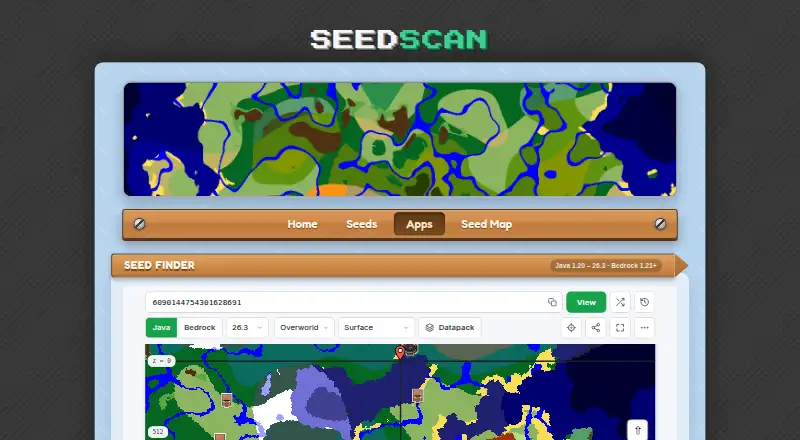
What Seedscan Seed Finder is
Seedscan Seed Finder is a free web tool for finding Minecraft seeds that fit conditions you choose. It supports Bedrock 1.21–26.52 and Java 1.20–26.3, and requires no account or download. Search rules can cover structures, biomes, structure clusters, terrain height, and islands. For structures, users can set a type and quantity within a radius; biome rules can require any, all, none, or only selected biomes. Distances can be measured from the seed's spawn point or from coordinates entered by the user. Matching seeds appear as the search runs, and selecting one displays it on a map. The finder samples random seeds rather than checking all possible seeds, so users can select Search more to continue. Bedrock searches are described as somewhat slower than Java searches. World generation runs in the browser using cubiomes compiled to WebAssembly. Seedscan says seeds are processed in the browser and are not sent to or stored on its servers. The site keeps aggregated server logs and may use privacy-friendly analytics and advertising; it uses no first-party cookies.
Who it suits
Seed Finder suits Minecraft players looking for worlds that match chosen structure, biome, or other listed conditions. It supports both Bedrock and Java editions through a browser.
What it does well
- Free, with no account or download required.
- Supports Bedrock and Java editions.
- Results can be inspected on a map.
- Seed processing stays in the browser, according to Seedscan.
What to know first
- It samples random seeds, not every possible seed.
- Bedrock searches are somewhat slower than Java searches.
- The site may use analytics and advertising.
Limits
The finder samples random seeds rather than searching all 2 to the power of 64 possible seeds, so Search more continues the search. Bedrock searches are described as somewhat slower than Java searches.
Plans
| Plan | Billed and limits | Price |
|---|---|---|
| Free | Free Minecraft seed finder for Bedrock and Java | Free |
As seedscan.net lists them, read 7 Oct 2026. The maker's own page has the final word.
Getting started
- Open the Seed Finder website in a browser.
- Choose Bedrock or Java and a supported version.
- Select the world conditions and set any desired distance anchor.
- Start the search and review matching seeds as they appear.
- Select a result to inspect it on the map, or choose Search more to continue.
Verdict
Seed Finder offers configurable searches and map previews without requiring an account or download. Remember that it samples seeds rather than exhaustively checking every possibility, and Bedrock searches may take longer.
Questions
How much does Seed Finder cost?
The Free plan costs nothing.
Which Minecraft editions and versions does it support?
The page lists Bedrock 1.21–26.52 and Java 1.20–26.3.
Does Seed Finder require an account or download?
No. The Seed Finder page says it requires neither an account nor a download.
Does Seedscan send or store searched seeds on its servers?
Seedscan says seeds are processed in the browser and are not sent to or stored on its servers.
Is Seedscan affiliated with Mojang or Microsoft?
Seedscan says it is not affiliated with Mojang, Microsoft, or Chunkbase.
How can I contact Seedscan?
The About page lists [email protected] for questions, corrections, or seed suggestions.
Facts from Seedscan Seed Finder's own pages
- Account and installation
- The Seed Finder page says it requires no account or download. · seedscan.net, 7 Oct 2026
- Affiliation
- Seedscan says it is not affiliated with Mojang, Microsoft, or Chunkbase. · seedscan.net, 7 Oct 2026
- Biome rules
- Biome conditions can require any, all, none, or only selected biomes. · seedscan.net, 7 Oct 2026
- Browser processing
- The finder computes Minecraft world generation in the browser using cubiomes compiled to WebAssembly. · seedscan.net, 7 Oct 2026
- Data collection
- The privacy page says the site keeps aggregated server logs and may use privacy-friendly analytics and advertising; it uses no first-party cookies. · seedscan.net, 7 Oct 2026
- Other conditions
- The five listed condition types are structure, biome, structure cluster, terrain height, and island. · seedscan.net, 7 Oct 2026
- Performance
- Bedrock searches are described as somewhat slower than Java searches. · seedscan.net, 7 Oct 2026
- Privacy
- Seedscan says seeds are processed in the browser and are not sent to or stored on its servers. · seedscan.net, 7 Oct 2026
- Purpose
- Seed Finder searches random Minecraft seeds for worlds matching conditions chosen by the user. · seedscan.net, 7 Oct 2026
- Results
- Matching seeds appear as the search runs, and selecting a result displays it on the map for inspection. · seedscan.net, 7 Oct 2026
- Search anchors
- Condition distances can be measured from the seed's spawn point or from user-entered X and Z coordinates. · seedscan.net, 7 Oct 2026
- Search limits
- The finder samples random seeds rather than searching all 2 to the power of 64 possible seeds; users can press Search more to continue. · seedscan.net, 7 Oct 2026
- Structure rules
- Users can search for a structure type and quantity within a radius. · seedscan.net, 7 Oct 2026
- Support
- The About page lists [email protected] for questions, corrections, or seed suggestions. · seedscan.net, 7 Oct 2026
- Supported editions
- The page lists Bedrock 1.21–26.52 and Java 1.20–26.3. · seedscan.net, 7 Oct 2026
Where Seedscan Seed Finder stands on Freedom251
- Minecraft Seed Finders#29 of 36