Freedom251 › Minecraft Seed Finders

MC Seed View
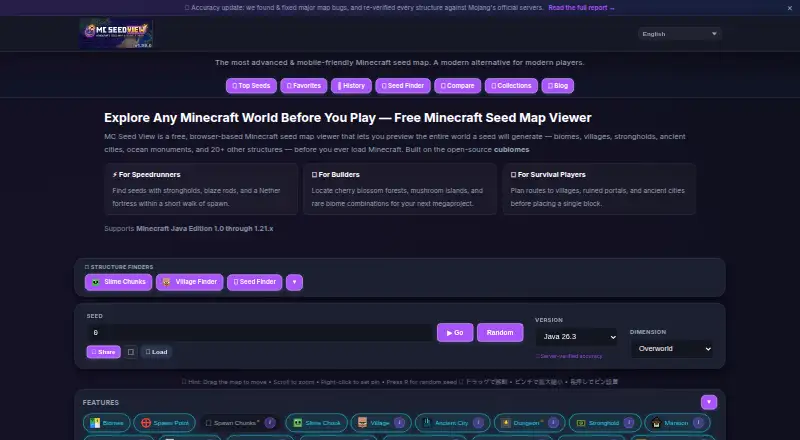
What MC Seed View is
MC Seed View is a free browser-based map viewer for inspecting Minecraft seeds before loading a world. Its interactive maps cover the Overworld, Nether, and End, and can move from a world-scale view down to chunk detail. The structure finder locates more than 20 structure types and gives coordinates plus teleport commands. Seed search can find worlds matching chosen criteria and grade them from S to F using nearby structures, biome diversity, and spawn quality. Loading a level.dat file can identify the seed, Minecraft version, and spawn point. The tool supports Java and Bedrock editions, though Bedrock biome accuracy is still improving. Biome and structure calculations run in the browser using cubiomes compiled to WebAssembly, and seed values are not sent to the operator's servers. The site says it works offline after the first page load and can be installed as a Progressive Web App. It supports smartphone and tablet browsers with touch gestures. The map does not predict variable decorations such as trees, ore veins, or tall grass. The tool is unofficial and not affiliated with Mojang AB or Microsoft Corporation.
Who it suits
It suits Minecraft players who want to inspect biomes and structures or search for seeds before starting a world. It supports Java and Bedrock, with improving rather than settled Bedrock biome accuracy.
What it does well
- Maps cover the Overworld, Nether, and End
- Finds more than 20 structure types
- Seed search grades results from S to F
- Loads level.dat to detect seed and spawn point
- Seed values are processed locally in the browser
What to know first
- Bedrock biome accuracy is still improving
- Map does not predict trees, ore veins, or tall grass
- Technical identifiers may be processed by listed third parties
Limits
The tool is free, requires no account, and makes all features available. Bedrock biome accuracy is still improving, and the map does not predict trees, ore veins, or tall grass.
Plans
| Plan | Billed and limits | Price |
|---|---|---|
| Free | Free to use · no account required · all features available | Free |
As mcseedview.com lists them, read 30 Sept 2026. The maker's own page has the final word.
Getting started
- Open https://mcseedview.com/ in a browser.
- Enter a seed to view its maps and search for biomes or structures.
- Adjust the map from a world overview toward chunk-level detail.
- Load a level.dat file to identify its seed, Minecraft version, and spawn point.
- After the first page load, use the site offline if needed, or install it as a Progressive Web App.
Overview
MC Seed View is a free browser tool for mapping Minecraft worlds and finding seeds that match chosen criteria. It suits players comparing candidate worlds or checking an existing save without creating an account. Its coverage across all three dimensions is useful, but it is not a terrain-analysis tool and Bedrock biome results need qualification.
Key features
The map spans the Overworld, Nether, and End, with views from a broad world overview down to chunk-level detail. That range works for both surveying a seed and checking a specific location. It does not predict variable decorations such as trees, ore veins, or tall grass, so the map should not be treated as a precise rendering of every detail a generated world will contain.
Structure search covers more than 20 types and gives coordinates plus ready-to-use teleport commands. The seed finder can search by criteria and grades results from S to F using nearby structures, biome diversity, and spawn quality. Those tools help shortlist worlds, though the grade reflects those stated factors rather than every preference a player might have.
For a saved world, importing a level.dat file can identify its seed, Minecraft version, and spawn point. Biome and structure calculations happen in the browser using cubiomes compiled to WebAssembly, so seed values are not sent to the operator's servers. That is useful for players who do not want to submit seeds to a service, though Google AdSense, Google Analytics, Cloudflare, and Supabase process technical identifiers when visitors use the site.
After its first page load, the site says it can work offline through Progressive Web App caching. Smartphone and tablet browsers support touch gestures, and the tool can be installed as a PWA. These options make it practical away from a desktop, but it remains a browser-based tool rather than a terrain-analysis application.
Pricing
MC Seed View is free: the Free plan costs nothing, requires no account, and includes all features. There is no paid tier to unlock additional capabilities, and no free trial. That makes it a straightforward choice for occasional seed searches as well as regular map use, with no published plan quota or seat limit to weigh.
Platforms
MC Seed View runs in a browser and supports Android, iOS, and web. It supports Java and Bedrock Edition; the homepage says Bedrock biome accuracy is still improving, so Java-focused players have firmer grounds for relying on the biome map. Its listed newest Java version is 26.3. Mobile support and offline use after the initial page load add flexibility, while the site remains an unofficial fan-made tool, not affiliated with Mojang or Microsoft.
Who it's for
Choose MC Seed View if you want a no-account way to compare seeds, inspect multiple dimensions, find structures, or identify the seed and spawn point of an existing world. It is less suitable if you need terrain analysis, exact decorative detail, or dependable Bedrock biome results.
Pros and cons
- Pros: Free access includes all features without an account, and the map covers the Overworld, Nether, and End.
- Pros: Seed search, structure coordinates, teleport commands, and world-file import support both world selection and saved-world lookup.
- Pros: Local seed calculations mean seed values are not sent to the operator's servers.
- Cons: Bedrock biome accuracy is still being refined, which limits confidence for Bedrock users.
- Cons: The map omits variable decorations and does not offer terrain analysis.
- Cons: Local seed processing does not prevent third-party services from processing technical identifiers.
Alternatives
Minecraft Seed Finders is a useful starting point for comparing more options. For a larger Java reverse-search pass, choose ChunkSeeds Seed Finder: its free web plan supports standard scans of up to 350,000 seeds per pass, but its stated emphasis is Java reverse search rather than MC Seed View's cross-dimension map. Ezseed Minecraft Seed Finder is another free, account-free browser choice, with Java 1.20–26.2 and Bedrock up to 26.30 compatibility.
Pick MC Seed Map Seed Finder if Java Edition seed search is the priority; its stated plan is Java-focused. Seed Map Pro suits iOS or macOS users who want to save up to three seeds and add up to ten custom pins on its free plan. SeedLander is a web alternative with a Premium World plan billed per world and a first 14 days free; its Team Add-on is also offered.
Choose wWaypoints if you want a Minecraft tool for Linux, macOS, or Windows. Chunkbase Seed Finder is another free web option. For a free, open-source desktop alternative, consider Cubiomes Viewer, which supports Linux and Windows.
Verdict
MC Seed View is a strong fit for players who want free, account-free seed search and mapping across the Overworld, Nether, and End, with structure lookup and saved-world identification in the same browser tool. Its local seed processing is a practical privacy advantage. Look elsewhere if terrain analysis, decorative detail, or reliable Bedrock biome accuracy is central to choosing a world.
Verdict
MC Seed View brings seed maps, structure lookup, and criteria-based seed search into a browser tool. Its Bedrock biome results are still being refined, and the map omits variable world decorations.
Questions
Does MC Seed View cost anything?
No. It is free to use, with all features available and no account required.
Which Minecraft editions does it support?
It supports Java Edition and Bedrock Edition. The site says Bedrock biome accuracy is still improving.
Can it show the Nether and End?
Yes. Its interactive maps cover the Overworld, Nether, and End.
Does MC Seed View send seed values to its servers?
No. Biome and structure calculations run in the browser, and seed values are not sent to the operator's servers. The privacy policy says several third parties process technical identifiers when visitors use the site.
Can I use it on a phone or offline?
It supports smartphone and tablet browsers, can be installed as a Progressive Web App, and the site says it works offline after the first page load.
Who maintains MC Seed View?
The About page says software engineer Satoru independently develops and maintains it. The site describes the tool as an unofficial fan-made project unaffiliated with Mojang AB or Microsoft Corporation.
Facts from MC Seed View's own pages
- Accuracy limitation
- The map does not predict decorations such as trees, ore veins, and tall grass, which the site says can vary with chunk generation. · mcseedview.com, 30 Sept 2026
- Affiliation
- The site describes itself as an unofficial fan-made tool not affiliated with Mojang AB or Microsoft Corporation. · mcseedview.com, 30 Sept 2026
- Founded
- 2025 · mcseedview.com, 28 Sept 2026
- Integrations and infrastructure
- The site lists Cloudflare Pages and Workers for hosting and edge routing, and Supabase for gallery and feedback storage. · mcseedview.com, 30 Sept 2026
- Local processing
- Biome and structure calculations run in the browser using cubiomes compiled to WebAssembly; seed values are not sent to the operator's servers. · mcseedview.com, 30 Sept 2026
- Maker
- The About page says MC Seed View is independently developed and maintained by Satoru, a software engineer, and that the project began in 2025. · mcseedview.com, 30 Sept 2026
- Map coverage
- The interactive map covers the Overworld, Nether, and End and can zoom from a world overview to chunk-level detail. · mcseedview.com, 30 Sept 2026
- Minecraft compatibility
- The homepage states support for Java Edition and Bedrock Edition, while noting Bedrock biome accuracy is still improving. · mcseedview.com, 30 Sept 2026
- Mobile support
- The site supports smartphone and tablet browsers with touch gestures and can be installed as a Progressive Web App. · mcseedview.com, 30 Sept 2026
- Offline use
- The site says it works offline after the first page load through Progressive Web App service-worker caching. · mcseedview.com, 30 Sept 2026
- Privacy and third parties
- Seeds are processed locally, but the privacy policy says Google AdSense, Google Analytics, Cloudflare, and Supabase process technical identifiers when visitors use the site. · mcseedview.com, 30 Sept 2026
- Purpose
- MC Seed View is a browser-based Minecraft seed map viewer for previewing biomes and structures before loading a world. · mcseedview.com, 30 Sept 2026
- Seed finder and scoring
- The tool searches for seeds matching criteria and grades seeds from S to F based on nearby structures, biome diversity, and spawn quality. · mcseedview.com, 30 Sept 2026
- Structure finder
- It locates more than 20 structure types and displays coordinates and ready-to-use teleport commands. · mcseedview.com, 30 Sept 2026
- Support
- The contact page says contact-form submissions are reviewed within 2–3 business days and also offers in-app feedback and X for brief questions. · mcseedview.com, 30 Sept 2026
- World file import
- Users can load a level.dat file to detect the world's seed, Minecraft version, and spawn point. · mcseedview.com, 30 Sept 2026
Where MC Seed View stands on Freedom251
- Minecraft Seed Finders#8 of 36
- Minecraft Seed Map Tools#4 of 9