Freedom251 › Typing Tutor Software
Klavaro
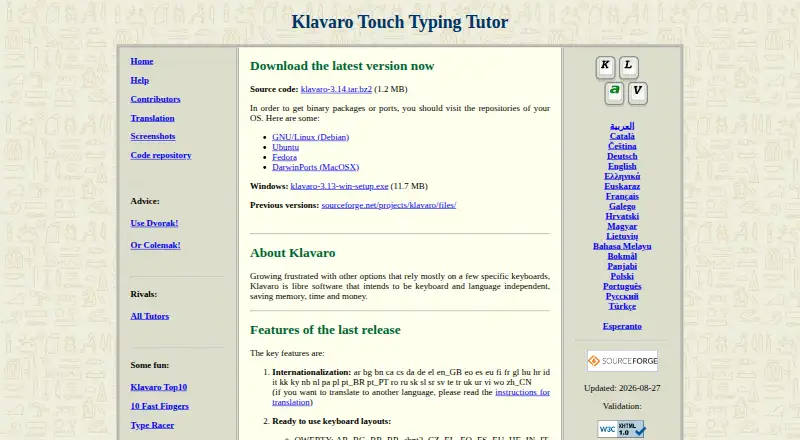
What Klavaro is
Klavaro is a free touch typing tutor designed to work independently of particular keyboards and languages. It includes ready-to-use keyboard layouts and a layout editor for configuring and saving custom layouts. Its exercises cover basic key positions, adaptability, typing speed, and typing fluidness. Klavaro saves exercise performance characteristics and can display them in progress charts. For advanced practice, users can import text from local files, paste from the clipboard, or drag text into the tutor. The contest module can rank users locally on a shared machine or send scores to a web server for a public global ranking. The site lists translations in dozens of languages, including English, French, Spanish, Arabic, and Chinese. Klavaro is available for Linux, macOS, and Windows, with source code, a Windows installer, and packages listed for Debian, Ubuntu, Fedora, and MacPorts. The project is licensed under GNU GPL version 3.0. Support is directed through SourceForge forums, where posting requires an account. The latest manual is available in Portuguese and Esperanto, not English.
Who it suits
Klavaro suits learners who want typing practice across different keyboard layouts or languages. Its custom-text exercises and progress charts may also suit users who want to track practice or work with their own material.
What it does well
- Includes ready-to-use layouts and a custom layout editor.
- Exercises cover key positions, adaptability, speed, and fluidness.
- Displays exercise performance in progress charts.
- Supports custom text from files, clipboard, or drag and drop.
- Available for Linux, macOS, and Windows.
What to know first
- The latest manual is not available in English.
- Posting to SourceForge support forums requires an account.
- No free trial is listed.
Plans
| Plan | Billed and limits | Price |
|---|---|---|
| Klavaro | Libre software · Downloadable source code and Windows installer · Linux and MacPorts packages listed | Free |
As klavaro.sourceforge.io lists them, read 4 Oct 2026. The maker's own page has the final word.
Getting started
- Visit the Klavaro website.
- Choose a download route: source code, the Windows installer, or an available operating system repository or MacPorts package.
- Install or obtain Klavaro for Linux, macOS, or Windows.
- Select a ready-made keyboard layout or configure and save a custom layout.
- Begin the guided exercises, or import, paste, or drag in text for advanced practice.
Klavaro is a free touch-typing tutor built to work across keyboard layouts and languages. It suits learners who want structured practice they can tailor to their keyboard, without paying for lessons. Its broad exercise mix and progress charts make it a practical choice; readers who rely on English documentation should be prepared for a gap.
Overview
Klavaro’s core idea is flexibility: rather than tying practice to one keyboard or language, it offers ready-made layouts and an editor for creating and saving custom ones. That makes it a stronger fit for people using less common layouts or switching between them than a tutor built around a single default.
Practice moves from key positions through adaptability, speed, and fluidness. Klavaro also records performance and can show progress charts, giving learners a way to track their work over time. Guided lessons are supported, while imported or pasted text lets more advanced typists practise with material they choose.
Key features
- Layout options: Use a ready-made layout or configure and save a custom one. This is useful when the keyboard in front of you does not match a standard lesson layout.
- Varied exercises: Practice key positions, adaptability, speed, and fluidness. The range gives learners more than speed drills, though the facts do not establish a particular lesson sequence.
- Progress charts: Saved exercise performance can be viewed as charts, which helps learners see changes over time rather than relying on memory.
- Custom text: Import a local file, paste from the clipboard, or drag text into the tutor for advanced exercises. This offers practice beyond the built-in material.
- Contest module: Rank users locally on a shared machine or send scores to a web server for a public global ranking. The local option suits group use without requiring public competition.
- Language coverage: The site lists translations in dozens of languages, including English, French, Spanish, Arabic, and Chinese.
Pricing
Klavaro is free software, with a listed plan at free. It includes downloadable source code and a Windows installer, with Linux and MacPorts packages listed. There is no paid tier or free-trial period to weigh against the free option.
The project is licensed under GNU General Public License version 3.0 (GPLv3). That makes the source available under an open-source license, a relevant distinction for users who prefer libre software to a proprietary tutor.
Platforms
Klavaro supports Linux, macOS, and Windows. The official site links to source code, a Windows installer, and operating-system repositories including Debian, Ubuntu, Fedora, and MacPorts, giving Linux users several distribution-oriented routes to the software.
Who it's for
Klavaro is a good match for individual learners who want no-cost guided typing practice, especially those who need a custom layout or want to practise in several languages. Its local contest mode may also suit classrooms or shared computers; SourceForge names education, desktop end users, and healthcare among the intended audiences.
It is less suitable for learners who need a current English manual: the latest manual is in Portuguese and Esperanto. Support is directed to SourceForge forums, where posting requires an account, so users seeking an account-free help channel should look elsewhere.
Pros and cons
- Pro: Custom layout editing and saving make practice adaptable to keyboards beyond the ready-made options.
- Pro: Charts, varied drills, and user-provided text support both structured learning and more tailored practice.
- Pro: Free availability across Linux, macOS, and Windows avoids platform-specific paid tiers.
- Con: The latest manual is not in English, which can make independent setup or troubleshooting harder for English readers.
- Con: Forum posting requires a SourceForge account, adding friction for users who need support.
Alternatives
For a broader comparison, see the Typing Tutor Software directory.
- TIPP10 is another free typing tutor, with Linux, macOS, Windows, and web platforms; consider it if browser access matters alongside desktop use.
- Touch Typer offers tests, stats, and streaks on Linux, macOS, and Windows, with a free plan and trial; consider it if those tracking features are your priority.
- Tux Typing is free software for Linux, macOS, and Windows from a volunteer group focused on software for children; consider it for a child-oriented option.
- Typing.com is web-based and its free edition includes grade-based lessons, tests, and games, with ads, 70-day data retention, email-only support, and classroom-level settings; consider it if those classroom features fit your needs.
- TypingClub offers a free individual edition on web and iOS; consider it if you want to practise on those platforms.
- keybr is a free, open-source web or self-hosted option; consider it if browser access or self-hosting matters more than desktop packages.
- Typing Bolt offers free web practice with no credit card required; consider it if you want a browser-based practice option.
- TypingCoach is web-based and offers a school plan for £59 a year for schools with 100 pupils or fewer, billed from September 2027; consider it if you need that school-oriented option.
Verdict
Choose Klavaro if you want a free desktop typing tutor that adapts to your keyboard, includes varied practice, and tracks progress. Its strongest reason to choose is the combination of layout flexibility and custom-text exercises; its clearest reason to look elsewhere is the lack of an English latest manual and the account requirement for forum support.
Verdict
Klavaro offers keyboard-layout options, varied practice exercises, progress charts, and custom-text exercises at no cost. Readers should know that the latest manual is in Portuguese and Esperanto, and forum posting requires a SourceForge account.
Questions
Is Klavaro free?
Yes. The listed Klavaro plan costs nothing, and the project is free software under GPLv3.
Which operating systems does it support?
Klavaro is listed for Linux, macOS, and Windows. The site links to a Windows installer and operating system packages, including Debian, Ubuntu, Fedora, and MacPorts.
Can I use my own keyboard layout or practice text?
Yes. Klavaro includes a layout editor for configuring and saving custom layouts. You can also import local text files, paste text from the clipboard, or drag text into the tutor.
Does Klavaro track progress?
It saves exercise performance characteristics and can display them as progress charts.
Is Klavaro open source?
SourceForge lists its license as GNU General Public License version 3.0 (GPLv3), and the official site links to source code.
Where can I get support?
The help page directs users to SourceForge forums for help, feedback, and suggestions. Posting requires a SourceForge account.
Facts from Klavaro's own pages
- Contest
- The contest module can rank users locally on a shared machine or send scores to a web server for a public global ranking. · klavaro.sourceforge.io, 4 Oct 2026
- Custom text
- Users can import text from local files, paste from the clipboard, or drag text into the tutor for advanced exercises. · klavaro.sourceforge.io, 4 Oct 2026
- Documentation
- The site says the latest manual is not translated into English and is available in Portuguese and Esperanto. · klavaro.sourceforge.io, 4 Oct 2026
- Downloads
- The official site links to source code, a Windows installer, and operating system repositories including Debian, Ubuntu, Fedora, and MacPorts. · klavaro.sourceforge.io, 4 Oct 2026
- Intended audience
- SourceForge lists education, desktop end users, and the healthcare industry as intended audiences. · sourceforge.net, 4 Oct 2026
- Keyboard layouts
- It includes ready to use layouts and a layout editor for configuring and saving custom layouts. · klavaro.sourceforge.io, 4 Oct 2026
- Languages
- The site lists translations for dozens of languages, including English, French, Spanish, Arabic, and Chinese. · klavaro.sourceforge.io, 4 Oct 2026
- License
- SourceForge lists the project license as GNU General Public License version 3.0 (GPLv3). · sourceforge.net, 4 Oct 2026
- Practice
- Its exercises cover basic key positions, adaptability, typing speed, and typing fluidness. · klavaro.sourceforge.io, 4 Oct 2026
- Product
- Klavaro is a touch typing tutor designed to be independent of specific keyboards and languages. · klavaro.sourceforge.io, 4 Oct 2026
- Progress tracking
- Klavaro saves exercise performance characteristics and can display them as progress charts. · klavaro.sourceforge.io, 4 Oct 2026
- Support
- The help page directs users to SourceForge forums for feedback, suggestions, help, and support; posting requires a SourceForge account. · klavaro.sourceforge.io, 4 Oct 2026
Where Klavaro stands on Freedom251
- Typing Tutor Software#3 of 36
- Typing Software#3 of 19