Freedom251 › Typing Tutor Software
keybr
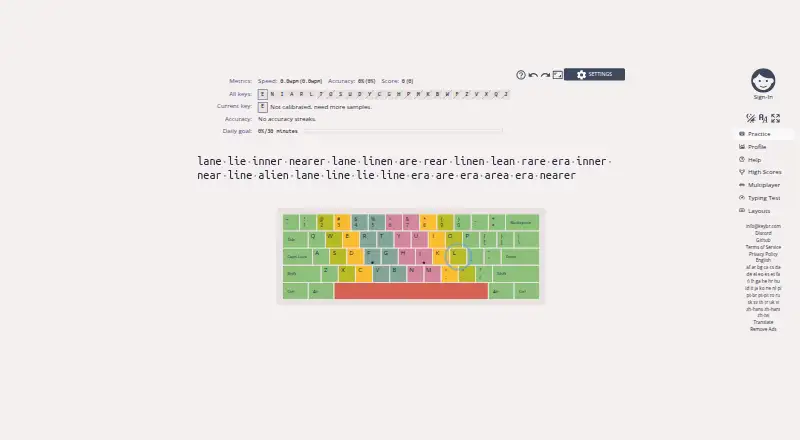
What keybr is
keybr is a free web application for learning touch typing and improving typing speed. It tracks keystrokes and calculates statistics for each key, then uses those measurements to build practice around weaker keys. Lessons begin with a small group of common letters, adding more as you reach the target speed for each set. You can set a speed goal, follow progress, and view graphs on a profile page. The application can estimate how many more lessons may be needed to reach your target, and offers multiple practice modes and configuration options. Its help guidance recommends starting with fingers on the home row and index fingers on the F and J key bumps. The project is released under the GNU Affero General Public License v3.0, and its repository includes Docker and Docker Compose files plus instructions for running a local instance. The project also welcomes bug reports, feature suggestions, translation contributions, and participation in its Discord server.
Who it suits
keybr suits people who want structured touch-typing practice focused on their weaker keys. Its local-instance instructions may also interest people who want to run the project themselves.
What it does well
- Free typing practice and learning features.
- Practice adapts to statistics for individual keys.
- Users can set a target typing speed.
- Progress is shown in profile graphs.
- Repository includes Docker and Docker Compose files.
What to know first
- Practice is focused on typing, not broader instruction.
- The guidance recommends home-row finger placement.
Plans
| Plan | Billed and limits | Price |
|---|---|---|
| Free | Typing practice and learning features | Free |
As keybr.com lists them, read 4 Oct 2026. The maker's own page has the final word.
Getting started
- Open the keybr website, or use the repository's Docker and Docker Compose instructions to run a local instance.
- Start a lesson with the initial set of common letters.
- Set a target typing speed and practice toward it.
- Review the profile graphs and lesson estimate as you progress.
Verdict
keybr offers adaptive drills, progress tracking, and a self-hosting path, all at no listed cost. Its approach centers on key-level typing statistics and reaching a chosen speed target.
Questions
Is keybr free?
Yes. The Free plan costs 0.00 USD and includes typing practice and learning features.
Which platforms does keybr support?
The listed platforms are web and self-hosted. The repository includes Docker and Docker Compose files and instructions for running a local instance.
Is keybr open source?
Yes. It is released under the GNU Affero General Public License v3.0.
How does keybr adapt lessons?
It uses typing statistics, including the time taken to type each key, to generate words for the next lesson. Lessons focus on weaker keys.
Can I set a typing goal?
Yes. You can set a target speed and track progress toward it; keybr can also estimate how many more lessons may be needed.
How can users contribute or give feedback?
The project invites bug reports, feature suggestions and translation contributions, and offers a Discord community.
Facts from keybr's own pages
- Adaptive lessons
- It automatically generates lessons that focus on a user's weakest keys. · github.com, 4 Oct 2026
- Community and feedback
- The project invites users to report bugs, suggest features, contribute translations, and join its Discord server. · github.com, 4 Oct 2026
- How lessons work
- The help page says typing statistics, including the time-to-type metric for each key, are used to generate the next list of words. · github.com, 4 Oct 2026
- Learning method
- The help page recommends placing fingers on the home row, with index fingers on the F and J key bumps. · github.com, 4 Oct 2026
- Lesson estimate
- The application can predict how many more lessons are needed to reach the target speed. · github.com, 4 Oct 2026
- Open source
- The project is released under the GNU Affero General Public License v3.0. · github.com, 4 Oct 2026
- Per-key statistics
- The application tracks keystrokes and computes statistics for each individual key. · github.com, 4 Oct 2026
- Practice options
- The application offers multiple practice modes and configuration options. · github.com, 4 Oct 2026
- Progress graphs
- Keybr provides a profile page with graphs showing learning progress. · github.com, 4 Oct 2026
- Progressive letters
- Practice starts with a small set of common letters and adds more as the user reaches the target speed for the current set. · github.com, 4 Oct 2026
- Purpose
- Keybr is a web application for learning touch typing and improving typing speed. · github.com, 4 Oct 2026
- Self-hosting
- The project repository includes Docker and Docker Compose files and instructions for running a local instance. · github.com, 4 Oct 2026
- Target speed
- Users can set a target typing speed and track progress toward it. · github.com, 4 Oct 2026
Where keybr stands on Freedom251
- Typing Tutor Software#8 of 36
- Typing Software#5 of 19