Freedom251 › Typing Tutor Software
GNU Typist
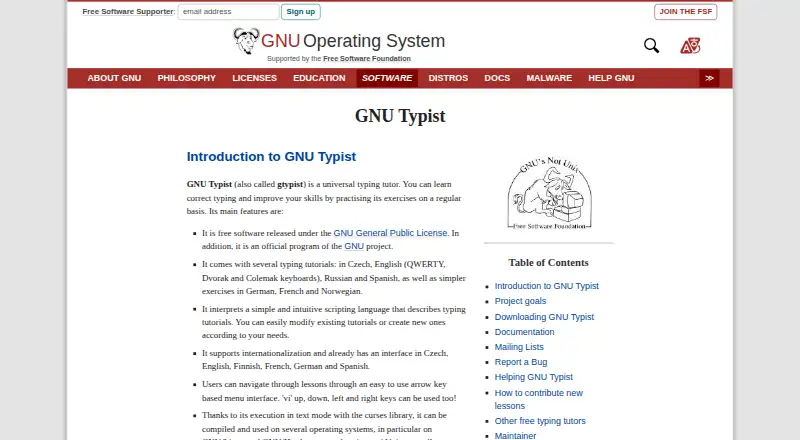
What GNU Typist is
GNU Typist is a typing tutor for learning accurate typing and building skills through practice. It runs on Linux and Windows and includes guided lessons for English QWERTY, Dvorak, and Colemak keyboards, along with lessons in Czech, Russian, and simpler exercises in German, French, and Norwegian. Practice includes drills and speed tests, with results shown in words per minute or characters per minute. The text-mode interface has an arrow-key menu and supports vi movement keys. You can change existing tutorials or write new lessons in its scripting language. The manual also describes an Emacs mode with lesson-editing commands and syntax highlighting, Vim syntax highlighting for lesson files, and typefortune, which uses text from the fortune program as practice material. GNU Typist is free software under the GNU General Public License, with a Free plan and no paid plans listed. The project aims to help individuals and schools learn or teach typing. The project notes a possible multi-byte input issue with available precompiled Windows binaries.
Who it suits
GNU Typist suits individuals and schools seeking structured typing practice on Linux or Windows. Its language and keyboard lessons may also suit learners who want to customize or create tutorials.
What it does well
- Free software under the GNU General Public License
- Lessons cover several keyboard layouts and languages
- Drills and speed tests show typing rates
- Users can create lessons with its scripting language
What to know first
- Text-mode interface rather than a graphical one
- Precompiled Windows binaries may have a multi-byte input issue
Limits
The listed plan is free, with no paid plans listed. Available precompiled Windows binaries may have a multi-byte input problem that the project expected to address in a later release.
Plans
| Plan | Billed and limits | Price |
|---|---|---|
| GNU Typist | GNU General Public License · No paid plans listed | Free |
As gnu.org lists them, read 11 Oct 2026. The maker's own page has the final word.
Getting started
- Visit the GNU Typist project page.
- Choose the Linux or Windows version.
- Start with a tutorial for your keyboard or a lesson in one of the available languages.
- Use the arrow keys or vi movement keys to navigate the text-mode menu.
- Modify a tutorial or create a lesson with the scripting language if needed.
GNU Typist is a free, scriptable typing tutor for learners and schools that want structured practice on Linux or Windows. It combines guided courses with drills, speed tests and editable lesson files. Choose it for keyboard-focused training and customization; look elsewhere if you need a graphical learning environment or a safer precompiled Windows setup.
Overview
GNU Typist focuses on learning accurate touch-typing technique and improving speed through repeated practice. Its tutorials provide a defined progression, while drills and tests let learners measure performance in words per minute or characters per minute. Because lessons can be changed or authored, the same installation can serve an individual changing keyboard layouts or a teacher preparing class-specific exercises.
The interface is deliberately text based. An arrow-key menu handles navigation, and vi movement keys are supported as well. That suits users comfortable working from the keyboard and keeps attention on typing, but it is a poor fit for anyone expecting animated guidance, mouse-driven controls or a polished visual course.
Key features
Layouts and languages
Built-in tutorials cover English QWERTY, Dvorak and Colemak. Lessons are also provided in Czech, Russian and Spanish, with simpler exercises in German, French and Norwegian. This is useful for multilingual learners, households sharing a computer and schools teaching alternatives to QWERTY. Coverage is not equally deep across every language: the German, French and Norwegian material is described as simpler exercises rather than full tutorial tracks.
Custom lesson authoring
Users can modify supplied tutorials or create new ones with GNU Typist’s scripting language. Teachers can therefore adapt wording and sequence to a class, while advanced learners can build practice around particular characters or layouts. The benefit comes with a learning curve: tailoring material requires working in the program’s lesson language rather than using a visual editor.
Drills, tests and editor integration
Exercises include drills and speed tests, and results can be shown in words per minute or characters per minute. That gives learners both focused repetition and a concrete speed metric. The manual documents an Emacs major mode with syntax highlighting and lesson-editing commands, plus Vim syntax highlighting for lesson files. These tools are especially relevant to users already working in Emacs or Vim; they add little for people who do not use those editors.
Text-source practice
The documented typefortune utility lets users practice with text drawn from the fortune program. It offers a way to vary practice material beyond fixed lessons, provided that utility is part of the user’s setup.
Pricing
| Plan | Price | What it includes |
|---|---|---|
| GNU Typist | free | Free software under the GNU General Public License; no paid plans listed |
There is no subscription, paid upgrade or free-trial period. The single free plan is the right fit for individuals and schools that can use a text interface and, when needed, edit lesson files themselves. It does not come with a separate commercial tier or published seat limits.
Platforms
GNU Typist runs on Linux and Windows. The project cautions that precompiled Windows binaries may have a multi-byte input problem that was expected to be addressed in a later release. Windows users who type affected characters should weigh that risk before choosing a binary download; Linux users avoid that specific warning.
Who it's for
GNU Typist suits self-directed learners who want free, repeatable practice, users moving to Dvorak or Colemak, and schools or instructors that need to adapt lessons. Its language selection also helps multilingual learners. It is less suitable for children or beginners who depend on visual coaching, and for anyone who wants a modern, graphical course with minimal configuration.
Pros and cons
Pros
- Completely free and GPL-licensed: there is no subscription cost or paid tier.
- Broad layout coverage: QWERTY, Dvorak and Colemak tutorials support common layout choices.
- Editable curriculum: scripting lets teachers and advanced users modify or create lessons.
- Useful measurement: drills and speed tests report words per minute or characters per minute.
- Keyboard-centric workflow: arrow-key navigation and vi movement keys suit terminal-oriented users.
Cons
- Text-mode presentation: the arrow-key menu lacks the visual instruction found in graphical tutors.
- Uneven language depth: German, French and Norwegian are represented by simpler exercises.
- Authoring requires technical work: custom courses use a scripting language rather than a visual lesson builder.
- Windows caveat: precompiled binaries may encounter a multi-byte input problem.
Alternatives
For a wider directory of choices, see Typing Tutor Software.
- TIPP10 is a free typing tutor on Linux, macOS, web and Windows, making it a better pick when browser or Mac access matters.
- Klavaro is free on Linux, macOS and Windows, with downloadable source and installers for users who need broader desktop coverage.
- Touch Typer offers free core tests with stats and streaks plus a trial, for readers wanting a more contemporary freemium option.
- Tux Typing is free across Linux, macOS and Windows and is developed by a volunteer group for children, so it is the more age-targeted choice.
- TypeTastic provides a free K–12 curriculum on Android, iOS and the web without ads, login or reporting, favoring schools needing browser and mobile access.
- KeyBlaze has a free version on macOS and Windows, while additional lessons and custom features require an upgrade.
- KTouch is free GPL software for Linux and Windows, suitable when a different open-source desktop tutor is preferred.
- Ratatype runs in a browser with unlimited speed tests but limits free users to 10 exercises per day and includes ads.
Verdict
GNU Typist is a strong choice for learners, teachers and schools that value free software, keyboard-layout coverage and the ability to author their own practice. Its main reason to choose it is flexibility without subscription cost. Look elsewhere if you require a graphical course, deeper uniform language coverage or confidence in a precompiled Windows package for multi-byte input.
Verdict
GNU Typist offers free lessons, drills, and speed tests, with customization for learners and teachers. Check the project’s note about a possible input issue before choosing a precompiled Windows binary.
Questions
How much does GNU Typist cost?
The listed plan is free under the GNU General Public License. No paid plans are listed.
Which platforms does GNU Typist support?
The listed platforms are Linux and Windows. The project notes a possible multi-byte input problem in available precompiled Windows binaries.
What keyboard layouts and languages are covered?
Tutorials cover English QWERTY, Dvorak and Colemak. Other lessons are in Czech, Russian and Spanish, with simpler exercises in German, French and Norwegian.
Can I create or change lessons?
Yes. Users can modify tutorials or create lessons using the program’s scripting language.
Does it include typing scores?
Exercises include drills and speed tests. Results can be displayed in words per minute or characters per minute.
What support does the project offer?
The project invites bug reports, suggestions, patches and new lessons at [email protected] and offers a mailing list at that address.
Facts from GNU Typist's own pages
- Audience
- The stated project goal is to help individuals and schools learn or teach typing. · gnu.org, 11 Oct 2026
- Custom lessons
- Users can modify tutorials or create new ones using the program’s scripting language. · gnu.org, 11 Oct 2026
- Download note
- The project page says available precompiled Windows binaries may have a multi-byte input problem that was expected to be addressed in a later release. · gnu.org, 11 Oct 2026
- Editor support
- The manual documents an Emacs major mode with syntax highlighting and commands for editing lessons, and Vim syntax highlighting for lesson files. · gnu.org, 11 Oct 2026
- Integrations
- The manual describes typefortune, a utility that lets users practice with text from the fortune program. · gnu.org, 11 Oct 2026
- Interface
- The program uses a text mode interface with an arrow key based menu, and also supports vi movement keys. · gnu.org, 11 Oct 2026
- Lessons
- It includes tutorials for English QWERTY, Dvorak and Colemak keyboards, plus lessons in Czech, Russian and Spanish and simpler exercises in German, French and Norwegian. · gnu.org, 11 Oct 2026
- License
- The project page describes GNU Typist as free software released under the GNU General Public License. · gnu.org, 11 Oct 2026
- Platforms
- The project page says GNU Typist can be compiled and used on GNU/Linux, GNU/Hurd, Unix variants, and Windows with PDCurses and MinGW. · gnu.org, 11 Oct 2026
- Purpose
- GNU Typist is a typing tutor for learning correct typing and improving typing skills through practice. · gnu.org, 11 Oct 2026
- Scoring
- Typing exercises include drills and speed tests, and the manual says results can be displayed in words per minute or characters per minute. · gnu.org, 11 Oct 2026
- Support
- The project invites bug reports, suggestions, patches and new lessons at [email protected] and offers a mailing list at that address. · gnu.org, 11 Oct 2026
Where GNU Typist stands on Freedom251
- Typing Tutor Software#2 of 35