Freedom251 › Restaurant Payroll Software

Kit by KitchenSync
What Kit by KitchenSync is
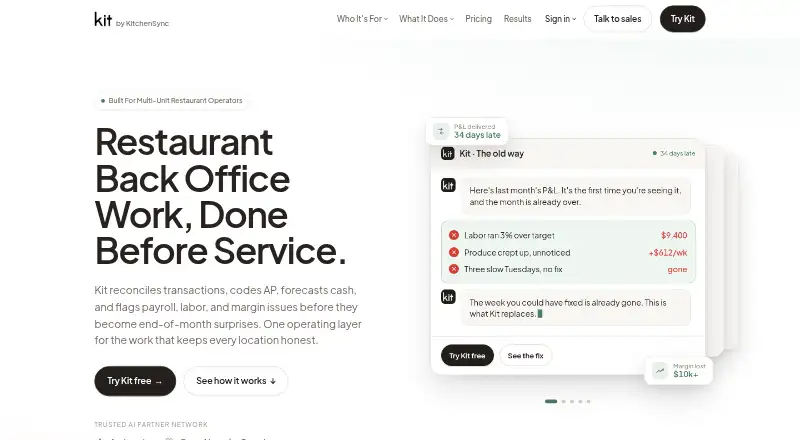
Kit by KitchenSync is an AI back office for multi-unit restaurant operators, covering finance and workforce tasks such as reconciliation, accounts payable, cash forecasting, payroll, labor and margin monitoring. It reconciles bank transactions overnight and prepares weekly P&Ls. It can code invoices and flag possible overcharges or duplicate charges, while its cash forecast looks 13 weeks ahead. Kit works with Toast, QuickBooks, bank feeds and other POS systems; its privacy policy also names Square and Clover. A KitchenSync team reviews AI work and investigates anomalies, with staff accountants and a relationship manager listed on the product page. KitchenSync says client data stays private to each group, is not used to train AI models, and AI decisions have an audit trail. The free option uses sample data and does not require a credit card or sales call; charges start when customers connect their own data. Kit Essentials costs $1,500 per location per month. Kit Pro is $1,950 per location per month, and Kit Max is $7,500 per month. Android, iOS, web and API platforms are listed.
Who it suits
Kit suits multi-unit restaurant operators seeking one service for financial and workforce operations. The free sample-data option lets prospective customers explore it before connecting their own data.
What it does well
- Overnight bank reconciliation and weekly P&Ls
- Rolling 13-week cash forecast
- Flags possible invoice overcharges and duplicates
- Human team reviews AI work and investigates anomalies
- Free sample-data access without a credit card
What to know first
- Kit Essentials costs $1,500 per location per month
- Additional employees cost $15 each
- Kit Pro costs $1,950 per location per month
Limits
Kit Essentials is $1,500 per location per month and includes one manager and five employees. The free option is for sample data; pricing starts when customers connect their own data.
Plans
| Plan | Billed and limits | Price |
|---|---|---|
| Kit Essentials | $1,500 per location / month · One manager and five employees · finance, weekly P&Ls, AP automation, payroll, HR, banking, cash flow, POS integration | $1,500 a month |
| Kit Pro | $1,950 per location / month · 20 people: five managers and 15 employees · inventory management · recipe costing | $1,950 a month |
| Kit Max | $7,500 per location / month · Unlimited AI usage · payroll, banking, and HR for every employee | $7,500 a month |
As kitchensync.us lists them, read 29 Sept 2026. The maker's own page has the final word.
Getting started
- Visit the KitchenSync website.
- Explore Kit free on sample data; no credit card or sales call is required.
- Choose a plan, starting with Kit Essentials at $1,500 per location per month.
- Connect your own data to begin paid use.
- Use the listed Android, iOS, web, or API platform.
Overview
Kit by KitchenSync is a restaurant back office for groups running multiple locations, combining finance, payroll and operating workflows. It is best suited to operators who want accounting and workforce tasks connected to restaurant data rather than a standalone payroll tool. Its breadth is compelling, but per-location pricing and additional people charges make the total cost an important part of the decision.
Key features
Finance and restaurant operations
Kit reconciles bank transactions overnight, prepares weekly P&Ls, codes invoices and flags possible overcharges or duplicates. A rolling 13-week cash forecast adds a forward-looking view to that routine bookkeeping. These tools should appeal to groups needing ongoing visibility across locations; operators looking only to process payroll may be paying for more than they need.
Payroll runs weekly and supports direct deposit, employee self-service, tip management, payroll tax filing and multi-state payroll. Kit also covers labor and margin monitoring. It works with Toast, QuickBooks, bank feeds and other POS systems; KitchenSync also names Square and Clover. Inventory management and recipe costing are included with Pro, not Essentials.
AI, human review and security
Workflows are routed through Anthropic, OpenAI and Google AI partners. KitchenSync says its team, including staff accountants and a relationship manager, reviews AI work and investigates anomalies. That human oversight is a useful counterweight to automated invoice and accounting tasks, though the product still depends on operators being comfortable with AI in their back office.
KitchenSync says each client group's data stays private, is not used to train AI models, and that AI decisions have an audit trail. Its privacy policy describes TLS 1.2 or higher in transit, AES-256 or equivalent encryption at rest, role-based access controls, security testing and monitoring, and SOC 2-audited or similarly certified hosting providers.
Setup and support
KitchenSync says most groups are fully live in about a week and that it can migrate ten years of Restaurant365 history in 45 minutes. These capabilities may ease a transition for Restaurant365 users, but operators should not assume every deployment will follow the same schedule. KitchenSync says it responds to inquiries within one business day.
Pricing
Kit is paid, with a free way to explore sample data before connecting a business's own data. That access requires no credit card or sales call, but it is not a free plan for live operations; there is no free trial. Paid pricing starts at $1,500/mo.
| Plan | Price | What it includes |
|---|---|---|
| Kit Essentials | $1,500 per location / month | One manager and five employees; finance, weekly P&Ls, AP automation, payroll, HR, banking, cash flow and POS integration. |
| Kit Pro | $1,950 per location / month | 20 people: five managers and 15 employees; Essentials' listed workflows plus inventory management and recipe costing. |
| Kit Max | $7,500 per location / month | Unlimited AI usage, plus payroll, banking and HR for every employee. |
Essentials is the entry point for groups that need the core finance and workforce bundle and fit within one manager and five employees. Pro costs more per location but adds inventory and recipe costing while covering 20 people, making it the clearer fit for larger teams that need those restaurant-specific tools. Max raises the price substantially in exchange for unlimited AI usage and payroll, banking and HR for every employee; it is aimed at groups whose scale makes those allowances relevant.
The pricing page adds $15 per additional employee and $75 per additional manager. Kit Pro HR consulting costs $15 per employee, with a 20-employee minimum. Those charges can change the economics for teams that exceed a plan's included headcount, so compare total staffing across locations before choosing. No annual billing term is stated.
Platforms
Kit is available on Android, iOS and web, and offers an API. That mix covers mobile and browser access as well as system integration needs.
Who it's for
Kit is a strong fit for multi-unit restaurant groups that want bookkeeping, invoice handling, forecasting, payroll and restaurant operations tied together, particularly when weekly reporting and cash visibility matter. Groups using Toast, QuickBooks, bank feeds, Square or Clover have named connection options. A single-location business seeking only payroll, or a group unwilling to pay per location and for additional people, should compare narrower tools.
Pros and cons
- Restaurant-focused finance in one product: Overnight reconciliation, weekly P&Ls, invoice flags and a 13-week forecast address recurring back-office work.
- Payroll covers specialized needs: Weekly runs, tips, multi-state payroll, tax filing and direct deposit suit restaurant workforces.
- Human review complements automation: KitchenSync says its team checks AI work and investigates anomalies.
- Costs scale with locations and headcount: Per-location charges plus extra employee and manager fees can add up for larger teams.
- Lower tier omits inventory tools: Inventory management and recipe costing require Pro, which costs $450 more per location each month than Essentials.
- Max is a large price step: At $7,500 per location / month, it makes sense only when unlimited AI usage and employee-wide payroll, banking and HR are worth the premium.
Alternatives
For a broader restaurant-payroll comparison, see Restaurant Payroll Software. isolved HCM is worth considering when a modular platform with flexible options for organizations of different sizes and industries is a better fit. Fourth Payroll is another paid option for Android, iOS and web.
ADP Workforce Now offers an all-in-one payroll and HR suite, with benefits administration in its Plus plan, so it may suit readers prioritizing that combination. Workforce.com offers scheduling, HR and payroll together, or a separate scheduling plan, for organizations focused on those workforce functions. OnPay may be a better fit for readers seeking a payroll plan priced at $49 base fee per month plus $6 per worker per month, with unlimited pay runs and schedules and year-end filings included; it also offers a free trial.
Paycor is another paid option with plans for organizations under 50 employees. PayMaster Hospitality is an alternative for Windows users. QuickBooks Contractor Payments is more relevant when paying contractors is the main need: its plan includes 20 contractors at $12.50/mo, with an additional charge for each extra contractor.
Verdict
Choose Kit if you run a multi-unit restaurant group and want finance, cash forecasting and workforce operations handled in one restaurant-oriented system, with human review around AI workflows. The main reason to look elsewhere is cost: per-location subscriptions and added headcount charges may be hard to justify if you need payroll alone, or if you need inventory and recipe tools but cannot stretch to Pro.
Verdict
Kit brings bookkeeping, invoice handling, forecasting and workforce operations together for restaurant groups. Its listed plans are priced per location, with additional charges for added employees and managers.
Questions
How much does Kit cost?
Kit Essentials is $1,500 per location per month, Kit Pro is $1,950 per location per month, and Kit Max is $7,500 per location per month.
Can I try Kit for free?
Yes. Kit can be explored on sample data without a credit card or sales call. Pricing starts when you connect your own data.
What does Kit Essentials include?
The plan lists one manager and five employees, with finance, weekly P&Ls, AP automation, payroll, HR, banking, cash flow, and POS integration.
Which systems does Kit integrate with?
Kit works with Toast, QuickBooks, bank feeds, and other POS systems. Square and Clover are also named in the privacy policy.
Which platforms are listed for Kit?
Android, iOS, web, and API are listed.
Who reviews Kit’s AI work?
A dedicated KitchenSync team reviews AI work and investigates anomalies; the product page names staff accountants and a relationship manager.
Facts from Kit by KitchenSync's own pages
- Accounts payable
- Kit codes invoices and flags possible overcharges and duplicate charges. · kitchensync.us, 29 Sept 2026
- AI partners
- Kit says it routes workflows through Anthropic, OpenAI, and Google AI partners. · kitchensync.us, 29 Sept 2026
- Bookkeeping
- Kit reconciles bank transactions overnight and prepares weekly P&Ls. · kitchensync.us, 29 Sept 2026
- Cash forecasting
- Kit provides a rolling 13-week cash forecast. · kitchensync.us, 29 Sept 2026
- Free access
- Kit can be tried free on sample data without a credit card or sales call; pricing starts when customers connect their own data. · kitchensync.us, 29 Sept 2026
- Human review
- A dedicated KitchenSync team reviews AI work and investigates anomalies, with staff accountants and a relationship manager named on the product page. · kitchensync.us, 29 Sept 2026
- Integrations
- The site says Kit works with Toast, QuickBooks, bank feeds, and other POS systems; its privacy policy also names Square and Clover POS systems. · kitchensync.us, 29 Sept 2026
- Plan add-ons
- The pricing page lists $15 per additional employee, $75 per additional manager, and Kit Pro HR consulting at $15 per employee with a 20-employee minimum. · kitchensync.us, 29 Sept 2026
- Privacy
- The site says client data is kept private to each group, is not used to train AI models, and AI decisions have an audit trail. · kitchensync.us, 29 Sept 2026
- Purpose
- Kit is an AI back office for multi-unit restaurant operators that handles reconciliation, accounts payable, cash forecasting, payroll, labor, and margin monitoring. · kitchensync.us, 29 Sept 2026
- Security
- The privacy policy describes TLS 1.2 or higher in transit, AES-256 or equivalent at rest, role-based access controls, security testing, monitoring, and SOC 2-audited or similarly certified hosting providers. · kitchensync.us, 29 Sept 2026
- Setup
- KitchenSync says most groups are fully live within about a week and that it can migrate ten years of Restaurant365 history in 45 minutes. · kitchensync.us, 29 Sept 2026
- Support
- The contact page says KitchenSync replies to inquiries within one business day. · kitchensync.us, 29 Sept 2026
Where Kit by KitchenSync stands on Freedom251
- Restaurant Payroll Software#2 of 23