Freedom251 › Routine Planner Apps
Kiritsu
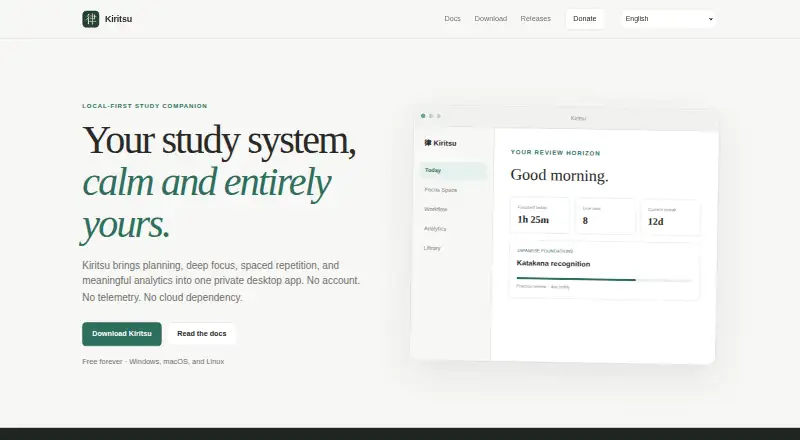
What Kiritsu is
Kiritsu is a desktop study app for organizing materials, planning tasks, focusing, and reviewing what you have studied. Its library supports books, courses, articles, videos, and custom materials, arranged in nested sections with linked topics. You can set up workflow columns, move study cards between them, and collect cards into focus groups. Focus Space offers Pomodoro sessions, custom focus-and-break cycles, and a freeform stopwatch. Based on relevant activity history, Kiritsu schedules separate Study and Practice review tracks. Local analytics show 7-day, 30-day, 90-day, and yearly views.
Kiritsu creates a local SQLite workspace on first launch. The maker says it makes no network requests for accounts, telemetry, advertising, or study synchronization; a user-controlled GitHub update check is the stated exception. You can create restorable backups and move a portable JSON version of your library, topics, workflow, activities, and settings between installations. The free plan costs nothing, with no account required. Installers are offered for Windows 10 and 11, Linux x86-64, and macOS on Apple Silicon and Intel.
Who it suits
Kiritsu suits students who want to organize varied study materials, schedule reviews, and track activity in a desktop app. It is available on Linux, macOS, and Windows.
What it does well
- Organizes books, courses, articles, videos, and custom materials
- Offers Pomodoro, custom cycles, and stopwatch timing
- Schedules separate Study and Practice review tracks
- Provides local analytics across four time spans
- Supports restorable backups and portable JSON exchange
What to know first
- macOS may require manual confirmation on first launch
- No free trial is offered
Limits
The listed Free forever plan costs nothing and requires no account. Kiritsu is a desktop app for Linux, macOS, and Windows; on macOS, manual confirmation may be needed at first launch.
Plans
| Plan | Billed and limits | Price |
|---|---|---|
| Free forever | Free forever · No account · desktop app | Free |
As kiritsu.app lists them, read 8 Oct 2026. The maker's own page has the final word.
Getting started
- Visit https://www.kiritsu.app/.
- The download page offers installers for Windows 10 and 11, Linux x86-64, and macOS for Apple Silicon or Intel.
- Install and launch Kiritsu; it creates a local SQLite workspace on first launch.
- On macOS, confirm the first launch manually if prompted.
- Add study materials and organize them into sections and linked topics.
- Create workflow columns and use Focus Space for study sessions.
Kiritsu is a free desktop app for learners who want to organize study materials, plan work, and schedule reviews in one place. It is a strong fit for private, structured study on a computer, but not for anyone who needs a mobile companion.
Overview
Kiritsu links a study library with task planning, focus sessions, spaced repetition, and analytics. The library accommodates books, courses, articles, videos, and custom materials, organized into nested sections and linked topics. That breadth can help learners keep resources and related ideas together; it is less suited to general-purpose routines or habits unrelated to study.
Users create workflow columns, move task cards through them, and collect cards into focus groups. This makes the planning system adaptable to different study processes, though it remains centered on desktop work rather than coordinating a routine across phone and computer.
Key features
Focus and review
Focus Space offers Pomodoro sessions, custom focus-and-break cycles, and a freeform stopwatch. That range works for both structured intervals and sessions where a fixed timer is not useful. Kiritsu also creates separate Study and Practice review tracks using relevant activity history, helping users plan both kinds of review rather than relying on a single repeating schedule.
Local workspace and data control
On first launch, Kiritsu creates a SQLite workspace in the operating system’s application-data directory. It says it makes no network requests for accounts, telemetry, advertising, or study synchronization; the stated exception is a user-controlled GitHub update check. Users can make restorable backups or export and import a portable JSON representation of their library, topics, workflow, activities, and related settings. These options support recovery and migration, but users remain responsible for keeping backups safe.
Analytics provide 7-day, 30-day, 90-day, and yearly views. Updates are checked only when users request them or enable automatic checks, and signed update artifacts are verified before installation. The support tracker is intended for reproducible problems; users are asked not to attach backups containing private study data.
Pricing
Kiritsu’s Free forever plan costs nothing, is billed Free forever, and requires no account. The desktop app is free to use, with no trial needed. That makes the full desktop workflow accessible without a subscription commitment; no paid tier is part of the offer.
Platforms
Kiritsu supports Linux, macOS, and Windows. Downloads include Windows 10 and 11, Linux x86-64, and macOS installers for Apple Silicon and Intel. The notable setup friction is on macOS: because the app is not notarized through a paid Apple Developer membership, macOS may require manual confirmation on first launch.
Its local workspace and lack of study synchronization make it a computer-based tool rather than a cross-device service. Learners who need to plan or review from a phone should choose a mobile-capable alternative instead.
Who it's for
Kiritsu suits learners who want a structured desktop library, movable study tasks, timed focus options, and activity-informed review tracks without creating an account. It is less appropriate for people who need mobile access, cloud synchronization, or a routine planner for everyday activities beyond study.
Pros and cons
- Pros: A single free desktop app combines a varied study library, workflow cards, focus timers, review tracks, and analytics.
- Pros: Local storage, restorable backups, and portable JSON import and export give users practical control over study data.
- Cons: Linux, Windows, and macOS are the supported platforms; mobile apps are not offered.
- Cons: macOS may require manual first-launch confirmation, adding a setup step for Mac users.
- Cons: No study synchronization is provided, so the local-first approach does not suit users seeking shared or cloud-based access.
Alternatives
For a mobile or web-based routine planner, Routime AI is free on Android, iOS, and web. Thruday also spans Android, iOS, and web, and its free plan focuses on visual daily planning, priority to-do lists, reminders, images and colors, and breathing exercises rather than Kiritsu’s study-library and review workflow.
Tiimo offers a free plan with selected planning tools on iOS and Android; its free plan excludes the web app. Awakee is an iOS and macOS option, though its free download limits the number of routines and habits.
My Morning Routine is available on Android and iOS, with up to four complete routines on its free plan. MyRoutine is another Android and iOS option, and also supports macOS. Routinely is for iOS and macOS users; its free plan allows up to two routines and five habits per routine. Routinery offers Android and iOS apps, with two routines and unlimited checklists on its free plan.
Browse Routine Planner Apps for more options in that category.
Verdict
Choose Kiritsu if you want a free, account-free desktop workspace that brings study organization, focus tools, review scheduling, and analytics together while keeping data local. Look elsewhere if you need mobile access or synchronized study data; those are the clearest limits on its otherwise broad study workflow.
Verdict
Kiritsu combines study planning, focus tools, review scheduling, and analytics in a local desktop workspace. Its backup and JSON options support moving or restoring study data, while macOS users may need to confirm the first launch manually.
Questions
How much does Kiritsu cost?
The Free forever plan costs nothing. It requires no account.
Is there a free plan or trial?
Kiritsu has a free plan. There is no free trial.
Which platforms does Kiritsu support?
Kiritsu offers installers for Windows 10 and 11, Linux x86-64, and macOS on Apple Silicon and Intel.
Where does Kiritsu store study data?
On first launch, it creates a local SQLite workspace in the operating system’s application-data directory. Users can create restorable backups and export or import a portable JSON representation.
Does Kiritsu make network requests?
The maker says Kiritsu makes no network requests for accounts, telemetry, advertising, or study synchronization. The stated exception is a user-controlled GitHub update check.
Does Kiritsu require an account?
The Free forever plan is listed as requiring no account.
Facts from Kiritsu's own pages
- Analytics
- Local analytics include 7-day, 30-day, 90-day, and yearly views. · kiritsu.app, 8 Oct 2026
- Backups and migration
- Users can create restorable backups and export or import a portable JSON representation of their library, topics, workflow, activities, and related settings. · kiritsu.app, 8 Oct 2026
- Data storage
- On first launch, Kiritsu creates a local SQLite workspace in the operating system’s application-data directory. · kiritsu.app, 8 Oct 2026
- Focus timers
- Focus Space offers Pomodoro, custom focus-and-break cycles, and a freeform stopwatch. · kiritsu.app, 8 Oct 2026
- macOS limitation
- Kiritsu is not notarized through a paid Apple Developer membership, so macOS may request manual confirmation on first launch. · kiritsu.app, 8 Oct 2026
- Privacy
- Kiritsu says it makes no network requests for accounts, telemetry, advertising, or study synchronization; the stated exception is a user-controlled GitHub update check. · kiritsu.app, 8 Oct 2026
- Purpose
- Kiritsu combines planning, focus sessions, spaced repetition, and analytics in a private desktop study app. · kiritsu.app, 8 Oct 2026
- Spaced repetition
- Kiritsu schedules independent Study and Practice review tracks from relevant activity history. · kiritsu.app, 8 Oct 2026
- Study materials
- Its library supports books, courses, articles, videos, and custom materials organized into nested sections and linked topics. · kiritsu.app, 8 Oct 2026
- Support
- The documentation directs users to report reproducible problems through the support tracker and asks them not to attach backups containing private study data. · kiritsu.app, 8 Oct 2026
- Supported systems
- The download page offers Windows 10 and 11, Linux x86-64, and macOS installers for Apple Silicon and Intel. · kiritsu.app, 8 Oct 2026
- Updates
- Kiritsu verifies signed update artifacts before installation and contacts GitHub for updates only when users check manually or enable automatic checks. · kiritsu.app, 8 Oct 2026
- Workflow
- Users can create workflow columns, move study task cards between them, and collect cards into focus groups. · kiritsu.app, 8 Oct 2026
Where Kiritsu stands on Freedom251
- Routine Planner Apps#3 of 27