Freedom251 › Routine Planner Apps

Awakee
What Awakee is
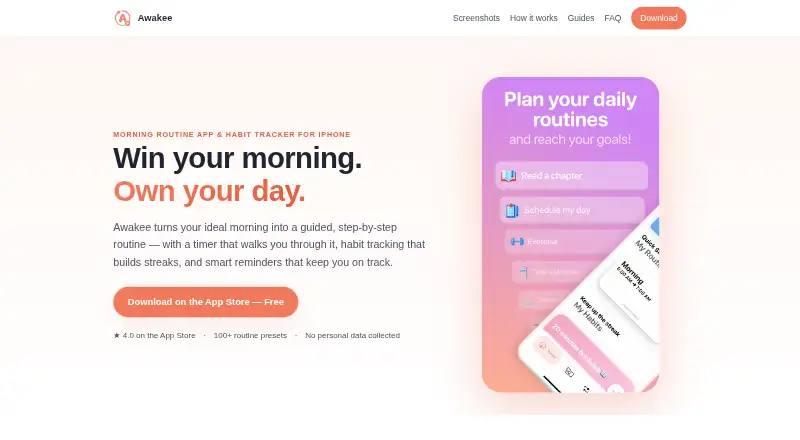
Awakee is a routine planner and habit tracker built around step-by-step routines with a guided timer. Users can make routines with a builder, set durations for individual steps, or select from more than 100 community presets. The timer can keep running in the background and on the lock screen while other apps are open. For habits outside a routine, Awakee supports flexible schedules and goals, and displays streak history and progress charts.
The app offers reminders that can be completed from notifications, plus home-screen and lock-screen widgets. It supports Apple Watch and iCloud sync, and the App Store lists compatibility with iPhone, iPad, Mac and Apple Watch. Routines and habits are stored on the device and can sync through a personal iCloud account using Apple’s CloudKit. An account is not required. The maker says it collects no personal data and does not use third-party analytics or crash-reporting services. Purchases are processed by Apple through the App Store account, and the maker says it does not see payment details. Awakee is described as an iPhone morning-routine app, with routines also intended for evening, gym or study use. It has a free download with a finite number of routines and habits, along with subscription and one-time purchase options.
Who it suits
Awakee suits people who want timed routines, habit schedules, streak tracking and reminders on Apple devices. Its presets and routine examples cover morning, evening, gym and study use.
What it does well
- Routine steps can have individual durations.
- More than 100 community routine presets are available.
- The timer runs in the background and on the lock screen.
- Habits include flexible schedules, goals, streak history and progress charts.
- Notifications and home-screen and lock-screen widgets support reminders.
- No account is required, and routines can sync through personal iCloud.
What to know first
- The free download limits the number of routines and habits.
- The listed platforms are iOS and macOS.
- iCloud syncing uses the user’s personal iCloud account.
Limits
The Free plan is a free download, but allows only a finite number of routines and habits. The listed paid options include subscriptions and one-time purchases.
Plans
| Plan | Billed and limits | Price |
|---|---|---|
| Free | Free download; without a subscription, only a finite number of routines and habits can be created. · Finite number of routines and habits | Free |
| Awakee Premium Unlimited | Premium Unlimited | $19.99, paid once |
| Annual Subscription | 12 months; subscription auto-renews unless auto-renew is turned off at least 24 hours before the current period ends. · Premium subscription | $24 a year |
| Lifetime Subscription | Lifetime access | $38.99, paid once |
| Awakee Premium Monthly | 1 month; subscription auto-renews unless auto-renew is turned off at least 24 hours before the current period ends. · Premium subscription | $4.99 a month |
| Promotional Yearly Premium | Promotional yearly option · Premium subscription | $4.99 a year |
| Promotional Annual Premium | Promotional annual option · Premium subscription | $9.99 a year |
As awakeeapp.com lists them, read 7 Oct 2026. The maker's own page has the final word.
Getting started
- Get Awakee through the App Store.
- Start without creating an account.
- Build a routine with the guided builder or choose a community preset.
- Set durations for routine steps and configure habits, schedules or goals.
- Enable reminders and use widgets or Apple Watch features as needed.
- Use personal iCloud to sync routines and habits across devices.
Awakee is a routine planner and habit tracker for people who want to time each step of a routine and track separate habits. It combines guided routines, reminders and progress tracking with Apple Watch support and iCloud sync.
Overview
Awakee is built around routines that move from one timed step to the next, rather than a list users must pace themselves. You can build a sequence or choose from more than 100 community presets, then set durations for its individual steps. The timer keeps running in the background and on the lock screen, so switching to another app does not interrupt a routine.
Alongside routines, Awakee tracks standalone habits with flexible schedules and goals, and shows streak history and progress charts. Reminders can be completed from notifications; home-screen and lock-screen widgets add quick access. Together, these features suit personal daily planning, though the app’s focus is narrower than a general task manager.
Key features
- Guided routines and presets: Build a routine step by step or start with one of more than 100 community presets. This gives users a choice between shaping a sequence themselves and adapting a ready-made starting point.
- Step timing: Each routine step can have its own duration, and the timer runs in the background and on the lock screen. That is useful for routines where pacing matters; users who only want an untimed checklist may not need this structure.
- Separate habit tracking: Flexible schedules and goals let habits be tracked apart from routines, with streak history and progress charts to follow consistency.
- Reminders and widgets: Reminders can be marked complete from notifications, while home-screen and lock-screen widgets put planning information within reach.
- Apple ecosystem support: Awakee supports Apple Watch and can sync through a personal iCloud account. It does not require an account; routines and habits are stored on the device and may sync using CloudKit.
- Privacy and support: The maker says Awakee collects no personal data and uses no third-party analytics or crash-reporting services. Subscription status is validated through RevenueCat using an anonymous app-generated identifier, device type and purchase history; Apple processes purchases through the App Store account, and the maker says it does not see payment details. The maker usually responds to support requests within 1–2 business days and accepts feedback by email or in the app.
Pricing
The free download costs nothing and allows only a finite number of routines and habits. It is a practical way to start, but users who want to build beyond those limits will need a paid option.
The recurring choices are the Annual Subscription at $1.99 a year and Awakee Premium Monthly at $4.99 a month. Both provide a premium subscription. These suit users who prefer a renewable plan; subscriptions auto-renew unless auto-renew is turned off at least 24 hours before the current period ends. Promotional Yearly Premium costs $4.99 a year, and Promotional Annual Premium costs $9.99 a year; both provide a premium subscription.
For a one-time payment, Awakee Premium Unlimited costs $19.99, paid once, while Lifetime Subscription costs $38.99, paid once for lifetime access. These avoid recurring billing, though their higher upfront prices may be less appealing to someone still deciding whether the app fits. A free trial is available.
Platforms
Awakee is available on iOS and macOS, with App Store compatibility covering iPhone, iPad, Mac and Apple Watch. Its Apple focus is a strength for users already using those devices, but people who need Android or web access should choose another option.
Who it's for
Awakee fits people who want to pace morning, evening, gym or study routines while keeping separate habits and progress history. Its presets help users who want a starting point, while step durations and a background timer serve people who prefer a more deliberate sequence. The finite free-plan allowance may be restrictive for anyone tracking many routines and habits without paying.
Pros and cons
- Pros: Individual step durations and a background, lock-screen timer support paced routines; more than 100 presets offer ready-made starting points; standalone habit schedules, streak history and charts add tracking beyond routines; Apple Watch support, widgets and personal iCloud sync connect the experience across Apple devices.
- Cons: The free download caps the number of routines and habits; platform support is limited to Apple devices; recurring subscriptions auto-renew unless canceled at least 24 hours before the period ends.
Alternatives
For a wider set of routine-planning choices, browse Routine Planner Apps.
- Routime AI is a free option for users who want Android, iOS and web support; its free plan has no specific limits stated.
- Thruday may suit users looking for visual daily planning, priority to-do lists, reminders, images and colors, and breathing exercises in a free plan.
- Tiimo is worth considering if Android or web access matters, as well as iOS and macOS; its free plan includes selected planning tools but excludes the web app.
- Kiritsu is a free-forever desktop alternative for Linux, macOS or Windows users who want an app without an account.
- My Morning Routine may fit Android or iOS users who want up to four complete routines on its free plan; its paid options are $7.99 a year or $24.99, paid once.
- MyRoutine is another freemium option for Android, iOS and macOS.
- Routinely is a closer Apple-platform alternative, with a free plan capped at two routines and five habits per routine.
- Routinery is an Android and iOS alternative whose free plan includes two routines and unlimited checklists; its premium plans cost $5 a month or $36 a year.
Verdict
Choose Awakee if timed, step-by-step routines and separate habit tracking are both important, especially if you use Apple devices and want Watch support or iCloud sync. The presets and background timer give routines useful structure, but the finite free allowance and Apple-only platform support are good reasons to look elsewhere if you need more room without a subscription or use other platforms.
Verdict
Choose Awakee if you want guided, timed routines and separate habit tracking across Apple devices. Its free download has a finite routine and habit allowance, so people who need more can consider a premium option. The platform list is limited to iOS and macOS.
Questions
Is Awakee free?
Yes. The Free plan is a free download, with a finite number of routines and habits.
What do the listed paid options cost?
The Annual Subscription is $1.99 a year, Awakee Premium Monthly is $4.99 a month, Promotional Yearly Premium is $4.99 a year, Promotional Annual Premium is $9.99 a year, Awakee Premium Unlimited is $19.99, paid once, and Lifetime Subscription is $38.99, paid once.
Which devices are listed as compatible?
The App Store lists iPhone, iPad, Mac and Apple Watch compatibility. The platform list names iOS and macOS.
Does Awakee require an account?
No. Awakee does not require an account.
How does syncing work?
Routines and habits are stored on the device and can sync through the user’s personal iCloud account using Apple’s CloudKit.
Who makes Awakee?
The site describes Awakee as built by an independent developer.
Facts from Awakee's own pages
- Account requirement
- Awakee does not require an account. · awakeeapp.com, 7 Oct 2026
- Apple ecosystem
- Awakee supports an Apple Watch app and iCloud sync; the App Store lists compatibility with iPhone, iPad, Mac, and Apple Watch. · awakeeapp.com, 7 Oct 2026
- Background timer
- The routine timer can run in the background and on the lock screen while the user uses other apps. · awakeeapp.com, 7 Oct 2026
- Habit tracking
- Awakee tracks standalone habits with flexible schedules and goals, and shows streak history and progress charts. · awakeeapp.com, 7 Oct 2026
- Integrations and storage
- Routines and habits are stored on the device and can sync through the user's personal iCloud account using Apple's CloudKit. · awakeeapp.com, 7 Oct 2026
- Maker and audience
- The site describes Awakee as an iPhone morning-routine app built by an independent developer and also describes routines for evening, gym, or study use. · awakeeapp.com, 7 Oct 2026
- Payments
- Purchases are processed by Apple through the App Store account, and the maker says it does not see payment details. · awakeeapp.com, 7 Oct 2026
- Privacy
- The maker says it collects no personal data and does not use third-party analytics or crash-reporting services. · awakeeapp.com, 7 Oct 2026
- Purpose
- Awakee is a routine planner and habit tracker with a guided, step-by-step routine timer, streak tracking, and reminders. · awakeeapp.com, 7 Oct 2026
- Reminders and widgets
- The app offers reminders that can be completed from notifications, plus home-screen and lock-screen widgets. · awakeeapp.com, 7 Oct 2026
- Routine builder
- Users can build routines with a guided builder or choose from more than 100 community presets, with durations for individual steps. · awakeeapp.com, 7 Oct 2026
- Subscription processing
- The privacy policy says subscription status is validated through RevenueCat using an anonymous app-generated identifier, device type, and purchase history. · awakeeapp.com, 7 Oct 2026
- Support
- The support page says the maker usually responds within 1–2 business days and accepts feedback by email or from inside the app. · awakeeapp.com, 7 Oct 2026
Where Awakee stands on Freedom251
- Routine Planner Apps#1 of 27