Freedom251 › Computer-Aided Manufacturing (CAM) Software

Kiri:Moto
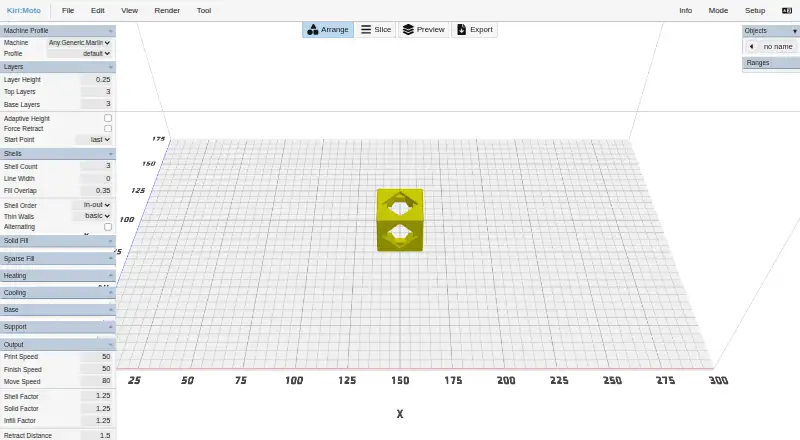
What Kiri:Moto is
Kiri:Moto is a browser-based slicer for 3D printers, CNC mills, and laser cutters. Its CAM, FDM, SLA, and LASER modes support different workflows; other modes extend the LASER workflow rather than being first-class modes. It imports OBJ, STL, and 3MF files, and can auto-extrude SVG, JPG, and PNG images into 3D parts. The free web app is available without ads, and the source code uses the MIT license. The project also documents desktop Electron binaries, local Docker deployment, and a command-line slicing utility. The maker says processing stays in the browser, with no collection of personal data or cloud transfer or storage of user data. The browser sandbox cannot access hard-drive data without user action. A GridSpace OctoPrint plugin can spool jobs to printers on a local network, and an Onshape extension can load parts from an Onshape document for slicing. For unsupported printers, users can customize a similar device or import a PrusaSlicer INI file, though macro logic is not automatically converted. The maker describes it for makers, hobbyists, professionals, students, and educators.
Who it suits
Kiri:Moto suits makers, hobbyists, professionals, students, and educators working with 3D printers, CNC mills, or laser cutters. Its browser, desktop, Docker, and command-line options support different deployment preferences.
What it does well
- Free web app access without ads.
- Supports CAM, FDM, SLA, and LASER modes.
- Imports OBJ, STL, and 3MF files.
- Maker says user data is not sent to or stored in the cloud.
- OctoPrint plugin can spool jobs over a local network.
What to know first
- Other modes extending LASER are not first-class modes.
- Unsupported printer macro logic does not convert automatically.
- Cloud slicing is not available.
Limits
The free plan provides web app access. For unsupported printers, macro logic from an imported PrusaSlicer INI file is not automatically converted.
Plans
| Plan | Billed and limits | Price |
|---|---|---|
| Free | Web app access · free of charge · free of ads | Free |
As grid.space lists them, read 8 Oct 2026. The maker's own page has the final word.
Getting started
- Open https://grid.space/kiri/ in a browser.
- Choose a supported mode: CAM, FDM, SLA, or LASER.
- Import an OBJ, STL, or 3MF file, or use SVG, JPG, or PNG for auto-extrusion.
- For a local printer workflow, use the GridSpace OctoPrint plugin to spool jobs on the local network.
- For other deployment routes, follow the documented Electron, Docker, or command-line setup.
Kiri:Moto is a browser slicer for 3D printers, CNC mills, and laser cutters. It is best suited to makers, educators, and professionals who move between fabrication methods. Its broad workflow coverage and privacy-first deployment are compelling, but printer compatibility and macro handling should decide whether it fits your setup.
Overview
Kiri:Moto combines CAM, FDM, SLA, and LASER work in one application. That makes it a sensible choice for a mixed fabrication workshop, while users who only need a conventional printer slicer may find its wider scope unnecessary. Additional modes build on the LASER workflow rather than being first-class supported modes.
Native support covers OBJ, STL, and 3MF files. SVG, JPG, and PNG images can be auto-extruded into three-dimensional parts, which is useful for turning graphics into cut or printed geometry without a separate modeling step.
The maker says processing happens entirely in the browser, with no personal-data collection and no sending or storage of user data in the cloud. Browser sandboxing means the app cannot read hard-drive data without an explicit user action. Source code is released under the MIT license, and the software is described as free to use without restriction.
Key features
Fabrication and printer connections
The CAM, FDM, SLA, and LASER combination is Kiri:Moto’s defining strength. GridSpace’s OctoPrint plugin can spool jobs to printers on a local network, adding a practical route from slicing to printer control. An Onshape web-app extension loads parts from an Onshape document for slicing, helpful for teams already designing there.
The FDM engine also powers Lychee Slicer, and the slicing engine is used by SimplyPrint’s web-based printer-management system. Those relationships indicate a reusable engine, though they do not replace checking Kiri:Moto’s own device support for your hardware.
Deployment and embedding
Use it in a browser, install documented desktop Electron binaries, run it locally with Docker, or use the command-line slicing utility. An iframe messaging API supports embedding Kiri:Moto in another application, making it a candidate for custom internal tools or education platforms rather than only standalone use.
Printer compatibility and support
If your printer is unsupported, you can customize a similar device or import a PrusaSlicer INI file. Macro logic does not convert automatically, so printer owners whose workflows depend on macros should expect manual work. Documentation, Discourse forums, Discord, bug reports, and a video guide provide several support channels.
Pricing
| Plan | Price | Includes |
|---|---|---|
| Free | free | Web app access, free of charge, free of ads |
There is no free trial because the product is already free, and no paid tier, seat charge, quota, or renewal term is stated. The free plan suits individual makers, classrooms, and professional users who can run a browser, desktop, Docker, or command-line workflow without a paid service. It gives up nothing to a cheaper tier because no cheaper tier exists, though cloud slicing is not provided.
Platforms
Kiri:Moto is available on web, Windows, macOS, Linux, self-hosted deployments, as an API, and through an extension. Browser use is the lowest-friction route; Docker and command-line options are better for controlled local or automated pipelines. Printer control is supported through the OctoPrint integration, while slicing itself is not a cloud-slicing service.
Who it's for
Choose Kiri:Moto if you are a maker, hobbyist, student, educator, or professional handling more than one fabrication process, or if you need an embeddable or self-hosted slicer. It is particularly attractive when keeping models in the browser and avoiding cloud transfer matters. It is a weaker fit for a printer whose macros are central to production, or for anyone wanting a hosted slicing backend.
Pros and cons
Pros
- Four core workflows: CAM, FDM, SLA, and LASER cover more equipment types than a printer-only slicer.
- Broad file intake: OBJ, STL, and 3MF import, plus image auto-extrusion, reduce conversion steps.
- Privacy-oriented operation: Browser processing, no personal-data collection, and no cloud storage of user data keep jobs local.
- Flexible deployment: Web, Electron, Docker, command line, iframe API, and Onshape integration fit varied technical environments.
- Open licensing: MIT-licensed source and unrestricted-use terms support inspection and adaptation.
Cons
- Printer setup may require work: Unsupported devices need a similar-device customization or PrusaSlicer INI import.
- Macros do not translate automatically: Macro-heavy printer workflows can demand manual rebuilding.
- Not every mode is first-class: Some LASER extensions are outside the primary supported mode set.
- No cloud slicing: Teams seeking a hosted processing service need another tool or their own deployment.
Alternatives
PrusaSlicer is the better pick for a free, open-source slicer focused on established 3D-printing workflows across desktop and web platforms.
OctoPrint suits users who primarily need free, open-source printer management and local control rather than Kiri:Moto’s multi-process slicing.
UltiMaker Cura is an alternative free, open-source desktop slicer when Linux, macOS, web, or Windows printer slicing is the priority.
Bambu Studio is appropriate for users wanting free slicing for Linux, macOS, or Windows with optional networking and SD-card printing.
CHITUBOX is the alternative to consider for a dedicated 3D-printing slicer with a free Basic edition and optional paid Dental plans.
AstroPrint fits users who prefer a freemium, multi-platform printer service with a free tier covering two printers, one user, and 1GB of storage.
Polar Cloud is better for a hosted freemium workflow whose free tier limits usage to one printer, five print jobs per month, and 300MB of storage.
SimplyPrint suits managed printer fleets needing a free tier for up to two printers plus 15 cloud slices per month and 12 AI Failure Detection hours.
See more options in 3D Printing Software and 3D Slicer Software.
Verdict
Kiri:Moto is a strong choice for users who want one free, privacy-conscious tool spanning several fabrication methods, with deployment options that extend from a browser to self-hosted automation. Choose it for that breadth and flexibility; look elsewhere if your printer depends on automatic macro conversion or if you require cloud slicing.
Verdict
Kiri:Moto offers several fabrication workflows in a free browser-based slicer, with desktop, Docker, and command-line options also documented. Users with unsupported printers may need to adjust a similar device or import an INI file, and macro logic will not convert automatically.
Questions
How much does Kiri:Moto cost?
The Free plan costs nothing and provides web app access free of charge and without ads.
Is there a free trial?
No. Kiri:Moto has a free plan and no free trial.
Which platforms does it support?
Listed platforms are API, extension, Linux, macOS, self-hosted, web, and Windows. The project documents browser use, desktop Electron binaries, local Docker setup, and a command-line slicing utility.
Is Kiri:Moto open source?
Its source code is available under the MIT license. The maker describes it as free to use without restriction.
Can it send jobs to a printer?
Yes. The GridSpace OctoPrint plugin can spool jobs from Kiri:Moto to printers on a local network.
What file formats can it import?
It natively imports OBJ, STL, and 3MF. It can auto-extrude SVG, JPG, and PNG files into 3D parts.
Facts from Kiri:Moto's own pages
- Audience
- The maker describes Kiri:Moto as a project for makers, hobbyists, professionals, students, and educators. · grid.space, 8 Oct 2026
- Browser security
- As a web app, it runs in a browser security sandbox and cannot access hard-drive data without user action. · docs.grid.space, 8 Oct 2026
- Deployment
- The project documents browser use, desktop Electron binaries, local Docker setup, and a command-line slicing utility. · github.com, 8 Oct 2026
- Embedded/API use
- Kiri:Moto can be embedded in an iframe with a messaging API, and its slicing engine is also available as a command-line utility. · docs.grid.space, 8 Oct 2026
- File formats
- It natively imports OBJ, STL, and 3MF, and auto-extrudes SVG, JPG, and PNG files into 3D parts. · docs.grid.space, 8 Oct 2026
- Founded
- 2013 · grid.space, 28 Sept 2026
- License
- The source code is available under the MIT license, and the maker describes the software as free for use without restriction. · github.com, 8 Oct 2026
- Modes
- Kiri:Moto supports CAM, FDM, SLA, and LASER modes; some other modes extend the LASER workflow and are not first-class supported modes. · docs.grid.space, 8 Oct 2026
- OctoPrint
- The GridSpace OctoPrint plugin can spool jobs from Kiri:Moto to printers on the local network. · docs.grid.space, 8 Oct 2026
- Onshape
- Kiri:Moto is available as an Onshape web-app extension that can load parts from an Onshape document for slicing. · docs.grid.space, 8 Oct 2026
- Other integrations
- The maker says Kiri:Moto's FDM engine powers Lychee Slicer and its slicing engine is used by SimplyPrint's web-based printer management system. · docs.grid.space, 8 Oct 2026
- Privacy
- The maker says Kiri:Moto runs entirely in the browser, does not collect personal data, and does not send or store user data in the cloud. · docs.grid.space, 8 Oct 2026
- Purpose
- Kiri:Moto is a browser-based slicer for 3D printers, CNC mills, and laser cutters. · github.com, 8 Oct 2026
- Support
- The maker links users to documentation, Discourse forums, Discord, bug reports, and a video guide. · grid.space, 8 Oct 2026
- Unsupported printers
- For an unsupported printer, users can customize a similar device or import a PrusaSlicer INI file; macro logic is not automatically converted. · docs.grid.space, 8 Oct 2026
Where Kiri:Moto stands on Freedom251
- Computer-Aided Manufacturing (CAM) Software#1 of 16
- 3D Printing Software#6 of 35
- 3D Slicer Software#9 of 27