Freedom251 › Additive Manufacturing Software

PrusaSlicer
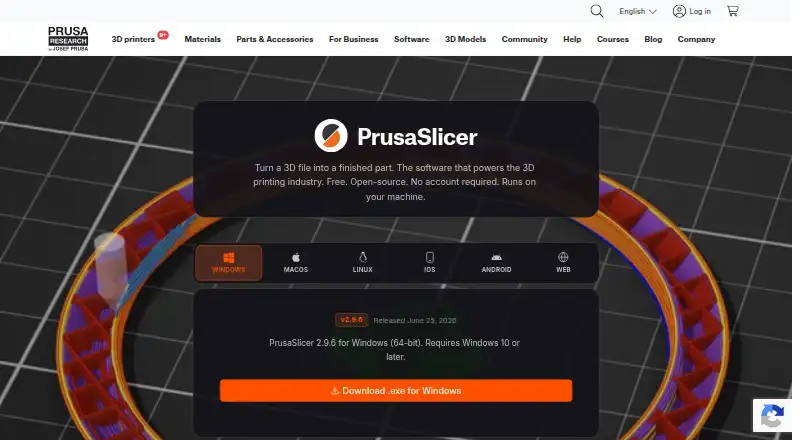
What PrusaSlicer is
PrusaSlicer turns 3D files into print files for a 3D printer. It is free, open-source software based on the Slic3r project, with downloads for Windows, macOS, and Linux. Slicing runs on the user's computer, and no account is required. The application has Simple, Advanced, and Expert modes, plus tools for generating organic-shaped supports and painting support zones onto models. Multi-material tools include material-region painting, MMU3 and multi-extruder setups, and layer-based filament changes for basic multicolor prints. A cut tool can split a model and add alignment pins at the seam. Its built-in Printables.com browser lets users find and import a model, slice it, and send it to a printer from the same window. Printer connections include Prusa Connect, Klipper, and OctoPrint. A command-line interface can batch-slice files or fit into custom manufacturing pipelines. Models, profiles, and G-code stay on the computer unless explicitly sent elsewhere. The Windows download requires Windows 10 or later.
Who it suits
It suits people who want a free desktop slicer with local processing, model editing, and multi-material tools. The command-line interface also supports batch slicing and custom manufacturing pipelines.
What it does well
- Free and open-source
- Slicing runs locally without an account
- Offers Simple, Advanced, and Expert modes
- Includes multi-material tools
- Connects with Prusa Connect, Klipper, and OctoPrint
What to know first
- Windows download requires Windows 10 or later
- No cloud slicing
Plans
| Plan | Billed and limits | Price |
|---|---|---|
| PrusaSlicer | Free · Open-source slicer; runs locally; Windows, macOS, Linux | Free |
As prusa3d.com lists them, read 30 Sept 2026. The maker's own page has the final word.
Getting started
- Visit the PrusaSlicer product page.
- Download the desktop application for Windows, macOS, or Linux.
- On Windows, use a system running Windows 10 or later.
- Open a model in the application and choose Simple, Advanced, or Expert mode.
- Set support or material regions as needed, then slice the model.
- Send the resulting file through Prusa Connect, Klipper, or OctoPrint if using one of those integrations.
Overview
PrusaSlicer is a capable desktop slicer for people who want detailed control over preparing 3D prints without moving models through a cloud service. Its combination of advanced preparation tools and local printer workflows is strongest for makers using supported desktop systems, especially those who value open-source software and keeping files on their own machine.
The three interface modes give newcomers a simpler starting point while preserving deeper controls for experienced users. That flexibility is useful, though the breadth of model, support, and material controls makes PrusaSlicer a more involved choice than a narrowly focused print utility.
Key features
- Support generation: Organic-shaped supports and painted support zones give users ways to tailor where support is placed. This is useful when a model needs more deliberate support placement than automatic generation alone provides.
- Multi-material preparation: Users can paint material regions, prepare MMU3 and multi-extruder setups, or use filament changes by layer for basic multicolor prints. The toolset suits printers and projects that need material assignment, while layer-based changes are aimed at simpler multicolor work.
- Model cutting: The cut tool can split a model and add alignment pins at the seam, helping prepare parts that need to be printed separately and aligned during assembly.
- Model discovery and printing workflow: A built-in Printables.com browser brings finding a model, importing it, slicing it, and sending it to a printer into one window. Printer integrations for Prusa Connect, Klipper, and OctoPrint extend that workflow beyond file preparation.
- Batch processing: The command-line interface can batch-slice hundreds of files or connect to custom manufacturing pipelines. That makes PrusaSlicer relevant beyond one-at-a-time desktop preparation.
- Local processing: Slicing runs on the user's machine, with no account required. Models, profiles, and G-code stay on the computer unless explicitly sent elsewhere, a meaningful advantage for users who need a local or air-gapped workflow.
Prusa provides a PrusaSlicer support section in its Knowledge Base. Pre-release PrusaSlicer 3 alpha builds are not recommended for production environments, so production users should avoid treating an alpha preview as a stable production choice.
Pricing
PrusaSlicer is free: its plan costs nothing and includes an open-source slicer that runs locally on Windows, macOS, and Linux. There is no paid tier to unlock the core slicer, multi-material tools, model repair, auto supports, printer control, or print monitoring. There is no free trial because the software is already offered as a free plan.
The trade-off is that this is a desktop slicer rather than a cloud-slicing service. Users who need slicing in the cloud should look elsewhere; PrusaSlicer keeps the work local.
Platforms
PrusaSlicer lists Windows, macOS, and Linux downloads. The Windows download requires Windows 10 or later. Although the platform listing also includes Android, iOS, and web, the described downloads and local slicing workflow are for desktop systems.
Who it's for
PrusaSlicer fits makers who want free, open-source desktop software with detailed support and material controls, as well as users who prefer models and print files to remain on their own computer. Its command-line batch slicing also suits teams or individuals incorporating file preparation into custom manufacturing pipelines.
It is a less suitable choice for anyone seeking cloud slicing or a mobile-first workflow. Users considering a pre-release PrusaSlicer 3 alpha for production should also take the stated warning seriously.
Pros and cons
- Pro: Local slicing and no required account keep the workflow on the user's machine, including for air-gapped environments.
- Pro: Organic supports, painted support zones, material-region painting, and multi-extruder support offer meaningful preparation control.
- Pro: Printables.com browsing, printer integrations, and command-line batch slicing cover both individual prints and automated workflows.
- Con: There is no cloud slicing, which rules it out for users who need that workflow.
- Con: The documented downloads are desktop-based, and Windows users need Windows 10 or later.
- Con: PrusaSlicer 3 alpha builds are explicitly not recommended for production environments.
Alternatives
3D Slicer Software and 3D Printing Software are useful starting points for comparing options across those categories.
- ideaMaker is another free option for Linux, macOS, and Windows, with no paid pricing tiers or usage limits stated.
- KISSlicer is worth considering if a free single-extruder setup is enough; its Free plan permits only one selected extruder per print, while a Premium Upgrade is listed at 40.00.
- Lychee Slicer offers a free Lite plan with limited multi-plate use and ads on export, plus a free trial, for desktop users comparing freemium options.
- OrcaSlicer is another free, open-source FDM slicer for Windows, macOS, and Linux.
- SuperSlicer is a free option that generates G-code for FFF printers and PNG layers for mSLA printers.
- Bambu Studio is a free desktop slicer with an optional networking plugin; SD card printing works without that plugin.
- Creality Print is an open-source slicer for FDM printers.
- GrabCAD Print is a freemium option available on web, Windows, iOS, and Android.
Verdict
Choose PrusaSlicer if you want a free, open-source desktop slicer that keeps preparation local while providing substantial support, material, editing, and printer-integration tools. Look elsewhere if cloud slicing or a mobile-centered workflow is essential, and do not rely on its alpha preview builds for production.
Verdict
PrusaSlicer combines local slicing with model editing, multi-material tools, and printer integrations. Its Windows download requires Windows 10 or later, and slicing is not cloud-based.
Questions
How much does PrusaSlicer cost?
PrusaSlicer is free. Its listed plan costs nothing, and it is open source.
Which platforms have downloads?
The product page lists downloads for Windows, macOS, and Linux. The Windows download requires Windows 10 or later.
Does PrusaSlicer require an account or cloud slicing?
No account is required, and slicing happens on the user’s machine. Cloud slicing is listed as unavailable.
Can it prepare multi-material prints?
It supports material-region painting, MMU3 and multi-extruder setups, and filament changes by layer for basic multicolor prints.
Which printer connections are described?
The product page describes sending files to printers through Prusa Connect, Klipper, and OctoPrint integrations.
Is there support available?
Prusa provides a PrusaSlicer support section in its Knowledge Base.
Facts from PrusaSlicer's own pages
- Automation
- A command-line interface can batch-slice hundreds of files or integrate with custom manufacturing pipelines. · prusa3d.com, 30 Sept 2026
- Founded
- 2012 · prusa3d.com, 23 Sept 2026
- Headquarters
- Prague, Czech Republic · prusa3d.com, 23 Sept 2026
- Limits
- The PrusaSlicer 3 alpha preview page says pre-release builds are not recommended for production environments. · prusa3d.com, 30 Sept 2026
- Model editing
- Its cut tool can split a model and add alignment pins at the seam. · prusa3d.com, 30 Sept 2026
- Modes
- The application has Simple, Advanced, and Expert modes. · prusa3d.com, 30 Sept 2026
- Multi-material
- It supports material-region painting, MMU3 and multi-extruder setups, and filament changes by layer for basic multicolor prints. · prusa3d.com, 30 Sept 2026
- Open source
- PrusaSlicer is open-source software based on the Slic3r project. · prusa3d.com, 30 Sept 2026
- Printables integration
- A built-in Printables.com browser lets users find a model, import it, slice it, and send it to a printer from the same window. · prusa3d.com, 30 Sept 2026
- Printer integrations
- The page describes sending files to printers through Prusa Connect, Klipper, and OctoPrint integrations. · prusa3d.com, 30 Sept 2026
- Privacy
- The page says models, profiles, and G-code remain on the computer unless the user explicitly sends them somewhere, and describes the software as suitable for air-gapped environments. · prusa3d.com, 30 Sept 2026
- Purpose
- PrusaSlicer turns a 3D file into print files for a 3D printer. · prusa3d.com, 30 Sept 2026
- Runs locally
- Slicing happens on the user's machine, and the page says no account is required. · prusa3d.com, 30 Sept 2026
- Support
- Prusa provides a PrusaSlicer support section in its Knowledge Base. · help.prusa3d.com, 30 Sept 2026
- Supported desktop systems
- The product page lists Windows, macOS, and Linux downloads; its Windows download requires Windows 10 or later. · prusa3d.com, 30 Sept 2026
- Supports
- It can generate organic-shaped supports and lets users paint support zones onto a model. · prusa3d.com, 30 Sept 2026
Where PrusaSlicer stands on Freedom251
- Additive Manufacturing Software#10 of 20
- 3D Slicer Software#15 of 27
- 3D Printing Software#20 of 35