Freedom251 › 3D Slicer Software
UltiMaker Cura
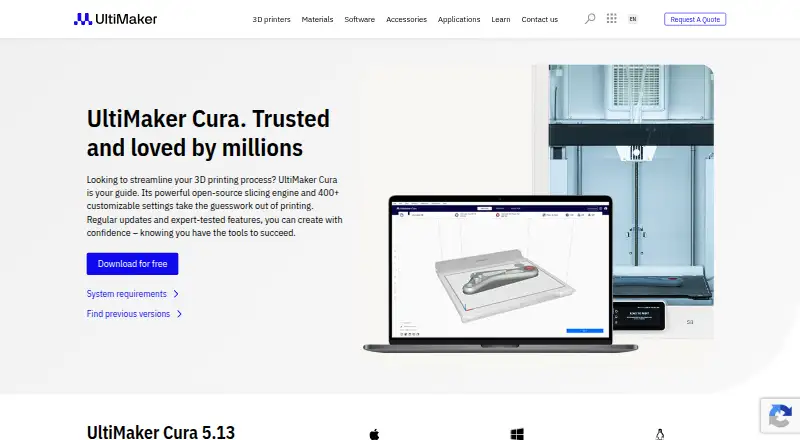
What UltiMaker Cura is
UltiMaker Cura is open-source slicing software that prepares 3D models for printing. Users can begin with recommended settings and choose speed and quality options, or switch to Custom mode for more than 400 print-preparation settings. Its intent profiles target specific applications, while recommended profiles have been tested for thousands of hours. Cura includes auto supports, printer control, print monitoring, multi-material tools, and multi-material printing, but does not offer cloud slicing. It integrates with UltiMaker products and supports STEP and IGES files. The UltiMaker Marketplace provides material profiles from leading brands and community-rated plugins for customizing print preparation. Cura runs on Linux, macOS, Windows, and the web, and its free plan is listed as free. For organizations, Cura Enterprise supports cross-platform deployment, configuration, and management. Enterprise receives two updates per year, with each release supported for 12 months, including security patches and bug fixes. UltiMaker says Cura automatically collects anonymous machine types, material usage, slice counts, and print settings, without personal information. Support articles and technical support tickets are available.
Who it suits
Cura suits both experienced and new 3D printer users who need to prepare models for printing. Cura Enterprise is an option for organizations that need cross-platform deployment and management.
What it does well
- Free and open-source slicing software
- Custom mode has over 400 settings
- Supports STEP and IGES files
- Includes printer control and print monitoring
- Marketplace offers material profiles and plugins
What to know first
- Cloud slicing is not included
- Automatically collects anonymous machine and print-setting data
Limits
Cloud slicing is not included in the free plan. The listed free plan is desktop slicing software.
Plans
| Plan | Billed and limits | Price |
|---|---|---|
| UltiMaker Cura | Free and open source desktop slicing software | Free |
As ultimaker.com lists them, read 7 Oct 2026. The maker's own page has the final word.
Getting started
- Visit the UltiMaker Cura website.
- Choose a supported platform: Linux, macOS, Windows, or web.
- Use the free UltiMaker Cura plan.
- Prepare a model with recommended settings, or open Custom mode for more detailed control.
- Choose speed and quality settings to start printing.
UltiMaker Cura is open-source software for turning 3D models into printer-ready instructions. It is a good fit for newcomers who want guided setup and for experienced makers who need deep control over slicing. The free desktop application is strongest when customization and printer-side workflow matter more than cloud-based preparation.
Overview
Cura has prepared models for 3D printing since 2011, using an open-source slicing engine developed by UltiMaker, headquartered in Zaltbommel, Netherlands. Recommended speed and quality choices provide a manageable entry point, while the same application can grow with users who need to tune individual print parameters. Support articles and technical support tickets are available when configuration or operation requires assistance.
Key features
Guided profiles and detailed control
Recommended profiles give beginners a sensible starting point instead of requiring immediate knowledge of every setting. Intent profiles target particular applications, and UltiMaker says its recommended profiles have been tested for thousands of hours. Those choices reduce initial setup work, although users with unusual materials, machines, or finish requirements will eventually need to make their own decisions.
Custom mode exposes more than 400 settings for granular preparation. That breadth is a substantial advantage for advanced users seeking precise results, but it also makes Cura a more demanding tool once a job moves beyond the guided options.
Printer workflow and file support
Cura includes automatic supports, printer control, print monitoring, multi-material tools, and multi-material printing. These capabilities make it more than a file-conversion utility: users can prepare jobs and manage aspects of the printing process in one application. Integration with UltiMaker products and support for STEP and IGES files are useful for workflows already using those formats or hardware.
Marketplace and enterprise management
The UltiMaker Marketplace supplies material profiles from leading brands and community-rated plugins. This gives users additional ways to adapt print preparation, though selecting and maintaining add-ons becomes part of managing a more customized setup.
Cura Enterprise can be deployed, configured, and managed through cross-platform systems distribution. It receives two updates each year, with each release supported for 12 months with security patches and bug fixes. UltiMaker says every enterprise release is independently scanned, tested, and analyzed for vulnerabilities, with a summary of the report published. That release policy is aimed at organizations that need a more controlled rollout than individual makers.
Cura automatically collects anonymous machine types, material usage, slice counts, and print settings to improve print quality and the user experience. UltiMaker says the data contains no personal information, but organizations with strict telemetry policies should account for this behavior.
Pricing
| Plan | Price | What it includes |
|---|---|---|
| UltiMaker Cura | free | Free and open-source desktop slicing software |
The free plan includes Cura's desktop slicing workflow, including its profile system, custom settings, printer control, monitoring, and multi-material capabilities. There is no paid tier or seat, quota, renewal term, or trial condition stated for this plan. Cloud slicing is not included, so users seeking browser-based slicing should consider a different service or a separate cloud workflow.
Platforms
Cura is available on Linux, macOS, Windows, and the web. Its core offering is described as desktop slicing software, while the web availability gives users another access route. The broad operating-system support suits mixed-device households, studios, and organizations.
Who it's for
Cura is designed for both rookie and experienced 3D printer users. Beginners benefit from recommended settings and simple speed-versus-quality choices; advanced makers gain the 400-plus controls needed for specialized preparation. It is particularly suitable for UltiMaker users, multi-material workflows, and teams that need enterprise deployment and a defined update-support window. It is a weaker fit for anyone whose priority is built-in cloud slicing or who wants a tightly constrained interface with fewer decisions.
Pros and cons
- Pros: Free and open source, so the full desktop slicer has no stated subscription cost.
- Pros: Recommended and intent profiles shorten the path from model to print, while custom mode preserves more than 400 adjustable settings.
- Pros: Printer control, monitoring, automatic supports, and multi-material printing support a broader workflow than slicing alone.
- Pros: Marketplace material profiles and plugins extend preparation for different materials and uses.
- Cons: Cloud slicing is absent, limiting browser-first workflows.
- Cons: The large settings catalogue can overwhelm users who only want a minimal set of choices.
- Cons: Anonymous usage telemetry is collected automatically, which may not suit every privacy policy.
Alternatives
Choose PrusaSlicer instead if you want another free, open-source slicer based on the Slic3r project. AstroPrint is the better direction for a freemium, multi-platform service with a free Basic plan covering two printers, one user, and 1GB of storage. Polar Cloud suits users who prefer a cloud-oriented free plan with one printer, five print jobs per month, seven-day history, and 300MB of storage.
Kiri:Moto is a free, ad-free web application. OctoPrint is a free, open-source option under the GNU Affero General Public License. SimplyPrint is worth considering for a free plan capped at two printers, one user, one location, 15 cloud slices per month, and 12 AI Failure Detection hours per month.
Bambu Studio is a free slicer for Linux, macOS, and Windows with optional networking and SD-card printing without the plugin. CHITUBOX offers a free Basic slicer alongside paid dental plans.
Verdict
Choose UltiMaker Cura if you want a no-cost, open-source slicer that welcomes beginners but can still expose highly specific controls, printer management, and multi-material preparation. Look elsewhere if cloud slicing is essential or automatic anonymous telemetry conflicts with your requirements.
Verdict
Cura offers a free route to model slicing, with recommended settings for getting started and extensive controls for custom preparation. Its cloud slicing gap and automatic collection of anonymous usage data are worth noting before choosing it.
Questions
Is UltiMaker Cura free?
Yes. The UltiMaker Cura plan is free and open source, priced at $0.
Which platforms does Cura support?
Cura is available for Linux, macOS, Windows, and the web.
Does Cura support cloud slicing?
No. Cloud slicing is not included.
What file types does Cura support?
The product page says Cura supports STEP and IGES files.
Who makes UltiMaker Cura?
UltiMaker makes Cura. The company was founded in 2011 and is headquartered in Zaltbommel, Netherlands.
What does Cura Enterprise include?
Cura Enterprise supports cross-platform deployment, configuration, and management. It receives two updates per year, each supported for 12 months with security patches and bug fixes.
Facts from UltiMaker Cura's own pages
- Audience
- UltiMaker says Cura is designed for both experienced and rookie 3D printer users. · ultimaker.com, 7 Oct 2026
- Customization
- Custom mode provides over 400 settings for granular control over print preparation. · ultimaker.com, 7 Oct 2026
- Ease of use
- Users can prepare models with recommended settings and choose speed and quality settings to start printing. · ultimaker.com, 7 Oct 2026
- Enterprise deployment
- Cura Enterprise can be deployed, configured, and managed with cross-platform systems distribution. · ultimaker.com, 7 Oct 2026
- Enterprise security
- Each Cura Enterprise release is independently scanned, tested, and analyzed for vulnerabilities, and UltiMaker publishes a summary of the report. · ultimaker.com, 7 Oct 2026
- Enterprise updates
- Cura Enterprise receives two updates a year, with updates supported for 12 months after release, including security patches and bug fixes. · ultimaker.com, 7 Oct 2026
- Founded
- 2011 · ultimaker.com, 28 Sept 2026
- Headquarters
- Zaltbommel, Netherlands · ultimaker.com, 28 Sept 2026
- Integrations
- The product page states that Cura integrates with UltiMaker products and supports STEP and IGES file types. · ultimaker.com, 7 Oct 2026
- Marketplace
- The UltiMaker Marketplace offers material profiles from leading brands and community-rated plugins to customize print preparation. · ultimaker.com, 7 Oct 2026
- Print profiles
- Intent profiles target specific applications, and recommended profiles have been tested for thousands of hours. · ultimaker.com, 7 Oct 2026
- Privacy
- UltiMaker says Cura automatically collects anonymous machine types, material usage, slice counts, and print settings to improve print quality and user experience, and that this data contains no personal information. · ultimaker.com, 7 Oct 2026
- Purpose
- UltiMaker Cura prepares 3D models for printing with an open-source slicing engine. · ultimaker.com, 7 Oct 2026
- Support
- UltiMaker provides support articles and lets users submit support tickets for technical assistance. · ultimaker.com, 7 Oct 2026
Where UltiMaker Cura stands on Freedom251
- 3D Slicer Software#19 of 27
- 3D Printing Software#28 of 35