Freedom251 › Technical Documentation Software
Jupyter Book
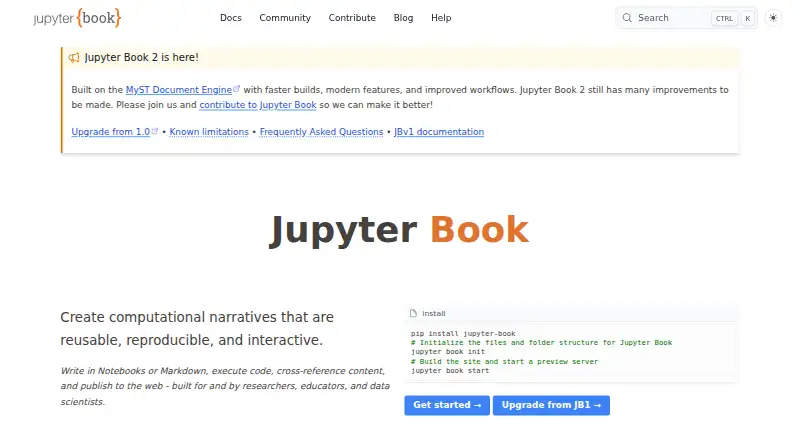
What Jupyter Book is
Jupyter Book turns computational material into books that can be published on the web, as PDFs, or in other formats. It is built for researchers, educators, and data scientists. Authors can use MyST Markdown and Jupyter notebooks, with support for citations, cross-references, figures, tables, equations, and executable code blocks. Code can run during a build to produce figures, tables, and values, though execution is off by default. Pages can include interactive widgets, run code in a browser through a remote kernel, or provide launch buttons for Binder and JupyterHub. Hosting options include GitHub Pages, Read the Docs, GitLab Pages, Netlify, Curvenote, and custom web servers. Plugins can add directives, roles, and content transforms. Installation options include PyPI, conda-forge, and npm, with methods such as pip, conda, pipx, uv, pixi, and npm. Jupyter Book 2 is a rewrite built on the MyST Document Engine and still has improvements to make; version 1 is mostly in maintenance mode. Version 2 does not support custom Sphinx extensions, and books relying directly on Sphinx's `conf.py` cannot be automatically upgraded. The project is open source and listed as free.
Who it suits
It suits researchers, educators, and data scientists who want to publish computational material in multiple formats. Authors using custom Sphinx extensions or relying directly on `conf.py` should note version 2's compatibility limits.
What it does well
- Builds websites, PDFs, and other formats
- Supports notebooks, citations, equations, and executable code
- Offers interactive widgets and remote-kernel code execution
- Can deploy to several listed hosting services
What to know first
- Execution is off by default during site builds
- Custom Sphinx extensions are incompatible with version 2
- Version 1 is mostly in maintenance mode
Limits
Code execution is off by default during site builds. For Jupyter Book 2, execution feature parity, editable Thebe cells, Sphinx autodoc-style API documentation, and exporting notebook outputs as MyST are not yet available. Custom Sphinx extensions are incompatible with Jupyter Book 2.
Plans
| Plan | Billed and limits | Price |
|---|---|---|
| Jupyter Book | Open source project · installable from PyPI, conda-forge, and npm | Free |
As jupyterbook.org lists them, read 11 Oct 2026. The maker's own page has the final word.
Getting started
- Install Jupyter Book through PyPI, conda-forge, or npm using a listed installation method.
- Author the book with MyST Markdown or Jupyter notebooks.
- Use `jupyter book start` to preview the book locally as content changes.
- Build the book in a website, PDF, or other format.
- Deploy through a listed option such as GitHub Pages, Read the Docs, GitLab Pages, Netlify, Curvenote, or a custom web server.
Overview
Jupyter Book is a publishing tool for turning technical writing and computational work into books for the web and other formats. It is best suited to researchers, educators, and data scientists who want explanations and executable material in the same publication. Its authoring range is a strong match for that work, but the transition to version 2 brings meaningful compatibility trade-offs.
Key features
Authors can bring MyST Markdown and Jupyter notebooks together with cross-references, citations, figures, tables, equations, and executable code blocks. That combination is especially useful when a reader should be able to connect an explanation to the computation behind it. Books can be built as websites, PDFs, or other formats, then published online.
Code execution at build time can generate figures, tables, and values for pages, but it is disabled by default. This leaves authors in control of whether a build runs code; projects that depend on computed output need to enable execution deliberately. Readers can also encounter interactive widgets, run code in the browser through a remote kernel, or launch Binder and JupyterHub environments. Jupyter Book 2 does not yet provide execution feature parity, so teams relying heavily on these workflows should check whether the current capabilities meet their needs.
Plugins can add custom directives, roles, and content transformations, and can be distributed as files, npm packages, or release artifacts. Installation is possible through PyPI, conda-forge, or npm, with methods including pip, mamba or conda, pipx, uv, and pixi. The jupyter book start command serves a local preview and refreshes it as content changes, a useful feedback loop while writing.
Publishing options include GitHub Pages, Read the Docs, GitLab Pages, Netlify, Curvenote, and custom web servers. The project is developed by the Executable Books community, which welcomes feedback and contributions. Discord is the route for quick questions, GitHub Discussions for detailed ones, and most Jupyter Book 2 bug reports go to the mystmd repository.
Pricing
Jupyter Book is open source and free: its Jupyter Book plan costs nothing and can be installed from PyPI, conda-forge, or npm. There is no paid tier or free trial to weigh, and custom domains are supported. Documentation versioning is not supported, so projects that need readers to browse multiple documentation versions will need another approach.
Platforms
Jupyter Book supports Linux, macOS, and Windows, as well as web and self-hosted use. That breadth gives teams flexibility to write and build in their own environment and choose where to publish.
Who it's for
Choose Jupyter Book when a publication needs to combine technical prose, notebook content, equations, and computation, particularly for research, teaching, or data-science material. Its multiple output formats and hosting choices suit teams publishing a book in more than one way. It is a less straightforward fit for projects built around Sphinx-specific customizations: Jupyter Book 2 is based on the MyST Document Engine rather than Sphinx, does not support custom Sphinx extensions, and cannot automatically upgrade books that directly use Sphinx's conf.py.
Version choice matters. Jupyter Book 1 is mostly in maintenance mode, with no active development planned for its tools and limited commitments to review community contributions. Version 2 is a rewrite and the project says it still has substantial improvements to make. Its FAQ also identifies editable Thebe cells, Sphinx autodoc-style API documentation, and exporting notebook outputs as MyST as unavailable. Teams migrating established books should assess those gaps before committing.
Pros and cons
Pros
- Prose and computational content fit together. MyST Markdown, notebooks, code blocks, citations, and equations support books that need both narrative and working material.
- Flexible publishing and deployment. Website and PDF output, several hosting options, and custom domains give authors room to choose how readers access a book.
- Free and extensible. The open-source project has plugin mechanisms and community contribution channels without a paid plan to budget for.
Cons
- Version 2 migration can require rework. Custom Sphinx extensions are incompatible, and direct use of conf.py prevents automatic upgrades.
- Some workflows are not yet available in version 2. Execution parity, editable Thebe cells, autodoc-style API documentation, and notebook-output export as MyST remain gaps.
- Version 1 is not an active-development path. Its maintenance status may deter teams that need ongoing development of its tools.
- No documentation versioning. Teams that must preserve and expose multiple documentation versions should account for that limitation.
Alternatives
For a paid-feature set with a defined free allowance, consider Fern: its free plan costs nothing and caps usage at 10 team members, 1,000 pages, 250 AI credits per month, 2,000 page generations per month, and one site. Pick it over Jupyter Book if those managed limits suit your team better than an open-source publishing workflow.
Mintlify offers a free Starter plan at no cost with five editor seats, custom domains, a web editor, authentication, an MCP server, and an API playground; it also offers a free trial. It is worth considering when that editor-and-platform package is a better fit than notebook-centered book authoring.
Sphinx is a free, BSD 2-Clause-licensed option that can be installed locally or self-hosted. It is the more direct choice for teams whose existing documentation depends on Sphinx and its extensions.
VitePress is a free, MIT-licensed static site generator that requires Node.js 22 or higher. DocFX is a free open-source static site generator requiring .NET SDK 8.0 or higher. Dokiel is a free open-source Scenari publishing chain available as a desktop or SCENARIchain installation. These are alternatives to compare when their stated generator or publishing-chain requirements align with your project.
Docsie offers a free knowledge-base plan at no cost with 25,000 AI credits, a custom domain, search, versioning, unlimited viewers, no credit card requirement, and no expiry; it also has a free trial. It may suit teams seeking a knowledge base with versioning rather than a computational book workflow.
Dr.Explain has a free restricted-license plan capped at 20 topics and a Business Temporary subscription at $290 a year for five users. It is another option to compare if those plan terms suit your documentation needs.
Browse Technical Documentation Software for more options.
Verdict
Jupyter Book is a strong choice for researchers, educators, and data scientists publishing material where narrative and computation belong together. Its free, extensible workflow and broad output choices are compelling; the main reason to look elsewhere is a project tied to Sphinx extensions or a version 2 capability that is still missing. For established Sphinx books, verify migration needs before choosing a version or rebuilding around it.
Verdict
Jupyter Book brings notebook-based and written material into publishable books with support for multiple formats and interactive elements. The version 2 compatibility limits matter for projects built around Sphinx extensions or configuration.
Questions
Is Jupyter Book free?
Yes. It is an open-source project.
What formats can a book use?
A book can be built as a website, PDF, or other formats.
Where can I install it from?
Jupyter Book is available through PyPI, conda-forge, and npm. Listed installation methods include pip, mamba or conda, pipx, uv, pixi, and npm.
Where can I publish a book?
Listed hosting options include GitHub Pages, Read the Docs, GitLab Pages, Netlify, Curvenote, and custom web servers.
Does code run when a book is built?
Code can run at build time, but execution is off by default when a site builds.
What is the status of Jupyter Book 1 and 2?
Version 2 is built on the MyST Document Engine and still has improvements to make. Version 1 is mostly in maintenance mode.
Facts from Jupyter Book's own pages
- Audience
- The project describes itself as built for and by researchers, educators, and data scientists. · jupyterbook.org, 11 Oct 2026
- Authoring
- Jupyter Book 2 supports MyST Markdown features including directives, cross-references, citations, figures, tables, equations, executable code blocks, tabs, grids, and cards. · jupyterbook.org, 11 Oct 2026
- Code execution
- Books can run code at build time, cache outputs, and include computational results such as figures, tables, and values. · jupyterbook.org, 11 Oct 2026
- Compatibility limit
- Custom Sphinx extensions are not compatible with Jupyter Book 2, and the upgrade guide says books using Sphinx’s `conf.py` directly cannot be automatically upgraded. · jupyterbook.org, 11 Oct 2026
- Extensibility
- Jupyter Book uses the MyST plugin system, which supports directives, roles, and transforms; plugins can be written in JavaScript or another language following the MyST plugin protocol. · jupyterbook.org, 11 Oct 2026
- Formats
- A book can be built as a website, PDF, or other formats and deployed to the web. · jupyterbook.org, 4 Oct 2026
- Installation
- Jupyter Book is available through PyPI, conda-forge, and npm, with installation instructions for pip, mamba or conda, pipx, uv, pixi, and npm. · jupyterbook.org, 4 Oct 2026
- Install options
- The install guide lists PyPI, conda-forge, and npm, with installation methods including pip, mamba or conda, pipx, uv, pixi, and npm. · jupyterbook.org, 11 Oct 2026
- Integrations
- The FAQ lists GitHub Pages, ReadTheDocs, Netlify, Vercel, CurveNote, and custom hosting as deployment options. · jupyterbook.org, 4 Oct 2026
- Interactive computing
- The documentation describes interactive widgets, in-page code execution through Thebe backed by a remote kernel, and launch buttons for Binder or JupyterHub. · jupyterbook.org, 11 Oct 2026
- Jupyter Book 1 status
- The Jupyter Book 1 stack is mostly in maintenance mode, with no active development planned for its tools and limited commitments to review community contributions. · jupyterbook.org, 4 Oct 2026
- Jupyter Book 2
- Jupyter Book 2 is a rewrite built on the MyST Document Engine rather than Sphinx. · jupyterbook.org, 11 Oct 2026
- Jupyter Book 2 status
- Jupyter Book 2 is built on the MyST Document Engine and the project says it still has many improvements to be made. · jupyterbook.org, 4 Oct 2026
- Known limitations
- The Jupyter Book 2 FAQ lists execution feature parity, editable Thebe cells, Sphinx autodoc-style API documentation, and exporting notebook outputs as MyST as not yet available. · jupyterbook.org, 11 Oct 2026
- Local preview
- The `jupyter book start` command runs a built-in server that serves the book locally and updates as content changes. · jupyterbook.org, 11 Oct 2026
- Open source community
- Jupyter Book is developed by the Executable Books community, which welcomes discussion, feedback, and contributions. · jupyterbook.org, 4 Oct 2026
- Publishing integrations
- The publishing guide lists GitHub Pages, Read the Docs, GitLab Pages, Netlify, Curvenote, and custom web servers as hosting options. · jupyterbook.org, 11 Oct 2026
- Purpose
- Jupyter Book creates computational narratives from notebooks or Markdown, executes code, and publishes the results to the web. · jupyterbook.org, 11 Oct 2026
- Security and compliance
- The opened Jupyter Book pages do not state security certifications or compliance claims. · jupyterbook.org, 11 Oct 2026
- Support
- The project points users to its Discord community and GitHub Discussions, and directs most Jupyter Book 2 bug reports to the MyST repository. · jupyterbook.org, 11 Oct 2026
Where Jupyter Book stands on Freedom251
- Technical Documentation Software#8 of 37
- Technical Writing Platforms#7 of 27