Freedom251 › Restoration Management Software
Job Workflow PRO
What Job Workflow PRO is
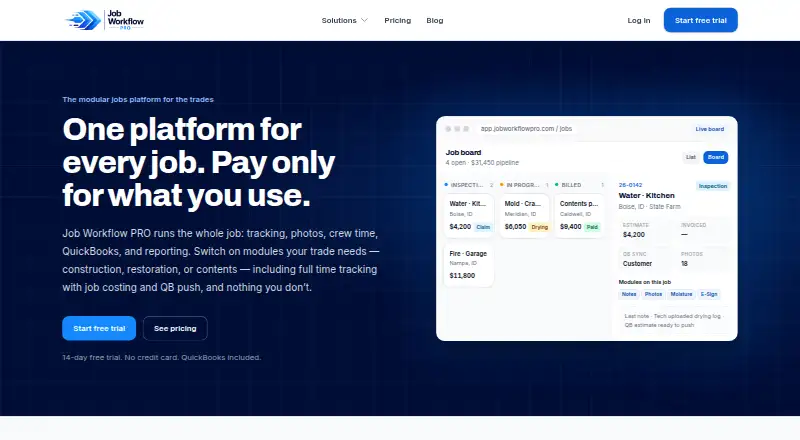
Job Workflow PRO is a modular jobs platform for trade businesses, combining job tracking, field documentation, photos, crew time options, QuickBooks Online sync, and reporting. Job tracking supports custom statuses, automatic job numbers, and list or board views. The core platform also includes threaded notes, email-out, photo galleries with PDF export, and document storage. QuickBooks Online sync covers customers, estimates, invoices, and accounts receivable. A native iOS and Android field app is included with every plan for tasks such as clocking in, capturing photos, and managing contents. Plans include Starter at $249 a month, Restoration at $349 a month, and Contents at $399 a month, each with 10 seats. Additional seats cost $34.99 per user per month. Time tracking, messaging, E-Sign, and AI item pricing have separate charges or usage billing. A 14-day free trial is available without a credit card, but there is no free plan. The platform is intended for businesses including construction, restoration, mitigation, and contents companies.
Who it suits
Job Workflow PRO suits trade businesses that need job tracking and field documentation, with plans for construction, restoration, and contents work. It may also fit teams that use QuickBooks Online and need an included mobile field app.
What it does well
- Custom statuses and automatic job numbers
- QuickBooks Online sync includes invoices and receivables
- Native iOS and Android field app included
- 14-day trial requires no credit card
What to know first
- No free plan
- Each plan includes 10 seats
- Additional seats cost $34.99 per user per month
- Some tools and AI pricing are separately billed
Limits
There is no free plan. The lowest listed plan, Starter, costs $249 a month and includes 10 seats; additional seats cost $34.99 per user per month. The Contents plan's AI item pricing is metered and billed weekly.
Plans
| Plan | Billed and limits | Price |
|---|---|---|
| E-Sign add-on | Per signed document · Contracts and approvals for signature · first three templates free | $1.50, paid once |
| Starter | Monthly subscription, paid by ACH · 10 seats · job tracking, notes, photos, documents · QuickBooks Online sync · advanced reports · mobile app | $249 a month |
| Restoration | Monthly subscription, paid by ACH · 10 seats · everything in Starter · insurance workflow · moisture mapping and drying logs · e-sign authorizations | $349 a month |
| Contents | Monthly subscription, paid by ACH; AI item pricing billed weekly by usage · 10 seats · everything in Starter · contents rooms, boxes and items · AI naming and descriptions · metered AI item pricing | $399 a month |
| Time tracking add-on | Per user monthly · GPS clock-in/out · job costing · edit approvals · breaks and premium activities · 50-state overtime · QuickBooks TimeActivity push | $7 a month |
| Email & Texting add-on | Monthly; overage metered · Two-way customer texting · in-app email · 2,000 texts and 5,000 emails per month included | $99 a month |
As jobworkflowpro.com lists them, read 15 Oct 2026. The maker's own page has the final word.
Getting started
- Visit https://www.jobworkflowpro.com/.
- Start the 14-day free trial; no credit card is required.
- Choose the Starter, Restoration, or Contents plan that matches your business workflow.
- Use the web platform or the included native iOS or Android field app.
- Add time tracking, messaging, or E-Sign as needed, accounting for their separate charges.
Verdict
Job Workflow PRO combines job records, field tools, and QuickBooks Online sync, with plans organized around different trade workflows. Buyers should account for plan seat limits and separate charges for some features.
Questions
Is there a free plan or trial?
There is no free plan. Job Workflow PRO offers a 14-day free trial with no credit card required.
What does Starter cost, and what does it include?
Starter costs $249 a month for 10 seats. It includes general construction and contractor tools, job tracking, notes, photos, documents, QuickBooks Online sync, advanced reports, and the mobile app.
Which platforms are available?
Job Workflow PRO is available on web, Android, and iOS. Every plan includes a native iOS and Android field companion app.
What do the Restoration and Contents plans add?
Restoration costs $349 a month and adds insurance workflows, moisture mapping and drying logs, and E-Sign for authorizations. Contents costs $399 a month and adds contents management plus AI item naming, descriptions, and metered item pricing.
Are there additional usage or seat charges?
Plans include 10 seats; each additional seat costs $34.99 per user per month. Time tracking costs $7 per user per month, messaging costs $99 per month for 2,000 texts and 5,000 emails, and E-Sign costs $1.50 per signed document; AI item pricing is metered and billed weekly.
What does QuickBooks Online sync cover?
It covers customers, estimates, invoices, and accounts receivable.
Facts from Job Workflow PRO's own pages
- AI contents tools
- Contents users can enable AI-generated item names, descriptions and replacement-price suggestions, with pricing metered by use. · jobworkflowpro.com, 15 Oct 2026
- AI data handling
- Optional AI features send relevant item details and photographs to third-party AI providers, and the maker says those inputs are not used to train general-purpose models except as needed to provide the feature. · jobworkflowpro.com, 15 Oct 2026
- Android listing
- AppAgg records an Android release under Idaho Software Development, marked free and categorized as Productivity. · appagg.com, 15 Oct 2026
- Android release date
- AppAgg records the Android app’s first release as July 29, 2026, with version 1.0.3 updated July 31, 2026. · appagg.com, 15 Oct 2026
- Android requirements
- AppAgg lists Android 7.0 as the operating-system requirement and a 24 MB package size. · appagg.com, 15 Oct 2026
- Apple listing
- Apple lists Job Workflow PRO as a free business app from Idaho Software Development LLC for iPhone and iPad. · apps.apple.com, 15 Oct 2026
- Apple privacy disclosure
- Apple’s listing says data linked to users may include precise location, contact details, photos or other user content, user ID and device ID. · apps.apple.com, 15 Oct 2026
- Apple requirements
- The App Store listing requires iOS or iPadOS 15.1 or later; Mac use requires macOS 12 or later with Apple M1 or newer. · apps.apple.com, 15 Oct 2026
- Audience
- The service is intended for business use by companies and their personnel, including construction, restoration, mitigation, and contents businesses. · jobworkflowpro.com, 8 Oct 2026
- Billing
- Base subscriptions and flat add-ons are charged by ACH, while usage charges such as AI pricing and messaging overage are billed weekly. · jobworkflowpro.com, 15 Oct 2026
- Contents features
- The Contents package supports room, box, and item inventory, photo tagging, condition and disposition workflows, customer approvals, and AI-assisted item naming, descriptions, and pricing. · jobworkflowpro.com, 8 Oct 2026
- Contents workflow
- The Contents package manages rooms, boxes and items and includes photo tagging, condition and disposition workflows and customer approvals. · jobworkflowpro.com, 15 Oct 2026
- Data processing role
- For customer-uploaded project and client data, Job Workflow PRO acts as the customer’s service provider or processor. · jobworkflowpro.com, 15 Oct 2026
- Documentation
- Core documentation tools include threaded notes, email-out, photo galleries with PDF export and document storage. · jobworkflowpro.com, 15 Oct 2026
- Headquarters
- Nampa, Idaho, United States · jobworkflowpro.com, 28 Sept 2026
- Integration dependency
- The maker says an integration may be discontinued if the third-party provider changes or ends its service. · jobworkflowpro.com, 15 Oct 2026
- Integration scope
- The terms identify accounting, electronic-signature, payment-processing, messaging and AI providers as supported third-party service categories. · jobworkflowpro.com, 15 Oct 2026
- Job tracking
- The core platform supports custom job statuses, automatic job numbers and list or Kanban board views. · jobworkflowpro.com, 15 Oct 2026
- License model
- The service is proprietary: its software and intellectual property belong to the maker or licensors, with only a limited subscription access right granted. · jobworkflowpro.com, 15 Oct 2026
- Limit: AI accuracy
- The terms warn that AI-generated descriptions and pricing can be inaccurate or incomplete and must be reviewed before use. · jobworkflowpro.com, 15 Oct 2026
- Limit: data backup
- The terms place responsibility on customers to maintain their own backups of important data. · jobworkflowpro.com, 15 Oct 2026
- Limit: no public signup
- The App Store description says the product is B2B and users must sign in with an account supplied by their company. · apps.apple.com, 15 Oct 2026
- Limit: service availability
- The terms provide the service as available and disclaim guarantees that it will be uninterrupted, error-free or secure. · jobworkflowpro.com, 15 Oct 2026
- Maker headquarters
- The maker lists 270 W Georgia Ave, Suite 104, Nampa, Idaho 83686, United States as its mailing address. · jobworkflowpro.com, 15 Oct 2026
Where Job Workflow PRO stands on Freedom251
- Restoration Management Software#5 of 25