Freedom251 › AR Creation Software

JigSpace
What JigSpace is
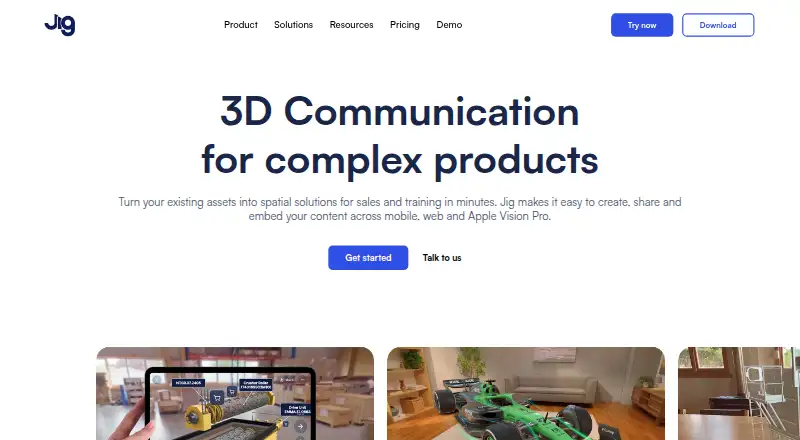
JigSpace turns existing assets into spatial presentations for sales and training. Each interactive presentation, called a Jig, can explain a concept step by step and show products in augmented reality. Jigs can be shared by link or QR code, or embedded in websites without requiring viewers to install an app. Presentations can include annotations, animations, sound, video, and custom branding. JigSpace lists integrations with 3D design and CAD tools including 3ds Max, Blender, CATIA, Fusion, Revit, Rhino, SketchUp, and SolidWorks, and it automatically optimizes large 3D files and CAD formats for AR rendering. The Apple Vision Pro app supports hand-based model manipulation, markup, and real-time multiplayer collaboration. JigSpace is listed for Android, iOS, macOS, web, and Windows. The Free plan permits one project and lists three active Jigs, three steps, 100MB of team storage, and two user seats. A Starter subscription has a 7-day free trial that must be cancelled by day seven to prevent payment.
Who it suits
JigSpace suits sales, marketing, training, and product support teams that need to present concepts or products in 3D. Its Starter plan is described as intended for qualified educators and startups.
What it does well
- Jigs can be shared by link or QR code
- Website embeds do not require a viewing app
- Supports annotations, animation, sound, and video
- Optimizes large 3D files for AR rendering
- Vision Pro app supports real-time multiplayer
What to know first
- Free plan allows one project
- Free plan lists three active Jigs
- Free plan includes two user seats
- Starter trial must be cancelled by day seven
Plans
| Plan | Billed and limits | Price |
|---|---|---|
| Free plan | annually · 3 active Jigs · 3 steps · 100MB team storage · 2 user seats | Free |
| Free | annually · 1 active Jig per user · 3 steps per Jig · 2 team users · 100MB team storage · public-link visibility · Apple Vision Pro preview up to 3 minutes | Free |
| Enterprise | custom · Custom active Jigs and steps · 10GB storage · 30 included user seats · custom additional seats · white-labeling · analytics · SSO and enterprise security options | On request |
| Starter | monthly or annually; save 30% paid annually · 10 active Jigs · 10 steps per Jig · 1GB storage · 4 included user seats · 100MB maximum upload · paid Apple Vision Pro access | On request |
As jig.com lists them, read 2 Oct 2026. The maker's own page has the final word.
JigSpace turns 3D assets into step-by-step presentations for sales, training, and product support. It suits teams that need to explain products interactively across devices, especially those sharing work by link or embedding it on a website. Its mix of 3D authoring and app-free viewing is compelling, though the Free plan’s small project and seat limits make it better for exploration than sustained team use.
Overview
A Jig is an interactive 3D presentation that can break down a concept step by step and show a product in augmented reality. Creators can add annotations, animation, sound, video, and custom branding, giving teams more ways to communicate than a static model alone.
Jigs can be shared through a link or QR code, or embedded in a website; viewers do not need a viewing app. That flexibility is useful for sales and product support, where recipients may not be part of the authoring team. JigSpace also automatically optimizes large 3D and CAD files for AR rendering, addressing a practical hurdle for teams bringing detailed design assets into presentations.
Key features
JigSpace’s integrations page names 3ds Max, Blender, CATIA, Fusion, Revit, Rhino, SketchUp, and SolidWorks. This breadth makes it relevant to teams with established 3D or CAD workflows, while automatic file optimization is intended to prepare large assets for AR presentation.
On Apple Vision Pro, the app supports hand-based model manipulation, markup, and real-time multiplayer collaboration. Security features include encryption at rest and in transit and SOC 2 Type 2 compliance. Password-protected sharing, role-based access, and Enterprise SSO are available on Organisation and Enterprise plans, so teams needing those controls should look beyond Free and Starter.
Pricing
JigSpace uses a freemium model, with Free and Starter plans and an Enterprise option. Free costs nothing, billed annually. It includes 3 active Jigs, 3 steps, 100MB of team storage, and 2 user seats. The pricing FAQ describes it as a way to create one project and explore apps, viewers, and Jig format features; the project cap makes it a limited starting point rather than a roomy shared workspace.
Starter has custom pricing, with monthly or yearly subscriptions and a stated 30% saving when paid annually. It is intended for qualified educators and startups, and includes 10 active Jigs, 10 steps, 1GB of team storage, and 4 user seats. A Starter subscription begins with a 7-day free trial; cancel by the end of day 7 to avoid payment. The increased quotas make it a more practical fit for small teams, but the four-seat cap still constrains larger groups.
Enterprise has custom pricing through sales. It includes custom usage and active Jig and step limits, 10GB of team storage, and 30 included user seats. Its configurable quotas and larger seat allowance suit organizations that need more capacity and access controls, though choosing it requires a sales conversation.
Platforms
JigSpace supports Android, iOS, macOS, web, and Windows, with Apple Vision Pro capabilities for manipulating and marking up 3D models and collaborating in real time. The combination of mobile, desktop, and web coverage supports sharing work across varied devices.
Who it's for
JigSpace is best suited to sales, marketing, training, and product-support teams that can turn existing 3D assets into visual explanations and distribute them to colleagues or customers. Qualified educators and startups are the stated audience for Starter. It is less suited to teams that need generous project capacity or more than four seats without moving to a higher plan.
Pros and cons
- Pro: Link, QR, and website-embed sharing lets recipients view Jigs without installing a viewing app.
- Pro: CAD integrations and automatic optimization help teams bring existing 3D assets into AR presentations.
- Pro: The Vision Pro app supports hand-based manipulation, markup, and real-time multiplayer collaboration.
- Con: Free is capped at one project, 3 active Jigs, 3 steps, 100MB storage, and 2 seats, limiting its usefulness for ongoing team work.
- Con: Starter’s 7-day trial has a firm cancellation deadline to avoid payment, and the plan is capped at 4 seats.
- Con: Starter and Enterprise have custom pricing, so their costs cannot be compared from a published price.
Alternatives
For classroom-focused options, browse Augmented Reality Learning Apps or AR Creation Software.
- TrainAR is worth considering when an open-source option matters most: it is free for commercial and non-commercial use under the MIT license.
- Augmented Classroom may suit someone seeking a free entry point with a 14-day trial option; its Demo Plan is limited to one interactive test, mobile only, and a single user.
- Delightex Edu (formerly CoSpaces Edu) may fit educators who want classroom quotas, including a free Basic plan for up to 29 students, 2 projects, and 1 class.
- Merge EDU is another education-focused option, with its free Classroom plan including student seats and classroom management.
- Quiver is a simpler alternative for AR coloring: its free tier includes 10 AR coloring sheets with no subscription required.
- Halo AR may be preferable when a published annual price is important; its PRO plan is $99 a year.
- Arility is another free option to compare.
- U.S. Army STARS Anatomy is another free option to compare.
Verdict
Choose JigSpace if your team needs to turn 3D or CAD assets into interactive product presentations that can be shared without asking viewers to install an app. The main trade-off is capacity: Free is tightly capped, Starter has only four seats and a trial deadline, and Enterprise requires custom pricing. It is a strong fit for small teams explaining products visually, but less compelling when low-cost scale or a larger ready-priced plan is the priority.
Verdict
JigSpace offers multiple ways to create and distribute interactive 3D presentations. The free project and seat limits, plus the Starter trial cancellation deadline, are worth noting before choosing a plan.
Facts from JigSpace's own pages
- Access controls
- Teams can use password-protected sharing, role-based access, and Enterprise SSO on Organisation and Enterprise plans. · jig.com, 2 Oct 2026
- Android support
- Android devices can view Jigs through Chrome or Samsung Internet, but there is no Android creation app. · jig.com, 15 Oct 2026
- Audience
- The pricing page describes Starter as intended for qualified educators and startups, and the product pages describe sales, marketing, training, and product support uses. · jig.com, 2 Oct 2026
- Automatic optimization
- JigSpace automatically optimizes large CAD and 3D files for rendering across devices. · jig.com, 15 Oct 2026
- CAD import
- Supported imports include STEP, OBJ, FBX, GLTF, USDZ and SolidWorks assembly or part files. · jig.com, 15 Oct 2026
- CAD integration
- Its integrations page lists 3D design and CAD software including 3ds Max, Blender, CATIA, Fusion, Revit, Rhino, SketchUp, and SolidWorks. · jig.com, 2 Oct 2026
- Company facts
- LinkedIn lists JigSpace as a privately held Melbourne software company founded in 2015 with 11–50 employees. · linkedin.com, 15 Oct 2026
- Creation features
- JigSpace supports annotations, animations, sound, video, and custom branding in 3D presentations. · jig.com, 2 Oct 2026
- Data residency
- The default hosting region is AWS US East in Virginia, while EU residency in Frankfurt is available to Enterprise teams. · jig.com, 15 Oct 2026
- Design integrations
- The integrations directory lists tools including SolidWorks, Fusion, Inventor, Creo, Blender, Rhino, SketchUp, Revit, CATIA, Maya, Matterport, Polycam and Shapr3D. · jig.com, 15 Oct 2026
- Documentation
- The Help Center provides categorized guides for viewing, sharing, creation, teams, administration, security and billing, plus tutorials and videos. · jig.com, 15 Oct 2026
- Embedding
- Jigs support oEmbed links and iframe embedding in systems such as Confluence, Jira, Canva, Moodle, SharePoint, TalentLMS, WordPress and Zendesk. · jig.com, 15 Oct 2026
- File optimization
- JigSpace automatically optimizes large 3D files and CAD formats for rendering in augmented reality. · jig.com, 2 Oct 2026
- Free plan limit
- The pricing FAQ says the Free plan lets users create one project and explore apps, viewers, and Jig format features. · jig.com, 2 Oct 2026
- Free-plan restrictions
- The free tier is intended for non-commercial evaluation and limits users to one Jig, three steps, two users, 100MB storage and public visibility. · jig.com, 15 Oct 2026
- Installation model
- Viewing a shared Jig needs no software installation, while creating Jigs or using Vision Pro features requires a JigSpace app. · jig.com, 15 Oct 2026
- Legal name and investors
- Crunchbase identifies the legal name as JigSpace Inc and lists 14 investors, including Anorak Ventures and Aura Ventures. · crunchbase.com, 15 Oct 2026
- Licence
- The terms grant a revocable, non-transferable, non-exclusive licence and prohibit reverse engineering, copying and derivative works, indicating proprietary software. · jig.com, 15 Oct 2026
- Limit: cost and package limits
- Capterra reviewers complain that the product is expensive and that package restrictions and changed limits make client work harder. · capterra.com, 15 Oct 2026
- Limit: device tracking
- An Apple App Store reviewer reported that the app repeatedly failed to recognize suitable flat surfaces for AR placement. · apps.apple.com, 15 Oct 2026
- Limit: ecosystem maturity
- A G2 reviewer said the platform and surrounding AR/VR ecosystem were not mature or stable enough for proper testing and required AR/VR hardware for end testing. · g2.com, 15 Oct 2026
- Limit: pricing
- G2 reviewers mention that pricing tiers could be lower. · g2.com, 15 Oct 2026
- Media and interaction
- Presentations can include images, video, audio, text, effects and actions that jump to steps, URLs or other Jigs. · jig.com, 15 Oct 2026
- Notable company news
- JigSpace said in its 2025 year-in-review update that Apple Vision Pro installations exceeded 100,000 and that its enterprise customer base grew. · linkedin.com, 15 Oct 2026
Where JigSpace stands on Freedom251
- AR Creation Software#4 of 25
- Augmented Reality Learning Apps#5 of 25