Freedom251 › Augmented Reality Learning Apps

Merge EDU
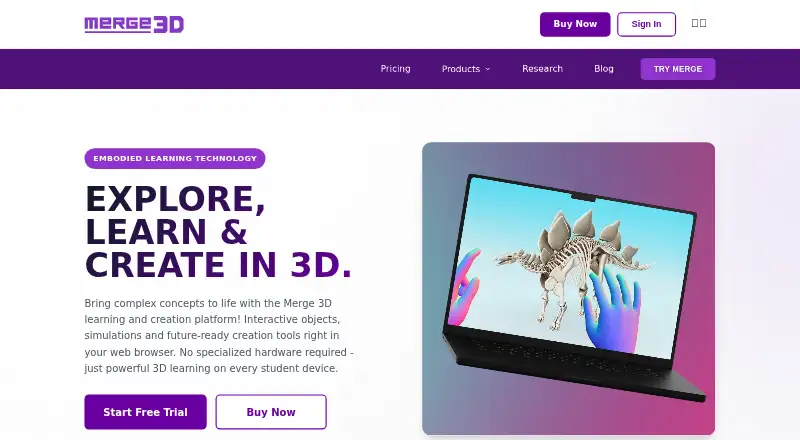
What Merge EDU is
Merge EDU is a K–12 immersive learning platform with interactive simulations and digital teaching aids. Merge Explorer provides more than 100 simulations across science subjects including biology, physics, chemistry, and astronomy; the maker says these align with core science standards. Object Viewer lets students inspect 3D models in augmented reality, import models, and create and share collections. HoloGlobe visualizes NASA and NOAA satellite information, including rainfall, cloud cover, temperatures, wildfires, and snowfall. The Merge Cube can enhance augmented reality, but most features do not require it. Apps are listed for iOS, Chromebook, and Windows, while the platform facts also list Android and web. The maker says play is stored locally and personally identifiable information is not collected from child users during app use. Classroom and School plans are listed as free. Individual costs $17 a month billed yearly at 207 USD; Teacher costs $28 a month billed yearly at 331 USD. A 14-day trial is available.
Who it suits
It suits K–12 educators and learners who want science simulations, AR model viewing, or satellite-data visualizations. The free Classroom and School plans are listed alongside paid Individual and Teacher plans.
What it does well
- More than 100 science simulations
- 3D model viewing and collection sharing
- NASA and NOAA satellite data visualization
- Free Classroom and School plans
What to know first
- Merge Cube is needed to enhance the AR experience
- Individual and Teacher plans have listed annual billing
- A 14-day trial is available
Limits
The free Classroom plan includes student seats and classroom management; the free School plan includes school-wide deployment, admin, and support. Individual costs $17 a month billed yearly ($207), and Teacher costs $28 a month billed yearly ($331).
Plans
| Plan | Billed and limits | Price |
|---|---|---|
| Classroom | Billed yearly ($0) · Both EDU + Creator suites included · Student seats · Classroom management | Free |
| School | Billed yearly ($0) · Both EDU + Creator suites included · School-wide deployment · Admin and support | Free |
| Individual | Billed yearly ($207) · Both EDU + Creator suites included · For individual use | $17 a month |
| Teacher | Billed yearly ($331) · Both EDU + Creator suites included · For classroom demonstrations | $28 a month |
As merge3d.ai lists them, read 29 Sept 2026. The maker's own page has the final word.
Getting started
- Visit https://merge3d.ai/.
- Choose a Classroom, School, Individual, or Teacher plan.
- Use the 14-day trial if it fits your needs.
- Access the platform on web or download an app for a listed device.
- Use the Merge Cube to enhance AR, if desired.
Overview
Merge EDU is a K–12 teaching platform for educators who want students to explore science through simulations, 3D models, and Earth-observation data. It is strongest for science classrooms that can use several kinds of digital learning aids; schools looking for a single-purpose activity may find the breadth unnecessary.
Its apps support augmented and non-augmented modes, lesson authoring, and classroom management. The Merge Cube enhances augmented-reality activities but is not required for most features, so it need not be a prerequisite for using the platform.
Key features
Science simulations
Merge Explorer offers more than 100 interactive simulations across biology, physics, chemistry, and astronomy. Merge says they align with core science standards, making them relevant to educators who want digital exploration connected to science instruction. The range is a strength for science teaching, but the stated focus is not a general-purpose curriculum across every subject.
3D models and Earth data
Object Viewer lets students inspect 3D models in AR, import models, and create and share collections. That flexibility supports activities built around examining and organizing models rather than only viewing prepared material. HoloGlobe visualizes NASA and NOAA satellite data, including rainfall, cloud cover, temperatures, wildfires, and snowfall; it gives lessons a way to explore real Earth data, though its stated scope is limited to those kinds of visualizations.
School use and privacy
Merge says it partners with Microsoft across its ecosystem for reliability and school integrations. It also says the Merge EDU Experience stores play locally and does not collect personally identifiable information from child users during app use. Its privacy policy identifies multifactor authentication, encryption in transit and at rest, and a data breach response plan among its safeguards. These are useful considerations for school adoption, though they do not replace a school’s own privacy and security review.
Pricing
Merge EDU is freemium, with free Classroom and School plans and paid Individual and Teacher plans. Both EDU and Creator suites are included across the named plans, but the free plans are differentiated by their intended setting and deployment features.
- Classroom: free, billed yearly ($0). Includes both suites, student seats, and classroom management.
- School: free, billed yearly ($0). Includes both suites, school-wide deployment, admin, and support.
- Individual: $17 a month, billed yearly ($207). Includes both suites for individual use. It is the lower-cost paid option, but not the plan described for classroom demonstrations.
- Teacher: $28 a month, billed yearly ($331). Includes both suites for classroom demonstrations. It costs more than Individual and is the more directly classroom-oriented paid choice.
The pricing note includes a 14-day trial. Individual plans have help documentation, Teacher and Classroom plans have email support, and School plans have dedicated support. Districts, enterprise customers, and customers with special requirements can request custom pricing and features.
Platforms
Merge EDU supports web, Windows, iOS, and Android. Its product pages list iOS, Chromebook, and Windows downloads for Merge EDU apps, while the platform listing also includes Android and web. The Cube is optional for most features, giving classrooms more flexibility in how they access the experience.
Who it's for
Merge EDU is best suited to K–12 science educators and schools that want simulations, model viewing, and Earth-data visualizations in one platform, with classroom or school plans that do not charge a subscription fee. Individual educators may prefer the paid Teacher plan for demonstrations. It is a less natural fit for buyers seeking a broad, all-subject learning platform or a narrowly defined single activity.
Pros and cons
- Pros: More than 100 science simulations span four major science fields, and Merge says they align with core science standards.
- Pros: Object Viewer and HoloGlobe add model-based activities and NASA and NOAA Earth data alongside simulations.
- Pros: Free Classroom and School plans include both suites, with management or deployment features suited to their respective settings.
- Cons: The paid Individual and Teacher prices are billed yearly, so the monthly figures do not describe a month-to-month billing term.
- Cons: The platform’s described learning focus is science, which may not suit educators seeking broader subject coverage.
Alternatives
JigSpace is worth considering for teams wanting to create Jigs with a defined small free tier: its free plan allows 3 active Jigs, 3 steps, 100MB team storage, and 2 user seats.
TrainAR is a free, open-source option for users who want software licensed for commercial and non-commercial use under the MIT license.
Augmented Classroom may suit someone who wants to begin with a demo limited to one interactive test, mobile use, and a single user.
Delightex Edu (formerly CoSpaces Edu) offers a free Basic plan for up to 29 students, with 2 projects, 1 class, and 1 assignment, making it an alternative for educators who want those stated classroom caps.
Quiver is a simpler alternative for free AR coloring activities, with 10 free sheets and no subscription required.
Assemblr EDU may fit educators who want a free account with 400 3D objects, limited topics and Edu Kits, and 30 MB of storage.
Halo AR is another freemium option for Android and iOS.
Narrator AR is another free app option for Android and iOS.
For more options, browse Augmented Reality Learning Apps.
Verdict
Choose Merge EDU if you teach K–12 science and want simulations, 3D models, and Earth data in one platform, with free plans for classroom and school settings. Its strongest case is the combination of science-focused tools and optional hardware; look elsewhere if you need broader subject coverage or need confirmed seat limits before choosing a plan.
Verdict
Merge EDU brings simulations, 3D models, and Earth data into a K–12 learning platform. Compare its plan options and device listings with the needs of your classroom.
Questions
Is there a free plan?
Yes. Classroom and School are listed as free, billed yearly at $0.
What does Merge EDU cost?
Individual is $17 a month, billed yearly ($207). Teacher is $28 a month, billed yearly ($331); custom pricing is offered for districts, enterprise customers, and special requirements.
Is there a free trial?
Yes, a 14-day trial is available.
Which platforms are supported?
The platform lists web, Windows, iOS, and Android. Merge EDU app downloads are listed for iOS, Chromebook, and Windows.
Is the Merge Cube required?
No. The Merge Cube can enhance the AR experience, but it is not required for most features.
Who makes Merge EDU?
Merge EDU was founded in 2014 and is headquartered in San Antonio, Texas, United States.
Facts from Merge EDU's own pages
- 3D objects
- Object Viewer lets students inspect 3D models in AR, import models, and create and share custom collections. · merge3d.ai, 29 Sept 2026
- Curriculum
- The maker describes Merge Explorer simulations as aligned to core science standards. · merge3d.ai, 29 Sept 2026
- Custom pricing
- The maker offers custom pricing and features for districts, enterprise customers, and special requirements. · merge3d.ai, 29 Sept 2026
- Devices
- The product pages list iOS, Chromebook, and Windows downloads for Merge EDU apps. · merge3d.ai, 29 Sept 2026
- Earth data
- HoloGlobe visualizes NASA and NOAA satellite data such as rainfall, cloud cover, temperatures, wildfires, and snowfall. · merge3d.ai, 29 Sept 2026
- Founded
- 2014 · merge3d.ai, 23 Sept 2026
- Hardware
- The Merge Cube enhances the AR experience but is not required for most features. · merge3d.ai, 29 Sept 2026
- Headquarters
- San Antonio, Texas, United States · merge3d.ai, 23 Sept 2026
- Purpose
- Merge EDU is a K–12 immersive learning platform with interactive simulations and digital teaching aids. · merge3d.ai, 29 Sept 2026
- School integrations
- Merge says it partners with Microsoft across the ecosystem for reliability and school integrations. · merge3d.ai, 29 Sept 2026
- Science simulations
- Merge Explorer offers more than 100 interactive simulations covering science topics including biology, physics, chemistry, and astronomy. · merge3d.ai, 29 Sept 2026
- Security
- The privacy policy lists multifactor authentication, encryption of data in transit and at rest, and a data breach response plan among its safeguards. · merge3d.ai, 29 Sept 2026
- Student privacy
- Merge says the Merge EDU Experience stores play locally and does not collect personally identifiable information from child users during app use. · merge3d.ai, 29 Sept 2026
- Support
- The pricing page lists help documentation for Individual plans, email support for Teacher and Classroom plans, and dedicated support for School plans. · merge3d.ai, 29 Sept 2026
Where Merge EDU stands on Freedom251
- Augmented Reality Learning Apps#7 of 25