Freedom251 › AR Creation Software

Assemblr EDU
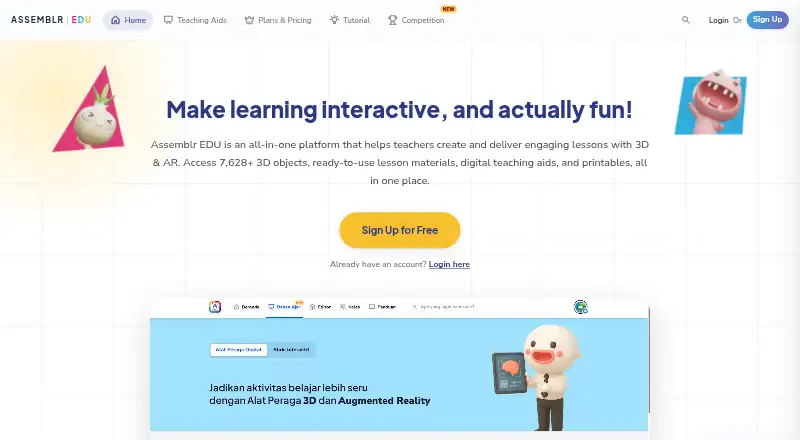
What Assemblr EDU is
Assemblr EDU is an education platform for teachers, parents, and students, using 3D and augmented reality visuals to support learning. Its drag-and-drop editor lets users create interactive materials from 2D and 3D objects, text, annotations, video, images, and presentation slides without coding. Ready-made Topics combine learning slides, 3D and AR lessons, and lesson plans for different curricula and grade levels. Teachers can create virtual classes, share lessons and work, and follow class updates. Projects can be shared by link, as 3D views, or as AR experiences; custom markers let viewers open a project in AR. A Free plan includes 30 MB of storage per account and limited Topics and Edu Kits. Single costs $1.49 a month and provides 300 MB, one premium member seat, up to 6,000 free and pro 3D objects, and unlimited Topics, Edu Kits, and Editor library access. The service is available on web, iOS, and Android. Assemblr lists tailored integrations for education products and platforms.
Who it suits
Assemblr EDU suits educators and students preparing or sharing classroom learning materials across subjects and grade levels. Its virtual classes and AR project-sharing options may also fit teachers who want to distribute interactive lessons.
What it does well
- Drag-and-drop editor requires no coding.
- Ready-made Topics include lessons and lesson plans.
- Projects can be shared as links, 3D, or AR.
- Virtual classes include sharing and class updates.
- Available on web, iOS, and Android.
What to know first
- Free plan limits storage to 30 MB per account.
- Free access to Topics and Edu Kits is limited.
- Single plan includes 300 MB per account.
Limits
The Free plan includes 30 MB of storage per account and limited access to Topics and Edu Kits. Single includes 300 MB per account; School also lists 300 MB of storage.
Plans
| Plan | Billed and limits | Price |
|---|---|---|
| Free | $0/forever · 400 free 3D objects · Limited Topics and Edu Kits · 30 MB storage per account · Unlimited QR markers · 25 custom graphic AR markers | Free |
| Single | now only $1.49/month; $2.99/month · 1 premium member seat · Up to 6,000 free and pro 3D objects · Unlimited Topics, Edu Kits, and Editor library access · 300 MB storage per account · 5 custom AR markers · Unlimited QR markers | $1.49 a month |
| School | Special pricing · Minimum 10 premium member seats · Up to 6,000 free and pro 3D objects · Unlimited Topics and Edu Kits · Unlimited Editor library access · 300 MB storage · 5 custom AR markers · QR markers | On request |
As edu.assemblrworld.com lists them, read 7 Oct 2026. The maker's own page has the final word.
Getting started
- Visit the Assemblr EDU website.
- Choose the Free plan or review the Single and School plans.
- Use the web, iOS, or Android platform.
- Create learning media in the drag-and-drop editor or select a ready-made Topic.
- Share projects through links, 3D views, AR experiences, or a virtual class.
Assemblr EDU is an education-focused workspace for making 3D and augmented-reality lessons, sharing them with learners, and organizing virtual classes. It suits teachers, students and parents who want visual authoring without code, especially when ready-made curriculum material is useful. Its main trade-off is scale: the free tier is suitable for trying the workflow, while regular classroom use quickly makes the paid storage and content allowances more relevant.
Overview
Assemblr EDU brings lesson creation, classroom sharing and AR presentation into a single service. The editor is designed around educational media rather than general 3D production, and the Topics library gives teachers a starting point across subjects, curricula and grade levels. That focused approach is a good fit for lesson preparation; organizations seeking custom educational experiences can also discuss integrations for products and platforms, including coding camps, museums, publishers and toy packaging.
Key features
The drag-and-drop 3D/AR Editor combines 2D and 3D objects, text, annotations, video, images and presentation slides. No coding is required, so a teacher can assemble visual material without maintaining a separate development workflow. The breadth of media supports explanatory lessons and presentations, although users wanting a general-purpose AR production environment may find the education focus limiting.
Ready-made Topics include learning slides, 3D and AR lessons, and lesson plans. They can reduce preparation time and provide material for different grade levels and curricula. Free accounts receive only limited Topics and Edu Kits; the restriction matters if a teacher expects the library, rather than authoring from scratch, to supply most classroom content.
Projects can be distributed through project links, 3D views or AR experiences. Custom markers let viewers scan a physical marker to open a project in AR, while QR markers provide another sharing route. Teachers can create virtual classes, share lessons and student work, and follow class updates in one place, making the service more useful for delivery and coordination than an editor alone.
Assemblr says it uses SSL encryption in transit, Scrypt-salted password hashes, restricted access to personally identifiable information, routine security audits and monitoring, and GDPR and EU–U.S. Privacy Shield Framework compliance. Data is processed and backed up on a partner-operated server. Support is available by email at [email protected] and by phone at +62 (22) 2046 3080 or +62 85157576127.
Pricing
The freemium structure gives individuals a way to start without a subscription, but the allowances differ substantially.
Free
Free costs nothing, billed at $0/forever. It includes 400 free 3D objects, limited Topics and Edu Kits, 30 MB of storage per account, unlimited QR markers and 25 custom graphic AR markers. This is appropriate for evaluation, occasional projects or small experiments; 30 MB and restricted library access are significant constraints for a continuing class.
Single
Single costs $1.49 a month, billed now at $1.49/month against a stated $2.99/month price. One premium member seat gets up to 6,000 free and pro 3D objects, unlimited Topics, Edu Kits and Editor library access, 300 MB of storage per account, five custom AR markers and unlimited QR markers. It is the practical choice for an individual educator who needs the full content library and more working room. The five-marker allowance is lower than Free's 25 custom graphic AR markers, so marker-heavy projects should be planned around that difference.
School
School uses custom pricing and requires a minimum of 10 premium member seats. It includes up to 6,000 free and pro 3D objects, unlimited Topics and Edu Kits, unlimited Editor library access, 300 MB of storage, five custom AR markers and QR markers. The seat minimum makes it a school or department purchase rather than a solo-teacher plan.
Platforms
Assemblr EDU runs on the web and has Android and iOS support. Its AR mode supports both experiences, so users can create and share across the listed platforms rather than being tied to one device family.
Who it's for
Choose Assemblr EDU when educators or students need to author visual lessons, draw on prepared teaching topics, and distribute work through classes, links, QR codes or AR markers. Parents can also use its learning-oriented materials. It is less suitable when the priority is a large, general AR-production toolkit rather than curriculum-oriented authoring and classroom management.
Pros and cons
Pros
- Education-specific workflow: the editor, Topics, Edu Kits and virtual classes cover preparation and sharing in one place.
- No-code visual authoring: teachers can combine 2D, 3D, video, images and slides without programming.
- Flexible distribution: links, 3D views, QR markers and custom-marker AR support different classroom situations.
- Low-cost individual upgrade: Single adds unlimited library and content access for $1.49 a month.
Cons
- Free storage is tight: 30 MB per account can restrict ongoing media projects.
- Free content is limited: Topics and Edu Kits are not fully available without upgrading.
- School requires scale: the minimum of 10 premium seats excludes very small teams from that plan.
- Single has only five custom AR markers: marker-based programs may need careful allocation.
Alternatives
MyWebAR is worth choosing when broad device coverage and a free Creator plan with 100 views per year, 100 MB of storage and five projects matter more than Assemblr's classroom-specific materials.
JigSpace suits teams wanting a free plan with three active Jigs, three steps, 100 MB of team storage and two user seats.
Artivive Bridge is an alternative for artwork-centered AR, with a free Basic plan offering unlimited artworks but 50 lifetime views and a 1 MB memory limit.
BlippBuilder fits creators who want to explore projects for free and move to a paid plan when publishing is required.
Kivicube is an option for users comfortable with scene-based plans and CNY pricing, including a free Basic tier with two scenes and 500 scene experiences.
STYLY is another freemium spatial-layer platform with a free Creator plan.
Elysium is a free iOS and web option for personal worlds, including one private world and 10 GB of asset storage.
Reality Composer is a free choice for Apple users who need an iPhone or iPad app and can meet its iOS 17.0 or later requirement.
For broader discovery, browse AR Creation Software and Augmented Reality Learning Apps.
Verdict
Assemblr EDU is a strong choice for educators who want no-code 3D/AR lesson authoring, ready-made teaching resources and classroom sharing in one platform. Single is the sensible individual plan when the 30 MB free allowance and limited content become obstacles; schools should consider School only when at least 10 seats are justified. Look elsewhere if you need a general-purpose AR studio, much larger storage, or a plan designed for a very small multi-user team.
Verdict
Assemblr EDU brings lesson authoring, ready-made teaching materials, virtual classes, and AR sharing into one education platform. The Free plan has limited content access and 30 MB of storage; Single costs $1.49 a month and expands access and storage.
Questions
Is there a free plan?
Yes. Free costs nothing and includes 400 free 3D objects, limited Topics and Edu Kits, 30 MB storage per account, unlimited QR markers, and 25 custom graphic AR markers.
How much does Single cost?
Single costs $1.49 a month. It includes one premium member seat, 300 MB per account, up to 6,000 free and pro 3D objects, and unlimited Topics, Edu Kits, and Editor library access.
Which platforms does Assemblr EDU support?
Assemblr EDU is available on web, iOS, and Android.
Can teachers manage classes?
Teachers can set up virtual classes, share works and lessons, and see class updates in one place.
Does Assemblr EDU support AR sharing?
Projects can be shared as augmented reality experiences, and users can scan custom markers to view projects in AR. The Free plan includes 25 custom graphic AR markers and unlimited QR markers.
Who makes Assemblr EDU?
Assemblr EDU is headquartered in Bandung, West Java, Indonesia.
Facts from Assemblr EDU's own pages
- AR sharing
- Projects can be shared as project links, 3D views, or augmented reality experiences, and users can scan custom markers to view projects in AR. · about.edu.assemblrworld.com, 7 Oct 2026
- Classes
- Assemblr EDU’s Google Play listing says teachers can set up virtual classes, share works and lessons, and see class updates in one place. · play.google.com, 7 Oct 2026
- Data handling
- The maker says access to personally identifiable information is restricted to employees and user data is processed and backed up on a partner-operated server. · about.edu.assemblrworld.com, 7 Oct 2026
- Editor
- Its 3D/AR Editor lets users create interactive learning media with drag-and-drop tools, 2D and 3D objects, text, annotations, video, images, and presentation slides without coding. · about.edu.assemblrworld.com, 7 Oct 2026
- Edu Kits
- The maker’s pricing page includes Edu Kits, with unlimited access on the Single plan and limited access on Free. · about.edu.assemblrworld.com, 7 Oct 2026
- Headquarters
- Bandung, West Java, Indonesia · edu.assemblrworld.com, 28 Sept 2026
- Integrations and partnerships
- The maker invites organizations to discuss tailored integrations of 3D/AR experiences into educational products or platforms, and lists coding camps, museums, book publishers, and toy packaging as use cases. · about.edu.assemblrworld.com, 7 Oct 2026
- Intended users
- The maker presents Assemblr EDU for educators and students, and describes ready-made teaching topics for classroom preparation across subjects and grade levels. · about.edu.assemblrworld.com, 7 Oct 2026
- Limits
- The Free plan includes 30 MB of storage per account and limited access to Topics and Edu Kits; the Single plan includes 300 MB per account. · about.edu.assemblrworld.com, 7 Oct 2026
- Platforms
- The maker says projects can be accessed through a web browser or mobile app; its Google Play listing specifies browser access on PC and laptop and app or browser access on tablets and smartphones. · about.edu.assemblrworld.com, 7 Oct 2026
- Product
- Assemblr EDU describes itself as an immersive education platform for teachers and parents that uses 3D and augmented reality visuals. · about.edu.assemblrworld.com, 7 Oct 2026
- Ready-made lessons
- Ready-to-use Topics include learning slides, 3D and AR lessons, and lesson plans for different curricula and grade levels. · about.edu.assemblrworld.com, 7 Oct 2026
- Security
- Assemblr says it complies with GDPR and the EU–U.S. Privacy Shield Framework, uses SSL encryption in transit, salts and hashes passwords with Scrypt, and conducts routine security audits and monitoring. · about.edu.assemblrworld.com, 7 Oct 2026
- Support
- The maker lists [email protected] and phone numbers +62 (22) 2046 3080 and +62 85157576127 as contact options. · about.edu.assemblrworld.com, 7 Oct 2026
Where Assemblr EDU stands on Freedom251
- AR Creation Software#2 of 25
- Augmented Reality Learning Apps#2 of 25