Freedom251 › AI Wireframe Generators
Jenova UI/UX Prototype Generator
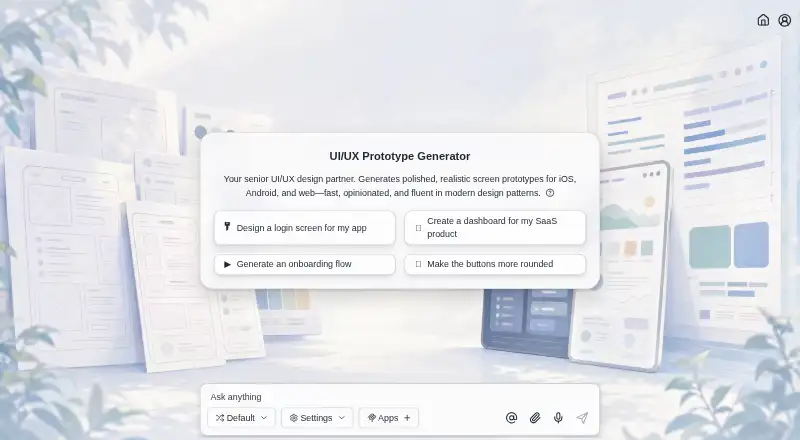
What Jenova UI/UX Prototype Generator is
Jenova UI/UX Prototype Generator turns natural-language descriptions into visual screen prototypes for iOS, Android, and web apps. It can create connected flows such as onboarding, navigation, dashboards, settings, and edge states, with designs informed by iOS Human Interface Guidelines, Material Design, and modern web conventions. You can provide brand assets or describe a visual identity, then refine layouts, colors, typography, and other elements through follow-up messages. Persistent memory carries design language across sessions, while conversation history and memory sync across web, iOS, and Android. Sketch or image input and clickable prototypes are supported, and the generator is also available through the Jenova API. Its output is visual prototypes, not code repositories or production design files. The free plan includes core features with limited usage. Plus costs $20 a month, billed monthly, and includes higher usage limits and specific AI model selection. Jenova's privacy policy says chat history and uploaded files are not used to train its own AI models.
Who it suits
It may suit founders, product managers, developers, marketers, and design teams who need visual app prototypes, including people without design-tool expertise. It is less suited to work that requires code repositories or production design files as output.
What it does well
- Generates multi-screen flows from natural-language descriptions.
- Supports brand assets and follow-up design refinements.
- Offers sketch or image input and clickable prototypes.
- Conversation history and memory sync across web and mobile.
What to know first
- Outputs visual prototypes, not code repositories or production design files.
- Free plan has limited usage.
- Plus costs $20 a month.
Limits
The free plan includes core features with limited usage. Plus costs $20 per month, billed monthly, and adds higher usage limits and specific AI model selection.
Plans
| Plan | Billed and limits | Price |
|---|---|---|
| Free | core features · limited monthly usage · no credit card | Free |
| Pro | monthly · 150× free usage | $100 a month |
| Enterprise | monthly · 1,500× free usage | $1,000 a month |
| Plus | monthly · 30× free usage | $20 a month |
| Max | monthly · 300× free usage | $200 a month |
| Premium | monthly · 75× free usage | $50 a month |
| Ultra | monthly · 750× free usage | $500 a month |
As jenova.ai lists them, read 15 Oct 2026. The maker's own page has the final word.
Getting started
- Open the Jenova UI/UX Prototype Generator website or use its iOS or Android experience.
- Choose the free plan or Plus at $20 per month, billed monthly.
- Describe the app and screens you want to prototype.
- Upload brand assets or describe the visual identity to guide the design.
- Refine layouts, colors and typography with follow-up messages.
- Use the Jenova API for programmatic access if needed.
Overview
Jenova UI/UX Prototype Generator turns written prompts and visual references into app-screen prototypes, making it a strong fit for people who need to explore product ideas without a design-tool workflow. Its conversational approach can take a concept across connected screens, but the deliverable remains a visual prototype rather than an implementation-ready design file or codebase.
Key features
Jenova can generate flows for onboarding, navigation, dashboards, settings, and edge states. That breadth helps teams consider how an experience fits together, rather than judging an idea from a single screen. Its designs draw on iOS Human Interface Guidelines, Material Design, and current web conventions, giving a cross-platform project recognizable starting points.
Users can provide brand assets or describe their visual identity; persistent memory carries that design language across sessions. Follow-up messages can refine layouts, color, typography, and other elements. This suits people who prefer to direct iterations in conversation, though it is less compelling for teams that need detailed manual control in a dedicated design file. Sketch or image input can guide the work, and clickable prototypes help communicate an intended interaction.
The boundary matters: Jenova produces visual prototypes, not code repositories or production design files. It can help a team align on an idea, but it is not a substitute for a tool that produces implementation artifacts.
Pricing
The Free plan costs nothing and provides core features with limited usage. It is a sensible starting point for occasional exploration, but the usage cap makes it less suited to sustained prototyping. Plus costs $20 a month, billed monthly, and raises usage limits while allowing specific AI model selection. That makes it the more practical option for regular work or teams that want model choice; the price is per month, and no seat allowance is stated.
Platforms
Jenova is available on Android, iOS, web, Linux, macOS, and Windows, and the maker says its mobile experience has feature parity with web. Conversation history and memory sync across platforms, which is useful for continuing work on different devices. The generator is also accessible through the Jenova API for programmatic use. The platform list and API access broaden how it can fit a workflow, though they do not change the visual-prototype output boundary.
Who it's for
Founders, product managers, developers, marketers, and design teams can use Jenova to turn a description into a reviewable interface concept, including people without design-tool expertise. It is most persuasive when the goal is to explore flows, communicate direction, or gather feedback before committing to production design. Teams that need code or production design files as the handoff should choose a different tool.
Jenova is operated by Azeroth Inc. Its privacy policy says chat history and uploaded files are not used to train its own AI models.
Pros and cons
- Pros: Multi-screen generation covers common app flows and edge states, making it useful for discussing an experience beyond its landing screen.
- Pros: Brand inputs and persistent memory help keep successive iterations aligned with a visual identity.
- Pros: Clickable prototypes and sketch or image input support both visual direction and interaction review.
- Pros: Cross-platform availability, synced conversation history, and API access support different ways of working.
- Cons: The Free plan has limited usage, so frequent iteration may require the paid plan.
- Cons: Visual prototypes are not production design files or code repositories, limiting Jenova's role in implementation handoff.
Alternatives
For a broader comparison, browse AI Wireframe Generators. Choose Genspark Design if its free allowance of 100 credits per day or Plus plan's 10,000 monthly credits and 50 GB AI Drive storage better matches your needs. Miro is a better fit when editable collaborative boards matter: its free plan includes three boards, 7,000+ templates, and 250+ integrations, while Jenova focuses on generated app prototypes.
Whimsical may suit lightweight board and document work, with a free plan capped at 50 board objects and 50 document blocks per month, watermarked exports, and seven-day version history. Consider Figma Make if you prefer its Figma-based option and need a plan with a stated 3,000 AI credits per month; its Professional Full seat costs $16 a month, billed monthly.
Lucid Train offers a free, forever CLI with local models or your own API keys, open source access, and no account requirement, a different fit for users who want that setup. MockFlow is another freemium option, with a free Basic plan for one editor and five reviewers. OpenDesign has a free local CLI with bring-your-own-key support and no recurring OpenDesign model-credit grant. Prototyper offers a free plan with five AI messages per week, two workspaces, and 100 MCP tool calls per week.
Verdict
Choose Jenova if you want to shape and share connected app-screen concepts through natural-language direction, especially across mobile and web. Its blend of flow generation, brand continuity, and clickable prototypes is the central reason to pick it. Look elsewhere if the work must end in production design files or code, or if a limited free usage allowance will not support your iteration needs.
Verdict
Jenova is aimed at turning descriptions and visual inputs into editable, clickable prototypes across app platforms. Its stated output is prototype visuals, so check that this fits your intended handoff.
Questions
Is Jenova UI/UX Prototype Generator free?
Yes. Its free plan includes core features with limited usage. Plus costs $20 per month, billed monthly.
Which platforms are supported?
The experience is available on web, iOS and Android, with conversation history and memory synced across those platforms. The generator is also available through the Jenova API.
Does it make clickable prototypes?
Yes. Clickable prototypes are supported, along with sketch or image input.
Does Jenova generate production files or code?
Its output is visual prototypes rather than code repositories or production design files.
Who operates Jenova?
Azeroth Inc. is identified as the company operating Jenova.
Are chats and uploaded files used to train Jenova's AI models?
Jenova's privacy policy says it does not use chat history or uploaded files to train its own AI models.
Facts from Jenova UI/UX Prototype Generator's own pages
- Android distribution
- The Android app is free to download, lists 10,000-plus downloads, and AppBrain reports about 2.74 out of 5 from roughly 140 ratings. · appbrain.com, 15 Oct 2026
- API
- The maker says the generator is available programmatically through the Jenova API. · jenova.ai, 4 Oct 2026
- API authentication
- Developers create keys in the platform dashboard and send them as Bearer tokens to the API. · jenova.ai, 15 Oct 2026
- API availability
- The UI/UX generator is available programmatically through the Jenova Agent API. · jenova.ai, 15 Oct 2026
- API billing
- API use is prepaid through credits consumed according to model, tool, storage, and request usage. · jenova.ai, 15 Oct 2026
- API capabilities
- The API supports orchestration, model routing, sessions, memory, file upload, retrieval-augmented generation, tools, and MCP integrations. · jenova.ai, 15 Oct 2026
- Audience
- The maker describes it for founders, product managers, developers, marketers, and design teams, including people without design-tool expertise. · jenova.ai, 4 Oct 2026
- Brand consistency
- Users can upload brand assets or describe their visual identity, and persistent memory carries design language across sessions. · jenova.ai, 4 Oct 2026
- Company
- The privacy policy identifies Azeroth Inc. as the company operating Jenova. · jenova.ai, 4 Oct 2026
- Company founder
- Crunchbase lists Boris Wang as founder. · crunchbase.com, 15 Oct 2026
- Company founding
- LinkedIn lists the company as founded in 2024. · linkedin.com, 15 Oct 2026
- Company headquarters
- LinkedIn lists New York, New York as headquarters. · linkedin.com, 15 Oct 2026
- Company legal name
- Crunchbase identifies the operating company as Azeroth Inc. · crunchbase.com, 15 Oct 2026
- Company size
- LinkedIn lists Jenova as having one employee. · linkedin.com, 15 Oct 2026
- Conversational iteration
- Users refine layout, color, typography, interactions, and hierarchy through follow-up instructions. · jenova.ai, 15 Oct 2026
- Conversation-based editing
- Users can refine layouts, colors, typography, and other elements through follow-up messages. · jenova.ai, 4 Oct 2026
- Data handling
- Jenova's privacy policy says it does not use chat history or uploaded files to train its own AI models. · jenova.ai, 4 Oct 2026
- Design conventions
- It generates designs informed by iOS Human Interface Guidelines, Material Design, and modern web conventions. · jenova.ai, 4 Oct 2026
- Design-system matching
- It can infer and preserve a visual language from uploaded assets or described brand requirements. · jenova.ai, 15 Oct 2026
- Documentation depth
- The API documentation includes quickstart instructions, endpoint reference material, authentication, billing, usage, and error information. · jenova.ai, 15 Oct 2026
- Funding
- Crunchbase shows one angel funding round but obscures the amount and investor details. · crunchbase.com, 15 Oct 2026
- Headquarters
- New York, United States · jenova.ai, 28 Sept 2026
- Integrations
- Jenova connects through MCP to services including Gmail, Google Drive, Notion, Reddit, and YouTube. · jenova.ai, 15 Oct 2026
- Licence
- Jenova states that its platform and services are proprietary and grants only a limited, revocable use licence. · jenova.ai, 15 Oct 2026
Where Jenova UI/UX Prototype Generator stands on Freedom251
- AI Wireframe Generators#5 of 34