Freedom251 › Eye Tracking Software
iTrace
What iTrace is
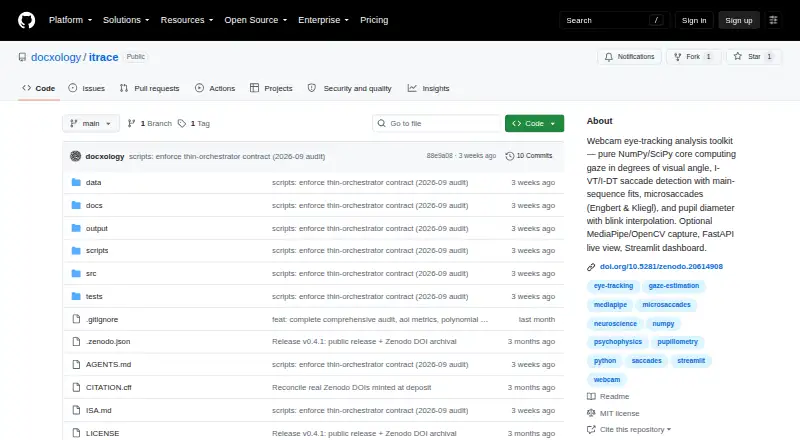
iTrace is an open-source webcam eye-tracking analysis toolkit with a scientific core built on NumPy and SciPy. It computes gaze in degrees of visual angle and detects fixations, saccades and microsaccades using I-VT, I-DT and Engbert–Kliegl methods. Pupil tools cover blink detection and interpolation, preprocessing, and eye-crop segmentation reported in pixels or relative to iris size. Affine screen-space calibration reports calibration error and gaze-quality measures. Optional capture uses OpenCV and MediaPipe iris landmarks; optional interfaces include a local FastAPI and WebSocket HTML app and a Streamlit dashboard. The CLI can analyze gaze CSV files and export JSON reports, while camera workflows can record gaze and pupil CSV data. Live exports can include derived gaze, pupil and capture-record CSVs plus a JSON analysis report. By default, raw eye video and persisted eye-crop images are not saved. The project says checks use synthetic ground truth, not real eye-tracking data or a reference device. Its live webcam pupil measurement is a relative proxy, not a diameter in millimetres. The MIT-licensed package is listed as free.
Who it suits
iTrace suits science and research users working with gaze or pupil data, especially those building an analysis workflow from CSVs or optional webcam capture. The project advises comparison with a reference device or public dataset before making device-level accuracy claims.
What it does well
- Free, MIT-licensed software.
- Detects fixations, saccades and microsaccades.
- Calibration reports error and gaze-quality measures.
- CLI exports JSON reports from gaze CSV files.
- Default exports omit raw eye video and saved eye-crop images.
What to know first
- Not validated against real eye-tracking data or a reference device.
- Webcam pupil measurement is relative, not millimetres.
- Optional capture and interfaces require additional components.
Limits
Its stated accuracy limits are that checks use synthetic ground truth rather than real-device validation, and live webcam pupil measurements are relative proxies rather than millimetre measurements.
Plans
| Plan | Billed and limits | Price |
|---|---|---|
| iTrace (MIT-licensed open-source software) | MIT license · Python package | Free |
As github.com lists them, read 10 Oct 2026. The maker's own page has the final word.
Getting started
- Open the iTrace GitHub project page.
- Install the Python package using the documented uv route.
- Add optional extras for capture, dashboard, figures, or web components as needed.
- Analyze gaze CSV files with the CLI, or use the optional camera workflow to record gaze and pupil CSV data.
- Use the optional local HTML interface or Streamlit dashboard for live viewing.
iTrace is an open-source Python toolkit for analyzing gaze and pupil data, with optional webcam capture and local viewing tools. It best suits researchers and developers exploring eye-movement methods; its analysis breadth is useful, but its webcam measurements are not validated against real eye-tracking devices.
Overview
At its core, iTrace processes gaze CSV files with NumPy- and SciPy-based analysis, calculating gaze in degrees of visual angle and identifying eye-movement events. Webcam capture is an optional layer, so the analysis workflow can also be used with existing gaze data. That separation makes it a flexible reference implementation, rather than a complete substitute for validated tracking hardware.
The project reports algorithmic checks against synthetic ground truth, but no validation against real eye-tracking data or a reference tracker. Researchers making device-level accuracy claims should compare results with a reference device or public dataset; synthetic checks alone do not establish real-world performance.
Key features
Gaze events and visualizations
For fixations and saccades, iTrace offers I-VT and I-DT detection; microsaccades use the Engbert–Kliegl method. Views include gaze traces, x/y time series, speed plots, event rasters, scanpaths, direction polar plots, amplitude histograms, and main-sequence scatter. The range supports inspection from several angles, though interpretation still depends on the quality and validation of the input data.
Pupil analysis and calibration
Pupil tools cover blink detection and interpolation, preprocessing, and eye-crop segmentation. Segmentation reports pixel size or pupil size relative to the iris, not diameter in millimetres. The latter is a relative proxy, so it can support algorithm exploration but should not be treated as a calibrated physical measurement. Affine screen-space calibration reports calibration error and gaze-quality measures, useful diagnostics that do not resolve the project's real-device validation gap.
Capture, interfaces, and exports
Optional webcam capture uses OpenCV and MediaPipe Face Mesh iris landmarks. A local FastAPI and WebSocket HTML app and a Streamlit dashboard provide viewing options; the live app can export derived gaze, pupil, and capture CSVs alongside a JSON analysis report. The CLI can analyze gaze CSVs and export JSON reports, or record gaze and pupil CSV data from a camera.
The default workflow does not save raw eye video or persisted eye-crop images, which limits retained sensitive imagery. Live viewing may send a transient JPEG eye crop to the browser over a local WebSocket, so users should account for that data flow. Python installation is documented through uv, with capture, dashboard, figures, and web components available as optional extras.
Pricing
iTrace (MIT-licensed open-source software) costs nothing and is an open-source Python package under the MIT license. There are no paid tiers in this plan structure. It is a straightforward fit for users comfortable installing Python software and assembling the optional components they need; those seeking a validated commercial tracker should look elsewhere.
Platforms
iTrace supports Linux and self-hosted use, with a web browser interface served locally. The browser option is tied to the local HTML interface rather than a separate hosted service. Webcam is the listed input method, while CSV analysis also supports gaze data already collected elsewhere.
Who it's for
Researchers and developers who want an inspectable reference implementation of gaze-event and pupil-analysis methods are the strongest fit. It is also relevant to people prototyping webcam workflows or analyzing gaze CSVs without requiring capture. It is not the right choice when the requirement is demonstrated accuracy against real eye-tracking hardware, or pupil diameter in millimetres.
Pros and cons
- Pros: Multiple established event-detection methods and a broad set of visualizations support detailed algorithm exploration.
- Pros: Capture is optional, and the CLI can work with gaze CSVs, so camera use is not required for analysis.
- Pros: Default exports omit raw video and persisted eye-crop images, reducing retained image data.
- Cons: Synthetic and closed-loop checks do not establish performance against real devices.
- Cons: Webcam pupil size is only a relative proxy, not a millimetre measurement.
- Cons: Optional capture and interface components add dependencies to an otherwise focused scientific analysis core.
Alternatives
For a broader set of eye-tracking options, see Eye Tracking Software.
- GazePlotter is another free, open-source option, with support across Android, iOS, Linux, macOS, web, and Windows.
- GazeRecorder is a free alternative for Android, iOS, web, or Windows users; its free plan is limited to non-commercial use.
- Labvanced may suit researchers who want a broader web-accessible platform; its free plan includes 300 MB storage, 10 recordings, and one active recruiting link.
- Hawkeye is an option for iOS or web use with a small free allowance of one project and five sessions; its Starter Plan costs $39.99 a month.
- PyGaze is another free, open-source Python toolbox, for users targeting Linux, macOS, or Windows.
- Chiasm is a paid web and API alternative with a free trial and usage-based Flex pricing, for those who prefer a commercial service model.
- OGAMA is a free, open-source alternative for Windows users.
- OpenGazer is another free, open-source gaze tracker for Linux and self-hosted use.
Verdict
Choose iTrace if you need an open-source, inspectable toolkit for experimenting with gaze and pupil-analysis methods or analyzing gaze CSVs. Its strongest case is the range of analysis methods and optional capture and interfaces; its decisive limitation is the absence of real-device validation. For accuracy claims or physical pupil measurements, use a reference-validated system instead.
Verdict
iTrace offers a broad set of gaze and pupil analysis methods, with optional capture and local interfaces. Its synthetic checks and relative pupil measure do not establish real-device accuracy.
Questions
Is iTrace free and open source?
Yes. The listed plan is free, and the project is released under the MIT license.
Which platforms does it support?
The listed platforms are Linux, self-hosted, and web. The local HTML interface runs in a web browser.
What can it analyze?
It can analyze gaze CSV files and detect fixations, saccades, and microsaccades. Pupil tools include blink detection, interpolation, preprocessing, and eye-crop segmentation.
Can it capture data from a webcam?
Yes. Optional webcam capture uses OpenCV and MediaPipe iris landmarks and can record gaze and pupil CSV data.
What does it export?
The CLI can export JSON analysis reports. The live app can export derived gaze, pupil, and capture-record CSVs.
Does the webcam pupil tool measure diameter in millimetres?
No. The project describes live webcam pupil measurement as a relative proxy and does not infer millimetres.
Facts from iTrace's own pages
- Accuracy limit
- The live webcam pupil measurement is a relative proxy and does not infer pupil diameter in millimetres. · github.com, 9 Oct 2026
- Accuracy limitation
- The project states that live webcam pupil measurements are a relative algorithmic proxy and do not infer millimetres. · github.com, 10 Oct 2026
- Analysis core
- The scientific analysis core uses NumPy and SciPy, with webcam capture provided as an optional layer. · github.com, 10 Oct 2026
- Analysis methods
- Its analysis includes I-VT and I-DT event detection, Engbert–Kliegl microsaccade detection, and pupil blink detection and interpolation. · github.com, 10 Oct 2026
- Calibration
- It supports affine screen-space calibration and reports calibration error and gaze-quality measures. · github.com, 9 Oct 2026
- Capture and interfaces
- Optional components use OpenCV and MediaPipe for capture, FastAPI and WebSockets for a local HTML interface, and Streamlit with Plotly for a dashboard. · github.com, 10 Oct 2026
- Capture integrations
- Optional webcam capture uses OpenCV and MediaPipe Face Mesh iris landmarks. · github.com, 9 Oct 2026
- Data handling
- The README says the default export writes derived gaze, pupil, and capture CSVs without writing raw eye video or persisted eye-crop images. · github.com, 10 Oct 2026
- Exports
- The live app can export derived gaze, pupil, and capture-record CSVs plus a JSON analysis report; its default workflow does not save raw eye video or persisted eye-crop images. · github.com, 9 Oct 2026
- Gaze and events
- It computes gaze in degrees of visual angle and detects fixations, saccades, and microsaccades using I-VT, I-DT, and Engbert–Kliegl methods. · github.com, 9 Oct 2026
- Inputs and outputs
- The CLI can analyze gaze CSV files and export JSON reports, and can record gaze and pupil CSV data from a camera. · github.com, 10 Oct 2026
- Install options
- The README documents Python installation through uv, with capture, dashboard, figures, and web components available as optional extras. · github.com, 9 Oct 2026
- Integrations
- The project lists OpenCV, MediaPipe, FastAPI, Uvicorn, Streamlit, Plotly, and Matplotlib as optional dependencies. · github.com, 10 Oct 2026
- Intended audience
- The package metadata identifies science and research as its intended audience. · github.com, 10 Oct 2026
- License
- The software is released under the MIT License. · github.com, 10 Oct 2026
- Live interfaces
- Optional interfaces include a local FastAPI and WebSocket HTML app and a Streamlit dashboard. · github.com, 9 Oct 2026
- Pupil analysis
- Pupil tools include blink detection and interpolation, preprocessing, and eye-crop segmentation that reports pixel or pupil-to-iris-relative size. · github.com, 9 Oct 2026
- Purpose
- iTrace is a webcam eye-movement analysis toolkit for gaze, saccades, microsaccades, and pupil measurements. · github.com, 10 Oct 2026
- Security and privacy
- The project describes its default export as privacy-preserving and says live viewing may send a transient JPEG eye crop to the browser over a local WebSocket. · github.com, 10 Oct 2026
- Use case
- The README presents it as a reference implementation of eye-movement estimation algorithms and advises comparison with a reference device or public dataset before reporting device-level accuracy. · github.com, 9 Oct 2026
- Validation limit
- The project says it is algorithmically verified against synthetic ground truth but has not been validated against real eye-tracking data or a reference eye tracker. · github.com, 9 Oct 2026
- Validation limitation
- The README says its synthetic and closed-loop checks are not real-device validation and that no bundled real-device validation is claimed. · github.com, 10 Oct 2026
Where iTrace stands on Freedom251
- Eye Tracking Software#4 of 27