Freedom251 › Eye Tracking Software

GazePlotter
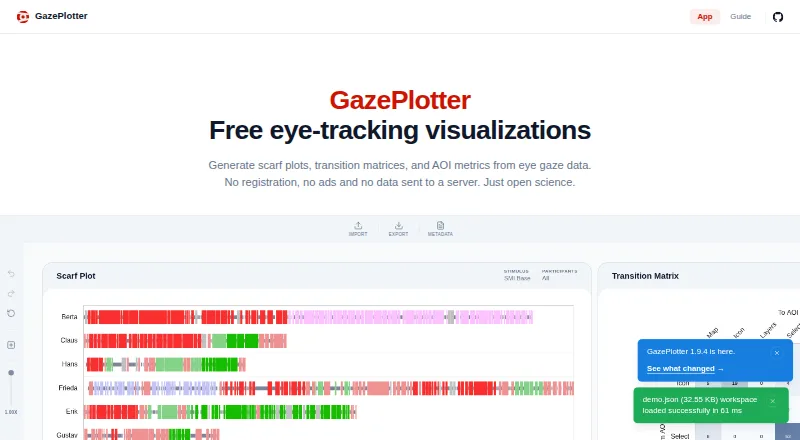
What GazePlotter is
GazePlotter is a free tool for researchers and non-programmers to visualize eye-gaze data without writing code. Its analysis suite includes scarf plots, AOI comparisons and timelines, transition matrices, recurrence plots, scanpaths, scanpath similarity, metric timelines, and metric correlations. The metrics library covers dwell time, fixation durations and counts, latency, AOI transitions, recurrence, scanpath similarity, and eye-movement types. It imports data from Tobii Pro Lab, SMI BeGaze, Gazepoint, Pupil Cloud, Varjo, OGAMA, and custom CSV files, and detects file types automatically. Users can export workspaces as JSON, figures as PNG or JPG, and segmented data, events, and metrics as CSV; ScanGraph export is also available. Metric exports can use long or wide CSV formats for tools such as R, Python, SPSS, JASP, or jamovi. The maker says data is processed locally in the browser. Documentation describes an offline-capable Progressive Web App for web browsers, Windows, macOS, Linux, Android, and iOS. The software is open source under GNU GPL v3.
Who it suits
GazePlotter suits researchers and other non-programmers who need to inspect eye-gaze data without coding. Its range of imports and analysis outputs may also suit users preparing metrics for statistical tools.
What it does well
- Free tool with no registration or subscription.
- Imports several eye-tracking formats and custom CSV.
- Processes data locally in the browser, according to its maker.
- Exports metrics in long or wide CSV formats.
What to know first
- OGAMA data does not preserve actual timing.
- Temporal measures from OGAMA, such as dwell time, may be inaccurate.
Limits
For OGAMA data, sequence order is preserved but actual timing is not, so temporal measures such as dwell time and time to first fixation cannot be calculated accurately.
Plans
| Plan | Billed and limits | Price |
|---|---|---|
| Free | Free tool; no registration or subscription | Free |
As gazeplotter.com lists them, read 28 Sept 2026. The maker's own page has the final word.
Getting started
- Visit https://gazeplotter.com/.
- Open it in a supported web browser or use its Progressive Web App.
- Import a supported eye-tracking file or custom CSV.
- Choose a visualization or metric for analysis.
- Export a workspace, figure, or data in a supported format.
GazePlotter is a no-cost tool for turning eye-gaze files into visual analyses without writing code. It is best suited to researchers who want a broad set of plots and export options while keeping data in the browser. Its main caveat is that some source files, notably OGAMA exports, cannot support accurate timing measures.
Overview
The tool brings gaze visualizations, metric calculations and data exports into a browser-based workflow. It is open-source software under the GNU GPL v3 license, and its documentation describes it as an offline-capable Progressive Web App for desktop and mobile devices. The maker says data is processed locally in the browser rather than sent to a server, which suits work where keeping files on the device is important.
GazePlotter’s range is its strongest case: users can move between visual inspection and structured metric exports without coding. The value of those analyses still depends on what the imported data contains. For more options in the category, see Eye Tracking Software.
Key features
Visualizations and metrics
Available views include scarf plots, AOI comparisons, transition matrices, AOI timelines, recurrence plots, scanpaths, scanpath similarity, metric timelines and metric correlations. The metric library covers dwell time, fixation duration and count, latency, AOI transitions, recurrence, scanpath similarity and eye-movement types. This breadth gives non-programmers several ways to inspect gaze patterns and compare areas of interest, though the tool does not remove limitations in the source data.
Imports, privacy and exports
GazePlotter accepts Tobii Pro Lab, SMI BeGaze, Gazepoint, Pupil Cloud, Varjo and OGAMA files, plus custom CSV files, and detects file types automatically. OGAMA data retains sequence order but not actual timing, so dwell time and time to first fixation cannot be calculated accurately from it. Researchers who need dependable temporal measures should use a source with timing information rather than rely on OGAMA imports for those calculations.
Workspaces can be saved as JSON, figures exported as PNG or JPG, and segmented data, events and metrics exported as CSV; ScanGraph export is also supported. Metric CSVs can be produced in long or wide format for use in R, Python, SPSS, JASP or jamovi. That makes GazePlotter useful as a visualization and preparation step in a wider analysis workflow, rather than a closed destination for results.
The maker directs users to GitHub to report bugs, request visualizations or contribute code. That route is relevant to users who want to engage with an open-source project, but it is not a substitute for a dedicated support service.
Pricing
GazePlotter’s Free plan costs nothing and is described as a free tool with no registration or subscription. It includes the app’s gaze visualizations and JSON, PNG, JPG, ZIP, CSV and ScanGraph export formats. There is no free-plan cap or trial period to weigh against a paid tier: the published offering is free, with no subscription commitment.
This makes it a straightforward fit for individual researchers and non-programmers who need the supported analysis and export workflow. It is less compelling for teams that require accurate temporal measures from OGAMA files; the price does not change that data limitation.
Platforms
GazePlotter supports web browsers, Windows, macOS, Linux, Android and iOS. Its offline-capable PWA format broadens its reach beyond desktop research setups, though the maker’s local-browser processing model is the key practical distinction for users handling sensitive gaze data.
Who it's for
Choose GazePlotter if you need to inspect eye-gaze data without writing code, want multiple visualization and metric options, and value local browser processing or export into statistical tools. It is a weaker choice when your workflow depends on precise temporal results from OGAMA data, or when you need a paid product with a different support model.
Pros and cons
- Pros: Broad plots and metrics let non-programmers examine gaze patterns from several angles.
- Pros: Imports span named eye-tracking platforms and custom CSV, with automatic file-type detection.
- Pros: Local browser processing and offline-capable PWA support suit users who want an on-device workflow.
- Pros: Multiple export formats, including long and wide metric CSVs, support follow-on work in common statistical packages.
- Cons: OGAMA imports lack actual timing, making dwell time and time to first fixation inaccurate.
- Cons: Bug reports, visualization requests and contributions go through GitHub rather than a dedicated support channel.
Alternatives
GazeRecorder is another free option for users looking for gaze software across Android, iOS, web and Windows; its free plan is limited to non-commercial use.
Labvanced may suit readers seeking a freemium research platform with a free trial: its Free plan includes 300 MB storage, 10 recordings and one active recruiting link.
Hawkeye is worth considering for an iOS or web workflow with a defined free cap of one project and five sessions; its Starter Plan costs $39.99 a month, billed monthly.
Retra is a free, open-source Android alternative.
OpenGazer is a free open-source gaze tracker for Linux users able to provide a webcam and meet its Linux build dependencies.
PyGaze is another free option for Windows, macOS and Linux.
OGAMA is a free alternative for Windows users.
WebGazer.js is a free web-based alternative.
Verdict
GazePlotter is a strong fit for researchers and non-programmers who want broad gaze visualizations, flexible exports and local browser processing without a subscription. Its main reason to look elsewhere is source-dependent accuracy: users relying on OGAMA should not treat its timing-based measures as reliable.
Verdict
GazePlotter offers a broad set of gaze visualizations, imports, and export formats at no cost. Users relying on OGAMA should account for the loss of timing information when interpreting temporal measures.
Questions
How much does GazePlotter cost?
The Free plan costs nothing, with no registration or subscription.
Does GazePlotter offer a free trial?
No. The listed free-trial status is no.
Which platforms does GazePlotter support?
It is listed for web browsers, Windows, macOS, Linux, Android, and iOS.
Is GazePlotter open source?
Yes. Its documentation says it is licensed under GNU GPL v3.
What data can GazePlotter import?
It supports Tobii Pro Lab, SMI BeGaze, Gazepoint, Pupil Cloud, Varjo, OGAMA, and custom CSV files.
What happens to OGAMA timing data?
OGAMA data preserves sequence order but not actual timing, so temporal measures such as dwell time and time to first fixation cannot be calculated accurately.
Facts from GazePlotter's own pages
- Analysis limitation
- OGAMA data preserves sequence order but not actual timing, so temporal measures such as dwell time and time to first fixation cannot be calculated accurately. · gazeplotter.com, 28 Sept 2026
- Data import
- It supports Tobii Pro Lab, SMI BeGaze, Gazepoint, Pupil Cloud, Varjo, OGAMA, and custom CSV files, and detects file types automatically. · gazeplotter.com, 28 Sept 2026
- Exports
- Users can export workspaces as JSON, figures as PNG or JPG, and segmented data, events, and metrics as CSV; ScanGraph export is also available. · gazeplotter.com, 28 Sept 2026
- Integration
- Metric exports are available in long or wide CSV formats for analysis in R, Python, SPSS, JASP, or jamovi. · gazeplotter.com, 28 Sept 2026
- Makers
- The homepage credits Michaela Vojtechovska as creator and Stanislav Popelka as supervisor. · gazeplotter.com, 28 Sept 2026
- Metrics
- Its metrics library covers dwell time, fixation durations and counts, latency, AOI transitions, recurrence analysis, scanpath similarity, and eye-movement types. · gazeplotter.com, 28 Sept 2026
- Offline and devices
- The documentation describes it as an offline-capable Progressive Web App that works on Windows, Mac, Linux, and mobile devices. · gazeplotter.com, 28 Sept 2026
- Open source
- The documentation says GazePlotter is open-source software licensed under GNU GPL v3. · gazeplotter.com, 28 Sept 2026
- Privacy
- The maker says data is processed locally in the browser and is not sent to a server. · gazeplotter.com, 28 Sept 2026
- Purpose
- GazePlotter lets researchers and non-programmers visualize eye-gaze data without writing code. · gazeplotter.com, 28 Sept 2026
- Support
- The maker directs users to GitHub to report bugs, request visualizations, or contribute code. · gazeplotter.com, 28 Sept 2026
- Visualization
- The analysis suite includes scarf plots, AOI comparisons, transition matrices, AOI timelines, recurrence plots, scanpaths, scanpath similarity, metric timelines, and metric correlations. · gazeplotter.com, 28 Sept 2026
Where GazePlotter stands on Freedom251
- Eye Tracking Software#1 of 27