Freedom251 › Desktop Publishing Software
iStudio Publisher
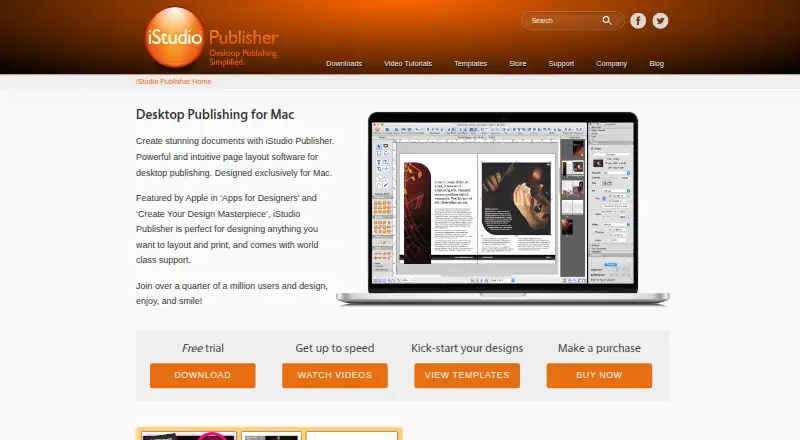
What iStudio Publisher is
iStudio Publisher is page-layout and desktop-publishing software for Mac, intended for documents such as newsletters, brochures, flyers, booklets, reports, posters, and yearbooks. Start with a designed template or create a blank document in any size. Layout features include master pages, automatic page numbering, spread editing, text columns, linked text flow, and text wrapping around shapes. Supported image formats include JPEG, TIFF, PNG, GIF, PSD, PDF, EPS, and AI. Finished documents can be printed or exported as PDF, text-only EPUB, or RTF. For commercial printing, the app can create PDFs with high-resolution images, CMYK colors, and embedded fonts. The maker lists version 1.7.5 for macOS 14 and later, with M-series chip support, and says it runs on Sonoma, Sequoia, and Tahoe. A 30-day trial allows saving, printing, and exporting without watermarks; after the trial, those actions are disabled, though existing documents remain viewable. The App Store listing says Chinese, Japanese, and Korean text input is not supported. The app is sold through the Mac App Store, and free technical support is offered by email.
Who it suits
It suits Mac users preparing multi-page documents or print-shop PDFs, including newsletters, brochures, reports, and booklets. The range of export formats may also suit users preparing text-only EPUBs or RTF files.
What it does well
- Templates or blank documents in any size.
- Master pages and automatic page numbering.
- Exports PDF, text-only EPUB, and RTF.
- Print-shop PDFs can include CMYK colors and embedded fonts.
- 30-day trial permits saving, printing, and exporting.
What to know first
- Saving, printing, and exporting stop after 30 days.
- Chinese, Japanese, and Korean text input is unsupported.
- Listed version 1.7.5 requires macOS 14 or later.
Limits
The fully functional trial lasts 30 days. After it ends, saving, printing, and exporting are disabled, although existing documents can still be opened and viewed.
Plans
| Plan | Billed and limits | Price |
|---|---|---|
| Free download | App download is free; subscriptions are offered for new users | Free |
| Six-monthly | Subscription; free trial offered to new users | On request |
| Yearly | Subscription; free trial offered to new users | On request |
| Monthly | Subscription; free trial offered to new users | On request |
As istudiopublisher.com lists them, read 2 Oct 2026. The maker's own page has the final word.
Getting started
- Get the free download through the Mac App Store.
- Use the 30-day trial to create and save documents.
- Start a project from a template or a blank document.
- Print or export to PDF, text-only EPUB, or RTF.
iStudio Publisher is a Mac desktop-publishing application for producing newsletters, brochures, flyers, booklets, reports, posters and yearbooks. It is best suited to individuals who need precise page composition and press-ready files rather than shared, browser-based editing. Its strongest case is controlled print production; the subscription terms, Mac-only availability and missing CJK text input may rule it out for some buyers.
Overview
You can begin with a professionally designed template or a blank document at any size, then arrange pages and spreads around your own content. The feature set is aimed at finished documents and printed collateral, not collaborative workflows: collaboration is not supported, so teams needing simultaneous in-app work should choose another tool.
Finished work can be printed or exported as PDF, text-only EPUB or RTF. The print workflow is notably capable: PDFs can include high-resolution images, CMYK colours and embedded fonts for commercial printers. Text-only EPUB output is useful for preserving the words of a document, but it does not carry over a fully designed digital layout.
Key features
Layout control
Master pages and automatic page numbering reduce repeated setup in multi-page publications. Spread editing, text columns, linked text flow and text wrapping around shapes give you the controls needed for newsletters, reports and booklets with more involved compositions. These tools favour users who want to manage page structure directly rather than rely on a rigid template system.
Artwork and export
Support covers JPEG, TIFF, PNG, GIF, PSD, PDF, EPS and AI files, accommodating photographs, layered artwork and vector assets from common production workflows. PDF export, colour management and print-shop settings make the application more suitable for professional output than a basic document editor. EPUB export is limited to text, while RTF provides a straightforward text-oriented handoff.
Trial boundaries and language support
The fully functional trial lasts 30 days, needs no credit-card details, and permits saving, printing and exporting without watermarks. After that period, those actions are disabled; existing documents remain openable and viewable. That gives prospective buyers a real production test, but it is not an ongoing free edition. The App Store listing also says Chinese, Japanese and Korean text input is not supported, a decisive limitation for publications requiring those languages.
Pricing
The free download costs nothing, but subscriptions are offered for new users. Six-monthly, yearly and monthly subscriptions are available with custom pricing, and each includes a trial for new subscribers. The download is therefore an entry point rather than a permanently unrestricted plan: after 30 trial days, saving, printing and exporting stop unless you subscribe. No seat quotas or usage quotas are stated, and sales have been handled solely through the Mac App Store since August 2024. Compare the recurring cost and renewal terms shown at purchase with your expected publishing schedule; occasional users may find the post-trial lockout inconvenient.
Platforms
iStudio Publisher runs on macOS. Version 1.7.5 is a dual-binary release for macOS 14 and later, with support for Apple M-series chips, and is listed as running on Sonoma, Sequoia and Tahoe. It is consequently a poor choice if you need Windows, Linux, mobile or web access. Free technical support is offered by email at [email protected]. Apple’s listing reports that the developer does not collect data, while Apple notes that this privacy information has not been verified by Apple.
Who it's for
Choose it for Mac-based solo publishers, designers, schools or small organisations preparing print-ready newsletters, brochures, posters, yearbooks and similar documents. The combination of master pages, linked text and press-focused PDF output suits work that must be composed carefully and delivered to a commercial printer. Look elsewhere if several people must edit together, if you require rich EPUB layouts, or if your publication depends on Chinese, Japanese or Korean input.
Pros and cons
- Pro: Print-shop PDFs support high-resolution images, CMYK colour and embedded fonts, reducing production compromises for commercial printing.
- Pro: Master pages, numbering, spreads, columns and linked text flow provide practical control for longer or more complex documents.
- Pro: The 30-day trial allows saving, printing and export without watermarks and without card details.
- Con: Saving, printing and exporting are disabled after the trial, so the free download is not a continuing production tier.
- Con: macOS 14 or later is required for the current release, excluding other operating systems and older Macs.
- Con: Chinese, Japanese and Korean text input is unsupported, and collaboration features are absent.
Alternatives
PublishMedia is the better direction when you need Linux, Windows or web access and can accept a free starter tier that only opens and views files, with editing and export unavailable.
VivaDesigner suits buyers seeking a broader cross-platform footprint, including web, Windows, Linux and self-hosted options, with a full-feature trial that continues as a limited free edition.
Blurb BookWright is a more focused choice for book projects, offering desktop book design, templates and offline editing.
Flipsnack fits browser and mobile publishing built around flipbooks, with a no-charge tier limited to five 15-page flipbooks and 100 MB PDF uploads.
InPage is worth considering when you need its platform-specific publishing tools on Windows, Android or iOS.
Affinity provides a free individual package combining vector design, pixel editing, page layout and export tools on macOS and Windows.
Kindle Create is the simpler free route for formatting books intended for publication through KDP.
Laidout is a free GPL 3.0 alternative for Linux users.
For more options, browse Desktop Publishing Software.
Verdict
Choose it for solo print projects that benefit from master pages, linked text and CMYK output. Look elsewhere if you need collaboration, non-Mac platforms, rich EPUB design, or CJK text entry, and weigh the recurring subscription against the 30-day trial’s hard production cutoff.
Verdict
iStudio Publisher offers layout controls and print-focused PDF output for Mac publishing projects. Check its trial limits, current macOS requirement, and lack of Chinese, Japanese, and Korean text input before choosing it.
Questions
What does iStudio Publisher cost?
The free download is listed as free. Six-monthly, yearly, and monthly subscriptions are offered to new users, with prices not listed.
Is there a free trial?
Yes. The fully functional trial lasts 30 days and permits saving, printing, and exporting without watermarks. No credit card details are required.
Which platforms does it support?
It supports macOS. The maker lists version 1.7.5 for macOS 14 and later, including M-series chip support.
What formats can it export?
It can export PDF, text-only EPUB, and RTF.
Does it support Chinese, Japanese, or Korean text input?
No. The App Store listing says Chinese, Japanese, and Korean text input is not supported.
Where can I buy it, and how can I get support?
The maker sells it solely through the Mac App Store and offers free technical support by email at [email protected].
Facts from iStudio Publisher's own pages
- After trial
- After 30 days, saving, printing and exporting are disabled, but existing documents can still be opened and viewed. · istudiopublisher.com, 2 Oct 2026
- Commercial printing
- The app can produce print-shop PDFs with high-resolution images, CMYK colors and embedded fonts. · istudiopublisher.com, 2 Oct 2026
- Current Mac support
- The maker lists version 1.7.5 as a dual-binary release for macOS 14 and later with M-series chip support, and says it runs on Sonoma, Sequoia and Tahoe. · istudiopublisher.com, 2 Oct 2026
- Headquarters
- Loughborough, Leicestershire, United Kingdom · istudiopublisher.com, 28 Sept 2026
- Image support
- The maker lists JPEG, TIFF, PNG, GIF, PSD, PDF, EPS and AI as supported image types. · istudiopublisher.com, 2 Oct 2026
- Layout tools
- The app includes master pages, automatic page numbering, spread editing, text columns, text flow linking and text wrapping around shapes. · istudiopublisher.com, 2 Oct 2026
- Maker
- iStudio Software describes itself as a UK-based company dedicated to creating publishing apps for Mac. · istudiopublisher.com, 2 Oct 2026
- Notable limitation
- The App Store listing says the app does not include Chinese, Japanese or Korean text input support. · apps.apple.com, 2 Oct 2026
- Output formats
- The maker says documents can be printed or exported as PDF, EPUB with text only, or RTF. · istudiopublisher.com, 2 Oct 2026
- Privacy
- Apple’s listing states that the developer reports the app does not collect data; Apple says the information has not been verified by Apple. · apps.apple.com, 2 Oct 2026
- Purpose
- iStudio Publisher is Mac page layout and desktop publishing software for creating documents such as newsletters, brochures, flyers, booklets, reports, posters and yearbooks. · istudiopublisher.com, 2 Oct 2026
- Sales channel
- The maker says that since August 2024 it sells iStudio Publisher solely through the Mac App Store. · istudiopublisher.com, 2 Oct 2026
- Support
- The product page offers free technical support by email at [email protected]. · apps.apple.com, 2 Oct 2026
- Templates
- Users can start with a professionally designed template or a blank document of any size. · istudiopublisher.com, 2 Oct 2026
- Trial
- The maker describes a fully functional 30-day trial that permits saving, printing and exporting without watermarks and requires no credit card details. · istudiopublisher.com, 2 Oct 2026
Where iStudio Publisher stands on Freedom251
- Desktop Publishing Software#7 of 30