
PublishMedia
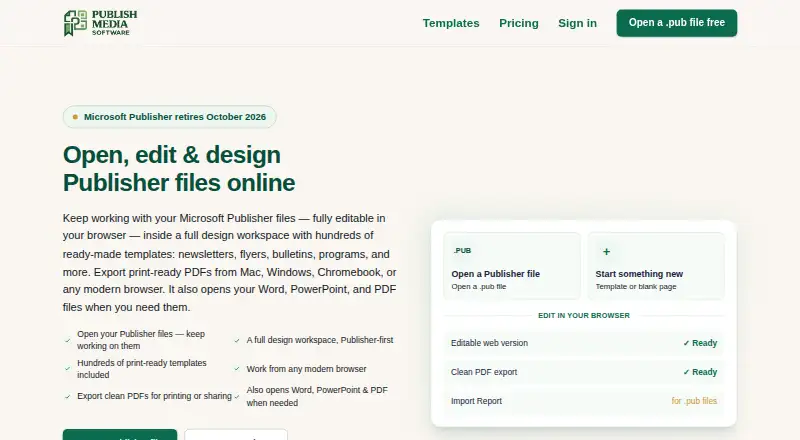
What PublishMedia is
PublishMedia is a browser-based workspace for opening, editing and creating Publisher-style documents, then exporting print-ready PDFs. It accepts Publisher, Word, PowerPoint, PDF, PNG, JPG and WebP files as starting points. Editing tools include text boxes, pictures, shapes, tables, grouping, cropping, page numbers, headers and footers. Its 575 templates cover print projects such as flyers, menus, newsletters, programs and certificates. Paid plans include PDF, PNG and print-grade exports without a watermark. The maker notes that complex Publisher layouts can shift in conversion; an Import Report identifies changed fonts, images or layout for review. Uploaded Publisher source files are encrypted in transit, not used for public templates, and deleted within two days of processing. Free-plan imports and converted copies are deleted after seven days; paid-plan files remain while the account is active. Free Starter permits viewing but not editing or exporting. Monthly costs $9.99 a month, and All-Access costs $99 a year, with full editing and commercial use.
Who it suits
It suits former Publisher users and organizations such as churches, nonprofits, funeral homes, schools, PTAs and small businesses that need to create or convert print documents.
What it does well
- Accepts several document and image formats
- Editing includes tables, cropping and page numbers
- 575 templates for print projects
- Paid plans include print-grade export
- Publisher source files are deleted within two days
What to know first
- Free Starter does not allow editing or export
- Free-plan imports and copies are deleted after seven days
- Complex Publisher layouts can shift during conversion
- Paid files remain stored while the account is active
Limits
Free Starter allows opening and viewing unlimited Publisher and Office files, but editing and export are unavailable; files are stored for seven days. Monthly costs $9.99 a month and includes unlimited conversions, projects and storage subject to fair use, plus PDF, PNG and print-grade export. All-Access costs $99 a year and includes full editing and the same listed export formats, with unlimited conversions, projects and storage subject to fair use.
Plans
| Plan | Billed and limits | Price |
|---|---|---|
| Free Starter | $0 · Open and view unlimited Publisher and Office files · files stored for 7 days · editing and export unavailable | Free |
| All-Access | $99/year; renews yearly; cancel anytime · Full editing · every template · unlimited conversions, projects and storage (fair use) · PDF, PNG and print-grade export · commercial use · priority support | $99 a year |
| Monthly | $9.99/month; renews monthly; cancel anytime · Same features as All-Access · unlimited conversions, projects and storage (fair use) · PDF, PNG and print-grade export | $9.99 a month |
As publishmediasoftware.com lists them, read 30 Sept 2026. The maker's own page has the final word.
Getting started
- Visit https://www.publishmediasoftware.com/.
- Open the browser-based editor on web, Windows, macOS, Linux or iPad.
- Choose Free Starter to view files, or select Monthly or All-Access for editing and export.
- Upload a Publisher, Word, PowerPoint, PDF, PNG, JPG or WebP file, or start from a template.
- Edit the document and export it in a format available with your plan.
PublishMedia suits former Publisher users and small organizations making print materials in a browser. Its import options and templates support familiar publishing work, but subscription plans are required for editing and practical export.
Overview
PublishMedia opens, edits and creates Publisher-style documents in a browser, with print-ready output as its focus. It accepts Publisher, Word, PowerPoint, PDF, PNG, JPG and WebP files as editable starting points, which can help users carry existing work forward. The main caveat is conversion fidelity: complex Publisher layouts can shift, so review the Import Report’s flags for changed fonts, images or layout before relying on an imported file for print.
Key features
The editor provides text boxes, pictures, shapes, tables, grouping, cropping, page numbers, headers and footers. That covers common publication tasks; it is a practical fit for adapting documents and producing routine print pieces, rather than a reason to choose it as a general-purpose design suite.
There are 575 templates for projects including flyers, menus, newsletters, programs and certificates. They give churches, nonprofits, funeral homes, schools, PTAs and small businesses starting points for recurring materials. Paid plans provide PDF, PNG and print-grade export without a watermark. The Import Report helps identify conversion changes, but does not remove the need to check complex layouts.
Publisher uploads are encrypted in transit, are not shared or used for public templates, and are automatically deleted within two days of processing. Free-plan imports and converted copies are deleted after seven days; paid-plan files remain stored while the account is active. Stripe handles billing, an email relay handles transactional mail, and conversions run on the maker’s own servers.
Pricing
The Free Starter plan costs nothing, billed $0. It opens and views unlimited Publisher and Office files, with files stored for seven days, but editing and export are unavailable. It is useful for viewing documents, not for producing or revising them.
Monthly costs $9.99 a month, billed $9.99/month. It renews monthly and can be cancelled anytime. It includes the same features as All-Access, with unlimited conversions, projects and storage subject to fair use, plus PDF, PNG and print-grade export. It suits users who need a short-term subscription or prefer monthly renewal.
All-Access costs $99 a year, billed $99/year, renews yearly and can be cancelled anytime. It adds full editing, every template, unlimited conversions, projects and storage subject to fair use, export formats, commercial use and priority support. For ongoing work, its annual price is lower than paying Monthly for a full year; the trade-off is annual renewal rather than monthly billing. Organization customers receive priority support.
Platforms
PublishMedia supports web, Windows, macOS, Linux and iPad. Because the editor is browser-based, it offers a way to work across these platforms without relying on a desktop editor, while remaining dependent on the browser workflow.
Who it's for
It is best suited to former Publisher users and small organizations that regularly prepare print materials and want to edit in a browser. The free tier can serve people who only need to view files. Readers who need to edit or export without a subscription should look elsewhere.
Pros and cons
- Pros: Broad editable import support lets users start from several common document and image formats.
- Pros: 575 templates and print-grade export support routine print production, with commercial use included in All-Access.
- Pros: The Import Report flags conversion changes, and the maker describes specific protections and deletion periods for uploaded files.
- Cons: Free Starter cannot edit or export, so it is not a production plan.
- Cons: Complex Publisher layouts may shift during conversion, requiring review before printing.
- Cons: Paid files remain stored while the account is active, unlike the seven-day deletion period for free imports and converted copies.
Alternatives
For a broader desktop publishing software shortlist or a print design template library, compare options by the workflow you need. Blurb BookWright is a better fit for desktop book design and offline editing, with templates and layout suggestions. Flipsnack offers web and mobile access and a free plan capped at five flipbooks, 15 pages each and 100 MB PDF uploads; choose it when those limits and flipbook output suit your needs. VivaDesigner is another option. Affinity offers free vector design, pixel photo editing, page layout and export tools for individuals on macOS and Windows. iStudio Publisher is another option. Laidout is a free Linux option. Megal Publisher is a web alternative with a free tier for creating and editing publications, though its free print preview is watermarked. Vellum is a macOS choice for ebook and paperback production, with one-time purchases for its ebook and press plans.
Verdict
Choose PublishMedia if you are continuing Publisher-style work and want browser-based editing, templates and print exports in one workflow. The Import Report and broad file support are useful, but conversion shifts can still demand careful review. Look elsewhere if you need free editing and export or cannot accept layout changes in complex Publisher files.
Verdict
PublishMedia offers browser-based editing and print exports, with a free viewing tier and paid editing plans. Review the Import Report for layout changes, especially with complex Publisher files.
Questions
How much does PublishMedia cost?
Free Starter costs nothing. Monthly is $9.99 a month, and All-Access is $99 a year.
What can I do on the free plan?
Free Starter lets you open and view unlimited Publisher and Office files. Editing and export are unavailable, and files are stored for seven days.
Which platforms does PublishMedia support?
PublishMedia is browser-based and lists web, Windows, macOS, Linux and iPad as supported platforms.
What file types can I open?
Publisher, Word, PowerPoint, PDF, PNG, JPG and WebP files are listed as editable starting points.
Does PublishMedia offer print and commercial exports?
Paid plans include PDF, PNG and print-grade export without a watermark. All-Access lists commercial use.
Who makes PublishMedia, and what integrations are named?
The product is named PublishMedia. Its privacy policy names Stripe for billing and an email relay for transactional mail, and identifies no other integrations there.
Facts from PublishMedia's own pages
- Conversion caveat
- The maker says complex Publisher layouts can shift and its Import Report flags changed fonts, images or layout for review. · publishmediasoftware.com, 30 Sept 2026
- Data retention
- Free-plan imports and converted copies are deleted after seven days; paid-plan files are stored while the account remains active. · publishmediasoftware.com, 30 Sept 2026
- Editing tools
- The editor includes text boxes, pictures, shapes, tables, grouping, cropping, page numbers, headers and footers. · publishmediasoftware.com, 30 Sept 2026
- Export
- The pricing page says plans include clean PDF download, while paid plans also include PDF, PNG and print-grade export without a watermark. · publishmediasoftware.com, 30 Sept 2026
- File formats
- It accepts Publisher, Word, PowerPoint, PDF, PNG, JPG and WebP files as editable starting points. · publishmediasoftware.com, 30 Sept 2026
- Integrations
- The privacy policy names Stripe for payments and an email relay for transactional mail; it does not identify other integrations there. · publishmediasoftware.com, 30 Sept 2026
- Payments and subprocessors
- Stripe handles billing and the maker says it uses an email relay for transactional mail; conversions run on its own servers. · publishmediasoftware.com, 30 Sept 2026
- Privacy and file handling
- Uploaded Publisher source files are encrypted in transit, not shared or used for public templates, and automatically deleted within two days of processing. · publishmediasoftware.com, 30 Sept 2026
- Product
- PublishMedia is a browser-based workspace for opening, editing and creating Publisher-style documents and exporting print-ready PDFs. · publishmediasoftware.com, 30 Sept 2026
- Support
- Users can contact support by email, and the support page says organization customers receive priority support. · publishmediasoftware.com, 30 Sept 2026
- Templates
- The site offers templates for print projects including flyers, menus, newsletters, programs and certificates. · publishmediasoftware.com, 30 Sept 2026
- Who it serves
- The maker describes the product for former Publisher users and for churches, nonprofits, funeral homes, schools, PTAs and small businesses. · publishmediasoftware.com, 30 Sept 2026
Where PublishMedia stands on Freedom251
- Brochure Makers#4 of 20
- Flyer Makers#5 of 20
- Desktop Publishing Software#9 of 30
- Letterhead Makers#8 of 26
- Print Design Template Libraries#15 of 28