Freedom251 › Desktop Publishing Software
VivaDesigner
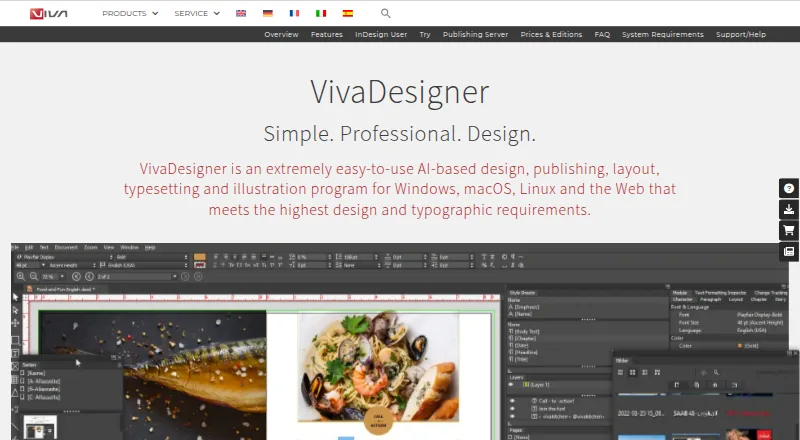
What VivaDesigner is
VivaDesigner is a desktop and web program for design, publishing, layout, typesetting and illustration. It supports work on books, brochures, flyers, newspapers, magazines, catalogs, business cards, resumes, logos and social media ads. Its typography tools cover languages and writing directions, structured text, styles, tables, paths and barcodes. AI features include automatic translation in more than 30 languages and automatic image clipping. The software imports native InDesign documents, and browser users can edit VivaDesigner or InDesign files. Teams can work online or offline, leave text notes and track visual changes. Documents can be printed or exported to PDF, XML, PNG, JPG and other formats. A server edition can connect to websites and web applications through an API, and can be deployed on premises. The Free Edition opens, edits, saves and prints documents, but has no hyphenation, spell check or PDF export. A full-feature trial lasts 30 days before continuing as the limited free edition. VIVA SaaS / IaaS costs €299 a month, net plus VAT, on a one-year contract.
Who it suits
VivaDesigner suits designers and publishing teams creating varied print and digital materials, including teams that need browser editing or collaboration. Its free edition may suit users who can work without hyphenation, spell check and PDF export.
What it does well
- Imports native InDesign documents.
- Teams can work online or offline.
- Exports include PDF, XML, PNG and JPG.
- Automatic translation covers more than 30 languages.
What to know first
- Free edition lacks hyphenation and spell check.
- Free edition does not export PDF.
- SaaS / IaaS requires a one-year contract.
Limits
The lifetime Free Edition has limited functionality: it can open, edit, save and print documents, but has no hyphenation, spell check or PDF export. The full-feature trial lasts 30 days and continues as the limited Free Edition. The €299 a month SaaS / IaaS plan is billed net plus VAT on a one-year contract and includes one concurrent Web Edition user; additional concurrent users cost €39/month.
Plans
| Plan | Billed and limits | Price |
|---|---|---|
| FREE Edition (Desktop) | per user · Permanent free edition · limited licensing functionality | Free |
| Free Edition | Lifetime free · private or commercial use · limited functionality · opens, edits, saves and prints documents | Free |
| Free Edition Plus trial | 30 days · Full-feature trial · continues as limited Free Edition after trial | Free |
| PERSONAL Edition (Desktop) | per user · Private/noncommercial use | $139, paid once |
| NPO/NGO Edition (Desktop) | per user · Nonprofit organizations | $159, paid once |
| VIVA SaaS / IaaS | Net price plus VAT per month for a one-year contract period · One desktop Commercial Edition license · one concurrent Web Edition user · 10 GB storage · German data center · automatic backup · additional concurrent users 39 €/month | €299 a month |
| GOVERNMENT Edition (Desktop) | per user · Government use | $329, paid once |
| COMMERCIAL Edition (Desktop) | per user · Commercial use | $399, paid once |
The first 8 of 10 plans, as viva.systems lists them, read 15 Oct 2026. The maker's own page has the final word. Every plan
Getting started
- Visit the VivaDesigner website.
- Choose desktop or web use on Windows, macOS, Linux or a web browser.
- Use the Free Edition, or begin the 30-day full-feature trial.
- For server integration, use the API or arrange on-premises deployment with VIVA.
- For hosted server use, choose the SaaS / IaaS offer.
VivaDesigner is a desktop and browser-based publishing suite for people who need more than basic page layout, especially teams handling multilingual or InDesign-based work. Its broad output and deployment options are a strength; the free edition’s missing proofing and PDF tools make it a limited way to judge a finished workflow.
Overview
From books and newspapers to business cards and social ads, VivaDesigner covers both long-form publishing and smaller design jobs. It combines layout, typesetting and illustration with translation and image-clipping functions. Browser editing of native InDesign documents may help teams bring existing files into a shared workflow without requiring every edit to happen on a desktop.
Its range comes with meaningful edition differences. The no-cost edition opens, edits, saves and prints documents, but lacks hyphenation, spell check and PDF export. The paid SaaS/IaaS plan bundles a commercial desktop license with one concurrent browser user, while desktop licensed editions vary by audience and use case.
Key features
Layout, text and language support
The software handles books, brochures, flyers, newspapers, magazines, catalogs, cards, resumes, logos and social media ads. Master pages, preflight tools and color management support more controlled publishing workflows. Typography options include structured text, styles, tables, paths and barcodes, with support for all languages and writing directions. That breadth is useful for varied and multilingual output, though the free edition’s lack of spell check and hyphenation cuts into its usefulness for polished text-heavy documents.
AI, collaboration and output
Automatic translation in more than 30 languages and automatic image clipping can reduce routine editing work. Teams can work online or offline, leave notes in text and track visual changes; versioning is the stated collaboration level. Documents can be printed or exported to PDF, EPUB, XML, PNG, JPG and other formats, but PDF export is one of the tools absent from the free edition.
Browser and server options
VivaDesigner imports native InDesign documents, and the browser editor can work on VivaDesigner and InDesign files. VivaDesigner Server can be integrated into websites and web applications, with functions accessible through an API. Customers can deploy it in their own data center, where VIVA says it installs the server, or use hosted server service with a German data center and automatic backups. This flexibility suits organizations with integration or deployment requirements; it is more infrastructure than a user seeking only a standalone layout tool may need.
VIVA’s privacy policy says it uses generally accepted data-protection standards, including encryption where appropriate, and does not sell or trade personal information. Support includes a manual, website search and a contact form.
Pricing
Free editions and trial
Free Edition costs nothing for lifetime use, including private or commercial use. It opens, edits, saves and prints documents, but has limited functionality and no hyphenation, spell check or PDF export. It is a practical starting point for basic document work, not a complete choice for proofing and delivering PDF publications.
Free Edition Plus trial costs nothing, billed 30 days. It provides a full-feature trial, then continues as the limited Free Edition. Use the trial to assess the complete feature set, but bear in mind that access to those features ends when it reverts.
Paid options
VIVA SaaS / IaaS costs €299 a month, billed as a net price plus VAT per month for a one-year contract period. It includes one desktop Commercial Edition license, one concurrent Web Edition user, 10 GB of storage, a German data center and automatic backup. Each additional concurrent user costs 39 €/month. The included browser capacity is one simultaneous user, so teams needing more must account for the per-user charge.
VivaDesigner Desktop licensed editions are lifetime licenses with upgrades purchased separately. Buy or rent options vary by edition, including personal, commercial, education, NGO/NPO and government editions; these have custom pricing. This offers a different route from the hosted bundle, but buyers should factor in separately purchased upgrades.
Platforms
VivaDesigner supports Windows, macOS, Linux and web browsers. Its server can be self-hosted, and API access is supported. The mix covers desktop, browser and deployment choices, rather than tying every workflow to one platform.
Who it's for
VivaDesigner is a strong fit for publishers and design teams that need broad print and digital output, multilingual typography, InDesign-file handling or browser collaboration. Organizations that need a site or application integration can consider the server and API options. It is less compelling for occasional users whose work depends on spell checking or PDF export but who want to stay on the free edition, and the annual SaaS/IaaS commitment may not suit someone seeking a short-term paid subscription.
Pros and cons
Pros
- Broad publishing scope, from books and magazines to logos and social ads, makes it useful across different kinds of design work.
- All-language and writing-direction support, plus structured text and typography tools, supports multilingual publishing.
- InDesign import and browser editing of InDesign files can help teams continue working with existing documents.
- Online and offline teamwork, visual-change tracking and notes give collaborators ways to coordinate edits.
- Windows, macOS, Linux and web support, plus self-hosted and API options, offer deployment flexibility.
Cons
- The free edition omits hyphenation, spell check and PDF export, limiting its role in a complete publishing workflow.
- The SaaS/IaaS plan is a one-year contract and includes just one concurrent web user; additional concurrent users cost 39 €/month.
- Desktop lifetime licenses require separately purchased upgrades, and editions have custom pricing.
Alternatives
Blurb BookWright is worth considering for desktop book design if templates, layout suggestions and offline editing are the priority; its software has no published price, and a softcover photo book costs 12.00 USD.
PublishMedia may suit someone who only needs to open and view Publisher or Office files for free: its Free Starter plan stores files for 7 days, but does not allow editing or export. Its Monthly plan is 9.
Affinity is an alternative for individuals who want vector design, pixel photo editing, page layout and export tools on macOS or Windows, with a free plan.
iStudio Publisher is a Mac-only publishing option from a UK-based maker dedicated to publishing apps for Mac.
Megal Publisher is a browser-based option for creating and editing publications and opening supported .pub files; its free plan watermarks print preview and restricts printing, PDF creation, export and download.
QuarkXPress is a paid alternative with a free trial and a prepaid annual subscription that renews automatically.
Kindle Create is a free option for Windows and macOS users.
Scribus is a free desktop publishing alternative for Windows, macOS and Linux.
Verdict
Choose VivaDesigner if your work spans serious publishing and design, particularly when you need multilingual typesetting, InDesign compatibility, team editing or server integration. Its range across desktop, browser and server workflows is the central reason to choose it. Look elsewhere if the free edition’s proofing and PDF omissions are deal-breakers or if a one-year SaaS commitment and per-user charges do not fit your team.
Verdict
VivaDesigner covers design and publishing work across desktop and web, with browser editing, team features and multiple export formats. Check the free edition's missing tools or the SaaS contract terms against your needs.
Questions
Is VivaDesigner free?
Yes. Its Free Edition is lifetime free for private or commercial use and can open, edit, save and print documents. A full-feature trial lasts 30 days before continuing as the limited Free Edition.
What does the free edition leave out?
It does not include hyphenation or spell check, and it cannot export to PDF.
How much does the SaaS / IaaS plan cost?
It costs €299 a month, net plus VAT, for a one-year contract. Additional concurrent Web Edition users cost €39/month.
Which platforms does VivaDesigner support?
It supports Windows, macOS, Linux and web browsers. The listed platform coverage also includes API and self-hosted use.
Can VivaDesigner work with InDesign files?
It imports native InDesign documents, and VivaDesigner or InDesign files can be edited in a browser.
Who makes VivaDesigner?
VIVA Vertrieb GmbH, based in Koblenz, Germany, develops VivaDesigner and says it has done so since 2005.
Facts from VivaDesigner's own pages
- Access controls
- Features include access rights, passwords and protected document areas for guiding or restricting editing. · viva.systems, 15 Oct 2026
- AI features
- The product offers automatic text translation in more than 30 languages and automatic image clipping. · viva.systems, 29 Sept 2026
- AI image clipping
- AI can automatically remove image backgrounds and clip subjects. · viva.systems, 15 Oct 2026
- AI translation
- The feature set includes automatic translation of text into more than 30 languages using AI. · viva.systems, 15 Oct 2026
- API operation
- The server organizes work into projects and concurrent instances, queues excess requests, and accepts files or URL data from any HTTP-capable application. · viva.systems, 15 Oct 2026
- Barcode generation
- VivaDesigner generates more than 40 barcode and identification code types, including QR, EAN and Data Matrix. · viva.systems, 15 Oct 2026
- Browser integration
- The web edition can be embedded into websites or other software with design guidelines and rule sets. · viva.systems, 15 Oct 2026
- Browser requirements
- The browser edition officially supports current Firefox or Chrome, requires at least 20 Mbit/s internet access and recommends 50 Mbit/s. · viva.systems, 15 Oct 2026
- Collections
- Version 11 adds Collections for combining multiple layout documents into a magazine, journal or book. · viva.systems, 15 Oct 2026
- Company
- VIVA Vertrieb GmbH lists its address in Koblenz, Germany, and says VivaDesigner has been developed since 2005. · viva.systems, 29 Sept 2026
- Company founding and size
- LinkedIn lists VIVA as privately held, founded in 1994, headquartered in Koblenz and employing 11–50 people. · de.linkedin.com, 15 Oct 2026
- Company legal identity
- The legal imprint identifies VIVA Vertrieb GmbH at Zuechner Str. 6-8, 56070 Koblenz, Germany. · viva.systems, 15 Oct 2026
- Company scale
- VIVA states that more than 300,000 users and customers use its media services and software products. · viva.systems, 15 Oct 2026
- Design work
- It supports designs including books, brochures, flyers, newspapers, magazines, catalogs, business cards, resumes, logos and social media ads. · viva.systems, 29 Sept 2026
- Developer documentation
- The downloads area provides a user manual, installation guide, scripting manual, database-publishing material and team-work documentation. · viva.systems, 15 Oct 2026
- Export formats
- Documents can be printed or exported to PDF, XML, PNG, JPG and other formats with color, bleed and layer controls. · viva.systems, 15 Oct 2026
- Free edition behavior
- The permanent Free Edition can open, edit, save and print documents but has licensing-based feature restrictions. · viva.systems, 15 Oct 2026
- Free edition limit
- The free edition has no hyphenation or spell check and no PDF export, according to the FAQ. · viva.systems, 29 Sept 2026
- Headquarters
- Koblenz, Germany · viva.systems, 28 Sept 2026
- InDesign compatibility
- VivaDesigner imports native InDesign documents and can edit VivaDesigner or InDesign files in a browser. · viva.systems, 29 Sept 2026
- InDesign import
- Native InDesign documents can be imported for offline or browser-based editing. · viva.systems, 15 Oct 2026
- Integrations
- VivaDesigner Server can be integrated into websites and web applications, and its functions can be accessed through an API. · viva.systems, 29 Sept 2026
- Licence
- VIVA licenses the proprietary software rather than selling it; the agreement restricts use to one computer at a time and forbids modification or reverse engineering. · viva.systems, 15 Oct 2026
- Limit: documentation
- A reviewer reports that the manual was not fully up to date and that the video tutorial was in German. · capterra.com, 15 Oct 2026
Where VivaDesigner stands on Freedom251
- Desktop Publishing Software#10 of 30