Freedom251 › Desktop Publishing Software
InPage
What InPage is
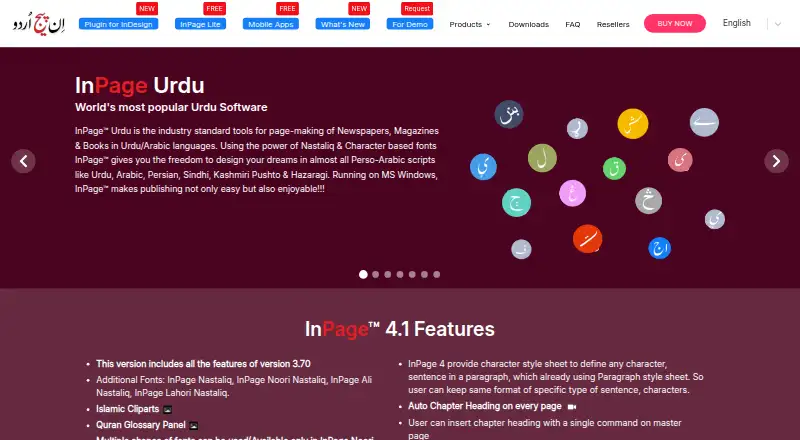
InPage is page-making software for Urdu and related Perso-Arabic languages, aimed at publishing newspapers, magazines and books. Its desktop product supports Urdu, Arabic, Persian, Sindhi, Kashmiri, Pushto and Hazaragi, with linked or separate text boxes and automatic lines between columns. Automatic kerning in Nastaliq text addresses extra interword spacing. InPage 4.1 adds character style sheets, multi-level bullets and numbering, spell check with autocorrection, and word completion. It imports AI and EPS files and exports pages to EPS, GIF, PNG, TIFF or BMP at selectable resolutions from 96 to 1200 DPI; it can also generate ePUB files. A free mobile app creates and edits Nastaliq and Naskh files for use with the InPage Urdu desktop application. The cloud-based InPage Tools utility converts INP files to PDF up to version 4.0, and to EPUB or TXT for versions up to 3.6. The maker says the product has served publishing needs since its introduction in 1994. The desktop product is not for Mac operating systems.
Who it suits
InPage suits publishers and others preparing Urdu or related Perso-Arabic text for newspapers, magazines or books. Its mobile app and conversion utility may also suit users working with compatible InPage files.
What it does well
- Supports seven listed Perso-Arabic scripts.
- Exports pages to five listed image formats.
- Can generate ePUB files.
- Free mobile app creates and edits Nastaliq and Naskh files.
What to know first
- Desktop product is not for Mac operating systems.
- PDF conversion supports INP files only up to version 4.0.
- EPUB and TXT conversion supports versions only up to 3.6.
- Annual support is listed at $50 a year.
Limits
InPage Tools Free Trial is limited to 50,000 words. INP-to-EPUB and TXT conversions support versions up to 3.6, while INP-to-PDF supports versions up to 4.0.
Plans
| Plan | Billed and limits | Price |
|---|---|---|
| InPage Tools Free Trial | 50,000 words; PDF conversion available to all users | Free |
| Free Trial | 50,000 words for newly registered users · INP to TXT/EPUB supports versions 3.6 and earlier · PDF conversion available to all users | Free |
| InPage Lite | Free version; provides essential InPage features | Free |
| InPage Mobile App | Free app; creates and edits Nastaliq and Naskh files | Free |
| Conversion | per word · Cloud conversion of InPage files to TXT, PDF or EPUB | ₹0.01, paid once |
| InPage Tools conversion | INR 0.01/word · INP to PDF up to version 4.0; INP to EPUB and TXT up to version 3.6 | ₹0.01, paid once |
| InPage Premium Users Club | US$50 per user annually · Free upgrades and major releases · First three months of post-sale support are free | $50 a year |
| InPage Premium Users Club Annual Support Program | US$ 50 per year for every user · Annual support; free upgrades and major releases | $50 a year |
As inpage.com lists them, read 9 Oct 2026. The maker's own page has the final word.
Getting started
- Visit the InPage website.
- Choose the InPage Lite free version, the free mobile app, or another listed option.
- For desktop use, install the Windows product.
- For mobile use, get the free app and create or edit Nastaliq and Naskh files.
- Use InPage Tools in the cloud for supported INP conversions.
InPage is desktop publishing software for Urdu and related Perso-Arabic scripts, with a free mobile app for editing compatible files. It suits publishers preparing newspapers, magazines, and books in those languages. Its script-specific layout tools are the draw; the Windows-only desktop app rules out Mac workflows.
Overview
InPage combines language-aware typesetting with page composition and export for print and digital formats. Its maker says it has served publishing needs since its introduction in 1994. That long-running, specialist focus is valuable when Nastaliq text and related scripts are central to a publication, but it is a narrower choice than a general-purpose publishing tool.
Key features
- Perso-Arabic typography: The desktop software supports Urdu, Arabic, Persian, Sindhi, Kashmiri, Pushto, and Hazaragi. Automatic kerning in Nastaliq addresses excess spacing between words, a practical benefit for producing more consistent script-specific layouts.
- Page composition: Linked and unlinked text boxes, automatic lines between text-box columns, and master pages support structured publications. InPage 4.1 adds character style sheets, multi-level bullets and numbering, spell check with autocorrection, and word completion. These tools suit recurring editorial layouts; the feature set is most compelling when the publication depends on InPage’s supported scripts.
- Import and export: InPage 4.1 imports AI and EPS files and exports pages as EPS, GIF, PNG, TIFF, or BMP at selectable resolutions from 96 to 1200 DPI. It also generates ePUB files, giving publishers options for print graphics and digital books.
- Mobile editing and Quran glossary: The free mobile app creates and edits Nastaliq and Naskh files for use with the InPage Urdu desktop application and works with the InPage keyboard. The InDesign plugin adds a Quran Glossary panel containing Indo-Pak Quranic text, with Surah and Ayah selection; that addition is relevant to Quranic publishing rather than a general layout need.
- Online conversion: InPage Tools runs in the cloud without downloads and says it supports Windows, macOS, Linux, and mobile devices. It converts INP files to PDF up to version 4.0, while EPUB and TXT conversion supports files through version 3.6. Older-file compatibility may be a constraint for newer projects, and conversion is charged by the word.
Pricing
InPage has free options alongside paid conversion and support. The desktop product is not for Mac operating systems, so its free version does not remove the main platform constraint.
- InPage Lite — free: The free version provides essential InPage features, making it a way to start with the core product before paying for support. The plan description does not establish that it includes every InPage 4.1 feature.
- InPage Tools Free Trial — free: Includes 50,000 words, with PDF conversion available to all users. It is useful for trying cloud conversion, but the word allowance makes it a limited option for larger conversion workloads.
- InPage Mobile App — free: Creates and edits Nastaliq and Naskh files. It is a free companion for mobile editing, not a substitute for the Windows desktop publishing application.
- InPage Tools conversion — ₹0.01, paid once: Billed INR 0.01/word. INP-to-PDF conversion supports versions up to 4.0; EPUB and TXT conversion supports versions up to 3.6. The per-word rate means cost scales with the amount converted.
- InPage Premium Users Club Annual Support Program — $50 a year: Billed US$ 50 per year for every user, with annual support and free upgrades and major releases. It fits users who want continuing assistance and releases; support is free only for the first three months after software sale, with annual support optional afterward.
Platforms
The desktop product is for Windows, despite the mobile app and cloud conversion tool extending beyond that platform. The payment guide says the desktop software is not for Mac operating systems, so Mac users should not choose InPage expecting a native desktop workflow. InPage Tools says it supports Windows, macOS, Linux, and mobile devices.
Who it's for
InPage is best suited to publishers producing Urdu or other supported Perso-Arabic-script newspapers, magazines, and books, especially when Nastaliq layout and export to ePUB matter. Mobile editing can complement that workflow, and the Quran Glossary panel serves a more specific Quranic publishing use. It is a poor fit for Mac-based desktop publishing or readers who need a general-purpose layout app.
Pros and cons
- Pro: Support for seven Perso-Arabic scripts and automatic Nastaliq kerning address real language-specific layout needs.
- Pro: Master pages, linked text boxes, and export to image formats and ePUB cover both structured page composition and digital output.
- Pro: A free mobile app can create and edit files intended for the InPage Urdu desktop application.
- Con: The desktop product is Windows-only, excluding Mac desktop workflows.
- Con: Online EPUB and TXT conversion stops at INP version 3.6, while PDF conversion supports only through version 4.0.
- Con: Conversion is billed by the word, and continuing support costs US$ 50 per user per year after the initial three months of free support.
Alternatives
For a broader comparison, browse Desktop Publishing Software.
- PublishMedia may suit readers who need Linux, macOS, web, and Windows access; its free starter plan opens and views Publisher and Office files, but editing and export are unavailable.
- VivaDesigner is an option to consider for a cross-platform workflow spanning Linux, macOS, web, Windows, or self-hosting.
- Blurb BookWright may be a better fit for desktop book design, with templates, layout suggestions, and offline editing.
- Flipsnack is an alternative for web-based flipbooks, with Android and iOS apps as well as web access; its free plan caps output at five flipbooks of 15 pages each and PDF uploads at 100 MB.
- Affinity is worth considering for free vector design, pixel photo editing, page layout, and export tools on macOS and Windows.
- iStudio Publisher is a Mac-focused publishing option from a UK company dedicated to Mac publishing apps.
- Kindle Create is a free desktop book-formatting tool for readers publishing through KDP; it supports macOS and Windows.
- Laidout is a free Linux option released under GPL 3.0.
Verdict
Choose InPage if you publish in Urdu or related Perso-Arabic scripts and need Nastaliq-aware desktop layout, publishing tools, and ePUB export. Its language-specific typography and composition tools are the main reason to choose it. Look elsewhere if you need Mac desktop support or if your conversion work depends on INP files newer than the supported version limits.
Verdict
InPage brings language-specific layout and publishing tools together with image and ePUB export. Check the desktop compatibility and file-version limits against your workflow before choosing it.
Questions
Is InPage free?
InPage Lite and the mobile app are listed as free. A paid conversion option and an annual support program are also listed.
Which platforms support the desktop product?
The desktop product is listed for Windows. The maker's payment guide says it is not for Mac operating systems.
Can InPage export PDF and ePUB?
PDF and EPUB export are listed. InPage Tools converts INP files to PDF up to version 4.0 and to EPUB up to version 3.6.
What does the InPage Tools trial include?
The free trial is listed with a 50,000-word limit, and PDF conversion is available to all users.
How much is annual support?
The Premium Users Club Annual Support Program costs $50 a year for every user and includes annual support, free upgrades, and major releases.
Facts from InPage's own pages
- Cloud conversion
- InPage Tools runs in the cloud without downloads and says it supports Windows, macOS, Linux, and mobile devices. · tools.inpage.com, 9 Oct 2026
- Cloud processing
- The converter runs in the cloud without a download and says uploaded files are handled confidentially. · tools.inpage.com, 15 Oct 2026
- Company headquarters
- The registered office is 111 Kala Vihar Apartments, Mayur Vihar Phase 1 Extension, East Delhi, Delhi 110091, India. · indiafilings.com, 15 Oct 2026
- Company legal name
- The maker is Concept Software Private Limited, an active unlisted Indian private company incorporated on 14 December 1988. · indiafilings.com, 15 Oct 2026
- Compatibility limit
- The maker's payment guide says the desktop product is not for Mac operating systems. · tools.inpage.com, 9 Oct 2026
- Conversion limits
- The online InPage Tools utility converts INP files to PDF up to version 4.0 and to EPUB or TXT for versions up to 3.6. · tools.inpage.com, 9 Oct 2026
- Desktop editions
- The desktop product is offered as a dongle package containing a DVD, USB dongle and PDF manual, or as an online download requiring continuous internet access and an emailed product key. · tools.inpage.com, 15 Oct 2026
- Desktop languages
- InPage supports Perso-Arabic scripts including Urdu, Arabic, Persian, Sindhi, Kashmiri, Pushto, and Hazaragi. · tools.inpage.com, 9 Oct 2026
- Developer documentation
- The official pages reviewed provide installation, payment, support, privacy and user manuals but do not describe a public API, SDK or self-hosting package. · inpage.com, 15 Oct 2026
- EPUB output
- InPage can generate EPUB files intended for Arabic or Urdu readers on Android and iOS. · inpage.com, 15 Oct 2026
- Export formats
- Pages can be exported as EPS, GIF, PNG, TIFF or BMP at selectable resolutions from 96 to 1200 DPI. · inpage.com, 15 Oct 2026
- File converter
- InPage Tools converts INP files to TXT, PDF and EPUB, with PDF support through version 4.0 and TXT/EPUB support through version 3.6. · tools.inpage.com, 15 Oct 2026
- Footnotes
- The software supports endnotes, footnotes, line-width controls and conversion between endnotes and footnotes. · inpage.com, 15 Oct 2026
- Headquarters
- Gurgaon, Haryana, India · inpage.com, 28 Sept 2026
- Illustration import
- The product imports EPS and Adobe Illustrator files and supports images or borders placed on master pages. · inpage.com, 15 Oct 2026
- Import and export
- InPage 4.1 can import AI and EPS files, export pages to EPS, GIF, PNG, TIFF, or BMP at selectable resolution from 96 to 1200 DPI, and generate ePUB files. · inpage.com, 9 Oct 2026
- InDesign integration
- The InPage Plugin for InDesign provides a Quran Glossary panel with the complete Indo-Pak Quranic text and selection of Surahs or Ayahs. · inpage.com, 9 Oct 2026
- InDesign plugin
- The InPage Plugin for InDesign provides Quran, text-carving, position-adjustment, symbol and Nastaliq spacing panels for Windows and Mac. · inpage.com, 15 Oct 2026
- InPage 4.1 fonts
- Version 4.1 adds InPage Nastaliq, Noori Nastaliq, Ali Nastaliq and Lahori Nastaliq fonts plus Naskh Lite. · inpage.com, 15 Oct 2026
- Keyboard extensibility
- The application includes built-in keyboards and allows users to create custom keyboards. · inpage.com, 15 Oct 2026
- Licence
- The support agreement reserves proprietary rights to the vendor, prohibits reverse engineering and bars transferring or sublicensing the software. · tools.inpage.com, 15 Oct 2026
- Limit: design and conversion
- G2 complaints include limited design-management creativity, weak special-paste support and troublesome English-to-Urdu conversion. · g2.com, 15 Oct 2026
- Limit: learning curve
- G2 reviewers report that typing and page-layout settings can be difficult for beginners and less convenient than Word. · g2.com, 15 Oct 2026
- Limit: mobile layout
- Google Play reviewers request page-size, page-color and proper page-setup controls, editable-file sharing, image text and PDF border tools. · play.google.com, 15 Oct 2026
Where InPage stands on Freedom251
- Desktop Publishing Software#4 of 30