Freedom251 › AI Video Background Removers
insMind Video Background Changer
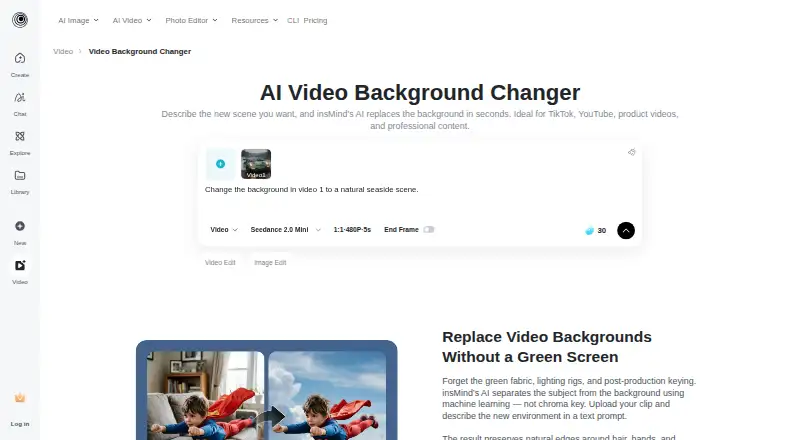
What insMind Video Background Changer is
insMind Video Background Changer uses AI to isolate a video subject and replace the background from a text prompt, without a green screen. Users upload a clip, describe a scene, optionally add one to four reference images, generate the edit and download the result. The browser-based tool requires no editing software installation and accepts MP4, MOV, WebM and AVI files. It supports vertical, square and horizontal video, including formats used for TikTok, Instagram Reels, YouTube Shorts and standard 16:9 content. The maker says frame-by-frame separation aims to preserve hair, hands and movement, while output keeps the source resolution and aspect ratio. Suggested uses include talking-head videos, product demonstrations, social clips, travel promotions, and Shopify or Amazon listings. A free trial includes core features, with extra credits available through platform activities.
Who it suits
It suits creators, brands, marketers and businesses making talking-head videos, product demos, social clips or travel promotions.
What it does well
- AI background replacement without a green screen
- Accepts MP4, MOV, WebM and AVI
- Supports vertical, square and horizontal video
- Reference images guide generated backgrounds
- Browser, Android and iOS access
What to know first
- No free plan
- Uploaded content may be shared with AI providers
- Logged-in web content remains stored until deleted
Limits
There is no free plan. The free trial includes core features, while the product uses a paid pricing model; free credits may be earned through platform activities.
Getting started
- Open the insMind web editor or install its Android or iOS app
- Upload an MP4, MOV, WebM, or AVI video
- Describe the replacement background with a text prompt
- Add one to four reference images if needed
- Generate the edit and download the result
Verdict
insMind offers prompt-based background changes across common video formats and platforms. Review its data-sharing and cloud-retention terms before uploading sensitive footage.
Questions
Does it require a green screen?
No. The tool separates the subject from its background using AI, without requiring a green screen.
Which video formats can I upload?
Supported input formats are MP4, MOV, WebM, and AVI.
What platforms are available?
insMind provides web access plus Android and iOS apps.
Can reference images guide the new background?
Yes. You can upload one to four reference images for the replacement scene.
What happens to uploaded content?
Prompts, images, or videos may be shared with third-party AI providers as needed for editing. Logged-in web users' generated content stays in cloud storage until deleted, while logged-out web content is stored for seven days before automatic deletion.
Facts from insMind Video Background Changer's own pages
- Browser based
- The tool runs in a browser and requires no software installation. · insmind.com, 8 Oct 2026
- Browser use
- Video background replacement runs in the browser without installing editing software. · insmind.com, 7 Oct 2026
- Company
- insMind describes itself as an AI creative platform for video creation, image generation, and visual editing, serving creators, brands, marketers, and businesses. · insmind.com, 8 Oct 2026
- Data hosting
- The privacy policy identifies Alibaba Cloud as its cloud server provider and says the server address is in Virginia, USA. · insmind.com, 8 Oct 2026
- Editing workflow
- The page describes a workflow of uploading a video, prompting a background, generating the edit, and downloading the result. · insmind.com, 7 Oct 2026
- Free trial
- The product FAQ says insMind offers a free trial with core features and says users can earn free credits through platform activities. · insmind.com, 8 Oct 2026
- Headquarters
- Singapore · insmind.com, 28 Sept 2026
- Integrations
- The page describes videos for Shopify and Amazon listings and formats for TikTok, Instagram Reels, and YouTube Shorts. · insmind.com, 8 Oct 2026
- Intended users
- The page presents use cases including talking-head videos, e-commerce product demos, social media clips, and travel promotion. · insmind.com, 7 Oct 2026
- Mobile apps
- The maker page links to App Store and Google Play downloads. · insmind.com, 8 Oct 2026
- Output
- The page says the finished video maintains the original footage resolution and aspect ratio. · insmind.com, 8 Oct 2026
- Output quality
- The page says the output maintains the original footage resolution and aspect ratio. · insmind.com, 7 Oct 2026
- Privacy and data
- The privacy policy says uploaded prompts, images, or videos may be shared with third-party AI service providers as needed to generate or edit requested content. · insmind.com, 7 Oct 2026
- Privacy retention
- The privacy policy says generated web content for logged-out users is stored for 7 days and then automatically deleted. · insmind.com, 8 Oct 2026
- Purpose
- The AI tool replaces video backgrounds from a text prompt without requiring a green screen. · insmind.com, 8 Oct 2026
- Reference images
- Users can upload 1 to 4 reference images to guide the replacement background. · insmind.com, 8 Oct 2026
- Security
- The privacy policy says insMind uses encryption and access controls as security measures for personal information. · insmind.com, 8 Oct 2026
- Subject separation
- It isolates subjects frame by frame and aims to preserve details such as hair, hands, and movement. · insmind.com, 8 Oct 2026
- Supported formats
- The tool is described as supporting vertical, square, and horizontal video formats, including formats for TikTok, Instagram Reels, YouTube Shorts, and standard 16:9 content. · insmind.com, 7 Oct 2026
- Trial and credits
- The FAQ says insMind offers a free trial with core features and that users can earn free credits through platform activities; it does not state a trial duration. · insmind.com, 7 Oct 2026
- Use cases
- The maker presents talking head videos, product demos, social clips, and travel promotions as use cases. · insmind.com, 8 Oct 2026
Where insMind Video Background Changer stands on Freedom251
- AI Video Background Removers#25 of 29