Freedom251 › Green Screen Software

BackgroundRemover.video
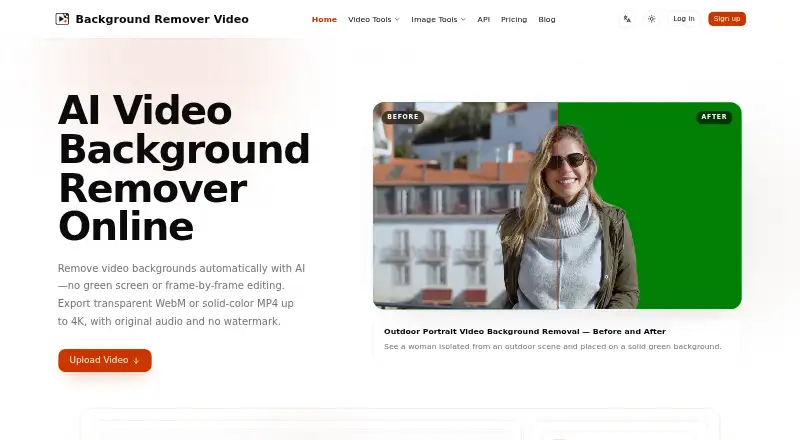
What BackgroundRemover.video is
BackgroundRemover.video is a web service and API that uses AI to remove video backgrounds without a green screen or frame-by-frame editing. It processes videos shorter than 60 seconds asynchronously at up to 4K resolution and retains their original aspect ratio. Exports can use transparent or solid-color backgrounds; original audio is preserved by default, and Auto Crop centers the subject. Supported inputs are MP4, MOV, WebM, M4V, and GIF. Export formats are MP4, MOV, WebM, MKV, and GIF. Each started second uses one credit, and batch processing and multi-file uploads are not supported. The public API handles video and image background removal through asynchronous upload, task creation, status polling, and download, with a limit of 60 requests per 60-second window per key. Uploaded videos and results are removed after seven days. The privacy policy says uploads may be shared with trusted video-processing services, are stored privately, and are not used for advertising. Paid one-time credit purchases start at $5.99 for 60 credits; the maker says credits do not expire.
Who it suits
It suits creators, online sellers, educators, marketing teams, video editors, and remote teams working with short videos. The API may suit teams automating background removal for video or image files.
What it does well
- Processes videos up to 4K resolution.
- Supports transparent or solid-color backgrounds.
- Preserves original audio by default.
- Purchased credits do not expire, according to the maker.
- Offers an API for video and image background removal.
What to know first
- Videos must be shorter than 60 seconds.
- Batch processing and multi-file uploads are not supported.
- Uploads and results are removed after seven days.
- Each started second consumes one credit.
Limits
Quick Try costs $5.99 a month as a one-time purchase and includes 60 credits, equivalent to 60 seconds. Each started second uses one credit; videos must be shorter than 60 seconds, and uploaded files and results expire after seven days.
Plans
| Plan | Billed and limits | Price |
|---|---|---|
| Creator | one-time purchase · 420 credits · 420 seconds of video · up to 4K · transparent or solid-color backgrounds · no watermark | $29.99, paid once |
| Quick Try | one-time purchase · 60 credits · 60 seconds of video · up to 4K · transparent or solid-color backgrounds · no watermark | $5.99, paid once |
| Starter | one-time purchase · 120 credits · 120 seconds of video · up to 4K · transparent or solid-color backgrounds · no watermark | $9.99, paid once |
| Studio | one-time purchase · 1,500 credits · 1,500 seconds of video · up to 4K · transparent or solid-color backgrounds · no watermark | $99.99, paid once |
As backgroundremover.video lists them, read 29 Sept 2026. The maker's own page has the final word.
Getting started
- Visit https://backgroundremover.video/.
- Choose a one-time credit purchase, starting with Quick Try at $5.99 a month.
- Upload a supported video shorter than 60 seconds.
- Choose a transparent or solid-color background and use Auto Crop if needed.
- Process the video and export it in a supported output format.
- For API use, upload a file, create a task, poll its status and download the result.
Verdict
BackgroundRemover.video combines short-clip background removal with transparent or solid-color exports and API access. Review its one-credit-per-second usage, seven-day file retention, and one-time credit plans before choosing it.
Questions
Is there a free plan?
No. The service is paid, with one-time credit purchases.
What does Quick Try cost?
Quick Try is $5.99 a month, billed as a one-time purchase, for 60 credits and 60 seconds.
Which video formats can I upload?
Supported inputs are MP4, MOV, WebM, M4V and GIF.
Can I export a transparent video?
Yes. Exports can use a transparent or solid-color background.
Is an API available?
Yes. The public API supports asynchronous video and image background removal. Requests are limited to 60 per 60-second window per key.
How long are uploaded files and results kept?
They are automatically removed after seven days.
Facts from BackgroundRemover.video's own pages
- API
- The public API supports server-to-server video and image background removal through asynchronous upload, task creation, status polling, and download steps. · backgroundremover.video, 29 Sept 2026
- API constraints
- API requests are limited to 60 per 60-second window per key, and uploaded files and results expire after 7 days. · backgroundremover.video, 29 Sept 2026
- Audio and framing
- Original audio is preserved by default, and an Auto Crop option automatically centers the subject. · backgroundremover.video, 29 Sept 2026
- Batch processing
- No · backgroundremover.video, 20 Sept 2026
- File retention
- Uploaded videos and processed results are automatically removed from the service after 7 days. · backgroundremover.video, 29 Sept 2026
- Free plan
- No · backgroundremover.video, 20 Sept 2026
- Inputs
- Supported video inputs are MP4, MOV, WebM, M4V, and GIF. · backgroundremover.video, 29 Sept 2026
- Intended users
- The maker describes use cases for content creators, online sellers, educators, marketing teams, video editors, and remote teams. · backgroundremover.video, 29 Sept 2026
- Outputs
- The service offers transparent or solid-color backgrounds and exports MP4, MOV, WebM, MKV, or GIF. · backgroundremover.video, 29 Sept 2026
- Payments
- Purchases are processed securely by Stripe, and the maker says purchased credits never expire. · backgroundremover.video, 29 Sept 2026
- Privacy
- The privacy policy says uploaded videos may be shared with trusted video-processing services, are not used for advertising, and are stored privately on the service. · backgroundremover.video, 29 Sept 2026
- Quality and duration
- It processes videos shorter than 60 seconds asynchronously at up to 4K resolution while retaining the original aspect ratio. · backgroundremover.video, 29 Sept 2026
- Security
- The privacy policy says the service uses reasonable safeguards and does not store complete card or bank details. · backgroundremover.video, 29 Sept 2026
- Support
- The maker lists [email protected] as its support contact. · backgroundremover.video, 29 Sept 2026
- Usage limits
- Each started second uses one credit, videos must be shorter than 60 seconds, and batch or multi-file uploads are not supported. · backgroundremover.video, 29 Sept 2026
- Video removal
- The service uses AI to remove video backgrounds without requiring a green screen or frame-by-frame editing. · backgroundremover.video, 29 Sept 2026
Where BackgroundRemover.video stands on Freedom251
- Green Screen Software#25 of 30
- Video Background Removal Software#20 of 24
- AI Video Background Removers#26 of 29
- AI Background Removers#91 of 94
- Background removers#69 of 70