Freedom251 › AI Camera Motion Video Tools
Wandura Video Background Remover
What Wandura Video Background Remover is
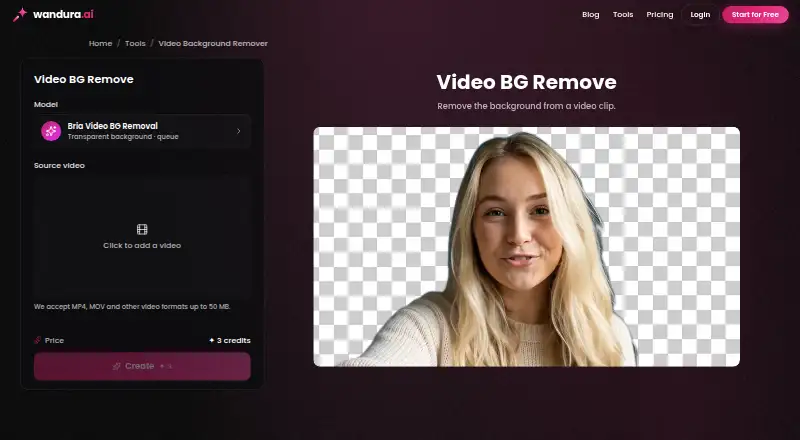
Wandura Video Background Remover is a web tool that isolates a video subject and places it on a transparent layer for compositing. Its Bria background-removal engine tracks the subject through each frame, so ordinary footage can be processed without a green screen or special lighting. MP4, MOV, and WebM clips are accepted. Uploads run as cloud background jobs, and completed results are saved in Creations. You can download the transparent video and layer it over an image, color, or other footage in an editor, or use it with another Wandura video tool. Clearly visible subjects, reasonable lighting, and contrast help produce cleaner cutouts; hair and other fine details are harder to separate. The tool does not remove watermarks or overlay text. A free plan is available. Pay-as-you-go credits cost $0.01 per credit, while subscriptions start at $10 per month when billed annually. Subscription credits do not roll over; one-time credits expire after 90 days.
Who it suits
Wandura suits creators who need transparent video subjects for compositing and can work with cloud processing. It accepts common video formats and supports editing workflows after download.
What it does well
- Works without a green screen
- Tracks subjects through every frame
- Accepts MP4, MOV, and WebM
- Transparent results can be composited in editors
- Free plan available
What to know first
- Does not remove watermarks or overlay text
- Fine details such as hair are harder to segment
- Subscription credits do not roll over
- One-time credits expire after 90 days
Limits
Subscription credits refresh each billing cycle and do not roll over. Credits bought in one-time packs are valid for 90 days; pay-as-you-go usage costs $0.01 per credit.
Plans
| Plan | Billed and limits | Price |
|---|---|---|
| Pay-as-you-go credits | $0.01 per credit; model usage is charged in credits when you generate · no separate subscription per model · pack credits expire after 90 days | $0.01, paid once |
| Enterprise | Custom credit volume; contact sales · SSO/SAML · dedicated SLA and support · volume discounts · white-label · full API access · team workspace | On request |
As wandura.ai lists them, read 8 Oct 2026. The maker's own page has the final word.
Getting started
- Open the Wandura Video Background Remover website
- Upload an MP4, MOV, or WebM clip
- Let the cloud background job process the video
- Find the completed result in Creations
- Download the transparent video
- Composite it over an image, color, or footage in an editor
Verdict
Wandura provides cloud-based foreground isolation for common video formats and editing workflows. Its free plan and credit options offer flexibility, but output quality depends on subject visibility and the service cannot erase overlaid text or watermarks.
Questions
Is there a free plan?
Yes, Wandura offers a free plan.
How much do credits cost?
Pay-as-you-go credits cost $0.01 per credit. Subscriptions start at 10 /mo when billed annually.
Which video formats are accepted?
The tool accepts MP4, MOV, and WebM clips.
Does it require a green screen?
No. Its model segments subjects from ordinary footage without a chroma-key backdrop or special lighting.
Can it remove watermarks or text overlays?
No. It separates the subject but does not remove watermarks or overlay text.
What is available for enterprise use?
Enterprise plans use custom credit volumes and can include SSO/SAML, a dedicated SLA and support, volume discounts, white-labeling, full API access, and a team workspace.
Facts from Wandura Video Background Remover's own pages
- AI engine
- The tool runs Bria's background-removal engine across the clip and tracks the subject through every frame. · wandura.ai, 8 Oct 2026
- Best footage
- Wandura says clearly visible subjects with reasonable lighting and contrast produce cleaner cutouts, while fine edge detail such as hair is hardest to segment. · wandura.ai, 8 Oct 2026
- Cloud processing
- Uploaded clips are processed as background jobs, and the result is saved to the user's Creations. · wandura.ai, 8 Oct 2026
- Content privacy
- Wandura says it does not sell user content or use created content to train its own AI models; submitted media is sent to fal.ai and relevant model providers for generation. · wandura.ai, 8 Oct 2026
- Credit rules
- Subscription plan credits refresh each billing cycle without rollover, while one-time pack credits are valid for 90 days. · wandura.ai, 8 Oct 2026
- Integrations
- The product page says users can composite its downloaded transparent video in their own editor or chain it into another Wandura video tool. · wandura.ai, 8 Oct 2026
- Limit
- The tool separates the subject from the background but does not remove watermarks or overlay text. · wandura.ai, 8 Oct 2026
- No green screen
- The model segments the subject from ordinary footage without a chroma-key backdrop or special lighting. · wandura.ai, 8 Oct 2026
- Output and workflow
- The transparent video can be downloaded and layered over an image, color, or footage in an editor. · wandura.ai, 8 Oct 2026
- Payment
- Wandura says payments are processed through Stripe and accepts major credit and debit cards. · wandura.ai, 8 Oct 2026
- Pricing model
- Models use a shared Wandura credit balance, and credits are deducted only when a generation runs. · wandura.ai, 8 Oct 2026
- Security
- Wandura says it uses encryption in transit, access controls, infrastructure providers, and internal safeguards to protect data. · wandura.ai, 8 Oct 2026
- Support
- Wandura lists [email protected] for privacy and account requests. · wandura.ai, 8 Oct 2026
- What it does
- It removes the background from video and leaves the subject on a transparent layer for compositing. · wandura.ai, 8 Oct 2026
Where Wandura Video Background Remover stands on Freedom251
- AI Camera Motion Video Tools#11 of 19
- AI Cinematic Video Generators (camera control)#17 of 26
- AI Video Background Removers#23 of 29