Freedom251 › Infographic Makers
InfoArt.ai
What InfoArt.ai is
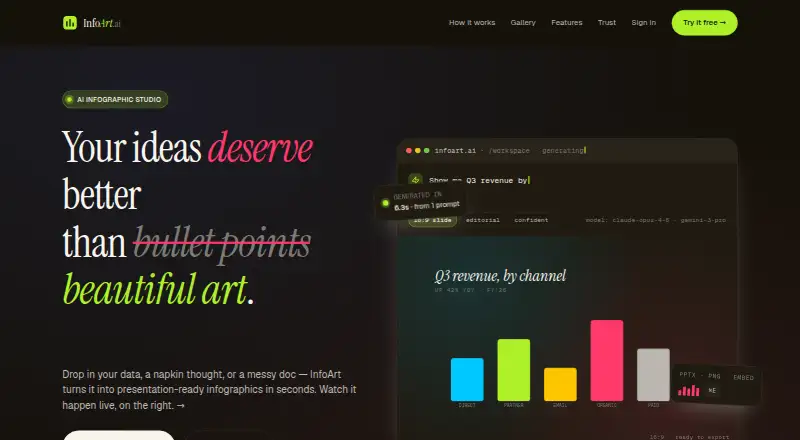
InfoArt.ai is a web service for turning data, concepts, and prompts into presentation-ready infographics. You can paste text, upload a CSV file or PDF, or begin by typing. Its described workflow uses Claude to organize the narrative and Imagen to create the artwork. You can then request changes such as a different color palette, chart type, or shorter title, while the service keeps the conversation context between revisions.
Exports include native PPTX files, PNGs intended for Keynote, and live embeds with view tracking. InfoArt.ai lists 16:9, 4:3, 1:1, and 9:16 formats, with automatic relayout. For CSV work, the feature page sets a limit of 1,000 rows per upload and lists PNG or PDF output. The free plan includes five drafts per month; watermark-free downloads start at $1.99. Brand Kit stores colors, style preferences, and guidelines for team use and is an enterprise feature. InfoArt.ai says prompts, uploads, and generated content are not used to train or refine AI models. Generated content is kept for 30 days, uploads are deleted after processing, and account data is deleted upon closure. The company trading as InfoArt.ai is Potomac Data Corporation.
Who it suits
InfoArt.ai suits people who need to turn source material into infographics for presentations or other visual communications. It may fit teams that want shared brand preferences, as well as users who need several aspect ratios or export formats.
What it does well
- Accepts pasted text, CSV files, PDFs, or typed prompts.
- Keeps context while users request design revisions.
- Offers PPTX, Keynote-ready PNG, and live embed exports.
- Supports four aspect ratios with automatic relayout.
- States customer content is not used to train AI models.
What to know first
- The free plan is limited to five drafts per month.
- Watermark-free downloads start at $1.99.
- Brand Kit is an enterprise feature.
- CSV uploads are capped at 1,000 rows.
Limits
The Free plan provides five drafts per month. Watermark-free downloads start at $1.99, and CSV uploads are limited to 1,000 rows; CSV output is listed as PNG or PDF.
Plans
| Plan | Billed and limits | Price |
|---|---|---|
| Free | 5 free drafts/month · Watermark-free downloads from $1.99 | Free |
As infoart.ai lists them, read 4 Oct 2026. The maker's own page has the final word.
Getting started
- Open https://www.infoart.ai/ in a web browser.
- Start by typing, pasting text, or uploading a CSV file or PDF.
- Create a draft and request changes such as colors, chart types, or shorter titles.
- Choose an available aspect ratio and export format.
Verdict
Choose InfoArt.ai if you want a web-based way to turn information or prompts into revisable infographics with presentation-oriented exports. The free plan is limited to five drafts a month, and watermark-free downloads start at $1.99; teams needing Brand Kit should note that it is an enterprise feature.
Questions
Does InfoArt.ai have a free plan?
Yes. The Free plan costs nothing and includes five drafts per month.
How much do watermark-free downloads cost?
Watermark-free downloads start at $1.99.
What platforms does InfoArt.ai support?
It is available on the web.
What can I upload or enter?
You can paste text, upload CSV files or PDFs, or start by typing. CSV uploads have a 1,000-row maximum.
What export formats are available?
Listed exports include native PPTX, Keynote-ready PNG, and live embeds with view tracking. The CSV feature lists PNG or PDF output.
Who makes InfoArt.ai?
Potomac Data Corporation trades as InfoArt.ai. Its Trust Center describes GDPR and CCPA compliance and says SOC 2 Type II is planned for 2026.
Facts from InfoArt.ai's own pages
- AI data use
- The Trust Center says customer prompts, uploads, and generated content are not used to train, improve, or fine-tune AI models. · infoart.ai, 4 Oct 2026
- AI generation
- The site describes a two-model pipeline in which Claude structures the narrative and Imagen composes the art. · infoart.ai, 4 Oct 2026
- Aspect ratios
- Supported aspect ratios listed are 16:9, 4:3, 1:1, and 9:16, with automatic relayout. · infoart.ai, 4 Oct 2026
- Brand Kit
- Brand Kit saves colors, style preferences, and guidelines for team use and is listed as an enterprise feature. · infoart.ai, 4 Oct 2026
- Company
- The contact page identifies Potomac Data Corporation as the company trading as InfoArt.ai and lists its address in Silver Spring, Maryland. · infoart.ai, 4 Oct 2026
- Compliance
- The Trust Center describes GDPR and CCPA compliance and says SOC 2 Type II is planned for 2026. · infoart.ai, 4 Oct 2026
- CSV limits
- The CSV feature page lists a maximum of 1,000 rows per upload and PNG or PDF output. · infoart.ai, 4 Oct 2026
- Exports
- The site lists native PPTX, Keynote-ready PNG, and live embeds with view tracking. · infoart.ai, 4 Oct 2026
- Inputs
- Users can paste text, upload CSV files or PDFs, or start by typing. · infoart.ai, 4 Oct 2026
- Iteration
- Users can request changes such as different colors, chart types, or shorter titles while InfoArt holds context between turns. · infoart.ai, 4 Oct 2026
- Purpose
- InfoArt.ai turns data, concepts, and prompts into presentation-ready infographics. · infoart.ai, 4 Oct 2026
- Retention
- Generated content is kept for 30 days, uploaded files are deleted after processing, and account data is deleted upon account closure. · infoart.ai, 4 Oct 2026
- Security
- The Trust Center lists TLS 1.3 in transit, AES-256 at rest, and AWS hosting. · infoart.ai, 4 Oct 2026
- Support
- The contact page says general support is available at [email protected] and typically responds within 24 hours on business days. · infoart.ai, 4 Oct 2026
Where InfoArt.ai stands on Freedom251
- Infographic Makers#13 of 26