Imgflip GIF Maker
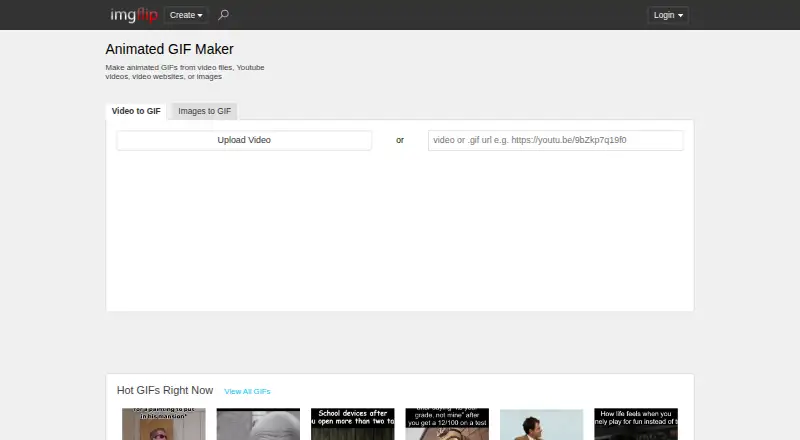
What Imgflip GIF Maker is
Imgflip GIF Maker is an online tool for turning images and video into animated GIFs. It accepts video files, URLs, YouTube, Vimeo, and Giphy, and supports image-to-GIF and video-to-GIF creation; prompt-to-GIF generation is not offered. Editing options include text, stickers, drawings, cropping, rotation, resizing, sound, and motion. You can share finished GIFs through links, downloads, phone apps, social media, or Imgflip communities, and logged-in users can save them to an Imgflip account. The free plan supports video segments up to 24 seconds, with up to 160 frames and 360x360 dimensions; image GIFs can use up to 1,600 frames and 500x500 dimensions. Pro raises video limits to 1,600 frames and 240 seconds, with unlimited dimensions and 240M total resolution. Pro also removes or customizes the watermark and disables ads. Video-based GIF sound requires Pro. The tool supports Windows, Mac, iOS, and Android. Pro costs $11.95 a month with yearly billing or $14.95 a month.
Who it suits
It suits people making GIFs from existing images or video who want editing and sharing options. The free plan has defined limits, while Pro raises video limits and includes watermark controls.
What it does well
- Makes GIFs from images, videos, URLs, YouTube, Vimeo, and Giphy.
- Includes text, stickers, drawings, cropping, rotation, and resizing.
- Free image-to-GIF creation supports up to 1,600 frames.
- Supports saving to accounts and sharing through several channels.
What to know first
- Free video GIFs are limited to 160 frames and 360x360.
- Free video segments are limited to 24 seconds.
- Video-based GIF sound requires Pro.
- Prompt-to-GIF generation is not supported.
Limits
The free plan allows video GIFs up to 160 frames, 360x360, 12M total resolution, and 24 seconds. Image GIFs can use up to 1,600 frames and 500x500 dimensions. Pro raises video limits and lists unlimited image frames and dimensions; sound on video-based GIFs requires Pro.
Plans
| Plan | Billed and limits | Price |
|---|---|---|
| Free | 160 video frames · 360x360 maximum video dimensions · 12M maximum total resolution · 24-second maximum video segment · 1600 image frames · 500x500 maximum image dimensions | Free |
| Pro | 1600 video frames · 240-second maximum video segment · Unlimited video dimensions · 240M maximum total resolution · Unlimited image frames · Unlimited image dimensions | On request |
| Pro annual billing | billed yearly at $11.95/month | $11.95 a month |
| Pro monthly | — | $14.95 a month |
As imgflip.com lists them, read 28 Sept 2026. The maker's own page has the final word.
Getting started
- Open https://imgflip.com/gif-maker.
- Choose images or video as the material for a GIF, or use a supported source such as a URL, YouTube, Vimeo, or Giphy.
- Edit the GIF with available text, sticker, drawing, crop, rotation, resize, sound, or motion tools.
- Use the free plan or choose Pro for higher limits and Pro features.
- Download or share the GIF; log in to save it to an Imgflip account.
Imgflip GIF Maker suits people who want to turn existing images or video into shareable GIFs, with editing tools and desktop and mobile support. It is a practical free option for short, small video clips and larger image sequences; Pro is the step up for extended or higher-resolution video and sound.
Overview
Imgflip works from media you already have: images, video files, URLs, or sources such as YouTube, Vimeo, and Giphy. Text, stickers, drawings, cropping, rotation, resizing, and motion give users a useful set of ways to adapt that material. The trade-off is clear: it is a conventional source-based editor, not a prompt-to-GIF generator.
Supported image formats include PNG, JPG/JPEG, GIF, SVG, WebP, TIFF, and BMP; video formats include MP4, MOV, AVI, WMV, and several others. Logged-in users can save GIFs to an Imgflip account, or share them through social media, phone apps, links, downloads, and Imgflip communities. Watermark-free export is supported, while Pro can remove or customize the imgflip.com watermark.
Key features
- Video-to-GIF: Free allows up to 160 frames, 360x360 video dimensions, 12M total resolution, and a 24-second segment. That is enough room for brief, modest-sized clips, but not for longer footage or sharper output. Pro raises the limits to 1,600 frames, unlimited video dimensions, 240M total resolution, and 240 seconds.
- Image-to-GIF: Free supports up to 1,600 frames and 500x500 image dimensions. This gives image sequences substantially more frame headroom than free video conversion, though users with larger images or sequences need Pro's unlimited image dimensions and frames.
- Editing and sound: The range of editing controls suits users who want to make changes before sharing. Sound is limited to video-based GIFs and requires Pro, so it is not part of the free workflow.
- Sharing and saving: Account saving and several sharing routes make it convenient to keep or distribute finished GIFs. Platform support spans Windows, macOS, iOS, and Android.
Pricing
| Plan | Price | Limits and inclusions |
|---|---|---|
| Free | free | 160 video frames; 360x360 maximum video dimensions; 12M maximum total resolution; 24-second maximum video segment; 1,600 image frames; 500x500 maximum image dimensions. |
| Pro annual billing | $11.95 a month, billed yearly | Expanded video limits, unlimited image frames and dimensions, sound on video-based GIFs, ad removal, and watermark removal or customization. |
| Pro monthly | $14.95 a month | Expanded Pro limits and features with monthly billing. |
Free is best for occasional short clips and image sequences within its caps. Pro fits creators who need longer or larger video output, sound, or a watermark-free or customized watermark; it also disables ads. Annual billing costs less per month than monthly billing, but requires yearly billing. Pro's price is also given as custom pricing.
Platforms
Imgflip supports Windows, macOS, iPhone/iOS, and Android. Its online workflow and media-source options suit people moving between desktop and mobile, rather than users seeking a prompt-based generator.
Who it's for
Choose Imgflip for editing and sharing GIFs made from existing images or video, especially if free image sequences or short video clips meet your needs. Look elsewhere if you want text-prompt generation or if free video limits are too restrictive and you do not want a paid plan.
Pros and cons
- Pro: Broad input sources and editing controls make it useful for adapting existing media rather than only converting a single file.
- Pro: Free image creation allows up to 1,600 frames, with no watermark-free export restriction stated for that tier.
- Con: Free video is limited to 160 frames, 360x360 dimensions, 12M total resolution, and 24 seconds, which constrains detailed or longer clips.
- Con: Sound on video-based GIFs and expanded output limits require Pro, so the free tier is not suitable for those needs.
- Con: It does not generate GIFs from prompts.
Alternatives
For a directory of prompt-oriented options, browse AI GIF Makers. Consider Moxion if a shared free AI generation each day, gifted credits, or a free trial suits your workflow. GifCraft is a free alternative with no account, no watermark, and no export limit, though its AI generator allows only a few images per hour. GIPHY Create is another free option for GIF creation. Kapwing may suit users who want a 720p free export with a four-minute export-length allowance and 10 credits. GifRun offers a free account with a 20-second limit and 600px maximum resolution, with a watermark. Hagif is an option for local, single-file tools without a required account or watermark. Photo2GIF is aimed at vintage-style AI GIFs, with one free AI GIF and a watermark on its free plan. Rewind.ai AI GIF Generator offers a free allowance of 5,000 tokens per day.
Verdict
Imgflip GIF Maker is a strong fit for people who want flexible editing and sharing for GIFs made from existing media, especially when free image-to-GIF limits are enough. Its main advantage is the combination of varied media sources and editing controls; its main drawback is that serious video output and sound sit behind Pro, while prompt-based creation is not supported.
Verdict
Imgflip GIF Maker covers image- and video-based GIF creation, with editing and sharing options. Check the free tier's frame, size, and duration limits; Pro is required for sound on video-based GIFs.
Questions
Is Imgflip GIF Maker free?
Yes. The Free plan costs 0.00 USD and supports GIF creation with the free-tier limits.
How much does Pro cost?
Pro annual billing is $11.95 a month, billed yearly. Pro monthly billing is $14.95 a month.
What can I use to make a GIF?
You can use images, video files, URLs, YouTube, Vimeo, and Giphy. The tool supports image-to-GIF and video-to-GIF, but not prompt-to-GIF.
Which platforms does it support?
Imgflip lists support for Windows, Mac, iPhone/iOS, and Android.
Can I make a GIF without a watermark?
Watermark-free export is listed as supported. Pro can remove or customize the imgflip.com watermark.
Can I add sound to a GIF?
Sound works with video-based GIFs and requires an Imgflip Pro account.
Facts from Imgflip GIF Maker's own pages
- Company identity
- The page identifies the company as Imgflip LLC in 2026. · imgflip.com, 28 Sept 2026
- Customization features
- Features include text, stickers, drawings, cropping, rotation, resizing, sound, and motion. · imgflip.com, 28 Sept 2026
- Free GIF creation
- Users can make high quality animated GIFs online for free. · imgflip.com, 28 Sept 2026
- Free image dimensions
- The free tier supports maximum image dimensions of 500x500. · imgflip.com, 28 Sept 2026
- Free image frames
- The free tier allows up to 1600 frames for image-to-GIF creation. · imgflip.com, 28 Sept 2026
- Free plan
- Yes · imgflip.com, 22 Sept 2026
- Free dimensions
- The free tier supports maximum video dimensions of 360x360. · imgflip.com, 28 Sept 2026
- Free video frames
- The free tier allows 160 maximum frames per GIF from video. · imgflip.com, 28 Sept 2026
- Free video length
- The free tier supports video segments up to 24 seconds. · imgflip.com, 28 Sept 2026
- Supported image formats
- Supported formats include PNG, JPG/JPEG, GIF, and browser-supported formats such as SVG, WebP, TIFF, and BMP. · imgflip.com, 28 Sept 2026
- Image to GIF
- Yes · imgflip.com, 22 Sept 2026
- Maximum GIF length
- 240 · imgflip.com, 22 Sept 2026
- Media sources
- GIFs can be made from YouTube, Vimeo, Giphy, video files, URLs, and images. · imgflip.com, 28 Sept 2026
- Online saving
- Logged-in users can save created GIFs to their Imgflip account. · imgflip.com, 28 Sept 2026
- Supported platforms
- It supports Windows, Mac, iPhone/iOS, and Android. · imgflip.com, 28 Sept 2026
- Pro ad removal
- Pro disables all ads. · imgflip.com, 28 Sept 2026
- Prompt to GIF
- No · imgflip.com, 22 Sept 2026
- Pro quality limits
- Pro raises video limits to 1600 frames, unlimited dimensions, 240M total resolution, and 240 seconds. · imgflip.com, 28 Sept 2026
- Pro watermark removal
- Pro can remove or customize the imgflip.com watermark. · imgflip.com, 28 Sept 2026
- Sharing options
- Users can share to social media, phone apps, links, downloads, and Imgflip communities. · imgflip.com, 28 Sept 2026
- GIF sound support
- Sound works with video-based GIFs, but requires an Imgflip Pro account. · imgflip.com, 28 Sept 2026
- Feedback support
- Users can send feedback or suggestions about the GIF maker. · imgflip.com, 28 Sept 2026
- GIF templates
- Yes · imgflip.com, 22 Sept 2026
- Supported video formats
- Popular supported formats include FLV, AVI, MOV, MP4, MPG, MPEG, WMV, 3GP, ASF, SWF, OGG, H264, and RM. · imgflip.com, 28 Sept 2026
Where Imgflip GIF Maker stands on Freedom251
- GIF makers#3 of 54
- AI GIF Makers#6 of 23