Freedom251 › AI Image Upscalers
Icons8 Smart Upscaler
What Icons8 Smart Upscaler is
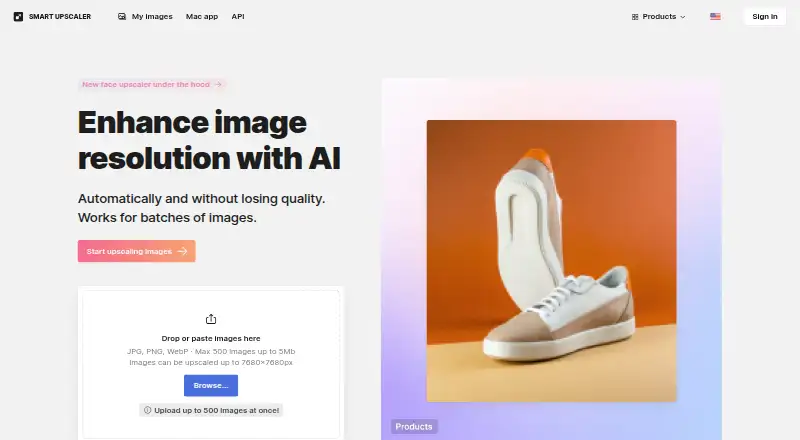
Icons8 Smart Upscaler is an AI service for enlarging images while preserving detail. It runs on the web and through an API, supports batch processing, and allows custom scaling. Web uploads accept JPG, PNG, and WebP files up to 5 MB each, with output up to 7680 × 7680 pixels. The API accepts those formats as files or image URLs and adds automated sharpening and noise reduction. Icons8 says JPEG or PNG sources below 3000 × 3000 pixels work best. Uploaded pictures are stored for history and re-downloads; the company says they are processed for the requested task, not shared or showcased, and not used to train machine-learning systems. A free plan is available. Paid choices include a 50-image prepaid package, a Limited subscription at $9 a month for 100 images with rollover credits, and an Unlimited subscription at $99 a month.
Who it suits
Smart Upscaler suits designers and image workflows needing browser or programmatic enlargement. It is useful when batch processing, API access, or stated upload privacy controls matter.
What it does well
- AI upscaling with custom scale settings
- Batch processing and API access
- Supports JPG, PNG, and WebP
- Web output up to 7680 × 7680 pixels
- Free plan available
What to know first
- Web uploads are limited to 5 MB each
- No desktop app is listed
- Unlimited subscription costs $99 a month
Limits
The Limited subscription covers 100 images per month with rollover credits. The prepaid package covers 50 images; the Unlimited subscription allows any number of images.
Plans
| Plan | Billed and limits | Price |
|---|---|---|
| Limited subscription | Monthly · 100 images/month · rollover credits | $9 a month |
| Unlimited subscription | Monthly · Any number of images | $99 a month |
| Prepaid package | Use anytime · 50 images | $10, paid once |
As icons8.com lists them, read 10 Oct 2026. The maker's own page has the final word.
Getting started
- Open the web product at https://icons8.com/upscaler.
- Upload a JPG, PNG, or WebP image no larger than 5 MB, or use batch processing.
- Choose a custom scale for web upscaling, up to 7680 × 7680 pixels.
- Choose the free plan, 50-image prepaid package, or a subscription for your image volume.
- Use the API with an uploaded JPEG, PNG, or WebP file, or provide an image URL.
Verdict
Icons8 Smart Upscaler combines web and API enlargement with batch handling, sharpening, and noise reduction. Its free option and volume-based paid plans cover different usage levels, while the 5 MB web-upload limit may shape workflows.
Questions
Is Smart Upscaler free?
A free plan is available. Paid choices include a 50-image prepaid package and two monthly subscriptions.
How much do the monthly subscriptions cost?
The Limited subscription costs $9 a month, billed monthly, for 100 images per month with rollover credits. The Unlimited subscription costs $99 a month, billed monthly, for any number of images.
Which platforms are available?
Smart Upscaler is available on the web and through an API. There is no desktop app.
What image files can I use?
The web uploader accepts JPG, PNG, and WebP files up to 5 MB each. The API accepts uploaded JPEG, PNG, or WebP files and can also process an image from a URL.
Does Icons8 use uploaded images for machine learning?
Icons8 says it does not use Smart Upscaler uploads for machine learning. It says uploads are used for requested processing and are not shared or showcased.
Who makes Smart Upscaler?
Icons8 describes itself as making graphics, graphic design apps, and AI tools to help designers.
Facts from Icons8 Smart Upscaler's own pages
- AI training
- Icons8 says it does not use uploaded Smart Upscaler pictures for machine learning. · icons8.com, 10 Oct 2026
- API access
- Yes · icons8.com, 20 Sept 2026
- API input
- The API accepts uploaded JPEG, PNG, or WebP files and can also upscale an image from a URL. · developers.icons8.com, 10 Oct 2026
- API integration
- The Smart Upscaler API provides automated sharpening, noise reduction, and upscaling. · developers.icons8.com, 10 Oct 2026
- Audience
- Icons8 describes itself as making quality graphics, graphic design apps, and AI tools to help designers. · icons8.com, 10 Oct 2026
- Batch processing
- The web page supports uploading up to 500 images at once. · icons8.com, 10 Oct 2026
- Best source images
- Icons8 says JPEG or PNG images smaller than 3000 × 3000 pixels work best. · icons8.com, 10 Oct 2026
- Desktop app
- Icons8 offers GoProd for Mac, which combines image upscaling and background removal and supports JPG, PNG, HEIC, and WebP. · icons8.com, 10 Oct 2026
- Image storage
- Uploaded images are stored securely so users can view their history and re-download enlarged photos. · icons8.com, 10 Oct 2026
- Input formats
- JPG, PNG, WebP · icons8.com, 20 Sept 2026
- Maximum dimensions
- Web images can be upscaled up to 7680 × 7680 pixels. · icons8.com, 10 Oct 2026
- Maximum scale
- custom · icons8.com, 20 Sept 2026
- Privacy policy
- Icons8's privacy policy says uploaded images are used to perform requested image processing and are not shared or showcased. · intercom.help, 10 Oct 2026
- Purpose
- Smart Upscaler uses AI to enhance image resolution and enlarge images while preserving details. · icons8.com, 10 Oct 2026
- Security
- Icons8 says its website uses an SSL certificate to encrypt data sent over the internet. · intercom.help, 10 Oct 2026
- Support
- The product page links to user documentation, a help center FAQ, and a contact page. · icons8.com, 10 Oct 2026
- Upload limit
- The web uploader accepts JPG, PNG, and WebP images up to 5 MB each. · icons8.com, 10 Oct 2026
- Upscaling method
- ai · icons8.com, 20 Sept 2026
Where Icons8 Smart Upscaler stands on Freedom251
- AI Image Upscalers#7 of 28
- Image Upscaling Software#26 of 99