Freedom251 › Video Editing Software
Icecream Video Editor
What Icecream Video Editor is
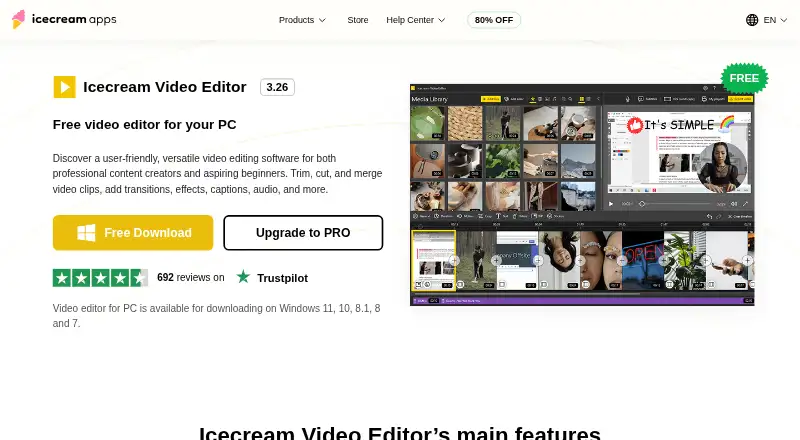
Icecream Video Editor is a Windows desktop editor for trimming, splitting, cutting, and merging video clips with photos and background audio. Its timeline supports more than 20 transitions, 10 motion effects for photos, captions, configurable text overlays, and adjustable music. Playback speed ranges from x0,25 to x10, and footage can be cropped, resized, or framed with blurred backgrounds. Users can create subtitles or import SRT files, convert media to MP4 or WebM, and export audio as MP3. Listed formats include MP4, AVI, WEBM, MOV, JPG, PNG, GIF, MP3, and WAV. The editor supports 4K editing on Windows 10 and Windows 11, plus cloud uploads, project-link sharing, and view tracking. The Free plan costs nothing and includes most main features, but free exports are limited to 10 scenes and five minutes without a watermark. PRO costs $66.60 a month, billed as a one-time lifetime fee, and removes those export limits. Team collaboration is listed.
Who it suits
Icecream Video Editor suits Windows users assembling clips, photos, audio, captions, and subtitles on a timeline. It is presented as suitable for people with minimal technical expertise and teams needing collaboration.
What it does well
- 4K editing on Windows 10 and 11
- More than 20 transitions
- Subtitle creation and SRT import
- Cloud sharing and view tracking
- Lifetime PRO license option
What to know first
- Windows-only platform
- Free exports limited to 10 scenes
- Free exports over five minutes include watermark
- No free trial is listed
Plans
| Plan | Billed and limits | Price |
|---|---|---|
| Free | Most main features · free exports are limited to 10 scenes and 5 minutes without watermark | Free |
| PRO | Lifetime license; page also says a one-year auto-renewing subscription is available, but does not show its price · More than 10 timeline scenes · Export videos longer than 5 minutes without watermark · Lifetime license never expires | $24, paid once |
As icecreamapps.com lists them, read 11 Oct 2026. The maker's own page has the final word.
Verdict
Icecream Video Editor covers everyday timeline editing, subtitles, format conversion, and 4K work on Windows. The free edition has scene and watermark limits, while PRO is a one-time lifetime purchase listed at 66.60 USD.
Facts from Icecream Video Editor's own pages
- 4K support
- The FAQ says 4K video editing is supported on Windows 10 and Windows 11. · icecreamapps.com, 11 Oct 2026
- Desktop app
- Yes · static.icecreamapps.com, 21 Sept 2026
- Ease of use
- The editor combines videos, photos, and background audio on an intuitive timeline and is described as suitable for users with minimal technical expertise. · icecreamapps.com, 11 Oct 2026
- Editing tools
- Users can trim and split clips, add and adjust background music, and create text overlays with configurable color, position, size, and motion speed. · icecreamapps.com, 11 Oct 2026
- Formats
- The editor lists support for MP4, AVI, WEBM, MOV, JPG, PNG, GIF, MP3, and WAV formats. · icecreamapps.com, 11 Oct 2026
- Founded
- 2014 · icecreamapps.com, 28 Sept 2026
- 4K export
- Yes · static.icecreamapps.com, 21 Sept 2026
- Free plan
- Yes · static.icecreamapps.com, 21 Sept 2026
- Free version limit
- The free version includes most main features, while PRO permits more than 10 timeline scenes and exports longer than 5 minutes without watermark. · icecreamapps.com, 11 Oct 2026
- Headquarters
- Limassol, Cyprus · icecreamapps.com, 28 Sept 2026
- Payment and refund
- The PRO page says payments are processed through 2Checkout and a full refund may be requested within 30 days for unresolved technical or other problems. · icecreamapps.com, 11 Oct 2026
- Privacy and security
- The maker's privacy policy says it applies administrative and technical safeguards, and states that credit card information is not stored on servers it controls. · icecreamapps.com, 11 Oct 2026
- Purpose
- Icecream Video Editor trims, cuts, and merges video clips and adds transitions, effects, captions, and audio. · icecreamapps.com, 11 Oct 2026
- Sharing
- The product page says users can upload edited videos to the cloud, share project links, and track views. · icecreamapps.com, 11 Oct 2026
- Speed and framing
- Playback speed ranges from x0,25 to x10, and the editor can crop and resize footage, including with blurred backgrounds for blank areas. · icecreamapps.com, 11 Oct 2026
- Subtitles and export
- Users can create subtitles or import SRT files, convert media to MP4 or WebM, and export audio as MP3. · icecreamapps.com, 11 Oct 2026
- Support
- The Help Center accepts direct messages and says support is provided in English only. · icecreamapps.com, 11 Oct 2026
- System requirements
- The listed minimums include Windows 7 or later, a compatible 2.66 GHz processor, 4 GB RAM, 1280×720 display resolution, and 100 MB–5 GB disk space. · icecreamapps.com, 11 Oct 2026
- Team collaboration
- Yes · static.icecreamapps.com, 21 Sept 2026
- Transitions
- It offers more than 20 video transitions and 10 motion effects for photos. · icecreamapps.com, 11 Oct 2026
Where Icecream Video Editor stands on Freedom251
- Video Editing Software#83 of 153