Freedom251 › Candidate Screening Software
HRClaw
What HRClaw is
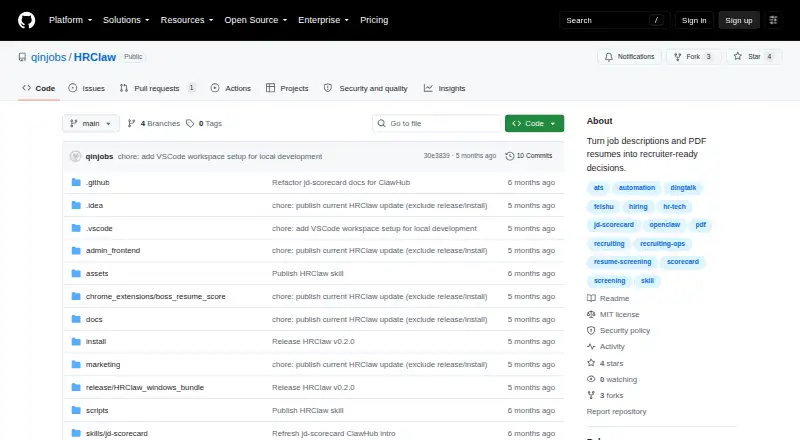
HRClaw is a local-first recruiting copilot for building job scorecards, screening groups of resumes, and capturing candidate details from browser pages. It turns a job description into a reusable scorecard with hard filters, required and preferred signals, interview questions, and red flags. Recruiters can import PDF, DOC, and DOCX resumes in batches; HRClaw extracts candidate profiles and supports evidence-based recommendations, reviews, or rejections. Scanned PDFs have an OCR fallback. A Chrome MV3 side panel can capture candidate detail pages and send them through the same scoring backend used for resume imports. The browser plugin also supports tracking a candidate’s status, notes, communication results, and next follow-up time. Results can be shared as JSON or Markdown, or as recruiter-friendly text for Feishu, DingTalk, Slack, and Teams. The project is free and open source under the MIT license. Its listed platforms include extension, macOS, self-hosted, web, and Windows. The README describes a local app opened at http://127.0.0.1:8080/login and lists deployment assistance, workflow customization, team calibration, and enterprise process adaptation as private deployment or service options. HRClaw is intended for repeated hiring needs and teams seeking a shared screening standard or a locally deployed pilot.
Who it suits
HRClaw suits recruiting teams that repeatedly hire for related role families and HR teams that want a consistent screening standard. It may also fit Feishu or DingTalk teams and pilots that value local deployment over a full ATS rollout.
What it does well
- Builds reusable scorecards from job descriptions.
- Batch imports PDF, DOC, and DOCX resumes.
- OCR fallback supports scanned PDFs.
- Captures candidate pages through a Chrome side panel.
- Tracks candidate status, notes, and follow-up time.
- Shares results in JSON, Markdown, and chat formats.
What to know first
- The described workflow centers on recruiting screening and tracking.
- The security policy says not to commit API keys, browser session data, login cookies, private candidate data, internal ATS or CRM exports, or client-specific scoring rules.
Limits
The free plan is listed as available, and the project is open source. The facts do not describe a free-plan quota or feature limit.
Getting started
- Open the HRClaw GitHub website.
- Choose a listed platform: extension, macOS, self-hosted, web, or Windows.
- For the local app workflow, open http://127.0.0.1:8080/login.
- Use the resume import workflow or Chrome side panel to bring candidate information into scoring.
- Share results as JSON, Markdown, or recruiter-friendly text for a named destination.
Verdict
Choose HRClaw if your team needs repeatable resume screening, reusable job scorecards, and a local-first recruiting workflow. It is especially suited to teams standardizing assessments or piloting local deployment. Teams seeking a full ATS rollout should look elsewhere, since the listed intended use is a pilot alternative to that rollout.
Questions
Is HRClaw free?
Yes. Its pricing model is free, and the project is open source under the MIT license.
Which platforms does HRClaw support?
The listed platforms are extension, macOS, self-hosted, web, and Windows.
Can it parse resumes and screen skills?
Yes. Resume parsing and skills screening are listed capabilities. It imports PDF, DOC, and DOCX files in batches and has an OCR fallback for scanned PDFs.
What formats and destinations can receive results?
Results can be shared as JSON or Markdown, or as recruiter-friendly text for Feishu, DingTalk, Slack, and Teams.
Who maintains HRClaw and how can users contact them?
The repository lists [email protected] and GitHub Issues options for demo requests and Chinese-language demo bookings.
Does HRClaw offer deployment support?
The README lists workflow customization, team calibration and rollout support, internal deployment assistance, and enterprise process adaptation under private deployment or service.
Facts from HRClaw's own pages
- Browser capture
- A Chrome MV3 side panel captures candidate detail pages and sends them to the same scoring backend used for resume imports. · github.com, 8 Oct 2026
- Candidate tracking
- The browser plugin lets HR save candidate tracking status, notes, communication results, and next follow-up time. · github.com, 8 Oct 2026
- Deployment services
- The README lists workflow customization, team calibration and rollout support, internal deployment assistance, and enterprise process adaptation under private deployment or service. · github.com, 8 Oct 2026
- Integrations
- The README names Feishu, DingTalk, Slack, and Teams as destinations for recruiter-friendly results. · github.com, 8 Oct 2026
- Integrations and output
- Results can be shared as JSON, Markdown, or Feishu- and DingTalk-friendly chat text, and the README also names Slack and Teams as recruiter-ready output destinations. · github.com, 8 Oct 2026
- Intended users
- It is intended for recruiting teams with repeated hiring in role families, HR teams seeking a shared screening standard, Feishu or DingTalk teams, and pilots that value speed and local deployment over a full ATS rollout. · github.com, 8 Oct 2026
- JD scorecards
- It turns job descriptions into reusable scorecards with hard filters, must-have and nice-to-have signals, interview questions, and red flags. · github.com, 8 Oct 2026
- License
- The repository identifies its license as MIT. · github.com, 8 Oct 2026
- License and support
- The repository is MIT-licensed and lists [email protected] and GitHub Issues demo requests as contact routes. · github.com, 8 Oct 2026
- Local deployment
- The README describes a local app opened at http://127.0.0.1:8080/login and calls the workflow local-first. · github.com, 8 Oct 2026
- Outputs
- Results can be shared as JSON, Markdown, or Feishu- and DingTalk-friendly chat text. · github.com, 8 Oct 2026
- Platforms
- The repository lists Windows and macOS bundles, local frontend packages, and a Chrome extension package. · github.com, 8 Oct 2026
- Purpose
- HRClaw is a local-first recruiting copilot for JD scorecards, batch resume scoring, browser capture, and recruiter-ready output. · github.com, 8 Oct 2026
- Resume screening
- It imports PDF, DOC, and DOCX resumes in batches, extracts candidate profiles, and recommends, reviews, or rejects candidates with evidence. · github.com, 8 Oct 2026
- Scanned PDFs
- The batch import workflow includes an OCR fallback for scanned PDFs. · github.com, 8 Oct 2026
- Scorecards
- It turns job descriptions into reusable scorecards with hard filters, must-have and nice-to-have signals, interview questions, and red flags. · github.com, 8 Oct 2026
- Security guidance
- The security policy says not to commit API keys, browser session data, login cookies, private candidate data, internal ATS or CRM exports, or client-specific scoring rules. · github.com, 8 Oct 2026
- Security policy
- The security policy says not to commit API keys, browser session data, login cookies, private candidate data, internal ATS or CRM exports, or client-specific scoring rules. · github.com, 8 Oct 2026
- Security reporting
- The policy asks users to report vulnerabilities privately through GitHub Security Advisories or direct maintainer contact. · github.com, 8 Oct 2026
- Support
- The README provides [email protected] and GitHub Issues options labeled Demo request and 中文 demo 预约 for contact. · github.com, 8 Oct 2026
- Target users
- It is aimed at recruiting teams with repeated hiring needs, HR teams seeking a consistent screening standard, and pilot projects that value local deployment over a full ATS rollout. · github.com, 8 Oct 2026
Where HRClaw stands on Freedom251
- Candidate Screening Software#2 of 36