Freedom251 › Academic Advising Software
HighPoint Degree Planner
What HighPoint Degree Planner is
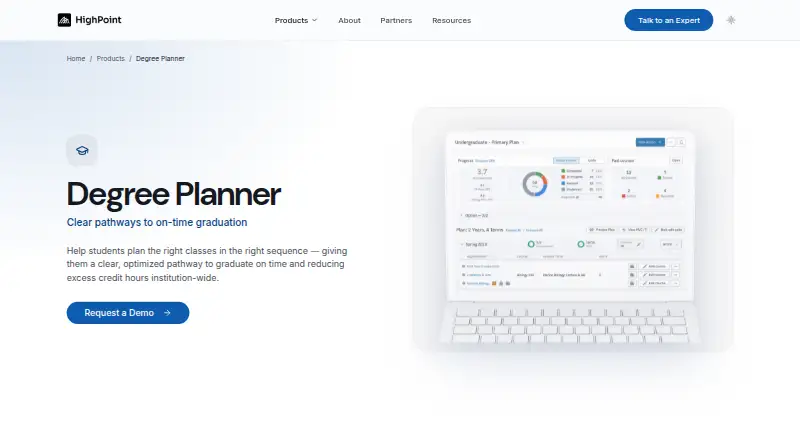
HighPoint Degree Planner helps students place degree requirements into academic terms and plan a path to graduation. Students can see courses needed to graduate and move them into appropriate terms. What-if scenarios let them consider changes such as credit load, major, or study abroad and evaluate the effect on their plan. At the University of Pittsburgh, plans can be generated and updated using academic progress, degree requirements, prerequisites, and typical course offering semesters. A dashboard maps completed courses, remaining requirements, and recommended sequences. HighPoint says planning stays in sync with audits and scheduling. The product is designed for institutions using PeopleSoft Campus Solutions and resides inside PeopleSoft; HighPoint says this approach leaves institutions in control of their data and requires no integrations. Advisors can use plans to identify students who may need help staying on track. The University of Pittsburgh describes the planner as a preparation aid for advising, not a substitute for one-on-one advisor support. Pricing is on request.
Who it suits
Degree Planner suits students organizing requirements and exploring course choices, as well as advisors, registrars, and academic affairs staff. It is designed for institutions using PeopleSoft Campus Solutions.
What it does well
- Students can model changes to credit load or major.
- Plans can reflect progress, prerequisites, and degree requirements.
- Planning stays in sync with audits and scheduling.
- Mobile access is listed.
What to know first
- Pricing is available on request.
- Designed for PeopleSoft Campus Solutions institutions.
- Does not replace one-on-one advisor support.
Getting started
- Visit the HighPoint Degree Planner website.
- Schedule a personalized demo with HighPoint.
- Configure the product for the institution’s PeopleSoft environment.
- Install the code; HighPoint says installation takes minutes.
HighPoint Degree Planner is a web-based planning tool for institutions that use PeopleSoft Campus Solutions. It suits students mapping requirements, advisors monitoring progress, and registrars or academic-affairs teams managing planning workflows. Its strongest case is a visual, automatically updated path to graduation; its main constraint is that it is designed for a PeopleSoft environment and remains an advising aid rather than a replacement for personal guidance.
Overview
Degree Planner places graduation requirements into academic terms and shows the resulting route in a visual dashboard. Students can see completed courses, outstanding requirements, and recommended sequences, then move courses into more suitable terms. The planner stays synchronized with degree audits and scheduling, so a plan can reflect academic progress, prerequisites, and typical semesters in which courses are offered.
That combination makes the product more useful than a static checklist. A student considering a heavier credit load, a different major, or study abroad can create a what-if scenario and inspect how the change affects the route to graduation. Advisors can use the same view to spot students whose plans may put on-time completion at risk. The practical limitation is important: the planner prepares students for advising, but does not replace one-to-one help from an academic advisor.
Key features
Visual course sequencing
The dashboard turns requirements and recommended sequences into a term-by-term map. Moving courses between terms gives students a concrete way to test schedules instead of reasoning from an undifferentiated requirement list.
Automatic plan updates
At the University of Pittsburgh, plans are generated and refreshed from academic progress, degree requirements, prerequisites, and typical course-offering semesters. This reduces the administrative work of rebuilding a plan after a requirement or completed course changes, while keeping the output dependent on the institution’s PeopleSoft data.
What-if scenarios and alerts
Scenario planning covers changes such as credit load, major, and study abroad. Early-alert capabilities and advisor views can direct attention to students who may need help staying on schedule, making the tool relevant to retention and completion work as well as individual planning.
PeopleSoft-native operation
HighPoint builds its products to reside inside PeopleSoft Campus Solutions. The company describes configuration-driven implementation, installation that takes minutes, and no separate integrations, with the institution retaining control of its data. This is a clear operational advantage for a PeopleSoft institution, but it makes Degree Planner a poor fit for campuses built around another student-information platform.
Pricing
Degree Planner uses paid, custom pricing. HighPoint asks prospective institutions to schedule a personalized demo; no public tiers, seat allowances, trial period, renewal terms, or free plan are provided. That structure is aimed at institutions that need a configured PeopleSoft deployment and are prepared for a sales-led evaluation, not buyers seeking a self-serve subscription with predictable per-user costs.
Platforms
The product is delivered on the web, with mobile access described through the secure, mobile-friendly HighPoint Campus Experience interface. Its use of students’ PeopleSoft requirements and its placement inside PeopleSoft Campus Solutions make the underlying platform requirement as significant as the browser access.
Who it's for
Students get a visual way to evaluate course options and build a path to graduation, particularly when they need to compare alternatives before meeting an advisor. Advisors benefit from a shared plan view and signals that can identify students who may be falling off track. Registrars and academic-affairs teams are the institutional buyers most likely to value synchronized audits, scheduling data, and PeopleSoft-native administration.
It is not the right choice for an individual learner looking for a standalone planning app, or for an institution that does not run PeopleSoft Campus Solutions. Students should also treat its recommendations as preparation for advising, not as an autonomous substitute for an advisor’s judgment.
Pros and cons
- Pro: Visual term-by-term sequencing makes remaining requirements and recommended order easier to act on.
- Pro: What-if scenarios cover credit load, major changes, and study abroad, supporting realistic contingency planning.
- Pro: Automatic updates can account for progress, prerequisites, and typical course-offering semesters.
- Pro: PeopleSoft-native deployment keeps planning connected to audits and scheduling without separate integrations.
- Con: The product is designed for PeopleSoft Campus Solutions institutions, limiting its relevance on other student-information systems.
- Con: Students still need individual advisor support, so the planner cannot stand alone as an advising service.
- Con: Custom pricing and demo-led sales make budgeting difficult before an institutional conversation.
Alternatives
CollegeSource Transferology is the better choice when transfer exploration is the priority and a free student account is useful; institutions can request a tailored subscription.
FlightPath suits organizations wanting a free, self-hosted web option that they can download, install, and run with MySQL and PHP.
Ellucian Degree Works is an alternative for institutions seeking a paid degree-audit platform across web, mobile, API, and Linux environments.
Ellucian Banner Finance is a paid Ellucian alternative for organizations evaluating that vendor’s broader administrative software.
DegreeSight offers a paid, web-based option with custom pricing and no published tiers.
Ellucian Advising is another paid web alternative for institutions that want an Ellucian advising product.
Kuali Financials is a paid API and web alternative sold through institutional inquiry and demos.
Risely Agentic Degree Audit is a paid web alternative focused on degree-audit use.
For broader category comparisons, see Degree Audit Software and Academic Advising Software.
Verdict
Choose HighPoint Degree Planner if your institution runs PeopleSoft Campus Solutions and wants synchronized, visual planning with what-if scenarios and advisor-oriented alerts. Look elsewhere if you need a platform-neutral product, transparent subscription pricing, or a tool intended to replace personal advising rather than support it.
Verdict
Degree Planner brings course sequencing and what-if planning into a visual graduation path. Institutions should note its PeopleSoft focus and that students still need individual advisor support.
Questions
How much does HighPoint Degree Planner cost?
Pricing is available on request. HighPoint invites visitors to schedule a personalized demo.
Which platforms does Degree Planner support?
It is web-based.
Does it support degree audits and planning?
Yes. Degree audit and degree planning are listed capabilities, and planning stays in sync with audits and scheduling.
Who is Degree Planner for?
HighPoint identifies advisors, registrars, and academic affairs staff as intended users. Students use it to evaluate course options and plan toward graduation.
Does the planner replace academic advising?
No. It is intended to help students prepare for advising and does not replace one-on-one help from an academic advisor.
How does it work with PeopleSoft?
HighPoint designs its products for PeopleSoft Campus Solutions institutions, and Degree Planner uses students’ PeopleSoft requirements. HighPoint says its in-PeopleSoft approach requires no integrations and leaves institutions in control of their data.
Facts from HighPoint Degree Planner's own pages
- Advisor use
- Advisors can use the planner to identify students who may need help staying on track to complete their plans on time. · registrar.pitt.edu, 3 Oct 2026
- Automatic planning
- At the University of Pittsburgh, Degree Planner automatically generates and updates plans based on academic progress, degree requirements, prerequisites, and typical course offering semesters. · technology.pitt.edu, 3 Oct 2026
- Connected workflows
- HighPoint says planning stays in sync with audits and scheduling. · highpoint.io, 4 Oct 2026
- Course planning
- It shows courses a student should take to graduate and lets them move courses to appropriate terms. · registrar.pitt.edu, 3 Oct 2026
- Data control
- HighPoint says its in-PeopleSoft approach leaves institutions in control of their data. · highpoint.io, 4 Oct 2026
- Implementation
- HighPoint says code installation takes minutes and implementation is configuration driven. · highpoint.io, 4 Oct 2026
- Integrations
- HighPoint says its products reside inside PeopleSoft and describes this setup as requiring no integrations. · highpoint.io, 4 Oct 2026
- Intended users
- HighPoint identifies advisors, registrars, and academic affairs staff as an audience for its Degree Planner overview. · highpoint.io, 4 Oct 2026
- Limits and intended use
- The University of Pittsburgh says Degree Planner is intended to help students prepare for advising and does not replace one-on-one help from an academic advisor. · technology.pitt.edu, 3 Oct 2026
- PeopleSoft focus
- HighPoint says its products are built to reside inside PeopleSoft and are designed for PeopleSoft Campus Solutions institutions. · highpoint.io, 4 Oct 2026
- Planning display
- The University of Pittsburgh says the planner presents courses taken, courses still needed, and recommended sequences in a visual map on a dashboard. · technology.pitt.edu, 3 Oct 2026
- Platform relationship
- The University of Pittsburgh describes Degree Planner as a scheduling tool within PeopleSoft/HighPoint Campus Experience. · registrar.pitt.edu, 3 Oct 2026
- Pricing availability
- The product page prompts visitors to schedule a personalized demo and does not state a price in the page content available. · highpoint.io, 4 Oct 2026
- Purpose
- HighPoint describes Degree Planner as a multi-term planning experience that gives students a path to graduation and advisors a shared planning canvas inside PeopleSoft. · highpoint.io, 4 Oct 2026
- Requirements
- The product uses students’ PeopleSoft requirements to support degree planning. · highpoint.io, 4 Oct 2026
- Security and access
- The University of Pittsburgh describes HighPoint Campus Experience as a secure, web-based, mobile-friendly interface for class, academic, and financial information. · technology.pitt.edu, 3 Oct 2026
- Student audience
- The University of Pittsburgh describes the planner as helping students evaluate course options and plan a path to graduation. · services.pitt.edu, 3 Oct 2026
- Support and sales
- HighPoint offers a personalized demo and lists [email protected] as its contact email. · highpoint.io, 4 Oct 2026
- What-if planning
- The product supports what-if scenarios. · highpoint.io, 4 Oct 2026
- What-if scenarios
- Students can model changes such as credit load, majors, or study abroad to evaluate effects on their graduation path. · registrar.pitt.edu, 3 Oct 2026
Where HighPoint Degree Planner stands on Freedom251
- Academic Advising Software#16 of 23