Freedom251 › File Shredder Software
HDShredder
What HDShredder is
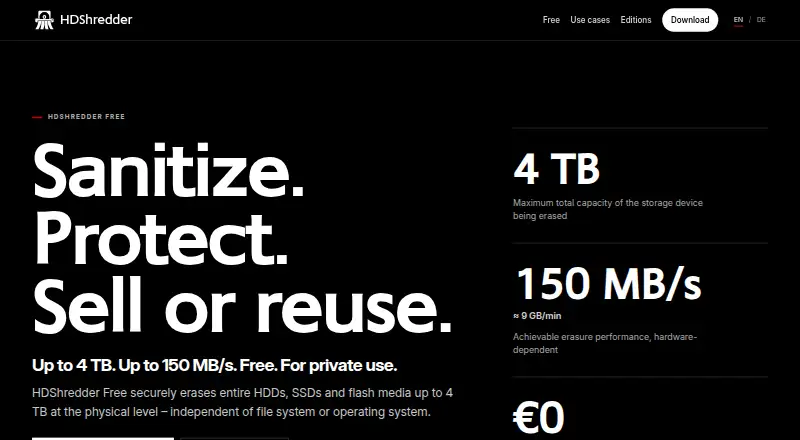
HDShredder securely erases hard disks, SSDs, USB drives, and other flash storage at the physical level, independently of the file system or operating system. It can erase entire drives; Basic and higher editions can target individual partitions. The Free Edition is for private use and supports storage media with up to 4 TB total capacity. Its download includes Windows software and a self-booting program that can be started from USB or CD/DVD media. Linux users can run the available AppImage on various Linux distributions. Edition features vary: Standard supports 15 international data-erasure standards, while Professional lets users define deletion patterns and procedures with up to 398 runs. Professional also creates detailed deletion reports, which can be saved to USB media and, in Windows, network drives. Enterprise editions erase up to 4, 8, or 16 media simultaneously, depending on the edition. Free and Basic licenses are limited to noncommercial use; Standard and Professional are also offered for commercial use. Miray Software AG is registered in Munich, Germany, and offers technical support through a ticket system. The maker recommends trying the Free Edition to check compatibility, since some recognized drives require a higher edition.
Who it suits
HDShredder suits people who need to erase HDDs, SSDs, USB drives, or other flash storage on Windows or Linux. Its higher editions fit users who need selectable partitions, custom procedures, reports, commercial licensing, or simultaneous erasure of multiple media.
What it does well
- Erases HDDs, SSDs, USB drives, and other flash storage.
- Works independently of the file system and operating system.
- Includes Windows software and self-booting media support.
- Linux users can run an AppImage.
- Standard supports 15 international erasure standards.
- Enterprise editions erase up to 16 media simultaneously.
What to know first
- Free Edition is limited to private use and media up to 4 TB.
- Free and Basic licenses are limited to noncommercial use.
- Some recognized drives require a higher edition.
Limits
The Free Edition is for private use and supports media with up to 4 TB total capacity. Free and Basic licenses are limited to noncommercial use; the Free Edition has one security level.
Plans
| Plan | Billed and limits | Price |
|---|---|---|
| Free Edition | private use · up to 4 TB · up to 150 MB/s · HDD, SSD and flash media | Free |
| Basic Edition | one-time · 3 security levels · selectable partitions · HPA/DCO removal · USB 3.x | €19.90, paid once |
| Professional Edition Portable | from one-time price · portable technician version · use on clients’ PCs | €199, paid once |
| Enterprise Edition 4x | one-time · parallel deletion of up to 4 targets | €299, paid once |
| Standard Edition | from one-time price · 18 security levels · 15 international erasure standards · workplace or volume licensing | €39.90, paid once |
| Enterprise Edition 8x | one-time · parallel deletion of up to 8 targets | €499, paid once |
| Enterprise Edition 16x | one-time · parallel deletion of up to 16 targets | €799, paid once |
| Professional Edition | from one-time price · 217 security levels · custom procedures · SecureErase and Sanitize · certificates · NVMe, eMMC, UFS, SAS/RAID · network reporting | €99, paid once |
As hdshredder.com lists them, read 15 Oct 2026. The maker's own page has the final word.
Getting started
- Visit the HDShredder website.
- Choose the Free Edition or a paid edition.
- On Windows, use the included program or start the self-booting program from USB or CD/DVD media.
- On Linux, use the available AppImage.
- Try the Free Edition to check whether your PC and storage media are supported.
Overview
HDShredder is a physical-erasure utility for clearing hard drives, SSDs and flash media independently of their filesystem. It suits private users wiping a device and technicians or organizations that need defined procedures, reports or batch processing. Its range runs from a free personal edition to commercial licenses with increasingly specialized controls, though some drives need a higher edition even when the Free Edition recognizes them.
Key features
HDShredder targets whole-media erasure rather than routine cleanup of selected files. It supports hard disks, SSDs, USB drives and flash cards such as CompactFlash and SD/MMC. That makes it relevant when preparing storage for reuse or disposal; it is the wrong tool if the job is simply removing a few files.
Basic and higher editions can erase individual partitions, which helps when a full-drive wipe would be excessive. Standard adds 15 international erasure standards. Professional lets users define deletion patterns and procedures with up to 398 runs, and creates reports that can be saved to USB or, on Windows, network drives. These controls are useful for repeatable or documented work, while most occasional home users can avoid paying for them.
Enterprise editions erase up to 4, 8 or 16 media at once, according to the license. That throughput can matter to organizations processing batches of drives, but is difficult to justify for one-off jobs. Windows downloads include a Windows program and self-booting software for USB or CD/DVD; Linux users can run the AppImage on various distributions. Miray also provides technical support through a ticket system.
Pricing
The Free Edition costs nothing and covers private use on media with up to 4 TB total capacity, with one security level. It is a sensible first choice for a personal wipe, but it cannot be used commercially, and a recognized drive may still require a higher edition.
Basic Edition costs €19.90, paid once. It is for private use and adds three security levels and partition selection, making it the low-cost step up for someone who needs to target a partition or choose among more levels. Its noncommercial license rules it out for business use.
Standard Edition costs €39.90, paid once and includes 15 international security standards plus workplace and volume licenses. It is the practical commercial option when those standards and licensing terms meet the job; Professional is the next step for custom procedures and reporting.
Professional Edition costs €99, paid once, adding custom deletion methods and reports alongside workplace and volume licenses. Professional Edition Portable costs €199, paid once and is a technician license for a portable service version used on clients’ PCs. The portable license is aimed at service work; the standard Professional edition fits organizations that need custom methods or records for their own workflows.
Enterprise Edition 4x costs €299, paid once for parallel erasure of up to four media; 8x costs €499, paid once for up to eight; and 16x costs €799, paid once for up to sixteen. Choose by the number of devices that need processing at the same time. For a single drive or occasional work, these tiers add capacity most users will not use.
Platforms
HDShredder supports Windows and Linux. Windows users get software that runs in Windows as well as a bootable program for USB or CD/DVD, useful when erasing a system drive. Linux users get an AppImage for use on various distributions. Miray recommends starting with the Free Edition to check support for a PC and its media, since some recognized drives require a higher edition.
Who it's for
HDShredder is a strong fit for people who need to erase entire storage devices and want to choose a method suited to private, commercial or service work. The Free Edition is enough for private use within its 4 TB limit; technicians may value the portable license and report options, while organizations handling batches have a clear path to parallel processing. It is a poor fit for commercial users restricted to Free or Basic, people who only need file cleanup, and owners whose drive requires a higher edition than they intend to buy.
Pros and cons
- Pros: Physical erasure covers HDDs, SSDs and several kinds of flash media, with Windows and Linux support.
- Pros: Paid editions scale from partition selection and established standards to custom procedures, reports and simultaneous processing.
- Pros: The free personal option supports media up to 4 TB, giving private users a no-cost way to check compatibility and erase within that cap.
- Cons: Free and Basic are limited to noncommercial use, so businesses need at least Standard.
- Cons: Edition-dependent drive support can make the free compatibility check a necessary first step before choosing a license.
- Cons: The specialized options raise the price sharply, reaching €799, paid once for 16-media processing.
Alternatives
Active@ KillDisk is worth considering if macOS support matters; it has a free plan and personal licenses at $64.95, paid once and $79.95, paid once.
BleachBit is a free, open-source option for users who want software for Linux, macOS and Windows rather than HDShredder’s edition-based drive-erasure workflow.
R-Wipe & Clean may suit Windows or macOS users looking for a freemium cleanup utility, with a free Lite plan that omits scheduled tasks and Windows Server support.
Alternate File Shredder is a free, open-source Windows option.
Autoruns is a free Windows utility.
CBL Data Shredder is a free Windows option with low-level hard-drive formatting and customizable wipe methods.
Crypto Shredder is a free Windows option.
DeleteOnClick is a free Windows option.
Browse more options in File Shredder Software.
Verdict
Choose HDShredder if you need physical erasure on Windows or Linux and want a license that can grow from private single-drive use to documented or parallel commercial work. Its strongest case is the progression from a free 4 TB personal edition to custom procedures, reports and batch capacity. Look elsewhere if you need commercial use on Free or Basic, only need to remove individual files, or your drive requires a higher edition than you plan to buy.
Verdict
Choose HDShredder if you need physical erasure on Windows or Linux, with editions for custom procedures, reports, and parallel processing. The Free Edition covers private use on media up to 4 TB. Look elsewhere if you need commercial use on the Free or Basic license, or if your drive requires a higher edition.
Questions
Is HDShredder free?
Yes. The Free Edition costs nothing, is for private use, and supports media up to 4 TB.
What are the paid plan prices?
Basic Edition is €19.90, paid once, Standard is €39.90, paid once, and Professional is €99, paid once. Professional Portable is €199, paid once; Enterprise editions cost 299.00 EUR, 499.00 EUR, or €799, paid once.
Which platforms does HDShredder support?
It supports Windows and Linux. Linux users can run an AppImage, and the download includes Windows software and a self-booting program.
Can it erase individual partitions?
Yes. Basic and higher editions can erase individual partitions instead of entire drives.
Which editions support commercial use?
Free and Basic licenses are limited to noncommercial use. Standard and Professional are also offered for commercial use.
How can I contact support?
Miray offers technical support through a ticket system.
Facts from HDShredder's own pages
- ARM support
- An optional ARM add-on provides a Windows-on-ARM executable and a boot version for Snapdragon PCs, tablets and notebooks. · miray.de, 15 Oct 2026
- CLI automation
- The documented command-line program supports shell and batch scripts, scheduled tasks, drive or partition targeting, standard and custom methods, verification and ERRORLEVEL return codes. · miray-software.com, 15 Oct 2026
- Company ownership and funding
- Crunchbase categorizes Miray Software as a private Munich company and shows no disclosed funding rounds or funding amount on the opened profile. · crunchbase.com, 15 Oct 2026
- Company profile
- LinkedIn lists Miray Software AG as a Munich software-development company with 11–50 employees, founded in 2006. · linkedin.com, 15 Oct 2026
- Compatibility caveat
- The maker recommends trying the Free Edition to check whether a PC and its storage media are supported, since some recognized drives require a higher edition. · miray-software.com, 7 Oct 2026
- Compliance claims
- The maker states that its methods address GDPR, DIN 66399, ISO 27001 and NIST SP 800-88R1 clear-level requirements, with SecureErase for purge. · miray.de, 15 Oct 2026
- Custom patterns
- Professional Edition provides a pattern editor supporting custom deletion procedures with as many as 398 runs. · miray-software.com, 15 Oct 2026
- Custom procedures
- Professional Edition lets users define deletion patterns and procedures with up to 398 runs. · miray-software.com, 7 Oct 2026
- Device support
- Listed supported media include hard disks, SSDs, USB drives, and flash storage such as CompactFlash and SD/MMC cards. · miray-software.com, 7 Oct 2026
- Documentation
- The current manual covers editions, Windows and self-booting variants, quickstart, inline help, licensing, support and troubleshooting in 13 pages. · miray-software.com, 15 Oct 2026
- Enterprise throughput
- Enterprise Edition can erase up to 4, 8, or 16 media simultaneously, depending on the edition. · miray-software.com, 7 Oct 2026
- Erasure reports
- Professional Edition creates detailed deletion reports that can be saved to USB media and, in Windows, network drives. · miray-software.com, 7 Oct 2026
- Erasure standards
- Standard Edition supports 15 international data-erasure standards. · miray-software.com, 7 Oct 2026
- Founded
- 2006 · hdshredder.com, 28 Sept 2026
- Free edition limit
- The Free Edition is for private use and supports storage media with up to 4 TB total capacity. · hdshredder.com, 7 Oct 2026
- Headquarters
- Munich, Germany · hdshredder.com, 28 Sept 2026
- Independent version information
- PC-WELT listed HDShredder Free Edition version 8.1.4.1 for Windows 10/11 with a zero-euro price in its March 23, 2026 download entry. · pcwelt.de, 15 Oct 2026
- Legal entity
- The maker’s imprint identifies Miray Software AG, registered in Munich under HRB 164551, with Michael Haunreiter as CEO and President. · miray-software.com, 15 Oct 2026
- License limits
- Free and Basic licenses are limited to noncommercial use, while Standard and Professional are also offered for commercial use. · hdshredder.com, 7 Oct 2026
- License model
- Licensing is proprietary freeware for the Free Edition and paid private, workplace, technician, volume or maintenance licenses for other editions. · miray-software.com, 15 Oct 2026
- Limit: free edition methods
- An OPCUG review states that the free edition is limited to write-zero erasure, with additional algorithms and custom protocols requiring commercial editions. · opcug.ca, 15 Oct 2026
- Limit: Softpedia review
- Softpedia says the unregistered version lacks advanced deletion methods and suggests a filtering feature for more selective file-level erasure. · softpedia.com, 15 Oct 2026
- Linux support
- An optional Linux add-on supplies an AppImage for 64-bit Intel/AMD Linux systems, and a bundle adds Linux-on-ARM support. · miray.de, 15 Oct 2026
- Maker and headquarters
- The maker is Miray Software AG, registered in Munich, Germany, with an address in Munich. · miray-software.com, 7 Oct 2026
Where HDShredder stands on Freedom251
- File Shredder Software#6 of 27