Freedom251 › File Shredder Software
Alternate File Shredder
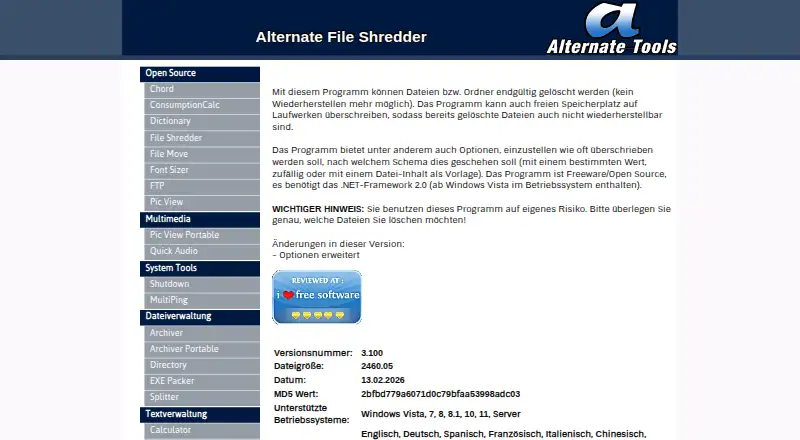
What Alternate File Shredder is
Alternate File Shredder is a freeware Windows program for permanently deleting files and folders. It can also overwrite a drive’s free space to make recovery of previously deleted files harder. Users can choose a specific value, random values or file content as the overwrite template. The program does not wipe entire drives and does not offer scheduled shredding. The maker describes it as open source. The listed supported systems are Windows Vista, 7, 8, 8.1, 10, 11 and Server, and the program requires .NET Framework 2.0; the maker says this framework has been included in Windows since Vista. The page lists 20 languages, including English, German, Spanish, French, Chinese and Japanese. Its listed version is 3.100, dated 13.02.2026, and the Freeware plan costs nothing. The maker cautions users to select files carefully and says they use the program at their own risk.
Who it suits
Alternate File Shredder suits Windows users who need to delete selected files or folders or overwrite free space. It is not suited to users seeking whole-drive wiping or scheduled shredding.
What it does well
- Permanently deletes files and folders
- Can overwrite free space
- Offers specific, random or file-content overwrite templates
- Freeware plan costs nothing
What to know first
- Does not wipe entire drives
- Scheduled shredding is not available
- Requires .NET Framework 2.0
Limits
The freeware plan supports Windows Vista, 7, 8, 8.1, 10, 11 and Server and requires .NET Framework 2.0. It does not provide drive wiping or scheduled shredding.
Plans
| Plan | Billed and limits | Price |
|---|---|---|
| Freeware | Windows Vista, 7, 8, 8.1, 10, 11 and Server · .NET Framework 2.0 · 2.4 MB download | Free |
As alternate-tools.com lists them, read 14 Oct 2026. The maker's own page has the final word.
Getting started
- Visit the Alternate File Shredder website.
- Use a supported Windows system: Vista, 7, 8, 8.1, 10, 11 or Server.
- Make sure .NET Framework 2.0 is available; the maker says it is included in Windows since Vista.
- Choose the files or folders to delete, or select free-space wiping.
- Select a specific value, random values or file content as the overwrite template.
Alternate File Shredder is a free, open-source Windows utility for deleting selected files and folders and overwriting drive free space. It is best suited to people who want those focused cleanup tasks without paying for a broader suite. It does not erase entire drives or schedule shredding.
Overview
The distinction between removing selected items, clearing traces of earlier deletions, and erasing a whole drive matters. Alternate File Shredder covers the first two: it permanently deletes files and folders, and can overwrite free space to prevent recovery of previously deleted data. That makes it useful for targeted cleanup, but not for preparing an entire drive for disposal or reuse.
The maker describes the program as freeware and open source. It also warns that users run it at their own risk and should consider carefully which files they select. That caution is appropriate for a utility whose purpose is irreversible deletion.
Key features
Deletion and free-space overwriting
File and folder deletion handles items you select directly; free-space wiping addresses data left behind after earlier deletions. The second function is a useful addition for users who have already removed files but want to reduce the chance of recovering them. Neither function amounts to whole-drive wiping, which this program does not support.
Overwrite templates
Users can choose a specific value, random values, or file content as the overwrite template. This gives some control over what is written during overwriting, though it does not change the program’s narrow focus or add scheduling.
Pricing
The Freeware plan costs nothing and includes file and folder deletion, free-space wiping, and advanced overwrite methods on Windows. There is no paid tier to weigh against it: the trade-off is scope, since drive wiping and scheduled shredding are absent.
The plan supports Windows Vista, 7, 8, 8.1, 10, 11, and Server, and requires .NET Framework 2.0. The maker says that framework has been included in Windows since Vista. The current listed version is 3.100, dated 13.02.2026.
Platforms
This is a Windows-only program, with support listed for Vista, 7, 8, 8.1, 10, 11, and Server. Its included languages span 20 options, including English, German, Spanish, French, Chinese, and Japanese. Users on Linux or macOS will need another tool.
Who it's for
Choose Alternate File Shredder if you use Windows and need free, focused deletion of selected files or folders, or want to overwrite free space after removing files. Look elsewhere if you need to erase a complete drive, automate shredding on a schedule, or use another operating system.
Pros and cons
- Pros: Free and open source, with both selected-item deletion and free-space wiping in one Windows utility.
- Pros: Three overwrite-template choices and support for 20 included languages make it more adaptable than a single-choice, single-language tool.
- Cons: No drive-wiping function, so it cannot handle whole-disk erasure.
- Cons: No scheduled shredding, making it a manual rather than automated cleanup option.
- Cons: The maker puts use at the user's own risk and urges care when selecting files, so mistaken choices carry particular weight.
Alternatives
For a wider set of file-shredder options, browse the File Shredder Software directory.
- Active@ KillDisk is worth comparing if you want a freemium option that runs on Linux, macOS, and Windows, with paid personal licenses from $64.95, paid once.
- BleachBit is another free, open-source option for Linux, macOS, and Windows.
- HDShredder may suit private users who want a free edition for drives up to 4 TB, or selectable partitions and three security levels in its €19.90, paid once Basic Edition.
- R-Wipe & Clean offers a free Lite plan for essential trace cleaning, but that plan lacks scheduled tasks and Windows Server support.
- Autoruns is a free Windows option for a different software task.
- CBL Data Shredder is a free Windows alternative whose listed features include low-level hard-drive formatting and customizable wipe methods.
- Crypto Shredder is another free Windows alternative.
- DeleteOnClick is a free Windows alternative for 32-bit and 64-bit systems.
Verdict
Alternate File Shredder is a sensible pick for Windows users who want a free, open-source way to delete selected files and folders and overwrite previously deleted data in free space. Its focused feature set is also its main limitation: choose another tool if you need whole-drive erasure, scheduled work, or support beyond Windows.
Verdict
Alternate File Shredder handles file and folder deletion plus free-space overwriting, with several overwrite template choices. Take care when selecting files: the maker places use at the user's own risk.
Questions
Is Alternate File Shredder free?
Yes. Its Freeware plan is listed as free.
Which operating systems does it support?
The page lists Windows Vista, 7, 8, 8.1, 10, 11 and Server.
Is Alternate File Shredder open source?
Yes. The maker describes the program as freeware and open source.
Can it wipe a whole drive or schedule shredding?
No. Drive wiping and scheduled shredding are not offered.
What overwrite methods can I choose?
You can use a specific value, random values or file content as the overwrite template.
Who makes Alternate File Shredder?
The imprint identifies the site operator as Christensen at Waechtersbacher Str. 22, 63505 Langenselbold.
Facts from Alternate File Shredder's own pages
- Activity log
- Softpedia says users can inspect logged activity information after shredding operations. · softpedia.com, 14 Oct 2026
- Adware and telemetry statement
- The maker says its programs do not install adware, alter browser settings, phone home automatically or inspect private user data. · alternate-tools.com, 14 Oct 2026
- Current listed version
- The page lists version 3.100, dated 13.02.2026. · alternate-tools.com, 2 Oct 2026
- Current version
- The official page lists version 3.100, dated 13 February 2026, with a 2,460.05 KB file size. · alternate-tools.com, 14 Oct 2026
- Deletion confirmations
- Softpedia reports an option to turn off deletion confirmation prompts. · softpedia.com, 14 Oct 2026
- Distribution rights
- The maker says its programs may be copied and shared freely but may not be sold or rented. · alternate-tools.com, 14 Oct 2026
- Drag-and-drop
- Softpedia describes adding files and folders to the task list by dragging them into the main window. · softpedia.com, 14 Oct 2026
- File and folder deletion
- The program permanently deletes files and folders so they cannot be recovered. · alternate-tools.com, 2 Oct 2026
- File-name shredding
- Softpedia reports that the application can overwrite file names as well as file contents. · softpedia.com, 14 Oct 2026
- Free space wiping
- It can overwrite a drive’s free space to prevent recovery of previously deleted files. · alternate-tools.com, 2 Oct 2026
- Independent changelog detail
- Softpedia lists custom color support as a version 3.100 change. · softpedia.com, 14 Oct 2026
- Independent performance praise
- Softpedia’s reviewer reports no freezes, crashes or error messages and says CPU and memory use stayed low during testing. · softpedia.com, 14 Oct 2026
- Independent recovery test
- In Digital Citizen’s test, Recuva detected the 120 test files but could not recover any usable content after shredding. · digitalcitizen.life, 14 Oct 2026
- Independent review praise
- Softpedia rates the application’s tested feature set as powerful and easy to use for securely deleting files and folders. · softpedia.com, 14 Oct 2026
- Independent usability praise
- Digital Citizen characterizes the interface as simple and friendly for deleting individual files and complete folders. · digitalcitizen.life, 14 Oct 2026
- Languages
- The maker lists 20 included languages, spanning English, German, Spanish, French, Chinese, Japanese and 14 others. · alternate-tools.com, 14 Oct 2026
- Limit: erasure algorithms
- Digital Citizen reports that the tested version offered only random-data overwriting, although users could choose the number of passes. · digitalcitizen.life, 14 Oct 2026
- MajorGeeks description
- MajorGeeks describes repeated overwriting and free-space wiping as intended to prevent recovery of deleted files. · majorgeeks.com, 14 Oct 2026
- MajorGeeks downloads
- MajorGeeks lists 93,956 downloads for the version 3.070 entry it hosts. · majorgeeks.com, 14 Oct 2026
- Maker legal identity
- The imprint identifies the site owner as Christensen at Waechtersbacher Strasse 22, 63505 Langenselbold, Germany. · alternate-tools.com, 14 Oct 2026
- Maker location
- The imprint lists the site operator as Christensen at Waechtersbacher Str. 22, 63505 Langenselbold. · alternate-tools.com, 2 Oct 2026
- Maker scope
- The home page says Alternate Tools publishes alternative utility programs mainly for Windows as freeware or open source. · alternate-tools.com, 14 Oct 2026
- Open source
- The maker describes the program as freeware and open source. · alternate-tools.com, 2 Oct 2026
- Overwrite choices
- Users can overwrite with a chosen fixed value, random values or the contents of a file used as a template. · alternate-tools.com, 14 Oct 2026
Where Alternate File Shredder stands on Freedom251
- File Shredder Software#2 of 27