Freedom251 › Secure File Shredding Software
Crypto Shredder
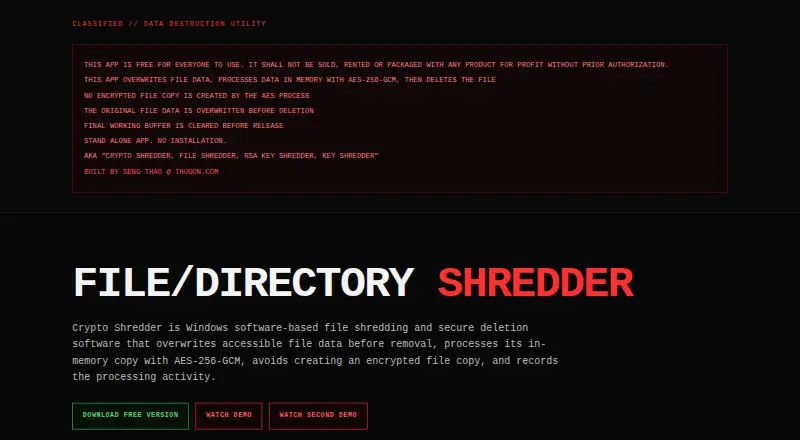
What Crypto Shredder is
Crypto Shredder is free Windows software that overwrites accessible file or folder data before deleting it. It replaces file contents with cryptographically generated random data, then flushes and synchronizes the write. The application also processes an in-memory copy three times with AES-256-GCM, using a new 256-bit key and nonce for each pass; it does not save the encrypted output as a file. Before releasing its final working buffer, it overwrites it with zeros, while noting that Python and the operating system may manage other temporary memory. Users must confirm before processing files or directories and can optionally export a text session report listing the date and time, computer, Windows user, IP address, selected item, and processing sequence. The maker describes it as a standalone application that requires no installation. It handles files and folders, not drive wiping. The maker cautions that software overwriting cannot guarantee sanitization of every physical NAND cell on SSD or NVMe storage, and that it cannot control copies in backups, cloud synchronization, and other locations. Activity reports document the app’s reported processing, not independent certification or regulatory compliance.
Who it suits
It suits Windows users who need to overwrite accessible file or folder data before deletion, including IT, security, compliance, business, and everyday users. Users should consider where other copies may exist before relying on deletion.
What it does well
- Free Windows app that requires no installation
- Processes files and folders before deletion
- Uses three AES-256-GCM passes with new keys and nonces
- Optional text reports record processing details
What to know first
- Does not wipe drives
- Cannot guarantee sanitization of every SSD or NVMe NAND cell
- Cannot control copies in backups, cloud sync, or other locations
- Deletion is permanent and cannot be undone by the app
Limits
The free Windows edition handles files and folders, not drive wiping. Software overwriting cannot guarantee sanitization of every physical NAND cell on SSD or NVMe storage, and the application cannot control copies in backups, snapshots, cloud synchronization, temporary files, pagefiles, hibernation data, virtual machines, or application recovery systems.
Plans
| Plan | Billed and limits | Price |
|---|---|---|
| Free Windows Edition | Windows · Version 2.0.1 · free for everyone | Free |
As thugon.com lists them, read 7 Oct 2026. The maker's own page has the final word.
Getting started
- Open the Crypto Shredder website.
- Use the standalone Windows app; no installation is required.
- Select the file or directory to process.
- Confirm the deletion when prompted.
- Optionally export an activity report.
Crypto Shredder is a no-install Windows utility for permanently overwriting selected files and folders before deletion. It suits people who need targeted cleanup with a documented processing step, not administrators seeking whole-drive sanitization. Its cryptographic workflow is carefully scoped, but storage and backup limitations mean it cannot promise that every residual copy is gone.
Overview
The application replaces accessible file contents with cryptographically generated random data, then flushes and synchronizes the write before deleting the selected items. It requests confirmation first, which is essential because its deletion cannot be undone by the application and the user remains responsible for authorization.
Crypto Shredder acts on files and directories rather than an entire disk. On SSD and NVMe media, software overwriting cannot guarantee that every physical NAND cell has been sanitized. Backups, snapshots, cloud synchronization, temporary files, pagefiles, hibernation data, virtual machines and application recovery systems may also hold copies outside the app’s control. That makes it a focused file-level tool, not a complete media-disposal solution.
Key features
Cryptographic overwrite
The processing sequence uses an in-memory copy three times with AES-256-GCM. Each pass receives a new 256-bit key and nonce, and the encrypted result is not saved as a separate file. This gives the overwrite routine a substantial cryptographic design for targeted deletion, while the three-pass process may be more than a user needs for routine housekeeping.
Memory handling and confirmation
Before releasing its final working buffer, the application overwrites that buffer with zeros. That is a sensible cleanup measure, although Python and Windows can manage other temporary memory beyond the application’s direct control. Confirmation before processing helps prevent an accidental irreversible selection.
Activity reports
An optional text session report records the date and time, computer, Windows user, IP address, selected file or directory and processing sequence. This can support an internal operational record or help a security team show what the application processed. The report is not independent certification of physical-media sanitization or regulatory compliance, so compliance programs should not treat it as a substitute for formal evidence.
Pricing
Crypto Shredder is free. The Free Windows Edition costs nothing and is identified as free for everyone, with version 2.0.1. It includes file and folder processing, advanced overwrite methods and the confirmation and reporting workflow without a paid tier to evaluate.
This is a straightforward fit for individual Windows users and organizations that need a no-cost targeted utility. Because there is no drive-wiping capability, buyers needing broader sanitization will have to pair it with another process or choose a different category of software.
Platforms
Crypto Shredder is a standalone Windows application that requires no installation. Windows-only support is suitable for desktop and administrative environments built around Microsoft systems, but it does not address Linux or other operating systems.
Who it's for
Everyday Windows users can use it when a particular file or folder must be removed rather than an entire disk. IT administrators, security teams and businesses may value the explicit overwrite sequence and exportable session record for internal procedures. Compliance teams can use the report as an application activity log, provided they do not present it as proof that physical media or external copies were sanitized.
Pros and cons
Pros
- Free for everyone: the complete listed edition costs 0.00 USD, removing a purchasing barrier for personal and organizational use.
- Targeted file and folder scope: users can select individual items instead of committing to a drive-wide operation.
- Advanced cryptographic routine: three AES-256-GCM passes with fresh keys and nonces provide a clearly defined overwrite process.
- Useful session records: reports capture identity, system, timing, selection and sequence details for internal accountability.
- No installation required: the standalone format is practical for Windows environments where a permanent install is undesirable.
Cons
- No drive wiping: it cannot sanitize an entire drive or replace a dedicated media-erasure workflow.
- Physical-cell limitation: SSD and NVMe behavior prevents a guarantee that every NAND cell was overwritten.
- External copies remain possible: backups, synchronization, snapshots and system-managed data can retain the material.
- Reports are not compliance certification: the log documents the application’s actions, not independent physical sanitization.
- Irreversible operation: a mistaken selection cannot be recovered by the application.
Alternatives
For a wider comparison, browse Secure File Shredding Software or File Shredder Software.
Choose Eraser instead if you want free Windows software whose source code is released under the GNU General Public License. File Shredder is the better fit when free-space wiping and five shredding algorithms matter alongside file and folder shredding. Pick Cairo Secure Eraser for a free Windows option with all listed features and a free account required for download.
Free File Eraser suits readers seeking a freeware Windows desktop utility with no stated function limit. OW Shredder is another free Windows download. Choose DeleteOnClick when 32-bit and 64-bit Windows support and a 100% free edition are the priority. Raider is the alternative for Linux users needing permanent file deletion. Autoruns is a free Windows utility, but it serves a different purpose from file shredding.
Verdict
Crypto Shredder is a sensible choice for Windows users who need free, targeted deletion of files or folders with a defined cryptographic overwrite sequence and an optional activity log. Look elsewhere when you need drive-wide wiping, stronger control over SSD physical cells, or assurance that backups and other copies have also been sanitized.
Verdict
Crypto Shredder provides file and folder overwriting on Windows, with confirmation and optional activity reports. It is not a drive-wiping tool, and its maker identifies limits around physical storage and copies outside the app’s control.
Questions
Is Crypto Shredder free?
Yes. The Free Windows Edition costs nothing and is described as free for everyone.
Which platform does it support?
Windows.
Can it wipe an entire drive?
No. It processes files and folders; drive wiping is not supported.
Does it require installation?
No. The maker describes it as a standalone app that requires no installation.
Who makes Crypto Shredder?
The product page credits Seng Thao at ThugOn.com. The listed headquarters is Fresno, California, USA.
Does its report certify sanitization or compliance?
No. The maker says reports document the application's reported processing and are not independent certification of physical media sanitization or regulatory compliance.
Facts from Crypto Shredder's own pages
- Activity reports
- It can export a text session report recording the date and time, computer, Windows user, IP address, selected file or directory, and processing sequence. · thugon.com, 7 Oct 2026
- AES processing
- It processes the in-memory copy three times with AES-256-GCM, using a new 256-bit key and nonce for each pass; the encrypted output is not saved as a file. · thugon.com, 7 Oct 2026
- Compliance caveat
- The maker says activity reports document the application's reported processing and are not independent certification of physical media sanitization or regulatory compliance. · thugon.com, 7 Oct 2026
- Confirmation
- The application asks for confirmation before processing files or directories and offers an optional activity report. · thugon.com, 7 Oct 2026
- Copies outside its control
- The app does not control copies that may exist in backups, snapshots, cloud synchronization, temporary files, pagefiles, hibernation data, virtual machines, or application recovery systems. · thugon.com, 7 Oct 2026
- Destructive deletion
- The maker says deletion is permanent and cannot be undone by the application, and users are responsible for confirming they are authorized to delete selected items. · thugon.com, 7 Oct 2026
- Headquarters
- ThugOn's homepage lists Fresno, California, USA. · thugon.com, 7 Oct 2026
- Intended users
- The maker describes it for Windows users including IT administrators, security teams, compliance teams, businesses, and everyday users. · thugon.com, 7 Oct 2026
- Maker
- The product page credits Seng Thao at ThugOn.com as its maker. · thugon.com, 7 Oct 2026
- Memory cleanup
- The application explicitly overwrites its final working buffer with zeros before releasing it, while noting that Python and the operating system may manage other temporary memory. · thugon.com, 7 Oct 2026
- Overwrite process
- It replaces accessible file contents with cryptographically generated random data, then flushes and synchronizes the write. · thugon.com, 7 Oct 2026
- Purpose
- Crypto Shredder is Windows software that overwrites accessible file data before deleting files or directories. · thugon.com, 7 Oct 2026
- Standalone app
- The maker describes Crypto Shredder as a standalone app that requires no installation. · thugon.com, 7 Oct 2026
- Storage limits
- The maker says software overwriting cannot guarantee sanitization of every physical NAND cell on SSD or NVMe storage. · thugon.com, 7 Oct 2026
Where Crypto Shredder stands on Freedom251
- Secure File Shredding Software#5 of 26
- File Shredder Software#8 of 27