Freedom251 › Security Guard Software

GuardTrac
What GuardTrac is
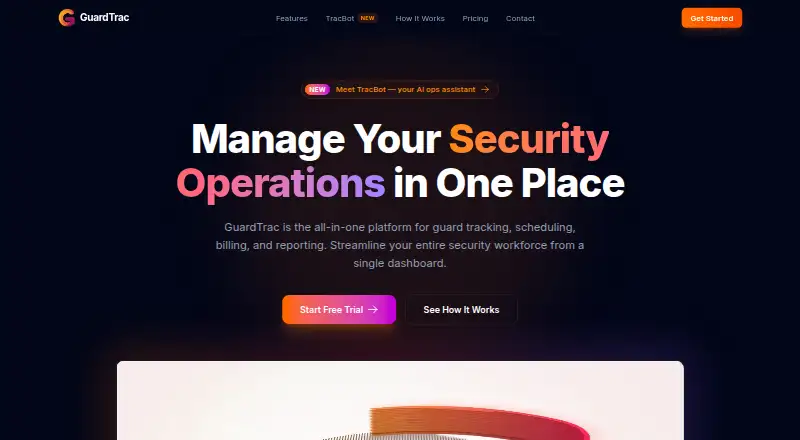
GuardTrac is a security guard management platform for tracking guards, scheduling shifts, billing and reporting. GPS tracking and geofencing monitor guard locations and patrol routes in real time. Managers can automate shift assignments and address scheduling conflicts, while QR code checkpoints help confirm patrol completion. The iOS and Android app supports clocking in and out, checkpoint scans, incident reports and communication with dispatch. TracBot answers plain-English questions using a customer’s guards, sites, shifts and reports. GuardTrac says its web maps use Mapbox. The Free plan costs nothing and is limited to 5 users and 1 client location. Pro is priced on request and includes unlimited client locations, TracBot, in-app messaging and an HR and Payroll module. A 30-day free trial is offered without a credit card. The privacy policy says precise location may be collected in the foreground and background while a guard is clocked into an active shift, then pauses collection when the shift ends.
Who it suits
GuardTrac suits security teams that need to coordinate guard shifts, track patrols and document incidents. Its mobile app and client dashboard may also suit teams that need guard and client-facing workflows.
What it does well
- Real-time GPS tracking and geofencing monitor patrols.
- QR checkpoints help verify patrol completion.
- Mobile app supports timekeeping and incident reports.
- Free plan includes up to 5 users and 1 client location.
- 30-day trial starts without a credit card.
What to know first
- Free plan is limited to 5 users.
- Free plan supports only 1 client location.
- Precise location may be collected during active shifts.
Limits
The Free plan is limited to 5 users and 1 client location. It includes basic reporting, live guard tracking, a client dashboard, and shift management; Pro is priced on request and includes unlimited client locations and additional features.
Plans
| Plan | Billed and limits | Price |
|---|---|---|
| Free | Up to 5 users · 1 client location · Basic reporting · Live guard tracking · Client dashboard · Shift management | Free |
| Pro | Unlimited client locations · TracBot AI assistant · In-app messaging · HR & Payroll module · Custom report templates · Priority support · Early access to new features | $5 |
| Enterprise | Everything in Pro · Unlimited guards · Unlimited client locations · Dedicated account representative · Priority feature requests | On request |
As guardtrac.com lists them, read 29 Sept 2026. The maker's own page has the final word.
Getting started
- Open https://www.guardtrac.com/.
- Start the 30-day free trial; no credit card is required.
- Choose the Free plan or Pro plan.
- Use the web interface for management and mapping.
- Install the iOS or Android mobile app for guard timekeeping, checkpoints, incident reports, and dispatch communication.
- Set up shifts, locations, and QR code checkpoints.
GuardTrac combines guard scheduling, patrol verification, timekeeping and reporting, with mobile tools for guards. It is best suited to security teams coordinating shifts and patrols across client sites. Its five-user free tier is a useful starting point, but its one-location cap and active-shift location collection deserve close attention.
Overview
GuardTrac brings operational tasks that often sit in separate workflows into one platform: managers can schedule shifts, track guards and patrol routes, and handle billing and reporting, while guards use a mobile app for field tasks. That range is a practical advantage for teams wanting oversight beyond checkpoint logging alone. The Free plan, however, is limited to one client location, so it is better for a small operation or initial evaluation than a multi-site deployment.
Key features
Live tracking and patrol verification
GPS tracking and geofencing provide real-time visibility into guard locations and patrol routes. QR checkpoints let teams verify patrol completion, with scans supported in the mobile app. These tools suit operations where supervisors need location and route visibility; teams should also weigh that oversight against the product’s active-shift location policy.
Scheduling and guard workflows
Scheduling tools automate shift assignments and help resolve conflicts, which can reduce coordination work as rosters change. Guards can clock in and out, submit incident reports, and communicate with dispatch through the mobile app. That combination makes GuardTrac relevant to teams seeking both scheduling and field reporting in the same system.
Reporting and AI
GuardTrac supports billing and reporting, and the Free plan includes basic reporting and a client dashboard. TracBot AI answers plain-English questions using a customer’s guards, sites, shifts and reports; it may be useful for querying operational data without relying only on standard reports. The web interface uses Mapbox for maps and geospatial visualization.
Privacy and security
GuardTrac says it does not sell or share personal information as defined by CCPA/CPRA. Its privacy policy describes encryption in transit and at rest, access controls, security assessments, staff training and secure hosting. It also says precise location may be collected in the foreground and background while a guard is clocked into an active shift, with collection pausing when the shift ends. That boundary is important for employers and guards assessing location monitoring.
Pricing
GuardTrac uses a freemium model, with a 30-day free trial that requires no credit card to start. The Free plan costs nothing and includes up to 5 users, 1 client location, basic reporting, live guard tracking, a client dashboard and shift management. It is a credible way for a small team to assess core workflows, but the user and location caps limit its value for growing or multi-site teams.
Pro is priced on request. It adds unlimited client locations, TracBot AI, in-app messaging, an HR and Payroll module, custom report templates, priority support and early access to new features. The additional locations and operational tools make it the more suitable tier for teams whose needs exceed the Free plan; the quoted unit is per contact, so buyers should clarify how that applies to their workforce before budgeting.
Enterprise has custom pricing and includes everything in Pro, unlimited guards and client locations, a dedicated account representative and priority feature requests. It is aimed at larger operations that need uncapped scale and a direct account contact. The Free plan’s limits and the 30-day trial are the clearest entry points for teams comparing options before committing.
Platforms
GuardTrac is available on the web, Android and iOS. The mobile apps support guard timekeeping, checkpoint scans, incident reporting and communication with dispatch, while the web interface provides maps and geospatial visualization.
Who it's for
GuardTrac is a strong fit for security providers that want scheduling, live guard tracking, patrol verification and client-facing reporting in one platform. Small teams can start on Free if one client location and five users are enough. Larger or multi-location teams should consider Pro or Enterprise, while organizations unwilling to collect precise location during active shifts should look elsewhere.
Pros and cons
- Pros: Scheduling, tracking, checkpoint verification, timekeeping and incident reporting cover key guard operations in one platform.
- Pros: The Free plan includes live tracking and shift management for up to five users at one client location.
- Pros: Pro adds unlimited client locations and TracBot AI on request.
- Cons: Free is capped at five users and one client location, restricting it for larger or multi-site teams.
- Cons: Precise location collection continues in the foreground and background during an active shift, which may not suit privacy-sensitive workplaces.
- Cons: Enterprise requires custom pricing, and Pro’s per-contact basis should be clarified for accurate budgeting.
Alternatives
Security Guard Software is a broader category to browse if you want to compare guard-management options beyond GuardTrac.
- Security Guard App is worth considering for a single user who wants a free plan with check-in/out, site posts, reports, multimedia attachments, teams and profiles, across Android, iOS, macOS, web and Windows.
- Guard Patrol Pro may suit a one-site, one-guard operation seeking a 15-day trial with basic reports and mobile app access; its Starter plan costs $15 a month.
- GuardConnect is another freemium option whose Free plan covers 1 to 10 officers.
- guardtour.app may be a better match for teams focused on checkpoint verification, with five checkpoints, one site, 30-day history, QR and NFC verification, and iOS and Android apps on its Free plan.
- ActivitySuite is an alternative with monthly plans priced by session allowance, starting at 99.00 USD for 250 sessions.
- PatrolLIVE is another freemium option, with a plan priced at $89 a month.
- Silvertrac uses custom quotes based on site count and selected modules.
- ZOOY Patrol is another paid patrol software option.
Verdict
Choose GuardTrac if your security team needs scheduling, patrol verification and live location oversight alongside guard reporting and timekeeping, especially when multiple sites make Pro’s unlimited locations useful. Its free tier offers a practical small-team starting point, but the five-user and one-location limits are firm constraints. Look elsewhere if active-shift location monitoring is unacceptable or if you need predictable Enterprise pricing before evaluating a larger rollout.
Verdict
GuardTrac brings scheduling, patrol verification, timekeeping and reporting into one platform, with mobile apps for guards. Compare the Free plan limits with your team’s size and location needs, and note its active-shift location collection policy.
Questions
Does GuardTrac have a free plan?
Yes. The Free plan costs nothing and is limited to 5 users and 1 client location.
Is there a free trial?
Yes. GuardTrac advertises a 30-day free trial and says no credit card is required to start.
What does Pro cost?
Pro is priced on request.
Which platforms are available?
GuardTrac is available on Android, iOS, and the web.
What does the mobile app do?
It supports clocking in and out, checkpoint scans, incident reports, and communication with dispatch.
How does GuardTrac handle location data?
Its policy says precise location may be collected in the foreground and background while a guard is clocked into an active shift, and collection pauses when the shift ends.
Facts from GuardTrac's own pages
- Checkpoint tours
- Teams can set up QR code checkpoints and verify patrol completion. · guardtrac.com, 29 Sept 2026
- Free plan limit
- The Free plan is limited to 5 users and 1 client location. · guardtrac.com, 29 Sept 2026
- GPS tracking
- It monitors guard locations and patrol routes in real time using GPS tracking and geofencing. · guardtrac.com, 29 Sept 2026
- Integration
- GuardTrac says its web interface uses Mapbox for maps and geospatial visualization. · guardtrac.com, 29 Sept 2026
- Location data
- The policy says precise location may be collected in the foreground and background while a guard is clocked into an active shift, and collection pauses when the shift ends. · guardtrac.com, 29 Sept 2026
- Mobile app
- The mobile app supports clock in and out, checkpoint scans, incident reports, and communication with dispatch, and is listed as available on iOS and Android. · guardtrac.com, 29 Sept 2026
- Privacy
- GuardTrac says it does not sell or share personal information as defined by CCPA/CPRA. · guardtrac.com, 29 Sept 2026
- Product
- GuardTrac is a security guard management platform for tracking guards, scheduling shifts, billing, and reporting. · guardtrac.com, 29 Sept 2026
- Scheduling
- Its scheduling tools automate shift assignments and help resolve scheduling conflicts. · guardtrac.com, 29 Sept 2026
- Security
- Its privacy policy lists encryption in transit and at rest, security assessments, access controls, staff training, and secure hosting among its data-protection measures. · guardtrac.com, 29 Sept 2026
- TracBot AI
- TracBot answers plain-English questions using a customer's guards, sites, shifts, and reports. · guardtrac.com, 29 Sept 2026
- Trial
- The site advertises a 30-day free trial and says no credit card is required to start. · guardtrac.com, 29 Sept 2026
Where GuardTrac stands on Freedom251
- Security Guard Software#5 of 27