Freedom251 › Integrated Development Environments
Greenfoot
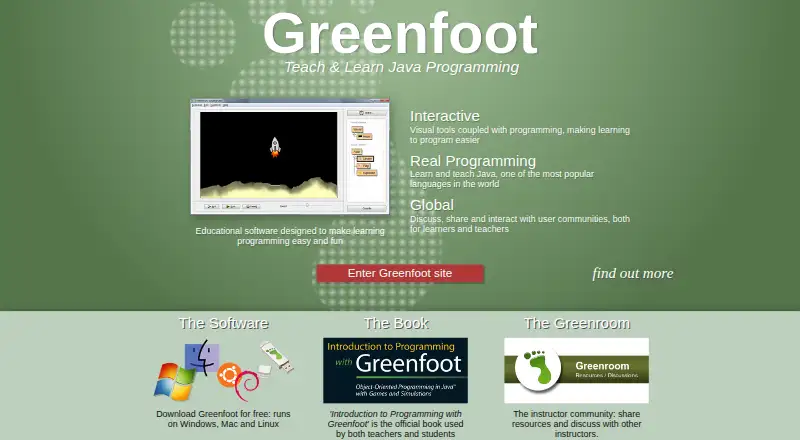
What Greenfoot is
Greenfoot is educational software for learning programming with Java by building interactive projects. It teaches object orientation using standard Java code, with actors living in worlds that users can combine into games, simulations, and other graphical programs. The environment includes visualization and interaction tools, while its IDE offers project management, auto-completion, syntax highlighting, and other common development tools. Users can publish projects online for others to play and comment on, and sharing is built into the environment. The Greenfoot site provides written and video tutorials for beginners and advanced users, as well as the Greenroom instructor community for sharing resources and discussing teaching. Greenfoot runs on Windows, macOS, and Linux. Download options list Windows 10 and 11, macOS 11 and later, Ubuntu with Debian support, and a generic option for systems with JDK and JavaFX. From version 3.6.0, Intel/AMD systems need a 64-bit CPU and operating system; the site directs users needing 32-bit support to version 3.5.4. The IDE source code is available under the GNU General Public Licence version 2 with classpath exception.
Who it suits
Greenfoot suits children and young adults learning Java and object-oriented programming through graphical projects. Instructors can use the Greenroom to share teaching resources.
What it does well
- Teaches object orientation with standard Java code
- Includes visualization and interaction tools
- Projects can be published for play and comments
- Written and video tutorials cover beginner and advanced users
What to know first
- Version 3.6.0 requires 64-bit Intel/AMD systems
- 32-bit users are directed to version 3.5.4
- Generic OS option requires JDK and JavaFX
Limits
From version 3.6.0, Intel and AMD computers need a 64-bit CPU and operating system. The site directs users who require 32-bit support to version 3.5.4; the generic OS download requires JDK and JavaFX.
Plans
| Plan | Billed and limits | Price |
|---|---|---|
| Greenfoot | Free software download · Windows, macOS, Ubuntu/Debian, or generic OS with JDK+JavaFX | Free |
As greenfoot.org lists them, read 4 Oct 2026. The maker's own page has the final word.
Getting started
- Visit the Greenfoot website and choose a download for your operating system.
- Choose Windows 10 or 11, macOS 11 or later, Ubuntu with Debian support, or a generic OS option with JDK and JavaFX.
- Install Greenfoot and start a project using actors and worlds.
- Use the written or video tutorials as learning resources.
- Publish a project online to let others play and comment.
Greenfoot is a free Java learning environment built around interactive worlds and actors. It suits children, young adults, and instructors introducing object-oriented programming through visible projects. Choose it for a focused, visual path into standard Java; choose another IDE when production-scale development is the priority.
Overview
Greenfoot teaches standard Java by having learners create games, simulations, and other graphical programs. Actors live in worlds, so object-oriented code produces an immediate, observable result. That connection makes concepts such as objects and interaction easier to discuss than in a code-only introduction, while retaining real Java syntax.
The environment is educational by design, not a general-purpose development suite. Its IDE still provides project management, auto-completion, syntax highlighting, and comparable everyday coding tools. Projects can be published online for others to play and comment on, with sharing built into the workspace.
Written and video tutorials address beginners through advanced users. Teachers can use the Greenroom community to exchange teaching resources and discuss classroom practice. Greenfoot also offers a transition into BlueJ and then more professional IDEs, so it works well as a first stage in a longer Java path.
Key features
Visual Java projects
Actors and worlds give code a visible setting, making Greenfoot particularly effective for lessons and self-directed learning that benefit from immediate feedback. The approach is less suitable for developers who need frameworks, deployment workflows, or a broad enterprise toolset.
IDE essentials
Project management, completion suggestions, syntax highlighting, and other familiar IDE functions support genuine Java practice rather than a simplified pseudocode exercise. Visualization and interaction tools are integrated, keeping learners in one environment while they build and revise a project.
Publishing and learning support
Online publication lets classmates or other users play projects and leave comments, which supports demonstration and discussion. Tutorials in both written and video formats provide a route beyond the first lesson, while the Greenroom gives instructors a dedicated peer community. Content posted by users must be safe for minors, matching the software's child- and young-adult audience.
Pricing
Greenfoot — free
The free plan is the software download for Windows, macOS, Ubuntu/Debian, or a generic operating system with JDK and JavaFX. There is no free trial because the product is already free, and no paid tier or renewal commitment is involved. That makes it practical for students, families, and classrooms that need a no-cost Java teaching environment, though it does not provide a separate commercial plan with additional capacity or services.
Platforms
Greenfoot supports Windows, macOS, and Linux. Downloads target Windows 10 and 11, macOS 11 and later, and Ubuntu with Debian support; a generic option covers systems that can provide a JDK and JavaFX. From version 3.6.0, Intel and AMD computers need a 64-bit processor and operating system. Users requiring 32-bit support must use version 3.5.4, which is an important compatibility constraint when equipping older machines.
The IDE source code is released under the GNU General Public Licence version 2 with a classpath exception. Technical help handles installation and operation by email, while programming questions belong in the discussions area. The site says it does not pass email addresses or other user data to third parties or use them beyond operating the website.
Who it's for
Greenfoot is a strong choice for children, young adults, and teachers who want object-oriented Java taught through games and simulations. Its visual model, tutorials, classroom community, and moderated-content expectation align with school and introductory settings. It is also useful for learners who want a bridge to BlueJ before moving to a professional IDE.
Experienced Java developers, teams needing advanced production tooling, or users whose computers are limited to 32-bit systems should look elsewhere. Greenfoot's educational focus and current hardware requirement are meaningful boundaries rather than minor inconveniences.
Pros and cons
Pros
- Standard Java in a visual setting: Actors and worlds make object-oriented behavior concrete without replacing Java with a teaching-only language.
- Useful IDE foundation: Project management, auto-completion, and syntax highlighting support authentic coding habits.
- Built-in sharing: Publishing for online play and comments gives learners a direct way to present work and receive feedback.
- Strong teaching resources: Tutorials and the Greenroom community support both learners and instructors.
- Free across major desktop systems: There is no subscription cost for supported Windows, macOS, or Linux setups.
Cons
- Educational scope: Its learning-first workflow is not a substitute for a broad professional Java IDE.
- 64-bit requirement on current releases: Intel and AMD systems needing 32-bit support are restricted to version 3.5.4.
- Desktop focus: The supported distribution centers on Windows, macOS, Ubuntu/Debian, or a manually prepared JDK-and-JavaFX environment.
Alternatives
For a wider survey, browse Java IDEs or Integrated Development Environments.
- BlueJ is the natural alternative when you want another free Java environment designed for beginners and a progression closely related to Greenfoot.
- Eclipse IDE is better when a free, open-source Java IDE is needed for broader development work.
- Apache NetBeans fits users wanting a free IDE and platform under the Apache License 2.0.
- IntelliJ IDEA suits learners who want a free core Java/Kotlin edition with an optional paid Ultimate subscription.
- CS++ Java IDE is an option for users who need Java access across iOS, macOS, web, and Windows.
- Java-Editor is free for personal, commercial, and government use, including Android alongside desktop platforms.
- DrJava is a free Java 8-compatible beta distributed as a JAR.
- MCreator is a free alternative when a donation-supported software option is preferred.
Verdict
Choose Greenfoot if you are teaching or learning object-oriented Java through games, simulations, and other interactive projects. Its strongest reason to exist is the combination of standard Java, visual feedback, tutorials, instructor community, and free online sharing. Look elsewhere when you need a production-oriented IDE, a different platform mix, or current support for 32-bit Intel/AMD systems.
Verdict
Greenfoot combines Java learning, interactive project building, and online sharing in a free environment. Check the listed system requirements, especially if 32-bit support is needed.
Questions
How much does Greenfoot cost?
Greenfoot is free software. Its listed plan is a free software download.
Which operating systems does Greenfoot support?
Downloads are listed for Windows 10 and 11, macOS 11 and later, Ubuntu with Debian support, and a generic OS option requiring JDK and JavaFX.
Is Greenfoot open source?
The Greenfoot IDE source code is available under the GNU General Public Licence version 2 with classpath exception.
What can learners make with Greenfoot?
Using standard Java code and actors in worlds, learners can create games, simulations, and other graphical programs.
Does Greenfoot offer teaching resources?
Yes. The site has written and video tutorials for beginners and advanced users. The Greenroom is a community for instructors to share resources and discuss teaching with Greenfoot.
What are the computer requirements for version 3.6.0 and later?
Intel and AMD systems require a 64-bit CPU and operating system. The site directs users needing 32-bit support to version 3.5.4.
Facts from Greenfoot's own pages
- Audience
- The site says Greenfoot is aimed at children and young adults and requires posted content to be safe for minors. · greenfoot.org, 4 Oct 2026
- Founded
- 2006 · greenfoot.org, 28 Sept 2026
- Hardware limit
- From version 3.6.0, Intel/AMD systems require a 64-bit CPU and operating system; the page directs users needing 32-bit support to version 3.5.4. · greenfoot.org, 4 Oct 2026
- Headquarters
- Canterbury, United Kingdom · greenfoot.org, 28 Sept 2026
- IDE features
- Its IDE includes project management, auto-completion, syntax highlighting, and other tools common to IDEs. · greenfoot.org, 4 Oct 2026
- Integrations
- The about page says Greenfoot provides an easy transition into BlueJ and more professional IDEs. · greenfoot.org, 4 Oct 2026
- Learning resources
- The site offers written and video tutorials, and says resources are available for beginners and advanced users. · greenfoot.org, 4 Oct 2026
- License
- The Greenfoot IDE source code is available under the GNU General Public Licence version 2 with classpath exception. · greenfoot.org, 4 Oct 2026
- Privacy
- The site says it does not pass email addresses or other user data to third parties or use them for purposes other than operating the website. · greenfoot.org, 4 Oct 2026
- Programming
- Greenfoot teaches object orientation with standard Java code, using actors that live in worlds to build games, simulations, and other graphical programs. · greenfoot.org, 4 Oct 2026
- Publishing and sharing
- Users can publish projects online for others to play and comment on, and online sharing is built into the environment. · greenfoot.org, 4 Oct 2026
- Purpose
- Greenfoot is educational software designed to make learning programming easy and fun. · greenfoot.org, 4 Oct 2026
- Support
- Technical support handles installation and operation problems by email; programming questions should go to the discussions area. · greenfoot.org, 4 Oct 2026
- Supported systems
- The download page lists Windows 10 and 11, macOS 11 and later, Ubuntu with Debian support, and a generic option for any OS that needs JDK and JavaFX. · greenfoot.org, 4 Oct 2026
- Teacher community
- The Greenroom is an instructor community for sharing teaching resources and discussing teaching with Greenfoot. · greenfoot.org, 4 Oct 2026
- Visual tools
- Visualization and interaction tools are built into the programming environment. · greenfoot.org, 4 Oct 2026
Where Greenfoot stands on Freedom251
- Integrated Development Environments#23 of 65
- Java IDEs#9 of 23