Freedom251 › Gradebook Software

GradingPal
What GradingPal is
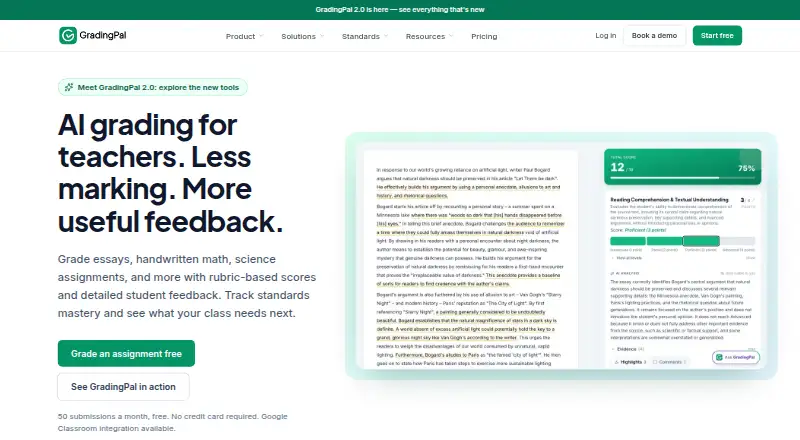
GradingPal is a web tool for teachers to assess student work against rubrics, generate scores and individual feedback, and identify classroom patterns that can inform instruction. It supports essays, worksheets, quizzes, exams, problem sets, presentations, art, and oral or video assignments, including supported handwritten math and science work. Teachers can review assessment evidence, change scores or comments, and decide what students receive. Feedback can be adjusted for style, language, and detail. The service supports Common Core, NGSS, TEKS, AP, IB, and teacher-defined criteria. Google Classroom can import classes, assignments, rubrics, and supported submissions; approved comments can be returned with or without grades. Canvas and Schoology are available on a school plan. The Free plan allows 50 submissions per month. Lite costs $14 a month billed annually; Pro costs $26 a month billed annually and includes unlimited submissions, analytics, all supported assignment types, training, and priority support. GradingPal states that student work is not used to train AI models and that student data is encrypted at rest and in transit.
Who it suits
GradingPal suits teachers who assess varied assignment types with rubrics and want to review or adjust scores and feedback. It also supports standards-based criteria and classroom analytics on eligible plans.
What it does well
- Supports essays, exams, art, and oral or video assignments.
- Teachers can review evidence and edit scores and comments.
- Supports Common Core, NGSS, TEKS, AP, and IB.
- GradingPal says student work is not used to train AI models.
What to know first
- Free plan is limited to 50 submissions per month.
- The product is available on web only.
- Canvas and Schoology are available on a school plan.
Limits
The Free plan allows 50 submissions per month, shared across assignment types. Lite allows 250 submissions per month and covers writing, presentations, and art; additional assignment types, analytics, and capacity are add-ons. Pro includes unlimited submissions and all supported assignment types.
Plans
| Plan | Billed and limits | Price |
|---|---|---|
| Free | 50 submissions/month · shared across assignment types · no credit card required | Free |
| Lite | $168 billed annually · 250 submissions/month · writing, presentations, and art · additional assignment types, analytics, and capacity available as add-ons | $14 a month |
| Pro | $312 billed annually · unlimited submissions · all supported assignment types · performance analytics · shared assignment and rubric library · training and onboarding · priority support | $26 a month |
| School & District | Contact us for a school plan · Pro features for teaching teams · Canvas and Schoology available · custom standards library · institutional data privacy agreement · dedicated customer success contact · training and onboarding | On request |
As gradingpal.com lists them, read 4 Oct 2026. The maker's own page has the final word.
Getting started
- Open the GradingPal website in a browser.
- Choose the Free, Lite, or Pro plan; Lite and Pro are billed annually.
- Use the Free plan without a credit card, or select a paid plan.
- Connect Google Classroom to import classes, assignments, rubrics, and supported submissions.
GradingPal is a web-based rubric assessment tool for teachers working across written, visual, oral, video, and handwritten assignments. It is best suited to educators who want AI-assisted scoring but retain editorial control over evidence, grades, and student feedback. The main trade-off is clear: broad support and unlimited work require Pro, while lower tiers impose meaningful volume or format restrictions.
Overview
GradingPal assesses essays, worksheets, quizzes, exams, problem sets, presentations, art, and oral or video assignments. Supported handwritten submissions include math and science work, giving subject teachers a way to keep rubric-based assessment in one workflow instead of separating paper-based tasks from digital ones.
Teachers can inspect the evidence behind an assessment, change scores and comments, and decide whether students receive feedback with grades or without them. Feedback controls cover style, language, and level of detail, so the output can be adjusted for different learners and lessons rather than sent unchanged. Rubrics can use Common Core, NGSS, TEKS, AP, or IB frameworks, or criteria created by the teacher.
Classroom analytics identify patterns in strengths and gaps for instructional planning. Progress reports, standards-based grading, and data import/export add reporting and portability, but the product remains a web service with no mobile-app coverage.
Key features
- Wide assignment coverage: One rubric process can span conventional writing, quantitative work, presentations, creative work, and spoken or recorded submissions. Lite limits the core plan to writing, presentations, and art unless other assignment types are purchased as add-ons.
- Human review controls: Evidence inspection and editable scores and comments make GradingPal an aid to teacher judgment, not a black-box replacement for it. Teachers retain the final decision about what students see.
- Configurable feedback: Adjustable language, style, and detail help teachers align comments with a learner or lesson, which is more useful than a single fixed feedback voice.
- Classroom insight: Analytics expose recurring strengths and gaps that can inform teaching. They are included in Pro and School & District; Lite treats them as an add-on.
- Classroom workflow: Google Classroom can import classes, assignments, rubrics, and supported submissions, then return approved comments with or without grades. Canvas and Schoology integrations are reserved for a school plan.
- Privacy and security: Student data is encrypted at rest with AES-256 and in transit with TLS 1.2 or higher. GradingPal says student work is not used to train AI models and cites FERPA, COPPA, GDPR and UK GDPR, SOPIPA, New York Education Law § 2-d, and CASA Tier 2 verification.
Pricing
GradingPal uses a freemium structure. There is no free trial, so the no-cost plan is the practical way to evaluate the workflow.
| Plan | Price and limits | Best fit |
|---|---|---|
| Free | free; 50 submissions per month shared across assignment types; no credit card required; help center access. | Individual teachers testing rubric assessment or handling a small monthly workload. The shared cap can become restrictive quickly. |
| Lite | $14 a month, billed $168 billed annually; 250 submissions per month; writing, presentations, and art; other assignment types, analytics, and capacity are add-ons; email support. | Teachers whose work is concentrated in those three formats and fits a predictable quota. It gives up the breadth and included analytics of Pro. |
| Pro | $26 a month, billed $312 billed annually; unlimited submissions; all supported assignment types; performance analytics; shared assignment and rubric library; training and onboarding; priority support. | Busy teachers or teams grading mixed formats. The annual billing commitment buys capacity and removes the central quota problem. |
| School & District | Custom pricing, billed by contacting GradingPal; Pro features for teaching teams, Canvas and Schoology, custom standards library, institutional data privacy agreement, dedicated customer success contact, training and onboarding. | Institutions needing team administration, district standards, LMS coverage beyond Google Classroom, and a formal privacy arrangement. |
Platforms
GradingPal runs on the web. Google Classroom integration supports importing classes, assignments, rubrics, and supported submissions, while Canvas and Schoology require the School & District plan. There is no mobile app coverage.
Who it's for
Choose it if you teach varied assignment types, rely on rubrics or formal standards, and want to revise AI-assisted results before release. It is especially compelling for schools already using Google Classroom and for educators who need analytics tied to instructional planning. A teacher with fewer than 50 monthly submissions can start free; a writing-focused teacher may find Lite sufficient. Schools with mixed subjects, high volume, or LMS and privacy requirements should budget for Pro or a custom school plan.
Pros and cons
- Pro: Supports an unusually broad set of assignment formats, including supported handwritten math and science work.
- Pro: Teachers can verify evidence, edit scores and comments, control feedback delivery, and tailor language and detail.
- Pro: Standards support, analytics, progress reporting, and Google Classroom workflow connect marking with planning and reporting.
- Pro: Encryption, stated non-training use of student work, and multiple education-privacy frameworks address institutional concerns.
- Con: Free's 50-submission shared cap limits sustained classroom use.
- Con: Lite's 250-submission quota and narrow included formats make add-on costs likely for broader curricula.
- Con: Canvas and Schoology, team features, and a custom standards library require the custom-priced school tier; there is no mobile app.
Alternatives
For broader gradebook software choices, see Gradebook Software. ThinkWave is a better fit when you want a free solo gradebook across Android, iOS, Linux, macOS, web, and Windows, with no stated limits on students, classes, or assignments and 25 MB upload limits per file. Pick SimpleGradebook instead for a free, cross-platform gradebook from Newcastle Technologies, described as 100% Canadian owned and operated. Vidyapeeth360 Digital Gradebook suits schools wanting a free tier for up to 100 students and 29 of 58 modules, with paid expansion at ₹99 a year per student. Gradebook.ng is an alternative for web-based essential grade management with a free tier for up to 50 students. Gradebox fits teachers seeking a free-forever single-classroom plan with 120 single-page submissions or grades per month, or a lower-priced 11.99 USD monthly Pro plan. Madrasatey is a free Android and web option for Madaris and Maktabs without per-parent charges. Smart Teacher is worth considering for Android and web planning with three classes, unlimited students, and 10 AI credits per month on its free plan. NavEd Free Gradebook is a simpler web choice limited to one class and 10 students on its free-forever plan.
Verdict
GradingPal is a strong choice for teachers and schools that need rubric-based assessment across many formats while keeping human approval over grades and feedback. Its main reason to choose it is the combination of assignment breadth, configurable feedback, and teacher review. Look elsewhere if you need a mobile app, a larger free allowance, or a straightforward gradebook rather than assessment and instructional analytics.
Verdict
GradingPal supports rubric-based assessment across varied assignment types while leaving teachers able to review and revise results. The Free plan has a monthly submission limit; higher plans add capacity and features at listed annual-billing rates.
Questions
Is GradingPal free?
Yes. Its Free plan costs nothing and allows 50 submissions per month without a credit card.
How much do the paid plans cost?
Lite is $14 a month, billed $168 annually. Pro is $26 a month, billed $312 annually.
What platforms does it support?
GradingPal is available on the web. Mobile app coverage is listed as none.
Does it work with classroom platforms?
Google Classroom is available for importing classes, assignments, rubrics, and supported submissions, and returning approved comments. Canvas and Schoology are available on a school plan.
Who makes GradingPal?
GradingPal is a product of Cues Technologies Inc. Its About page names Rajesh Vora as Founder & President.
Is there a free trial?
No. GradingPal lists no free trial; it offers a Free plan instead.
Facts from GradingPal's own pages
- AI data use
- GradingPal states that student work is not used to train AI models. · gradingpal.com, 4 Oct 2026
- Analytics
- Classroom analytics surface patterns in strengths and gaps to help teachers plan instruction; the pricing page says analytics is included in Pro and school plans and is a Lite add-on. · gradingpal.com, 4 Oct 2026
- Assignment types
- It supports essays, worksheets, quizzes, exams, problem sets, presentations, art, and oral or video assignments. · gradingpal.com, 4 Oct 2026
- Compliance
- The company lists FERPA, COPPA, GDPR and UK GDPR, SOPIPA, and New York Education Law § 2-d coverage, and says it is CASA Tier 2 verified. · gradingpal.com, 4 Oct 2026
- Feedback controls
- Teachers can shape feedback style, language, and level of detail to fit the learner and lesson. · gradingpal.com, 4 Oct 2026
- Google Classroom workflow
- Teachers can import classes, assignments, rubrics, and supported submissions, then return approved comments with or without grades. · gradingpal.com, 4 Oct 2026
- Handwritten work
- Teachers can submit supported handwritten work, including math and science work, for rubric-based assessment. · gradingpal.com, 4 Oct 2026
- Headquarters
- Beverly Hills, California, United States · gradingpal.com, 28 Sept 2026
- Integrations
- Google Classroom is available, while Canvas and Schoology are available on a school plan. · gradingpal.com, 4 Oct 2026
- Maker
- GradingPal is a product of Cues Technologies Inc.; its About page names Rajesh Vora as Founder & President. · gradingpal.com, 4 Oct 2026
- Purpose
- GradingPal assesses student work against rubrics, generates scores and individualized feedback, and provides classroom insights for teachers. · gradingpal.com, 4 Oct 2026
- Security
- The security page says student data is encrypted at rest with AES-256 and in transit with TLS 1.2 or higher. · gradingpal.com, 4 Oct 2026
- Standards
- The product supports standards and frameworks including Common Core, NGSS, TEKS, AP, and IB, and allows teachers to use their own criteria. · gradingpal.com, 4 Oct 2026
- Support
- The Free plan includes help center access, Lite includes email support, and Pro includes priority support and training. · gradingpal.com, 4 Oct 2026
- Teacher review
- Teachers can inspect assessment evidence, edit scores and comments, and choose what feedback students receive. · gradingpal.com, 4 Oct 2026
Where GradingPal stands on Freedom251
- Gradebook Software#3 of 24