Freedom251 › Game Asset Marketplaces
Godot Asset Library
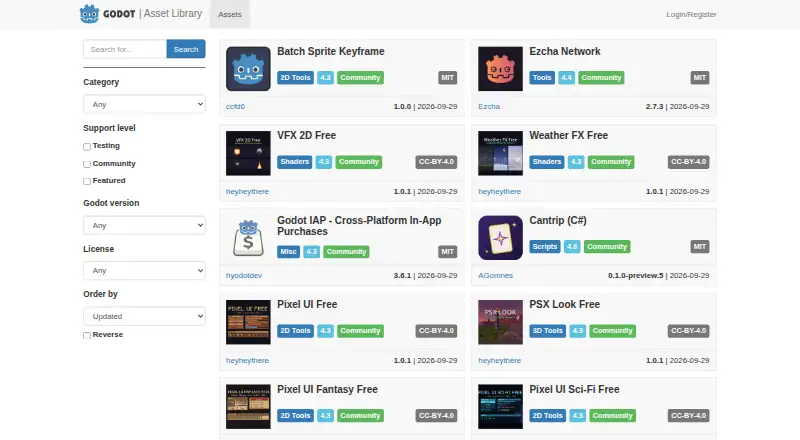
What Godot Asset Library is
Godot Asset Library is a free repository of user-submitted addons, scripts, tools, and other resources for Godot. Users can browse the official website or download assets from within the Godot editor. Templates, projects, and demos are standalone projects; other resources are intended to go into an existing project. The web library offers filters for category, support level, engine version, and license, with sorting by license, name, or update date. Its labels identify Featured assets selected by the library, Community assets maintained by contributors, and Testing assets that may contain bugs and are not recommended for serious projects. Browsing and downloading require no login, but uploading requires a registered account and sign-in. Assets link to third-party repositories rather than being hosted by the library. Each asset entry can cover only one Godot version, and the editor fetches assets only for the version currently running. Web search results do not update automatically when query settings change; users need to submit the search again. All assets are distributed free, and paid assets cannot be uploaded to the official library.
Who it suits
It suits Godot users looking for project resources and developers who want to submit assets. The support labels and engine-version filters help users narrow their choices.
What it does well
- Browse and download without logging in.
- Filter by category, support level, version, and license.
- Assets are distributed free of charge.
- Downloads are available through the website or editor.
What to know first
- Asset entries cover only one Godot version.
- Editor downloads are limited to the running Godot version.
- Testing assets may contain bugs.
- Web searches must be resubmitted after changing settings.
Limits
All assets are free, and paid assets cannot be uploaded. An asset listing supports only one Godot engine version; the editor can fetch assets only for the version currently running.
Plans
| Plan | Billed and limits | Price |
|---|---|---|
| Free | All assets are distributed free of charge; paid assets cannot be uploaded to the official library | Free |
As godotengine.org lists them, read 4 Oct 2026. The maker's own page has the final word.
Getting started
- Visit the Godot Asset Library website or open the library from within Godot.
- Browse or filter assets by category, support level, engine version, or license.
- Choose an asset and download it from the website or the editor.
- Use templates, projects, and demos as standalone projects; add other assets to an existing project.
- To upload an asset, register an account, sign in, and submit it for manual review.
Overview
Godot Asset Library is a free catalogue of community-made addons, scripts, tools, templates, projects and demos for Godot. It suits developers looking for resources to use in a Godot project, especially those who want to browse on the web or fetch assets from the editor. Its breadth and version and license filters help narrow the search, but assets live in external repositories and their support levels deserve attention.
Key features
The library serves both people extending an existing project and those seeking a starting point: addons, scripts and tools are intended to be placed into a project, while templates, projects and demos are standalone. Users can browse or download without an account; uploading requires registration and login.
Web filters cover category, support level, engine version and license, with sorting by license, name or update date. Featured assets are hand-picked, Community assets are maintained by community members, and Testing assets may contain bugs and are not recommended for serious projects. These labels offer useful context, but do not make every community submission equally suitable for production.
Godot's editor can fetch assets directly, but only for the engine version currently running. A single entry cannot provide downloads for multiple Godot versions, so authors may need separate entries for each version. Web search also requires resubmission after changing query settings rather than updating results in real time. The library page displayed 5,376 assets, a substantial catalogue, though the version limits make careful filtering important.
Assets point to third-party Git repositories rather than being hosted by the library. That gives users a direct route to repositories on providers such as GitHub, GitLab or Bitbucket, but means the library is a catalogue rather than a file host. Uploaders must ensure the displayed license matches the repository license and that the repository includes a LICENSE or LICENSE.md file with license text and a copyright statement. Submissions go through manual review, which may take up to a few days. The documentation directs users to the library's GitHub repository for issues and pull requests.
Pricing
Godot Asset Library is free: its Free plan costs nothing, and all assets are distributed free of charge. Paid assets cannot be uploaded to the official library, so developers seeking a marketplace for paid resources should look elsewhere. There is no free trial because access is free rather than trial-based.
Platforms
The listed platforms are Linux, macOS, web and Windows. The editor download workflow is tied to the Godot version a user is running, while the website provides the searchable catalogue.
Who it's for
This is a strong fit for Godot developers seeking free community resources, particularly those comfortable checking engine compatibility, support level and repository licensing before adopting an asset. It is less suitable for buyers who need paid assets in an official library, or developers who want one entry to offer downloads for several Godot versions.
Pros and cons
- Pros: Free access to a broad catalogue with category, support-level, version and license filters, useful for narrowing choices before adding a resource.
- Pros: Browsing and downloads require no login, and editor access offers a direct route to fetch compatible assets.
- Cons: Testing assets may contain bugs, so their support label is a warning against relying on them in serious projects.
- Cons: External repository hosting and one-version-per-entry limits require users to verify repository and engine-version fit themselves.
- Cons: Web results do not refresh automatically when query settings change, adding a manual step to searching.
Alternatives
For broader game-asset browsing, compare the Game Asset Marketplaces list; for narrative-focused tools, see Game Narrative Design Software.
ChatMapper is a freemium option for readers who need a narrative design tool with a bounded free tier of one editor, three projects and 300 nodes each, plus core exports and permitted commercial use.
Ren'Py is a free alternative for readers seeking a system for visual novels, with use permitted for commercial and non-commercial purposes. ink and Inky suits readers seeking free, MIT-licensed narrative scripting tools, while Narrat is another free and open-source choice under the MIT License.
Quest Viva is worth considering for readers who want a free MIT-licensed tool that permits selling games and using modified source in closed-source commercial applications. TADS is a free authoring system with no restrictions on games created.
Yarn Spinner is a free, open-source alternative for readers who want integrations for Unity, Godot and Unreal plus a VS Code extension. articy:draft X may suit readers who prefer a free tier with 700 objects per project and unlimited projects.
Verdict
Godot Asset Library is the right starting point for Godot developers who want free resources searchable by version, support level and license, with the convenience of editor access. Choose it when community assets and external repositories fit your workflow; look elsewhere if you need paid library listings or multi-version downloads from a single asset entry.
Verdict
Godot Asset Library offers a free route to find Godot resources, with web filters and access from the editor. Check the support level and engine version before choosing an asset; entries link to external repositories rather than hosting the files themselves.
Questions
Is Godot Asset Library free?
Yes. All assets are distributed free of charge, and paid assets cannot be uploaded to the official library.
Do I need an account to download assets?
No. Browsing and downloading do not require login. Uploading requires a registered account and sign-in.
Where can I access the library?
You can access it on Godot's official website or from within the Godot editor.
What kinds of assets are available?
The repository includes addons, scripts, tools, templates, projects, demos, and other resources. Templates, projects, and demos are standalone; other assets are intended for an existing Godot project.
How are assets hosted and licensed?
Library entries link to third-party repositories such as GitHub, GitLab, or Bitbucket. The listed license must match the repository license, which must contain a LICENSE or LICENSE.md file with the license text and copyright statement.
How long does asset submission review take?
Submissions enter a manual review queue that may take up to a few days for approval or rejection.
Facts from Godot Asset Library's own pages
- Asset types
- Templates, projects, and demos are standalone projects, while other assets are intended to be placed into an existing Godot project. · docs.godotengine.org, 4 Oct 2026
- Current listing
- The opened library page displayed 5,376 assets and offered filters for category, support level, Godot version, and license. · godotengine.org, 4 Oct 2026
- Editor limitation
- From the editor, users can fetch assets only for the Godot version they are currently running. · docs.godotengine.org, 4 Oct 2026
- In-engine access
- Assets can be downloaded directly from within Godot or accessed on Godot's official website. · docs.godotengine.org, 4 Oct 2026
- License rules
- The license shown in the library must match the repository license, and the repository must include a LICENSE or LICENSE.md file containing the license text and copyright statement. · docs.godotengine.org, 4 Oct 2026
- Login requirement
- Browsing and downloading do not require login, but uploading assets requires a registered user account and login. · docs.godotengine.org, 4 Oct 2026
- Purpose
- The Asset Library is a repository of user-submitted Godot addons, scripts, tools, and other resources. · docs.godotengine.org, 4 Oct 2026
- Repository hosting
- Assets are not hosted directly on the Asset Library and instead point to repositories on third-party Git providers such as GitHub, GitLab, or Bitbucket. · docs.godotengine.org, 4 Oct 2026
- Search filters
- The web library can filter assets by category, support level, engine version, and license, and sort by license, name, or update date. · docs.godotengine.org, 4 Oct 2026
- Submission review
- Submitted assets enter a manual review queue that may take up to a few days for approval or rejection. · docs.godotengine.org, 4 Oct 2026
- Support channel
- The Asset Library documentation directs users to its GitHub repository to submit pull requests and issues. · docs.godotengine.org, 4 Oct 2026
- Support levels
- Featured assets are hand-picked, Community assets are submitted and maintained by community members, and Testing assets may contain bugs and are not recommended for serious projects. · docs.godotengine.org, 4 Oct 2026
- Version limitation
- A single asset entry cannot contain downloads for multiple Godot engine versions, so authors may need separate entries for different engine versions. · docs.godotengine.org, 4 Oct 2026
- Web search behavior
- Web search results do not update in real time; users must submit the search again after changing query settings. · docs.godotengine.org, 4 Oct 2026
Where Godot Asset Library stands on Freedom251
- Game Asset Marketplaces#4 of 21
- Game Narrative Design Software#6 of 25