Freedom251 › Game Narrative Design Software
ChatMapper
What ChatMapper is
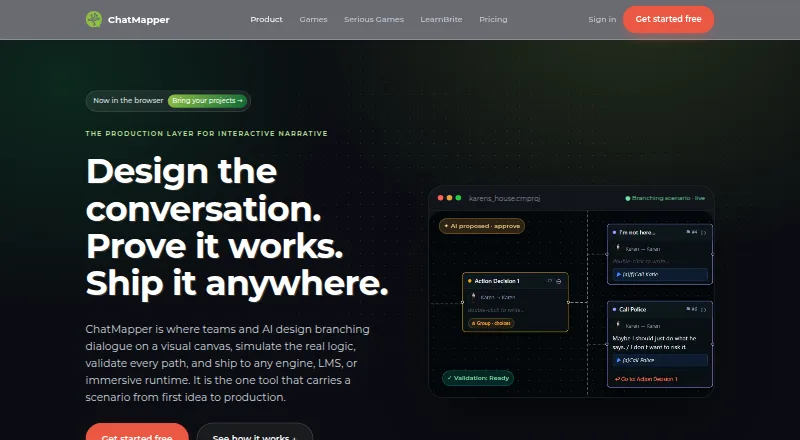
ChatMapper is a browser-based workspace for designing, simulating, validating, and delivering branching conversations. Its visual graph organizes dialogue, choices, actors, variables, conditions, scripts, media, and links between conversations. The simulator runs Lua logic and checks for broken links, dead ends, and undefined variables. An AI collaborator can propose structured edits for human review, with accepted changes stored as revisions. ChatMapper imports .cmp, XML, Arcweave, Twine, articy:draft, and CSV, and exports JSON, Unity XML, SCORM, xAPI, Yarn, HTML, and LearnBrite. The maker describes Unity and Yarn exports and says canonical JSON can be used with Unreal, Godot, and custom engines. Listed uses include games, interactive stories, learning, immersive experiences, and AI character roleplay. The Free plan allows one editor, three projects, and 300 nodes per project, with core exports and commercial use. Paid plans start at $19/mo billed annually. Cloud works in current Chrome, Edge, Firefox, or Safari; the separate Desktop 1.9.1 app is Windows-only.
Who it suits
ChatMapper suits writers and teams building branching conversations for games, learning, interactive stories, immersive experiences, or AI character roleplay. Its graph and validation tools may help organize and check complex dialogue.
What it does well
- Graph supports dialogue, variables, scripts, media, and links.
- Simulates Lua and checks broken links and dead ends.
- AI suggestions require human review; accepted edits become revisions.
- Free plan permits commercial use and core exports.
What to know first
- Free plan allows one editor and three projects.
- Free projects are limited to 300 nodes each.
- Desktop 1.9.1 is Windows-only.
- Paid plans start at $19/mo billed annually.
Limits
The Free plan is limited to one editor, three projects, and 300 nodes per project. It includes core exports.
Plans
| Plan | Billed and limits | Price |
|---|---|---|
| Free | 1 editor · 3 projects · 300 nodes each · visual canvas · Lua simulation · deterministic validation · JSON/HTML/screenplay export · commercial use | Free |
| Desktop Personal | Free forever · 1 user · Windows Desktop 1.9.1 · fully offline · local files · personal and non-commercial use only | Free |
| Desktop Team | Billed annually at $1,320/year · 3 professional users · commercial/client work · advanced exports · Windows Desktop 1.9.1 | $110 a month |
| Creator | Billed annually at $228/year, or $24 month to month · unlimited projects and nodes · production exports · AI collaborator · generative voice/video with provider keys · localization · 90-day history | $19 a month |
| Desktop Commercial | Billed annually at $420/year · 1 professional user · commercial/client work · advanced exports · Windows Desktop 1.9.1 | $35 a month |
| Team | Billed annually at $948/year, or $99 monthly; 3 editors included, plus $20 per extra editor · organizations · roles · live presence · conflict protection · full diff/history/restore · shared AI provider configuration · priority support | $79 a month |
| Enterprise & OEM | OEM/white-label engine · custom integrations/exporters · SSO · security review · DPA · private or on-prem deployment · onboarding · SLA · commercial support | On request |
As chatmapper.com lists them, read 15 Oct 2026. The maker's own page has the final word.
Getting started
- Open the ChatMapper website in a current Chrome, Edge, Firefox, or Safari browser.
- Choose the Free plan or a paid plan; Creator starts at $19 a month, billed annually.
- For offline use, install the Windows-only ChatMapper Desktop 1.9.1 app.
- Create a project and author a branching conversation in the visual graph.
ChatMapper is a visual workspace for creating and checking branching conversations. It suits writers and teams building interactive stories, game dialogue, or learning scenarios who need structured authoring and multiple delivery formats. Its range of exports and validation tools are compelling; the free cloud plan is tightly capped, and the full feature set starts at $19 a month billed annually.
Overview
ChatMapper puts dialogue and choices into a node-based graph, with support for actors, variables, conditions, scripts, media, and links between conversations. It can simulate Lua logic and flag broken links, dead ends, and undefined variables, making it a practical fit for scenarios with branching structure that needs checking before delivery.
Its use cases span games and interactive stories, serious games and learning, immersive experiences, and AI character roleplay. The public canonical JSON format and MIT reference parser offer a path to work with scenarios outside ChatMapper, rather than leaving portability dependent on a single workspace.
Key features
- Graph authoring and validation: Combine dialogue, choices, and scenario logic in one visual structure, then simulate Lua and check common structural problems. This is useful for authors managing complex branches; it is more than a simple dialogue-writing tool.
- AI-assisted editing: The AI collaborator proposes structured changes for human review, and accepted edits become revisions. That review step keeps authors in control of what changes.
- Provider integrations: OpenAI, Anthropic, ElevenLabs, HeyGen, and Synthesia are supported using customers’ own keys. Generative-media charges go directly to the provider, with no ChatMapper markup, so provider usage is a separate cost to account for.
- Import and export: Imports include .cmp, XML, Arcweave, Twine, articy:draft, and CSV; exports include JSON, Unity XML, SCORM, xAPI, Yarn, HTML, and LearnBrite. Unity and Yarn have direct export support; canonical JSON can also be used with Unreal, Godot, and custom engines.
- Localization and history: Localization workflow and version history are available, with the Creator plan including 90-day history and Team adding full history.
Pricing
The Free cloud plan costs nothing and permits one editor, three projects, and 300 nodes per project, with core exports and commercial use allowed. Those caps make it a sensible way for a solo author to start or for a small project, but active commercial work that outgrows three projects or 300 nodes will need a paid plan. There is no free trial.
Creator costs $19 a month, billed annually. It removes project and node limits and adds Unity, Yarn, SCORM, xAPI, and LearnBrite exports, AI copilot, localization, and 90-day history. It is the clearest fit for an individual creator who needs substantial project capacity and those delivery formats; it does not include the team features offered at the next tier.
Team costs $79 a month, billed annually, and includes three editors. Additional editors cost $20 each. Roles and teams, live presence, full history, and priority support make it the relevant upgrade for collaborative work, though the included seat count is modest for larger groups.
There are also Windows desktop licenses. Desktop Personal is free for one user and allows personal, non-commercial projects in the fully offline application. Desktop Commercial costs $35 a month, billed annually at $420 a year, for one professional user and commercial or client work; Desktop Team costs $110 a month, billed annually at $1,320 a year, for three professional users. Both paid desktop plans include advanced exports and Windows Desktop 1.9.1. The desktop application is described as stable and maintained, while active development happens in the browser product, so desktop buyers are choosing offline Windows use over the actively developing cloud workspace.
Enterprise & OEM has custom pricing and adds an OEM and white-label engine, custom integrations and exporters, SSO, security review, DPA, self-hosted or on-prem options, onboarding, SLA, and commercial support. It is aimed at organizations with deployment, compliance, or integration needs beyond the standard plans.
Platforms
ChatMapper Cloud runs in current Chrome, Edge, Firefox, or Safari. The desktop application is Windows-only and runs offline. The product also supports Linux, macOS, web, and self-hosted deployment; enterprise plans include self-hosted and on-prem options.
Who it's for
ChatMapper is best for authors who need to map branching dialogue, validate its logic, and deliver it to game engines or learning formats. Solo creators can start on Free, while teams can move to collaboration features and organizations can choose enterprise deployment options. Someone seeking a fully offline workflow on macOS or Linux should look elsewhere: the offline desktop app is Windows-only.
Pros and cons
- Pro: Lua simulation and checks for broken links, dead ends, and undefined variables help catch structural issues in branching scenarios.
- Pro: A wide import and export range, plus public canonical JSON and an MIT reference parser, supports movement between tools and engines.
- Pro: Commercial use is permitted on the free cloud plan, and the free Windows desktop plan provides an offline option for personal, non-commercial work.
- Con: Free cloud use is limited to one editor, three projects, and 300 nodes per project, which can constrain a growing solo project as well as a team.
- Con: Creator is billed annually, and team collaboration requires the $79 a month Team tier or per-editor additions.
- Con: The offline desktop option is Windows-only and is not where active development happens.
Alternatives
Game Narrative Design Software is a useful category overview for readers who want to compare narrative tools broadly.
- Godot Asset Library is a better match when the need is a free source of Godot assets rather than a conversation-authoring workspace; its assets are free to distribute, and paid assets cannot be uploaded to the official library.
- Narrat suits readers seeking a free, open-source tool with personal or commercial use and no restrictions.
- Yarn Spinner is worth considering when open-source dialogue authoring and Unity, Godot, or Unreal integrations, including a VS Code extension, are the priority.
- articy:draft X may suit authors who prefer a free plan with unlimited projects and a 700-object limit per project, or want its monthly subscription option.
- Narratyr is another freemium option for readers comparing narrative tools.
- Arcweave is a web-based alternative whose free Basic plan allows three projects and 200 items per project, with unlimited members and guests.
- Ren'Py is a free alternative for readers looking for a tool available on desktop and mobile platforms.
- ink and Inky is a free alternative for readers considering a different narrative-writing tool.
Verdict
Choose ChatMapper if you need a graph-based way to author, simulate, and validate branching conversations, especially when Unity, Yarn, or learning-format exports matter. Its strongest case is the combination of structured authoring, validation, and portability. Look elsewhere if you need a generous free team plan or an actively developed offline desktop app outside Windows.
Verdict
ChatMapper offers a graph-based way to author and validate branching conversations, with multiple import and export formats. The free plan has project and node limits, while paid plans start at $19/mo billed annually.
Questions
Is ChatMapper free?
Yes. The Free plan costs nothing and includes one editor, three projects, up to 300 nodes each, core exports, and commercial use.
What is the starting paid price?
Creator is listed at $19 a month, billed annually.
Which platforms are available?
ChatMapper lists Linux, macOS, self-hosted, web, and Windows. ChatMapper Desktop 1.9.1 is a separate Windows-only offline application.
Which game engines does it support?
The maker describes Unity and Yarn exports. Canonical JSON can be used with Unreal, Godot, and custom engines.
Which services can it integrate with?
The site lists OpenAI, Anthropic, ElevenLabs, HeyGen, and Synthesia as provider integrations using customers’ own keys. Provider usage is billed directly by the provider.
Does ChatMapper offer self-hosted or on-prem deployment?
Enterprise & OEM lists self-hosted and on-prem options, along with SSO, security review, DPA, SLA, and support.
Facts from ChatMapper's own pages
- AI assistance
- The AI collaborator proposes structured edits for human review, and accepted changes are saved as revisions. · chatmapper.com, 28 Sept 2026
- AI billing
- Generative media uses customers’ own provider keys, with provider usage billed directly by the provider and no ChatMapper markup. · chatmapper.com, 28 Sept 2026
- AI editing
- The AI collaborator proposes structured scenario drafts, branch extensions, rewrites and scoring logic that a person must approve before application. · chatmapper.com, 15 Oct 2026
- AI providers
- ChatMapper lists OpenAI, Anthropic, ElevenLabs, HeyGen and Synthesia as provider options, with customers supplying their own keys. · chatmapper.com, 15 Oct 2026
- Authoring
- Its visual graph supports dialogue, choices, actors, variables, conditions, scripts, media, and cross-conversation links. · chatmapper.com, 28 Sept 2026
- Browser compatibility
- The documentation says ChatMapper Cloud runs in current Chrome, Edge, Firefox, or Safari. · docs.chatmapper.com, 28 Sept 2026
- Company size
- LinkedIn lists ChatMapper as a privately held company with 2–10 employees. · ec.linkedin.com, 15 Oct 2026
- Custom engines
- Unreal, Godot and proprietary engines can consume the canonical JSON format through a documented custom-runtime route. · docs.chatmapper.com, 15 Oct 2026
- Data portability
- The site says scenarios use a public canonical JSON format with an MIT reference parser and can be exported. · chatmapper.com, 28 Sept 2026
- Desktop download
- Desktop 1.9.1 is distributed as a 21.85 MB executable installer and a 26.20 MB MSI for managed Windows deployment. · chatmapper.com, 15 Oct 2026
- Desktop platform
- ChatMapper Desktop 1.9.1 is a Windows-only application that runs fully offline; the maker says it is stable and maintained while active development happens in the browser product. · chatmapper.com, 28 Sept 2026
- Desktop status
- The maker describes Desktop 1.9.1 as stable and maintained, while active development is concentrated in the browser product. · chatmapper.com, 15 Oct 2026
- Deterministic validation
- Validation checks broken links, dead ends, unreachable content, undefined variables and runtime-readiness issues across the graph. · chatmapper.com, 15 Oct 2026
- Documentation depth
- Developer documentation covers the data model, normative JSON, runtime semantics, Lua, XML, format extensions, validation, importers and multiple integrations. · docs.chatmapper.com, 15 Oct 2026
- Engine support
- The site describes Unity and Yarn exports and says canonical JSON can be used with Unreal, Godot, and custom engines. · chatmapper.com, 28 Sept 2026
- Exports
- Exports include canonical JSON, Unity XML, Yarn, HTML player, SCORM, xAPI, CSV, RTF, SVG, CMPKG and LearnBrite delivery. · docs.chatmapper.com, 15 Oct 2026
- Founded
- LinkedIn lists ChatMapper's founding year as 2012. · ec.linkedin.com, 15 Oct 2026
- Import and export
- ChatMapper lists imports from .cmp, XML, Arcweave, Twine, articy:draft, and CSV, and exports to JSON, Unity XML, SCORM, xAPI, Yarn, HTML, and LearnBrite. · chatmapper.com, 28 Sept 2026
- Imports
- Supported imports include ChatMapper desktop files, .cmp, .cmpkg, XML, JSON, CSV/Excel, Twine, Arcweave and articy:draft. · docs.chatmapper.com, 15 Oct 2026
- Integrations
- The site lists OpenAI, Anthropic, ElevenLabs, HeyGen, and Synthesia as supported provider integrations using customers’ own keys. · chatmapper.com, 28 Sept 2026
- JavaScript API
- The standalone player exposes window.chatmapperPlayer with scenario, session, completion and choice callbacks. · docs.chatmapper.com, 15 Oct 2026
- Limit: editor clutter
- A Bath Spa research thesis reports that ChatMapper's UI and output felt encumbered by extra avatar and game-asset features for the author's writing workflow. · researchspace.bathspa.ac.uk, 15 Oct 2026
- Limit: extra processing
- The same thesis says ChatMapper exports redundant data that required additional processing for the author's application. · researchspace.bathspa.ac.uk, 15 Oct 2026
- Limit: macOS use at the time
- The thesis author reported needing a Windows emulator to use ChatMapper on macOS during the period studied. · researchspace.bathspa.ac.uk, 15 Oct 2026
Where ChatMapper stands on Freedom251
- Game Narrative Design Software#4 of 25