Freedom251 › Membership Billing Software
Givebear
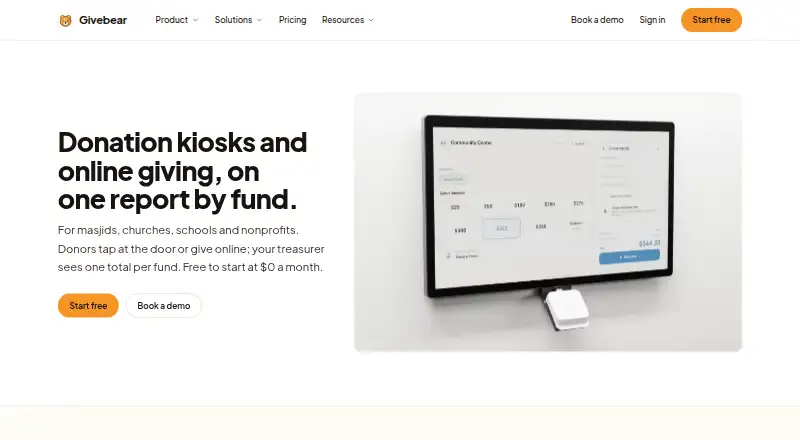
What Givebear is
Givebear provides donation kiosks and online giving for mosques, churches, schools, nonprofits and other community organizations. Donors can contribute at a kiosk, through a donation page or QR code, or by paying membership dues and event tickets. Each gift is recorded against the fund selected by the donor, and gifts and recurring plans from those channels are collected in one donor history. Givebear sends email receipts after gifts and year-end statements, with reports exportable by fund and date range.
Its 21.5-inch kiosk accepts Apple Pay, Google Pay and contactless cards, and offers English, Arabic, Spanish and Turkish. The kiosk can take one-time gifts offline; recurring gifts need a live connection. Donation forms can be embedded on websites including WordPress, Squarespace, Wix, Webflow, Shopify, GoDaddy, Weebly and Square Online. Givebear connects to QuickBooks Online to post payout journal entries split by fund, with fees and refunds broken out. Stripe processes card payments. Givebear says its servers receive tokenized payment references and do not store raw card numbers. The service has a free plan and paid subscriptions, with per-gift platform fees that vary by plan; kiosks are sold separately for a one-time charge. It is available on Android, iOS and the web.
Who it suits
Givebear suits community organizations that need to collect donations across kiosks, online forms, dues or event tickets and keep gifts organized by fund. Its donor history, exportable reports and QuickBooks Online connection may suit teams managing contributions across multiple channels.
What it does well
- Accepts gifts through kiosks, donation pages, QR codes, dues and tickets.
- Tracks gifts against donor-selected funds across giving sources.
- Combines gifts and recurring plans in one donor history.
- Offers receipts, year-end statements and exportable reports.
- Embeds donation forms on several named website builders.
- Available on Android, iOS and web.
What to know first
- Free plan charges a 5.9% platform fee per gift.
- Recurring gifts at a kiosk require a live connection.
- Kiosks cost $999 or $1,099 one-time.
- Stripe processing fees are passed through at cost.
Limits
The Free plan includes 50 donor contacts and 100 emails a month, and charges a 5.9% platform fee per gift. Plus, listed from $29/mo billed annually, includes 2,500 donor contacts, 10,000 emails and 250 texts a month; Growth, listed from $39/mo billed annually, includes 15,000 contacts, 75,000 emails and 1,000 texts a month. Stripe processing is passed through at cost on plans.
Plans
| Plan | Billed and limits | Price |
|---|---|---|
| Free | $0 a month; no subscription · 50 donor contacts · 100 emails a month · email support | Free |
| Floor stand kiosk | $1,099 one-time · 21.5-inch screen · 4-hour battery plus wired power · no monthly kiosk fee | $1,099, paid once |
| Plus | $29 a month billed annually ($348 a year); $39 a month month-to-month · 2,500 donor contacts · 10,000 emails a month · 250 texts a month · priority support | $29 a month |
| Growth | $39 a month billed annually ($468 a year); $54 a month month-to-month · 15,000 donor contacts · 75,000 emails a month · 1,000 texts a month · priority support and dedicated onboarding | $39 a month |
| Wall mount kiosk | $999 one-time · 21.5-inch screen · wired power · no monthly kiosk fee | $999, paid once |
As givebear.io lists them, read 7 Oct 2026. The maker's own page has the final word.
Getting started
- Visit the Givebear website.
- Choose the Free plan or a paid subscription; Plus and Growth have a 30-day trial.
- Use Givebear on the web, Android or iOS.
- Set up a donation page or QR code, or purchase a kiosk separately.
- Embed donation forms on a supported website builder if needed.
- Connect QuickBooks Online if you want payout journal entries posted by fund.
Givebear combines donation kiosks and online giving with dues and event tickets for community organizations. It suits groups that want gifts tied to designated funds and gathered into shared donor histories. Its range of giving channels is a strength, but transaction fees and the kiosk’s upfront price deserve close attention.
Overview
Donors can give at a kiosk, through an online donation page or QR code, or by paying membership dues and event tickets. Gifts are recorded against the fund a donor selects, and gifts and recurring plans from these channels are brought into one donor history. That makes Givebear a sensible choice for organizations managing several kinds of giving that want a consolidated record, rather than a donation page alone.
Email receipts follow gifts, and the service provides year-end statements and exportable reports by fund and date range. Organizations can export donor records and reports as CSV and manage donor-record access with role-based permissions. Stripe processes card payments; Givebear says it receives tokenized payment references rather than storing raw card numbers.
Key features
Kiosks and online giving
The 21.5-inch kiosk accepts Apple Pay, Google Pay and contactless cards, with English, Arabic, Spanish and Turkish support. It accepts one-time gifts offline, a useful fallback where connectivity is unreliable, but recurring kiosk gifts require a live connection. Donation forms can also be embedded on sites built with WordPress, Squarespace, Wix, Webflow, Shopify, GoDaddy, Weebly and Square Online.
Organizations can buy a wall-mount kiosk for $999 one-time or a floor stand for $1,099 one-time. Both have a 21.5-inch screen and no monthly kiosk fee; the floor stand adds a four-hour battery alongside wired power. The upfront hardware cost may be worthwhile for a fixed giving station, but groups wanting to avoid a large initial purchase can use the online options instead.
Accounting and reporting
Givebear can connect to QuickBooks Online and post payout journal entries split by fund, with fees and refunds broken out. This is particularly relevant to organizations that need fund-level accounting, while the exportable reports and CSV records give organizations a way to work with their data outside the platform.
Pricing
Givebear is freemium, with a 30-day trial and card payment methods. Every plan has a per-gift platform fee, with Stripe processing passed through at cost: 5.9% on Free, 2.9% on Plus and 1.9% on Growth. The paid tiers lower that fee but retain it, so the right plan depends not only on contact and messaging limits but also on giving volume.
| Plan | Price and limits | Best fit |
|---|---|---|
| Free | $0 a month; no subscription charge. 50 donor contacts, 100 emails a month, email support and a 5.9% platform fee per gift. | Small organizations that want to start without a subscription and can accept the higher per-gift fee and modest contact and email caps. |
| Plus | $29 a month billed annually ($348 a year), or $39 a month month-to-month. 2,500 donor contacts, 10,000 emails and 250 texts a month, priority support, and a 2.9% platform fee per gift. | Organizations that need more room for donor records and outreach, and expect the lower platform fee to justify a subscription. |
| Growth | $39 a month billed annually ($468 a year), or $54 a month month-to-month. 15,000 donor contacts, 75,000 emails and 1,000 texts a month, priority support with dedicated onboarding, and a 1.9% platform fee per gift. | Larger organizations with substantial contact and messaging needs or giving volume that makes the lowest platform fee valuable. |
Annual billing reduces the monthly price relative to month-to-month billing, but commits the organization to a full year’s charge. Kiosks are separate one-time purchases, not included as monthly kiosk subscriptions. The combination of a capped free plan and per-gift fee means Free is not automatically the cheapest choice for an organization processing many gifts.
Platforms
Givebear is available on Android, iOS and the web. Its site embeds broaden where online donation forms can appear, while the kiosk provides an in-person option. That mix is useful for organizations serving donors across devices and in person, though recurring kiosk gifts still depend on a live connection.
Who it's for
Givebear is aimed at mosques, churches, schools, nonprofits and other community organizations. It is strongest for groups that need to connect in-person and online giving with fund tracking, donor histories, receipts and reports. Organizations that primarily need membership-billing software may prefer to compare the Membership Billing Software category.
Pros and cons
- Pros: Kiosk, online, QR-code, dues and event-ticket giving feed into fund tracking and shared donor histories, giving organizations a more unified view of contributions.
- Pros: The kiosk supports several payment methods and four languages, and handles one-time gifts offline.
- Pros: QuickBooks Online journal entries can be split by fund, with fees and refunds broken out.
- Cons: Platform fees range from 1.9% to 5.9% per gift, in addition to Stripe processing passed through at cost.
- Cons: Kiosks cost $999 or $1,099 upfront, and recurring kiosk gifts cannot be taken offline.
- Cons: Free limits organizations to 50 donor contacts and 100 emails a month; texts begin on paid plans.
Alternatives
For organizations focused on dues and member administration rather than a combined giving setup, the ChamberedIn Premier plan includes 250 members for $499 per month; its Revenue Share plan has no upfront cost. memberplanet is another option for groups seeking a membership platform with a free plan and a paid Essentials tier at $50 per month, which includes a 2% platform fee and 1,000 campaigns. For clubs wanting unlimited members on a free entry plan, Mybers offers Starter with 500 emails a month; its Club plan is $39 per month and includes 5,000 emails.
Associatify may suit web-only groups seeking member registry and basic email automation on a free plan; its Starter tier is €89 per month. membermojo is a web-based membership option with a 100-member plan at £50 per year, with prices inclusive of VAT. MembershipWorks offers a free plan for 50 accounts and a monthly plan for up to 300 accounts at $35 per month. For organizations looking for a self-hosted membership plugin, Paid Memberships Pro has an open-source core plugin and Add Ons under GPLv2 that can run on as many sites as desired. Asovex is another web-based option, with a free plan for up to 10 members and a Basic plan at $9 per month billed $90 yearly for up to 100 members.
Verdict
Choose Givebear if your organization needs to bring kiosk and online giving, dues and event tickets into one fund-tracked donor record, with reporting and a QuickBooks Online connection. Its principal drawback is the cost structure: per-gift fees remain on every tier, and physical kiosks require a substantial one-time purchase. Organizations needing recurring kiosk gifts without connectivity should look elsewhere.
Verdict
Choose Givebear if your organization wants kiosk and online giving with fund tracking, donor histories and reports. The free plan has no subscription charge, but its 5.9% per-gift platform fee may make Plus or Growth worth considering as needs change. Look elsewhere if your kiosk must accept recurring gifts without a live connection.
Questions
Is there a free plan?
Yes. The Free plan is billed at $0 a month with no subscription, 50 donor contacts, 100 emails a month and email support. It charges a 5.9% platform fee per gift, with Stripe processing passed through at cost.
How much do the paid plans cost?
Plus is $29 a month billed annually ($348 a year), or $39 a month month-to-month. Growth is $39 a month billed annually ($468 a year), or $54 a month month-to-month.
How much do the kiosks cost?
The wall mount kiosk is $999 one-time. The floor stand kiosk is $1,099 one-time.
Which platforms does Givebear support?
Givebear is available on Android, iOS and the web.
Can Givebear connect to accounting software?
Yes. It can connect to QuickBooks Online to post payout journal entries split by fund, with fees and refunds broken out.
Who is Givebear for?
Givebear describes its product as built for mosques, churches, schools, nonprofits and other community organizations.
Facts from Givebear's own pages
- Accounting integration
- Givebear can connect to QuickBooks Online to post payout journal entries split by fund, with fees and refunds broken out. · givebear.io, 7 Oct 2026
- Data and access
- Givebear says organizations control donor-record access through role-based permissions and can export records and reports as CSV. · givebear.io, 7 Oct 2026
- Donor records
- Givebear keeps gifts and recurring plans from kiosk, online giving and dues in one donor history. · givebear.io, 7 Oct 2026
- Fees
- Plans charge a platform fee per gift of 5.9% on Free, 2.9% on Plus or 1.9% on Growth, with Stripe processing passed through at cost. · givebear.io, 7 Oct 2026
- Fund tracking
- Each gift is recorded against the fund selected by the donor, across giving sources. · givebear.io, 7 Oct 2026
- Giving options
- Donors can give at a kiosk, online by donation page or QR code, and through membership dues and event tickets. · givebear.io, 7 Oct 2026
- Intended users
- Givebear describes its product as built for mosques, churches, schools, nonprofits and other community organizations. · givebear.io, 7 Oct 2026
- Kiosk features
- The 21.5-inch kiosk accepts Apple Pay, Google Pay and contactless cards, and supports English, Arabic, Spanish and Turkish. · givebear.io, 7 Oct 2026
- Offline use
- The kiosk accepts one-time gifts while offline; recurring gifts require a live connection. · givebear.io, 7 Oct 2026
- Payment security
- Stripe processes card payments; Givebear says its servers receive tokenized payment references and do not store raw card numbers. · givebear.io, 7 Oct 2026
- Product
- Givebear provides donation kiosks and online giving for mosques, churches, schools and nonprofits. · givebear.io, 7 Oct 2026
- Receipts and reports
- It sends email receipts after gifts and year-end statements, and provides exportable reports by fund and date range. · givebear.io, 7 Oct 2026
- Support
- Free includes email support, Plus includes priority support, and Growth includes priority support with dedicated onboarding. · givebear.io, 7 Oct 2026
- Website integrations
- Donation forms can be embedded on websites including WordPress, Squarespace, Wix, Webflow, Shopify, GoDaddy, Weebly and Square Online. · givebear.io, 7 Oct 2026
Where Givebear stands on Freedom251
- Membership Billing Software#4 of 34