GitX
What GitX is
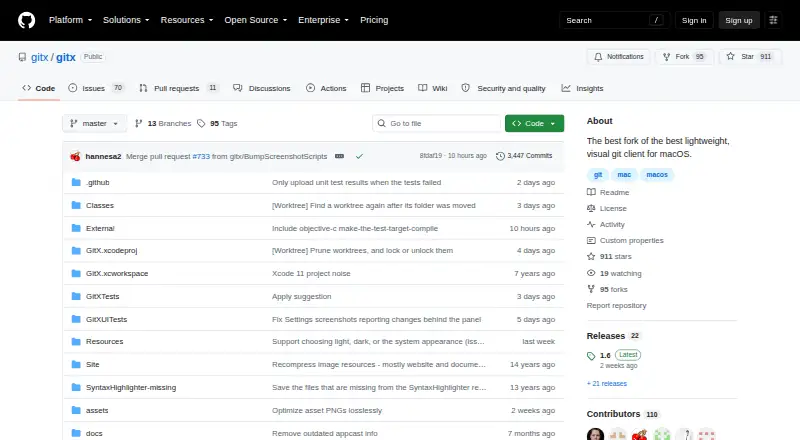
GitX is a free graphical client for working with Git repositories on macOS. It is a native app, and the project is maintained by a community effort consolidating earlier branches and versions. Release 1.7 lists worktree creation, removal, pruning, locking, and unlocking, as well as an option to force-push with lease after a rejected push. Users can select a commit-date format and choose light, dark, or system appearance settings. GitX also provides Git configuration preferences and Fetch and Prune menu items, including an option to prune during fetch. Preferences let users choose a terminal application, and GitX can open iTerm2 as a tab. It is licensed under GPL version 2. Mac users can install it with Homebrew or download a release and move it into Applications; the project directs Apple Silicon users to the arm64 release. The project documents Xcode and command-line build workflows, and its build instructions list objective-git and libgit2 dependencies.
Who it suits
GitX suits macOS users who want a free graphical interface for Git, including users who need worktree controls or terminal integration. The project also documents build workflows for people working with its source.
What it does well
- Free macOS client licensed under GPL version 2.
- Release 1.7 includes several worktree management operations.
- Offers light, dark, and system appearance settings.
- Can open iTerm2 as a tab.
- Available through Homebrew or downloadable releases.
What to know first
- Available only for macOS.
- Apple Silicon users are directed to the arm64 release.
- Build workflows depend on objective-git and libgit2.
Plans
| Plan | Billed and limits | Price |
|---|---|---|
| GitX | macOS git client · GPL version 2 | Free |
As github.com lists them, read 11 Oct 2026. The maker's own page has the final word.
Getting started
- Install with Homebrew using `brew install --cask gitx`
- Or download a release and move it into Applications
- Apple Silicon users should choose the arm64 release
- Use `brew upgrade` to update a Homebrew installation
Verdict
GitX provides a free native macOS interface for repository work, including worktree controls and terminal options. It is limited to macOS, and users building the app should account for its listed dependencies.
Questions
How much does GitX cost?
GitX is free. Its listed plan is free.
Which operating systems does GitX support?
GitX supports macOS.
How can I install GitX?
Install it with Homebrew using `brew install --cask gitx`, or download a release and move it into Applications. Apple Silicon users are directed to the arm64 release.
Is GitX open source?
GitX is licensed under GPL version 2.
Who maintains GitX?
The repository describes GitX as a community-maintained effort to consolidate earlier branches and versions.
Can I build GitX myself?
The project documents Xcode and command-line build workflows, including `make build`, `make unit-test`, and `make dmg`. Its build instructions name objective-git and libgit2 as dependencies.
Facts from GitX's own pages
- Architecture
- The build instructions say `ARCH=x86_64` selects an x86 build. · github.com, 11 Oct 2026
- Build
- The project documents Xcode and command-line build workflows, including `make build`, `make unit-test`, and `make dmg`. · github.com, 4 Oct 2026
- Build dependencies
- The build bootstrap checks out submodules and builds objective-git and libgit2, which the app links against. · github.com, 11 Oct 2026
- Command line
- The Homebrew installation puts the `gitx` command-line tool on the user's PATH and can be updated with `brew upgrade`. · github.com, 11 Oct 2026
- Dependencies
- The build instructions say the app links against objective-git and libgit2 dependencies. · github.com, 4 Oct 2026
- Download
- The project provides releases for download and directs Apple Silicon users to the arm64 release. · github.com, 4 Oct 2026
- Downloads
- The project also offers releases to download and move into Applications, with an arm64 release recommended for Apple Silicon Macs. · github.com, 11 Oct 2026
- Git features
- The 1.7 release notes list worktree creation, removal, pruning, locking and unlocking, plus an option to force-push with lease after a rejected push. · github.com, 11 Oct 2026
- Git operations
- Release 1.5.3 added Fetch and Prune menu items and exposed prune-on-fetch. · github.com, 4 Oct 2026
- History and appearance
- Version 1.7 added a selectable commit-date format and light, dark or system appearance settings. · github.com, 11 Oct 2026
- Install
- GitX can be installed with Homebrew using `brew install --cask gitx`. · github.com, 11 Oct 2026
- Installation
- GitX can be installed with Homebrew using `brew install --cask gitx`. · github.com, 4 Oct 2026
- License
- GitX is licensed under version 2 of the GNU General Public License. · github.com, 11 Oct 2026
- Maintained project
- The repository describes this as a community-maintained version intended to consolidate earlier branches and versions. · github.com, 11 Oct 2026
- Preferences
- Release 1.5.3 added a Git Preferences window for editing Git configuration. · github.com, 4 Oct 2026
- Product
- GitX is a native macOS graphical client for the Git version control system. · github.com, 4 Oct 2026
- Project
- The repository describes GitX as a community-maintained effort to consolidate earlier branches and versions. · github.com, 4 Oct 2026
- Recent feature
- Release 1.6 added basic support for worktree branches. · github.com, 4 Oct 2026
- Security and distribution
- The 1.6 release notes say the release DMG and ZIP ship with notarization stapled. · github.com, 4 Oct 2026
- Security and signing
- The project instructions say debug builds are ad-hoc signed, while a developer certificate is needed for hardened-runtime builds and signed DMGs. · github.com, 11 Oct 2026
- Terminal
- Release 1.6 lets users choose the terminal application in preferences and fixes the Open in Terminal action in released builds. · github.com, 4 Oct 2026
- Terminal integration
- GitX supports opening iTerm2 as a tab and lets users choose the terminal application in preferences. · github.com, 11 Oct 2026
- What it does
- GitX is a native graphical client for the git version control system on macOS. · github.com, 11 Oct 2026
Where GitX stands on Freedom251
- Git GUI Clients#22 of 32