Freedom251 › Version Control Software

SourceGit
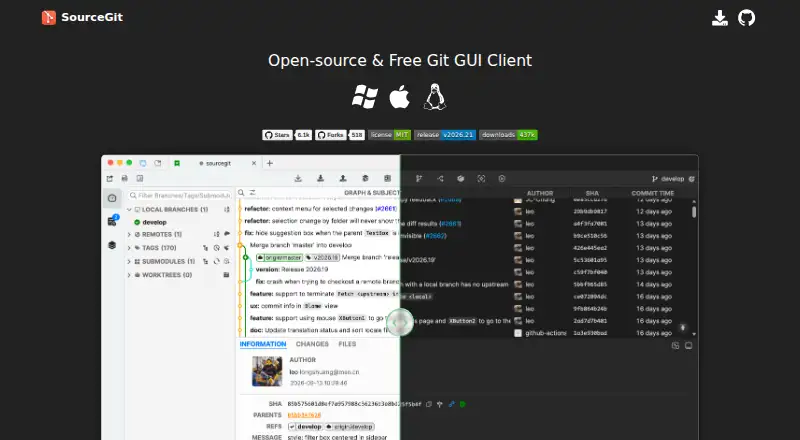
What SourceGit is
SourceGit is an open-source graphical client for working with Git repositories on Windows, macOS, and Linux. It brings repository changes and review into one interface, with commands for cloning, fetching, pulling, pushing, merging, rebasing, resetting, reverting, cherry-picking, and managing worktrees. Interactive rebase is available as well. To inspect project history, SourceGit provides a visual commit graph, commit search, file history, blame, and comparisons between revisions or branches. Image changes can be viewed side by side, by swiping between versions, or in a blended view.
The client supports GitFlow, Git LFS, bisect, stashes, submodules, issue links, and custom actions. It can create pull requests on GitHub, GitLab, Gitea, Gitee, and Bitbucket. For commit messages, it can use OpenAI or another service with an OpenAI-compatible HTTP API, including Ollama. Listed external tools include Visual Studio Code, VSCodium, Cursor, Sublime Text, Zed, and JetBrains IDEs. SourceGit is free and requires Git 2.25.1 or later. Installation options include stable releases, Scoop for Windows, and Homebrew for macOS.
Who it suits
SourceGit suits Git users who want a graphical interface for repository operations, history review, and image diffs across Windows, macOS, or Linux. It may also suit teams using its listed hosting services or developers who want to connect an external editor or an OpenAI-compatible service for commit messages.
What it does well
- Covers interactive rebase, worktrees, and common Git operations.
- Includes a visual commit graph, file history, blame, and commit search.
- Supports Git LFS and submodules.
- Can create pull requests on five listed hosting services.
- Offers image diffs in three viewing styles.
- Free and open-source on Windows, macOS, and Linux.
What to know first
- Requires Git version 2.25.1 or later.
- Linux testing is reported only on Debian 12 with X11 and Wayland.
- macOS packages on the Releases page are unsigned.
Limits
SourceGit requires Git version 2.25.1 or later. The project's Linux testing is limited to Debian 12 with X11 and Wayland; macOS packages on its Releases page are unsigned, with a contributor providing a signed distribution.
Plans
| Plan | Billed and limits | Price |
|---|---|---|
| Open-source/Free | Windows · macOS · Linux | Free |
As sourcegit-scm.github.io lists them, read 7 Oct 2026. The maker's own page has the final word.
Getting started
- Install Git version 2.25.1 or later.
- Choose a stable release or an available installation option for your platform.
- On Windows, Scoop is an installation option; on macOS, Homebrew is available.
- Install SourceGit on Windows, macOS, or Linux.
Verdict
Choose SourceGit if you want a free, open-source Git GUI with repository operations, history tools, image diffs, and pull request creation for its listed hosting services. Look elsewhere if you need a macOS package signed on the Releases page or Linux support beyond the project's stated testing environment.
Questions
Is SourceGit free?
Yes. Its listed plan is free, and it is open-source.
Which operating systems does it support?
SourceGit supports Windows, macOS, and Linux.
What Git version does it require?
It requires Git version 2.25.1 or later.
Does it support Git LFS and submodules?
Yes, both Git LFS and Git submodules are supported.
Which hosting services can it use to create pull requests?
It can create pull requests on GitHub, GitLab, Gitea, Gitee, and Bitbucket.
Can it generate commit messages with AI?
It can use OpenAI or another service with an OpenAI-compatible HTTP API, including Ollama.
Facts from SourceGit's own pages
- AI commit messages
- It can generate commit messages using OpenAI or another service with an OpenAI-compatible HTTP API, including Ollama. · github.com, 7 Oct 2026
- Distribution
- The README links to stable releases and provides installation options including Scoop for Windows and Homebrew for macOS. · github.com, 7 Oct 2026
- Editor integrations
- The README lists Visual Studio Code, VSCodium, Cursor, Sublime Text, Zed, and JetBrains IDEs among supported external tools. · github.com, 7 Oct 2026
- Git features
- The client lists support for GitFlow, Git LFS, bisect, stashes, submodules, issue links, and custom actions. · github.com, 7 Oct 2026
- Git operations
- Its GUI supports operations including clone, fetch, pull, push, merge, rebase, reset, revert, cherry-pick, interactive rebase, and worktrees. · github.com, 7 Oct 2026
- Git requirement
- Using SourceGit requires Git version 2.25.1 or later. · github.com, 7 Oct 2026
- History and diffs
- Features include a visual commit graph, commit search, file history, blame, revision and branch diffs, and side-by-side, swipe, or blend image diffs. · github.com, 7 Oct 2026
- Hosting integrations
- It can create pull requests on GitHub, GitLab, Gitea, Gitee, and Bitbucket. · github.com, 7 Oct 2026
- Linux support note
- The project says Linux has only been tested on Debian 12 with X11 and Wayland. · github.com, 7 Oct 2026
- Local data
- The app stores user settings, downloaded avatars, and crash logs in platform-dependent folders, with a portable mode available for Windows packages and Linux AppImages. · github.com, 7 Oct 2026
- macOS package security
- The project says macOS packages on its Releases page are unsigned and points to a signed package distribution provided by a contributor. · github.com, 7 Oct 2026
- Product
- SourceGit is an open-source Git GUI client. · github.com, 7 Oct 2026
Where SourceGit stands on Freedom251
- Version Control Software#34 of 62
- Git GUI Clients#19 of 32