Freedom251 › Sales Mapping Software

GeoMaps
What GeoMaps is
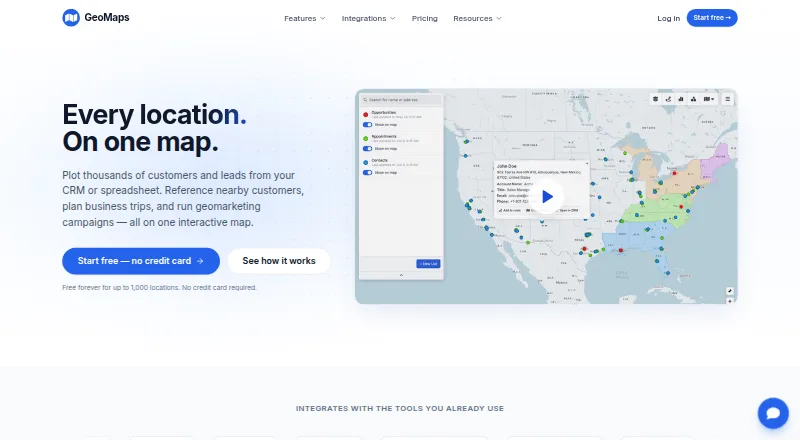
GeoMaps turns spreadsheet, CRM, and database records into interactive maps for location exploration and business-trip planning. Users can plot thousands of records, customize markers, filter data, and find nearby locations. Map layers can include drawn territories, administrative boundaries, drive-time areas, radius rings, and imported shapefiles. The service builds multi-stop routes with drive times that users can share, print, or export to navigation apps. Visualization options include heatmaps, clusters, grids, region shading, demographic data, geographic centers, and H3 hexagons. Integrations span spreadsheets, CRMs, databases, automation tools, and REST APIs, including Google Sheets, Excel, HubSpot, PostgreSQL, Zapier, Make, and n8n. GeoMaps also says users can describe a map for its AI to generate one connected to their data. It is aimed at sales, field operations, and territory teams, with iOS and Android companion apps for viewing existing lists, records, layers, and routes. A free plan covers 1,000 locations and one user; paid plans start at $20/mo (annual).
Who it suits
GeoMaps suits sales, field operations, and territory teams that work with location records and plan multi-stop trips. Its mobile apps are for viewing existing lists, records, layers, and routes.
What it does well
- Plots and filters location records with customizable markers.
- Builds shareable, printable multi-stop routes.
- Offers multiple map layers and visualization types.
- Includes over 30 integrations on the free plan.
What to know first
- Free plan is limited to 1,000 locations and one user.
- REST API is limited to 120 requests per minute per key.
- Application and database are hosted in the United States.
Limits
The Free plan is limited to 1,000 locations, one user, 25 stops per route and 500 prospects a month. Pro, the least expensive paid plan, includes 20,000 locations, five users, routes of up to 100 stops and unlimited prospects; it costs $20 a year when billed yearly or $25 per month when billed monthly.
Plans
| Plan | Billed and limits | Price |
|---|---|---|
| Free | Free forever · 1,000 locations · 1 user · Up to 25 stops per route · 500 prospects a month · All 30+ integrations · Community support | Free |
| Pro | billed yearly, or $25/mo monthly · 20,000 locations · 5 users included · Up to 100 stops per route · Unlimited prospects · No watermark on public maps · All 30+ integrations · Priority email support | $20 |
| Enterprise | billed yearly, or $99/mo monthly · 100,000 locations · Unlimited users · Up to 100 stops per route · Unlimited prospects · No watermark on public maps · All 30+ integrations · Dedicated support + SLA | $79 |
As geomaps.co lists them, read 28 Sept 2026. The maker's own page has the final word.
Getting started
- Open the GeoMaps website and choose the Free, Pro or Enterprise plan.
- Connect a spreadsheet, CRM or database, or import a CSV file.
- Plot records and configure markers, filters or map layers.
- Build a route or choose a visualization for the mapped data.
- Use the iOS or Android companion app to view existing lists, records, layers and routes.
Overview
GeoMaps converts spreadsheet, CRM, and database records into interactive maps for location analysis and business-trip planning. It is a strong fit for sales, field-operations, and territory teams that need mapping, routing, and coverage analysis in one product. Its main trade-off is the gap between the tightly capped free plan and paid tiers built for larger datasets and teams.
Key features
GeoMaps can plot thousands of records with custom markers, filters, and nearby-location search. For teams managing accounts across a service area, the combination of territory drawing, administrative boundaries, drive-time areas, radius rings, and shapefile imports adds useful planning context beyond a pin map.
Multi-stop routes include drive times and can be shared, printed, or exported to navigation apps. Free routes allow up to 25 stops; Pro and Enterprise raise that to 100. Those limits should suit smaller visit schedules, while teams planning longer routes will need another approach. Heatmaps, clusters, grids, region shading, demographic data, geographic centers, and H3 hexagons give teams several ways to examine geographic patterns.
Integrations cover spreadsheets, CRMs, databases, automation tools, and the REST API, with Google Sheets, Excel, HubSpot, PostgreSQL, Zapier, Make, and n8n among the named connections. AI map generation can create a map from a description and connect it to the user's data. The API's 120-requests-per-minute-per-key limit is worth factoring into automated workflows.
Companion iOS and Android apps let users view existing lists, records, layers, and routes. GeoMaps says it does not sell customer data and processes imported data only to provide the service on the customer's instructions. Its application and database are hosted in the United States; transfers outside the EEA use safeguards such as Standard Contractual Clauses or the EU–US Data Privacy Framework where applicable.
Pricing
The free plan costs nothing and is billed Free forever. It includes 1,000 locations, one user, routes of up to 25 stops, 500 prospects a month, all 30+ integrations, and community support. It is a useful way for an individual to try the mapping workflow, but the location, seat, and monthly prospect caps constrain ongoing team use.
Pro is $20 a year, billed yearly, or $25/mo monthly. It includes 20,000 locations, five users, routes of up to 100 stops, unlimited prospects, maps without a watermark, all 30+ integrations, and priority email support. This is the practical step up for a small sales or field team that has outgrown Free. Enterprise is $79 a year, billed yearly, or $99/mo monthly; it raises capacity to 100,000 locations and unlimited users, while retaining the 100-stop route limit and unlimited prospects. Dedicated support with an SLA makes it the tier for larger deployments that need that support commitment.
Platforms
GeoMaps is available on web, iOS, Android, through its API, and as a self-hosted option. The mobile apps are companion tools for viewing existing mapping data rather than a separately described full workflow.
Who it's for
Sales, field-operations, and territory teams can use GeoMaps to locate accounts, plan coverage, and organize multi-stop visits. It is less compelling for a solo user with a large database or a team that needs more than 100 route stops: Free is limited to 1,000 locations and one seat, while paid routes remain capped at 100 stops.
Pros and cons
- Pros: Territory layers, nearby search, routing, and multiple visualization formats support both account review and field planning.
- Pros: All 30+ integrations are included even on Free, giving a single user room to connect data before paying.
- Pros: Pro raises the location allowance to 20,000 and includes five users and unlimited prospects.
- Cons: Free's 1,000-location, one-user, and 500-prospect monthly limits make it a trial-sized option for active teams.
- Cons: Pro and Enterprise both cap routes at 100 stops, and API use is limited to 120 requests per minute per key.
- Cons: United States hosting may not suit organizations that require application and database hosting in another region.
Alternatives
Sales Mapping Software is a useful category starting point for readers comparing sales-focused mapping tools.
- Badger Maps is worth considering for teams prioritizing route optimization up to 120 stops and native mobile apps; its Personal plan offers a 14-day free plan with the full business feature set.
- ODL Studio is a free, open-source option for readers who need desktop software on Linux, macOS, or Windows.
- SalesRabbit Appointment Management may fit teams focused on appointment management; its Lite plan is single-user with limited core features and no full team management.
- Scribble Maps offers a free plan with five lifetime map saves, one user, and 450×450px images, a better fit for occasional map creation with modest output needs.
- Create Mappins starts free with up to three maps and 20 pins per map, suiting simpler, smaller mapping projects.
- Gradient Works has a free tier with 1,000 credits, five rep users, one Carve scenario, and Market Map, making it an alternative for readers drawn to its sales-territory toolkit.
- Mapline is another freemium mapping option for readers comparing mapping plans.
- TerraMap is worth a look for territory modeling: its Starter plan is $49.00 per month and includes up to three territory models, 15 territories, 10,000 data points, and two users.
Verdict
Choose GeoMaps if your sales or field team needs to connect business records with territory analysis, varied map visualizations, and shareable multi-stop routes. The broad toolkit and included integrations make it a capable mapping workspace, but the free tier is narrow for team use and paid routing tops out at 100 stops. Look elsewhere if those caps or United States hosting conflict with your needs.
Verdict
GeoMaps combines data-driven mapping, route planning, and a broad set of visualization options. Its free plan has location and user limits, while the API has a stated request limit.
Questions
Is GeoMaps free?
Yes. Its Free plan is billed Free forever and includes 1,000 locations, one user, up to 25 stops per route and 500 prospects a month.
How much do the paid plans cost?
Pro costs $20 a year when billed yearly, or $25 per month when billed monthly. Enterprise costs $79 a year when billed yearly, or $99 per month when billed monthly.
Which platforms does GeoMaps support?
GeoMaps lists web, iOS, Android, API and self-hosted platforms. Its mobile apps display existing lists, records, layers and routes.
Which integrations are available?
GeoMaps lists more than 30 integrations, including Google Sheets, Excel, HubSpot, PostgreSQL, Zapier, Make and n8n.
What is the REST API limit?
The REST API is rate-limited to 120 requests per minute per key.
Who makes GeoMaps?
GeoMaps is headquartered in Spain.
Facts from GeoMaps's own pages
- AI map generation
- GeoMaps says users can describe a map and have its AI generate one connected to their data and ready to share. · geomaps.co, 28 Sept 2026
- API limit
- The REST API is rate-limited to 120 requests per minute per key. · geomaps.co, 28 Sept 2026
- Headquarters
- Spain · geomaps.co, 28 Sept 2026
- Hosting and transfers
- GeoMaps says its application and database are hosted in the United States and that transfers outside the EEA use safeguards such as Standard Contractual Clauses or the EU–US Data Privacy Framework where applicable. · geomaps.co, 28 Sept 2026
- Integrations
- GeoMaps lists spreadsheet, CRM, database, automation, and REST API integrations, including Google Sheets, Excel, HubSpot, PostgreSQL, Zapier, Make, and n8n. · geomaps.co, 28 Sept 2026
- Intended users
- GeoMaps describes itself as built for sales, field operations, and territory teams. · geomaps.co, 28 Sept 2026
- Map layers
- Maps can include drawn territories, administrative boundaries, drive-time areas, radius rings, and imported shapefiles. · geomaps.co, 28 Sept 2026
- Mapping
- Users can plot thousands of records, customize markers, filter data, and find nearby locations. · geomaps.co, 28 Sept 2026
- Mobile apps
- GeoMaps offers iOS and Android companion apps for viewing existing lists, records, layers, and routes. · geomaps.co, 28 Sept 2026
- Routes
- GeoMaps builds multi-stop routes with drive times that users can share, print, or export to navigation apps. · geomaps.co, 28 Sept 2026
- Security and privacy
- GeoMaps says it does not sell customer data and processes imported customer data only to provide the service and on the customer's instructions. · geomaps.co, 28 Sept 2026
- Support
- The listed plans include community support, priority email support, or dedicated support with an SLA depending on tier. · geomaps.co, 28 Sept 2026
- Visualization
- The product offers heatmaps, clusters, grids, region shading, demographic data, geographic centers, and H3 hexagons. · geomaps.co, 28 Sept 2026
- What it does
- GeoMaps turns spreadsheet, CRM, and database data into interactive maps for exploring locations and planning business trips. · geomaps.co, 28 Sept 2026
Where GeoMaps stands on Freedom251
- Sales Mapping Software#1 of 33