Freedom251 › Sales Mapping Software

Create Mappins
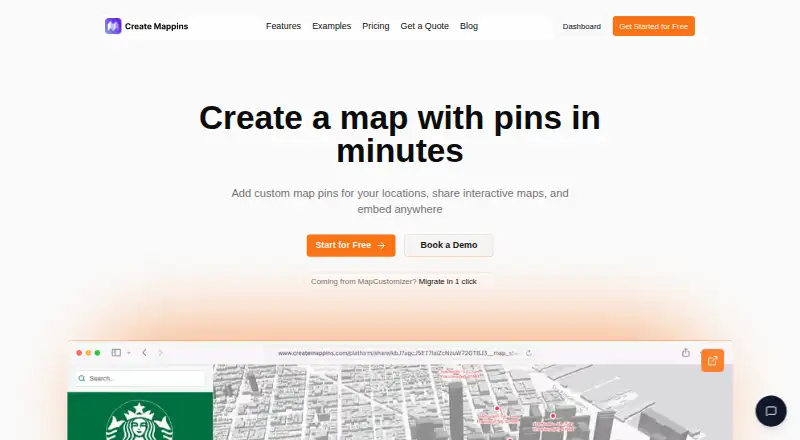
What Create Mappins is
Create Mappins is a web platform for building and sharing interactive maps with pins, locations, and data layers. Users can upload location data from CSV; the site says maps update in seconds without technical setup. Layers can show information such as competitors, partners, demographics, or logistics zones. Maps can be shared by link or embedded on a website. Teams can coordinate edits using roles and permissions, and analytics cover map views, pin interactions, and activity by region. An import tool brings over MapCustomizer map pin names, descriptions, and marker colors. Sales teams can import CSV exports from Salesforce, HubSpot, Pipedrive, or other CRMs, but there is no direct CRM sync. The Free plan costs nothing, billed forever, and allows up to 3 maps with 20 pins per map. Pro costs $20 a month, and Business costs $90 a month; both are billed monthly and allow unlimited maps and pins. The service is intended for personal, educational, and commercial use.
Who it suits
Create Mappins suits individuals, educators, and businesses that need to make, share, or collaboratively edit interactive maps. Sales teams can bring CRM data in through CSV exports rather than a direct connection.
What it does well
- CSV location data import
- Maps can be shared by link or embedded
- Team roles and permissions for edits
- Analytics cover views, pin interactions, and regions
What to know first
- Free plan allows up to 3 maps
- Free maps are limited to 20 pins each
- No direct CRM sync
- No mobile access
Limits
The Free plan allows up to 3 maps and 20 pins per map. Pro and Business list unlimited maps and pins.
Plans
| Plan | Billed and limits | Price |
|---|---|---|
| Free | forever · Up to 3 maps · 20 pins per map · Community support | Free |
| Pro | monthly · Unlimited pins and maps · Priority support | $20 a month |
| Business | monthly · Unlimited pins and maps · Dedicated support · Custom onboarding | $90 a month |
As createmappins.com lists them, read 3 Oct 2026. The maker's own page has the final word.
Getting started
- Visit the Create Mappins website.
- Choose the Free plan, Pro, or Business.
- Upload location data from a CSV file.
- Add pins and organize information into map layers.
- Share the map by link or embed it on a website.
Overview
Create Mappins is a web platform for building interactive maps from locations, pins, and data layers. It suits people and teams who need to visualize geographic information and share it online. Its strongest case is flexible mapping without technical setup; the main trade-off is that CRM updates rely on file imports rather than a direct connection.
Key features
CSV imports let users plot location data, including exports from Salesforce, HubSpot, Pipedrive, or other CRMs. The service says maps update in seconds after import, which can make a file-based workflow workable for periodic updates. It is less suitable for teams that need CRM changes to flow into maps automatically.
Layers can combine geographic context such as competitors, partners, demographics, and logistics zones. That gives teams a way to compare several types of location data in one map, while link sharing and website embeds make maps useful beyond the people editing them.
Team roles and permissions support coordinated editing across departments. Analytics cover map views, pin interactions, and region-level activity, offering a way to understand how maps are being used. Existing MapCustomizer users can import maps while retaining pin names, descriptions, and marker colors.
Create Mappins supports territory management, but has no activity heatmaps or mobile access. That makes it a better fit for desktop-based planning and sharing than for field teams that need mapping on mobile devices. The privacy policy says the company does not sell or rent personal or business data; it also acknowledges that no internet-based service can guarantee absolute security.
Pricing
The Free plan costs nothing, billed forever. It includes up to 3 maps, 20 pins per map, and community support. Those caps make it a useful starting point for small or occasional projects, but can quickly constrain a team maintaining several maps or larger datasets.
Pro costs $20 a month, billed monthly, and includes unlimited maps and pins plus priority support. It is the clearest fit for regular individual or team use when the free limits get in the way. The pricing information gives no seat limits, so teams should not assume a particular user allowance.
The paid plans are billed monthly; no annual billing terms are provided.
Platforms
Create Mappins runs on the web and has no mobile access. It is therefore suited to people working from a browser, not teams that need a native mobile mapping workflow.
Who it's for
The service is offered for personal, educational, and commercial use. It is especially relevant to teams coordinating territories or turning CRM exports into shareable maps, provided that periodic CSV updates are acceptable. Users moving from MapCustomizer may also value the migration tool’s preservation of pin details and marker colors.
Pros and cons
- Pros: CSV imports cover common CRM exports without technical setup, and layers can bring several kinds of geographic context into one map.
- Pros: Link sharing, embeds, team permissions, and usage analytics support both collaboration and wider distribution.
- Pros: Pro and Business remove map and pin caps, while Business includes dedicated support and custom onboarding.
- Cons: There is no direct CRM sync, so map data depends on importing updated files.
- Cons: The Free plan’s 3-map and 20-pin-per-map limits may be restrictive for ongoing work.
- Cons: No mobile access or activity heatmaps limits its fit for field-based teams and heatmap-focused analysis.
Alternatives
For a broader comparison of sales-focused tools, see Sales Mapping Software. Choose Badger Maps instead if native iOS and Android apps or route optimization for up to 120 stops matter more. Its Personal plan is free for 14 days and includes the full Business feature set.
GeoMaps may suit teams that need mobile or self-hosted options: its free plan includes 1,000 locations, one user, up to 25 stops per route, and 500 prospects a month. ODL Studio is a free, open-source alternative for Linux, macOS, and Windows.
SalesRabbit Appointment Management offers a free single-user Lite plan with limited core features and no full team management; its Team plan costs $59 a month, billed per use. Scribble Maps is another freemium mapping option: its Free plan allows 5 lifetime map saves for one user, with 450×450px images.
Gradient Works has a free plan with 1,000 credits, five rep users, one Carve scenario, Market Map, basic Bookbuilder, and analytics. MapyCRM is a free web-based option whose Forever Free plan includes unlimited companies and team members.
Verdict
Create Mappins is a sound choice for browser-based territory planning and shareable maps, especially when CSV imports, layered context, and unlimited paid-plan maps matter. The free tier is best for small projects; regular use points toward Pro, while Business is for teams that value custom onboarding and dedicated support. Look elsewhere if live CRM sync or mobile access is essential.
Verdict
Create Mappins offers map layers, sharing, team editing, and analytics, with unlimited maps and pins on its paid plans. The free plan has limits of 3 maps and 20 pins per map, and CRM data must be imported rather than synced directly.
Questions
Does Create Mappins have a free plan?
Yes. Free costs nothing, billed forever, and includes up to 3 maps with 20 pins per map.
What are the paid plan prices?
Pro costs $20 a month and Business costs $90 a month; both are billed monthly.
Which platforms does Create Mappins support?
The listed platform is web. Mobile access is listed as none.
Can I connect a CRM directly?
No direct CRM sync is listed. You can import CSV exports from Salesforce, HubSpot, Pipedrive, or another CRM.
Can maps be shared outside the platform?
Yes. Maps can be shared by link or embedded on a website.
What support comes with each plan?
Free includes community support, Pro includes priority support, and Business includes dedicated support and custom onboarding.
Facts from Create Mappins's own pages
- Analytics
- The site says analytics can track map views, pin interactions, and region-level activity. · createmappins.com, 3 Oct 2026
- Collaboration
- The site describes team roles and permissions for coordinating map edits across departments. · createmappins.com, 3 Oct 2026
- Data handling
- The privacy policy says Create Mappins does not sell or rent personal or business data to third parties. · createmappins.com, 3 Oct 2026
- Data import
- Users can upload location data from CSV, and the site says maps update in seconds without technical setup. · createmappins.com, 3 Oct 2026
- Headquarters
- Newark, Delaware, United States · createmappins.com, 28 Sept 2026
- Integrations
- The sales-team page describes importing CSV exports from Salesforce, HubSpot, Pipedrive, or any CRM; it does not describe a direct CRM connection. · createmappins.com, 3 Oct 2026
- Intended users
- The terms say the service is offered for personal, educational, and commercial purposes. · createmappins.com, 3 Oct 2026
- MapCustomizer migration
- The site offers a tool to import MapCustomizer maps, preserving pin names, descriptions, and marker colors. · createmappins.com, 3 Oct 2026
- Map layers
- Maps can include overlays such as competitors, partners, demographics, or logistics zones. · createmappins.com, 3 Oct 2026
- Notable limits
- The Free plan allows up to 3 maps and 20 pins per map; Pro and Business list unlimited maps and pins. · createmappins.com, 3 Oct 2026
- Security
- The privacy policy says it uses technical, administrative, and physical safeguards and notes that no internet-based service can guarantee absolute security. · createmappins.com, 3 Oct 2026
- Security reporting
- The security page invites vulnerability reports at [email protected] and lists Firebase/Firestore and Cloud Storage security rules among its in-scope areas. · createmappins.com, 3 Oct 2026
- Sharing
- Maps can be shared by link or embedded on a website. · createmappins.com, 3 Oct 2026
- Support
- The Free plan includes community support, Pro includes priority support, and Business includes dedicated support. · createmappins.com, 3 Oct 2026
- What it does
- Create Mappins is a web-based platform for creating, customizing, and sharing interactive maps with pins, locations, and data layers. · createmappins.com, 3 Oct 2026
Where Create Mappins stands on Freedom251
- Sales Mapping Software#5 of 33