Freedom251 › Field Sales Software

Badger Maps
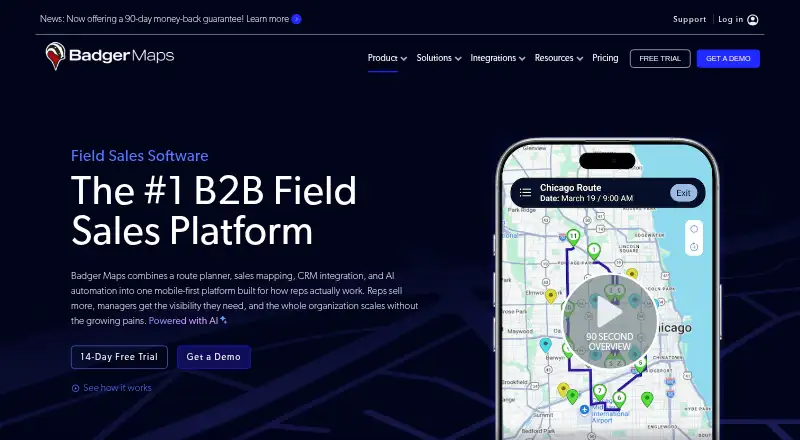
What Badger Maps is
Badger Maps combines route planning, sales mapping, CRM connections and AI automation for B2B field sales teams. Route optimization supports up to 120 stops and integrates live traffic and turn-by-turn navigation. On the map, users can filter and colorize customer records by custom fields and view layers such as postal codes, points of interest and counties. Native CRM connections include Salesforce, HubSpot, Microsoft Dynamics, Zoho, NetSuite, Pipedrive, monday.com, Insightly, SugarCRM, Veeva and Odoo. Custom CRMs and databases can connect through FTP or REST API, while Zapier links other apps. CRM integration depth varies: Standard covers Accounts or Contacts and one related Task or Activity; Advanced supports unlimited objects and relationships. A 14-day free Personal plan includes the Business feature set. Business is listed at $58/user/mo billed annually, or $69/mo per user billed monthly. The web app requires an internet connection; a prepared Google Maps offline map can keep a current route navigable.
Who it suits
Badger Maps is suited to sales reps, sales managers and sales operations teams that plan field visits and use CRM records. The maker also lists field service among its intended roles.
What it does well
- Route optimization supports up to 120 stops.
- Map records can be filtered by custom fields.
- Native integrations cover many named CRM systems.
- Custom CRM connections are available through FTP or REST API.
- Personal includes the Business feature set for 14 days.
What to know first
- The web app requires an internet connection.
- Offline mobile access is not offered.
- Business costs $58/user/mo billed annually.
Limits
The Personal plan is a 14-day free period. Listed ongoing plans start at $12/month; Business costs $58/user/mo billed annually and supports single-object, two-way real-time CRM integration; Advanced integration supports unlimited objects and relationships.
Plans
| Plan | Billed and limits | Price |
|---|---|---|
| Personal | 14-day free plan · Sales mapping · route optimization up to 120 stops · Android and iOS apps · phone and chat support · talk-to-text notes with photos · AI visit recommendations · follow-up reminders | Free |
| Enterprise | per user, billed monthly · Everything in Business · multiple CRM objects · location and time-stamped reports · SSO with SCIM · dedicated account manager · HIPAA support · enhanced lead generation · API/developer key | $109 a month |
| Badger Scoreboard | per user, billed annually; minimum 5 licenses · Dynamic leaderboards · gamification · charts and graphs · custom metrics · CRM integration | $12 a month |
| Badger Lead Routing | per territory, billed annually; minimum 5 licenses · Territory-based assignment · object routing · address-to-territory matching · assignment rules · CRM integration · lead notifications | $16 a month |
| Badger Align | per territory, billed annually; minimum 5 territories · Territory creation and alignment · weighted/custom metrics · optimization · CRM integration · scenario planning | $20 a month |
| Badger Insights | per user, billed annually · Sales-cycle dashboard · territory insights · CRM integration · heat, bubble and thematic maps · charts · comparisons · demographic overlays · dynamic reports | $50 a month |
| Business | per user, billed monthly · Everything in Personal · single-object real-time CRM integration · lead generation · AI route planning, email automation and voice-to-CRM · team roles · forms · dashboards · API/developer key | $69 a month |
| Enterprise Plus | Get a quote · Everything in Enterprise · custom development · territory alignment · territory-based lead routing · scenario planning · heat, bubble and thematic maps · gamification | On request |
As badgermapping.com lists them, read 14 Oct 2026. The maker's own page has the final word.
Getting started
- Visit https://www.badgermapping.com/.
- Start with the Personal plan's 14-day free period or choose a paid plan.
- Use the web app or the native iOS or Android app.
- Connect a listed CRM, or use FTP or REST API for a custom CRM or database.
- Connect other apps through Zapier if needed.
Overview
Badger Maps combines customer mapping, route planning and CRM connections for sales teams that spend time in the field. It is best suited to teams coordinating visits around CRM records; the main trade-off is that its web app needs an internet connection, and CRM object access varies by plan.
Visit planning, territory management, lead capture, route optimization and check-in tracking make it a broader field-sales tool than a standalone route planner. The Personal plan offers a 14-day window with the full Business feature set, which gives an individual a way to assess that workflow before a paid commitment.
Badger Maps also fits the Field Sales Software, Sales Mapping Software and Route Planning Software categories. Its usefulness depends on whether a team's CRM structure and territory needs fit the integration tier it chooses.
Key features
Routes and geographic context
Route optimization supports up to 120 stops, with live traffic and turn-by-turn navigation integrations. That capacity can cover a substantial day of appointments, while live traffic helps route planning account for changing road conditions. Customer records can be filtered and colorized by custom fields, and map layers include postal codes, points of interest and counties. Those views help teams work from both their customer data and geographic context rather than locations alone.
CRM connections and data scope
Native integrations include Salesforce, HubSpot, Microsoft Dynamics, Zoho, NetSuite, Pipedrive, monday.com, Insightly, SugarCRM, Veeva and Odoo. Badger can also connect custom CRMs and databases through FTP and REST API, and connect other apps through Zapier. Business supports a single-object, two-way real-time CRM integration; its standard integration covers Accounts or Contacts and one related Task or Activity. Teams relying on multiple object types and relationships need Enterprise, whose advanced integration supports unlimited objects and their relationships.
Security and connectivity
Badger says customer data is hosted on AWS, protected in transit with HTTPS and SSL/TLS, and backed up daily with AES-256 encryption at rest; backups are retained for up to 12 months. Its security page states compliance with HIPAA, GDPR and 42 CFR Part 2, while HIPAA compliance and support are included with Enterprise. The web app requires internet for its features. Users can continue navigating a current route if they prepared offline maps in Google Maps, but that is not offline access to Badger's mobile app.
Pricing
The Personal plan costs nothing for 14 days. It includes the full Business feature set, route optimization for up to 120 stops and native iOS and Android apps. This is a trial period, not an ongoing free tier.
Badger Scoreboard costs $12 a month per user, billed annually, or $14/mo billed monthly. It requires at least 5 licenses, falls to $8/mo after 40 users, and adds leaderboards and gamification. It suits teams seeking those features, but its stated scope is narrower than a full Business subscription.
Badger Lead Routing costs $16 a month per territory, billed annually, or $18/mo billed monthly. The minimum is 5 licenses, with the price falling to $10/mo after 40 seats. Badger Align costs $20 a month per territory, billed annually, with a 5-territory minimum and a reduction to $10/mo after 40 territories. These territory-priced options suit teams buying routing or alignment by coverage area rather than by individual user.
Badger Insights costs $50 a month per user, billed annually, or $60/mo billed monthly. It includes territory insights, heat, bubble and thematic maps, and reports, making it the focused choice for teams that need those analytical views.
Business costs $58 a month per user, billed annually, or $69/mo per user billed monthly. It includes single-object, two-way real-time CRM integration, lead generation, team roles and permissions, and API access. It is the entry point for a paid full platform, but the single-object integration is a material constraint for teams with more complex CRM relationships.
Enterprise costs $95 a month per user, billed annually, or $109/mo per user billed monthly. It adds multiple CRM objects, SSO with SCIM, a dedicated account manager and support, HIPAA compliance and support, and an API limit of 25k requests per day per team. Enterprise Plus has custom pricing and includes everything in Enterprise, plus custom development, territory alignment, territory-based lead routing, scenario planning and gamification. The pricing page includes phone and chat support; support is also available by email, scheduled calls and phone.
Platforms
Badger Maps supports Android, iOS, web and API. Native mobile apps make it relevant to field teams on either major mobile platform, but the product does not offer offline mobile access. The Google Maps workaround preserves navigation on a prepared route, not Badger's full feature set.
Who it's for
Badger Maps is a strong fit for sales representatives, sales management and sales operations teams that need to connect customer records to territory views and planned visits. Field service is also among its intended roles. Teams with complex CRM data should budget for Enterprise, while teams that must use the web app without reliable connectivity should look elsewhere.
Pros and cons
- Pros: Route optimization handles up to 120 stops and integrates live traffic and turn-by-turn navigation, useful for dense visit schedules.
- Pros: Filtering and colorizing customer records alongside geographic layers helps teams organize work by CRM fields and area.
- Pros: Native links to major CRMs plus FTP, REST API and Zapier options cover both common and custom data workflows.
- Cons: Business's standard CRM integration is limited to Accounts or Contacts and one related Task or Activity; broader object relationships require the more expensive Enterprise plan.
- Cons: The 14-day Personal offer is time-limited rather than a continuing free plan.
- Cons: The web app requires internet, and there is no offline mobile access to Badger Maps features.
Alternatives
Choose SalesRabbit Appointment Management if its free single-user Lite plan's limited core features are enough, or if its Team plan at $59 a month better fits your needs; it also has a free plan and no free trial. SalesRoute.ai is another freemium option, with web, Windows, macOS and Linux platforms. TurfCRM is a free-plan option on web, while DoorPro CRM offers a free plan under a freemium model.
RepZio may suit teams that can begin with a free Basic sales rep license: it includes web app access but excludes iOS app access, order submission, flipbooks, Send Files, tags and badge scanning. FieldFlowSales is worth considering for teams comparing paid field-sales tools with Starter coverage for up to 10 agents or Growth coverage for up to 100 agents. Field SFA is a paid option for web, iOS and Android; Advantive Field Sales is a paid option for iOS and Android.
Verdict
Choose Badger Maps if your field team needs customer-aware route planning, territory views and CRM-linked visit workflows in one product. Its route capacity and breadth of integrations are compelling, but the internet requirement and the Business plan's narrow CRM object scope are reasons to look elsewhere or pay for Enterprise.
Verdict
Badger Maps brings mapping, route planning and CRM data together for field teams. Check its internet requirement and CRM object limits against the way your team works.
Questions
Is Badger Maps free?
The Personal plan costs nothing and provides a 14-day free period with the Business feature set.
How much does Badger Maps cost?
Business costs $58/user/mo billed annually or $69/mo per user billed monthly. Other plans include per-user, per-territory, and quote-based options.
Which platforms does Badger Maps support?
It supports Android, iOS, and web, and lists an API.
Which CRMs can it connect to?
Native integrations include Salesforce, HubSpot, Microsoft Dynamics, Zoho, NetSuite, Pipedrive, monday.com, Insightly, SugarCRM, Veeva, and Odoo. Custom CRMs and databases can connect through FTP or REST API.
Does Badger Maps work offline?
The web app requires an internet connection. Users can continue navigating a current route if they prepared offline maps in Google Maps, but offline mobile access is not offered.
What does Enterprise include?
Enterprise includes multiple CRM objects, SSO with SCIM, a dedicated account manager and support, HIPAA compliance and support, and an API limit of 25k requests per day per team.
Facts from Badger Maps's own pages
- API and extensibility
- Paid plans include API/developer-key access; the documented REST API uses token authentication at badgerapis.badgermapping.com/api/2 and covers accounts, locations, routes, check-ins and users. · apis.io, 14 Oct 2026
- Audience
- Badger Maps describes itself as a mobile-first field sales platform and lists sales reps, sales management, sales operations, and field service among its roles. · badgermapping.com, 30 Sept 2026
- Company facts
- LinkedIn lists Badger Maps as privately held, founded in 2012, headquartered in San Francisco and employing 51–200 people. · linkedin.com, 14 Oct 2026
- Company history
- Badger Maps says founder and CEO Steve Benson founded the company in 2012 after working in field sales at IBM and selling Google Maps API at Google. · badgermapping.com, 30 Sept 2026
- Compliance
- Badger states that it is compliant with HIPAA, GDPR and 42 CFR Part 2. · badgermapping.com, 14 Oct 2026
- CRM integrations
- The maker lists native integrations including Salesforce, HubSpot, Microsoft Dynamics, Zoho, NetSuite, Pipedrive, monday.com, Insightly, SugarCRM, Veeva, and Odoo. · badgermapping.com, 30 Sept 2026
- CRM limits
- Standard integration supports Accounts or Contacts and one related Task or Activity; Advanced integration supports unlimited objects and their relationships. · badgermapping.com, 30 Sept 2026
- Custom integrations
- Badger says it can connect custom CRMs and databases through FTP and REST API, and connect to other apps through Zapier. · badgermapping.com, 30 Sept 2026
- Documentation
- The support center organizes 27 setup articles, 8 integration articles, 130 feature articles, 188 device articles and 21 troubleshooting articles. · badgermapping.com, 14 Oct 2026
- Field data capture
- Mobile users can record notes by voice or text, attach photos, check in and update CRM records. · badgermapping.com, 14 Oct 2026
- Founded
- 2012 · badgermapping.com, 23 Sept 2026
- Founder
- Crunchbase identifies Steven Benson as Badger Maps founder and CEO and lists four investors, including Lighter Capital. · crunchbase.com, 14 Oct 2026
- Headquarters
- San Francisco, California, USA · badgermapping.com, 23 Sept 2026
- Integrations
- Native connectors include Salesforce, HubSpot, Microsoft Dynamics, Zoho, Pipedrive, monday.com, NetSuite, Insightly, SugarCRM, Veeva and Odoo; Zapier and Excel are also listed. · badgermapping.com, 14 Oct 2026
- Lead generation
- The product surfaces nearby prospects and supports mobile prospecting when a meeting is cancelled. · badgermapping.com, 14 Oct 2026
- Limit: follow-up and notes
- Users request stronger follow-up workflows, easier check-in history views and better note management. · trustradius.com, 14 Oct 2026
- Limit: mobile reliability
- Google Play reviews mention recurring error messages, slow map loading, photo-upload limits and inconsistent updates. · play.google.com, 14 Oct 2026
- Limit: performance and accuracy
- Reviewers report occasional slow loading, inaccurate locations, lag and routing inaccuracies. · softwareadvice.com, 14 Oct 2026
- Limit: price
- Review summaries repeatedly say pricing is high for individuals or small teams and lowers perceived value. · softwareadvice.com, 14 Oct 2026
- Mapping
- Users can filter and colorize customer records by custom fields and view map layers such as postal codes, points of interest, and counties. · badgermapping.com, 30 Sept 2026
- Notable limit
- The web app requires an internet connection for its features, though users can continue navigating a current route if they prepared offline maps in Google Maps. · badgermapping.com, 30 Sept 2026
- Praise: support
- Independent reviewers frequently describe support as fast, friendly, knowledgeable and helpful during setup and training. · getapp.com, 14 Oct 2026
- Praise: usability and routing
- GetApp reviewers repeatedly praise intuitive mapping, lasso selection, route optimization, visual account management and time savings. · getapp.com, 14 Oct 2026
- Purpose
- Badger Maps combines route planning, sales mapping, CRM integration, and AI automation for B2B field sales teams. · badgermapping.com, 30 Sept 2026
Where Badger Maps stands on Freedom251
- Field Sales Software#6 of 30
- Sales Mapping Software#10 of 33
- Route Planning Software#18 of 39